Gamification · Claw Machine

The claw machine popup that grabs emails

An arcade cabinet with a claw on a rail over a pit of prize balls, shown as an overlay on your own site. Your visitor presses GRAB; the claw slides across, drops, closes and lifts. On a win the ball rides up and a discount code is theirs once they leave an email. On a loss it slips out at the last second. Either way, the outcome was decided on our servers, not in the browser.

  • Free plan, no credit card required
  • Outcome decided server-side
  • Prize code revealed only on a real win
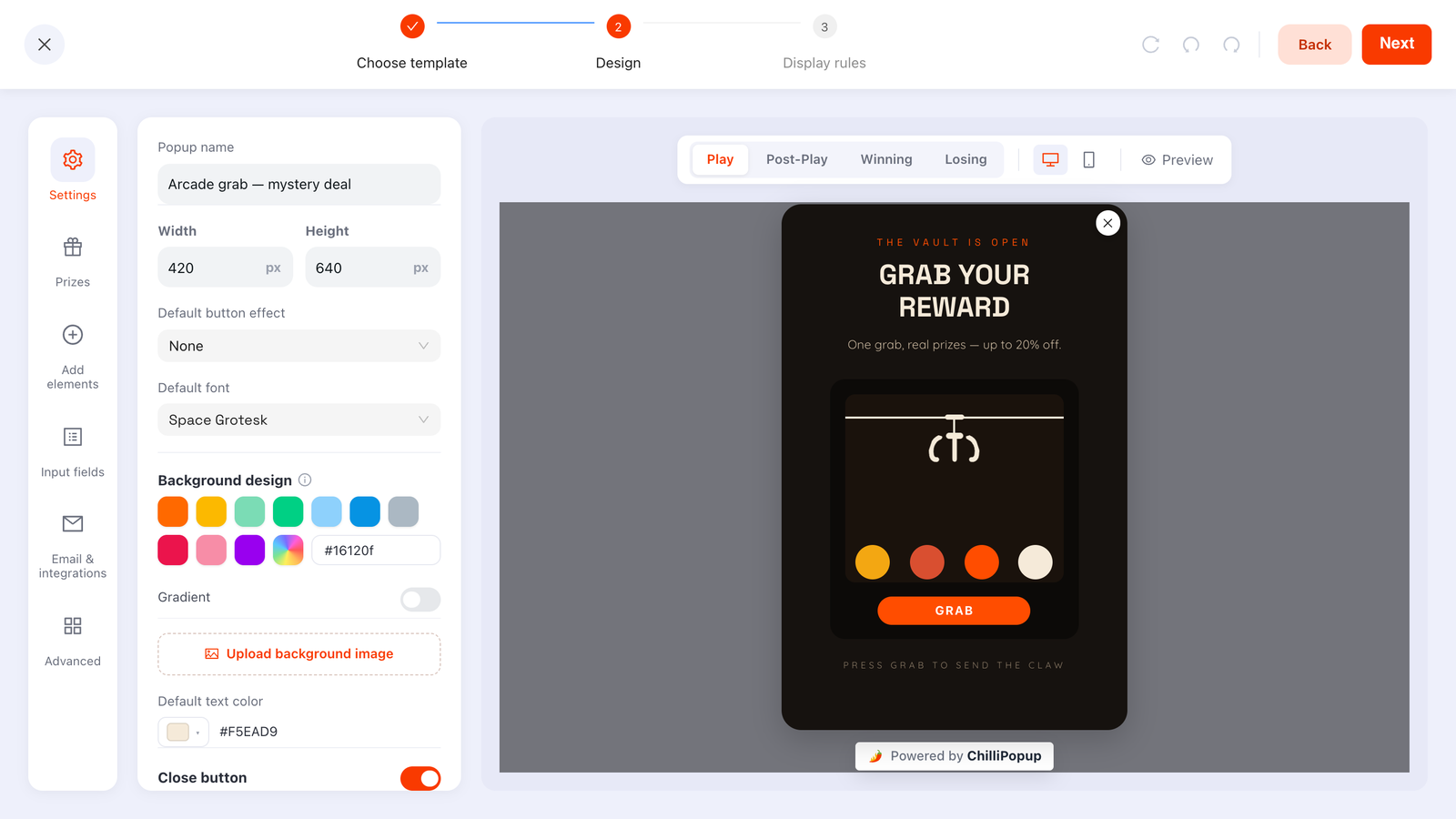
The ChilliPopup game editor with the Play, Post-Play, Winning and Losing screen tabs and a Prizes panel, showing a claw machine design
The claw machine in the ChilliPopup editor: Play, Post-Play, Winning and Losing are separate screens, and the Prizes panel holds the odds and reward codes.
How it works

From empty cabinet to live game in three steps

A claw machine is a popup like any other in ChilliPopup: the same editor, the same display rules, the same pixel. Only the play surface changes.

1

Pick a theme

Start from one of six claw themes. Each brings its own cabinet, window, claw and rail colours, its pit of prize balls and its GRAB label. Then write the campaign around it: every screen in the flow is its own canvas of drag-and-drop blocks.

2

Set prizes and odds

Add prizes in the Prizes panel: a label, a reward code and a win chance for each. Give every prize equal odds with one toggle, or tune them one by one while the editor shows the chance of not winning. Flag a prize as a losing option to keep it in the draw without a payout.

3

Publish

Choose when the game appears with display rules, hit Publish, and it goes live through the pixel you already installed. Nothing to embed, no theme edits, and no redeploy when you change a prize or its odds.

The prize engine

Decided on the server, revealed on a win

A prize game is only as good as its odds are honest, so ChilliPopup never lets the browser decide. When GRAB is pressed, the player asks our servers for the outcome. The server reads your saved prize table, rolls a weighted draw and answers win or lose; the claw then animates to that result. Your visitor gets the suspense, you get a draw you can trust.

  • Server-decided odds: the win/lose roll happens on our servers against the odds you saved, never in page JavaScript
  • Codes only on a win: prize codes are stripped from the public popup config and returned solely with a winning outcome
  • Per-prize probability: each prize carries its own win chance; whatever the table leaves short of 100% is the chance of winning nothing
  • Losing outcomes allowed: flag a prize as a losing option and the draw can still land on it — the claw lets the ball slip, and your Losing screen shows with no code attached
  • Fail-safe by default: if the server can't be reached, the play resolves as a loss, so an outage can never hand out prizes
  • One grab per showing: the GRAB button locks after a play, so nobody hammers it for a better result
What happens when GRAB is pressed
  1. 1
    Lock and askThe button disables itself and the player requests an outcome from our server for this popup and this visitor session.
  2. 2
    Roll on the serverThe server loads your published prize table, with odds and codes that never left it, and draws a weighted result.
  3. 3
    Animate the grabThe claw slides to the target ball, extends, closes and lifts. On a win the ball rides up with the claw; on a loss it rises, slips and falls back.
  4. 4
    Claim with an emailA win opens the Post-Play screen, where the visitor leaves an email to claim the prize.
  5. 5
    Reveal the codeThe Winning screen shows the code, with an optional confetti burst. A loss shows your Losing screen instead.
Make it yours

Pick your machine, write your campaign

The theme sets how the machine looks. Everything around it — the copy, the screens and the popup itself — is an ordinary ChilliPopup canvas.

  • Six machines to choose from: each theme carries its own cabinet, window, claw and rail colours, its ball palette, a pit of three to six balls and its GRAB label — from candy-bright to matte black
  • Four screens plus a teaser: Play, Post-Play (the email claim), Winning and Losing, plus an optional pre-play teaser, each its own canvas of text, image, button and input blocks
  • Prize placeholders: the Winning screen can print {{prize_label}} and {{prize_code}} anywhere in its copy, so the reveal reads like a sentence rather than a receipt
  • Per-screen styling: every screen inherits the Play step's background and font by default; switch that off and give it its own colour, gradient, image, font or text colour
  • The popup around it: width and height, on-screen position, entry and exit animations, overlay opacity, corner radius, shadow and how the close button behaves
  • Confetti and fonts: a celebratory burst on the Winning screen you can switch off, and your Google or custom fonts throughout
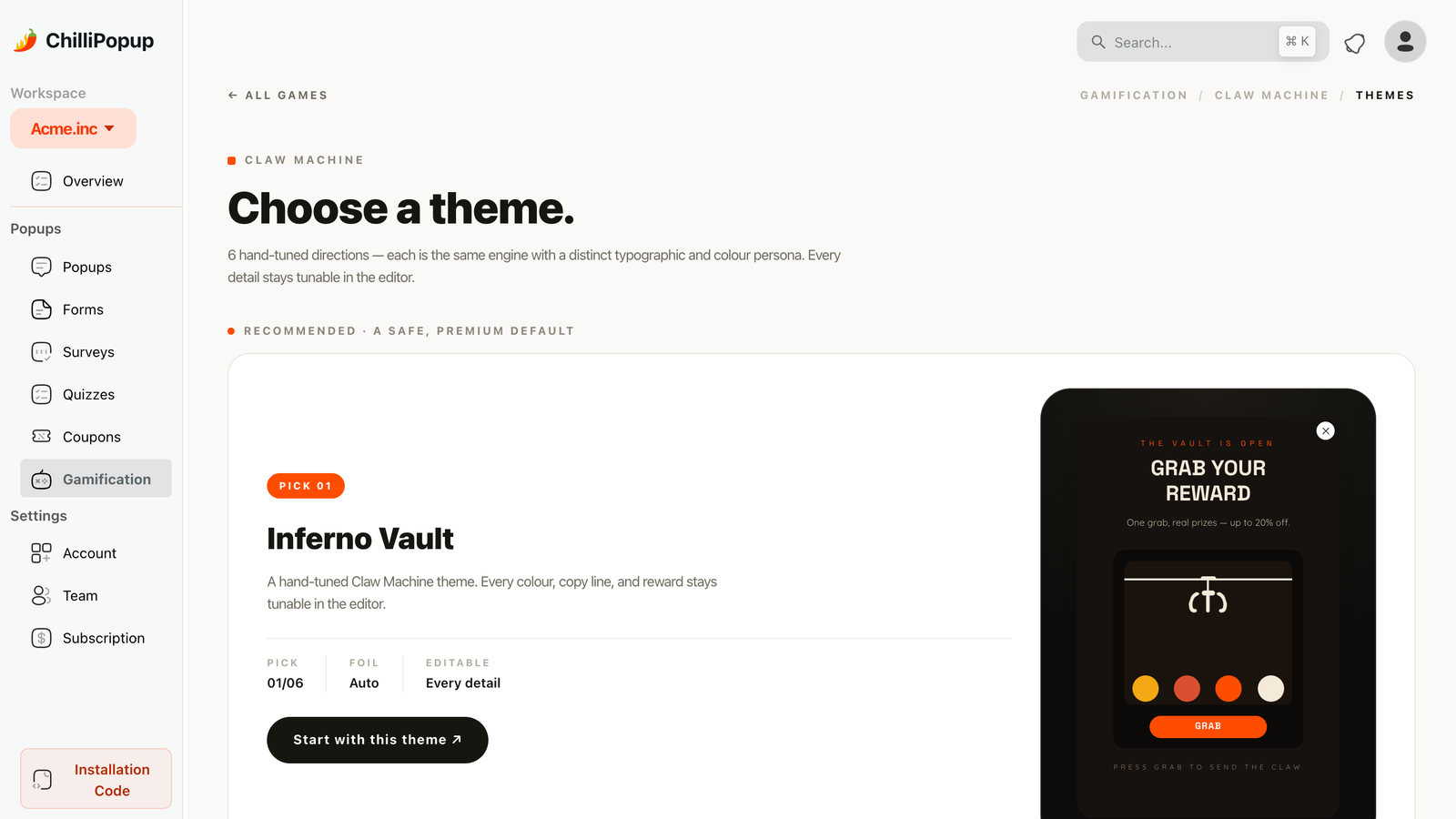
The Claw Machine theme picker in ChilliPopup: a recommended theme and a grid of alternatives, each a live preview
The claw machine theme picker: a recommended pick first, then the rest of the grid. The theme sets the machine's look; the copy, the screens and the popup around it are yours.
Six ready-made themes Sticker Grab Inferno Vault Velvet Vault Sunset Grab Neon Vault Paper Vault
Targeting and triggers

Show the machine at the right moment

A claw machine carries the same display rules as every ChilliPopup popup. Combine six triggers so the game appears when a visitor is about to leave, has scrolled far enough or has gone quiet, then narrow the audience with targeting rules so it never interrupts the wrong person.

  • Six triggers: exit intent, time delay, scroll depth, page-view count, click count and inactivity; the first one to fire opens the game
  • Device, page and browser: desktop or mobile, page-URL rules, operating system and browser
  • New vs. returning, with frequency caps: define what counts as a new or returning visitor, show once per session or every few days or visits, and hide the game from visitors who already converted
  • Schedule: date windows and day-and-hour slots for a weekend promo or a launch week
  • A/B testing: one click creates a Variant B of the game with a traffic split you choose and sticky assignment per visitor
Display rules · Triggers
Exit intentWhen the cursor leaves the page
Time delayAfter a set number of seconds on the page
ScrollingAfter scrolling a percentage of the page
📄
Page countAfter visiting a number of pages
👆
Clicks countAfter a number of clicks on the page
💤
InactivityAfter a number of seconds of inactivity
Analytics

Every grab, win and claimed email in one report

A game popup gets the standard popup report plus a game section, so you can follow the funnel from a view to a claimed prize and see which reward actually moves people.

  • Views, clicks, closes and conversion rate, like any popup, over the date range you pick
  • Plays, wins, losses and claimed wins as headline numbers for the game
  • Plays by outcome and claimed wins by prize, so a prize nobody claims stands out
  • A claimed-wins table with each winner's email, prize, time and device
  • A/B results side by side, with a confidence indicator, when you run a variant
The ChilliPopup analytics dashboard: opens, unique views, clicks, submissions and conversion rate over a 30-day range, with an interaction chart and a device breakdown
The standard popup report. A claw machine adds a Plays / Wins / Losses / Claimed wins section and a claimed-wins table underneath it.
Use cases

Where a claw machine earns its place

Keep the prize simple and the ask honest. A game is a reason to leave an email, not a substitute for a good offer.

Ecommerce discounts

Fill the pit with percentage-off and free-shipping codes, fire the game on exit intent for first-time visitors, and let the claimed-wins-by-prize chart tell you which reward converts. The code only appears after the email, so every winner is also a lead.

Newsletter growth

For blogs, creators and SaaS sites, the prize can be a discount on a paid tier, early access or a free-resource code. The Post-Play claim step is your signup form; the claw is simply the reason people fill it in.

Seasonal campaigns

Swap the theme and prizes for Halloween, Black Friday or Christmas, schedule the game to a date window, and retire it without touching your site. Our Halloween and Christmas popup ideas are a good place to start on prizes.

Great for Exit-intent discounts First-order incentives Newsletter signups Holiday sales Product launches
Other games

Same prize engine, three more ways to play

The claw machine shares its prizes, odds, claim-and-reveal screens and report with three sibling games. Pick the one that fits your brand, or run a different one each season.

FAQ

Claw machine popup questions

What is a claw machine popup?
A claw machine popup is a gamified overlay that trades one play of an arcade claw for an email address. In ChilliPopup it is a popup type of its own: a cabinet with a claw on a rail over three to six prize balls, a GRAB button, and a flow of Play, Post-Play (claim), Winning and Losing screens. The visitor plays once; on a win they enter an email to receive the reward code.
Can the visitor cheat or read the prize codes from the page?
No. The win or loss is rolled on ChilliPopup's servers against the odds you saved, not in the browser. Prize codes are stripped from the public popup configuration and only returned together with a winning outcome. If the server cannot be reached the play resolves as a loss, and the GRAB button locks after one play, so refreshing or spamming does not buy a better result.
Can I control the odds, or make some plays lose?
Yes. Every prize carries its own win chance in percent; whatever your prizes leave short of 100% is the chance of winning nothing, and the editor shows that number as you type. A single toggle gives all prizes equal odds instead. You can also mark a prize as a losing option: the draw can still land on it, but the claw lets the ball slip, your Losing screen shows, and no code is ever attached to it.
Does the claw machine work on Shopify, WordPress and Wix?
Yes. The claw machine renders through the same ChilliPopup pixel as every other widget, so it works anywhere the pixel is installed: with the WordPress plugin, the Shopify embedded app (a theme app embed), the Wix app, Google Tag Manager, or a single script tag on any site. Each guide walks through the install step by step.
When does the visitor give their email, and where do the leads go?
After a winning grab. The Post-Play screen asks for an email to claim the prize; only then does the Winning screen reveal the code. A losing grab goes straight to the Losing screen. Claimed wins are listed in the dashboard's analytics with each winner's email, prize, time and device. ChilliPopup does not send emails or push leads to an email-marketing tool; you read them in the dashboard.
Is there a free plan?
Yes. The Free plan is $0 per month, forever, with no credit card and no time limit. Paid plans are Pro at $29 a month and Business at $79, each with a 14-day free trial, and every plan includes all four games, AI generation, A/B testing and analytics. Every plan shows a small "Powered by ChilliPopup" badge on the popup. See the pricing page for the full comparison.
Does the claw machine work on mobile?
Yes. The machine is built into your page from plain DOM elements, with no iframe, and it scales with the popup, so GRAB is an ordinary tap on a phone. Device targeting lets you show the game on desktop only, mobile only, or both.
Can I A/B test a claw machine popup?
Yes. One click creates a fully editable Variant B of the game with a traffic split you choose, and each visitor sticks with the version they saw first. Results for A and B sit side by side with a confidence indicator, so you can test a different theme, prize table or copy. The A/B testing guide shows the steps.

Put a claw machine on your site today

Pick a theme, fill the pit with prizes, set the odds and publish through the pixel you already have. Same editor, same targeting, same analytics as every other ChilliPopup widget.