The best Christmas popup ideas do one of three things: help a gift shopper decide faster, make a real deadline impossible to miss, or turn the December rush into a small game. Below are 12 popups that do exactly that — each with its trigger, sample copy, and the ChilliPopup pieces that build it.
December traffic is unlike any other month. Your visitors are browsing categories they never normally open, buying for people whose taste they're unsure of, and doing it all against a date that will not move. The right holiday popups meet them there — and because the season has a fixed arc, you can build every one of them in advance and let scheduling rules run the whole thing.
Key Takeaways
- Christmas shoppers buy for other people. Popups that help them decide — gift quizzes, gift guides — beat louder discounts.
- The shipping cutoff is urgency you never have to fake. Count down to it, then switch to digital gift cards the hour it passes.
- Build the season in November. Date-range rules (start and end date, down to the hour) flip each phase on and off automatically.
- Turn off "show again after conversion" on every capture popup — December frequency is high enough without re-asking subscribers.
- A/B test the offer, not the snowflakes. Gift wrapping vs a discount teaches you something reusable; red vs green doesn't.
Why Christmas popups aren't Black Friday popups
It's tempting to leave the November popups running with a new coat of tinsel. Don't. The two seasons have different shoppers, and the difference changes what the popup should say.
- The Black Friday shopper buys for themselves. They know what they want, they're comparing prices, and the popup's job is to win a discount-driven decision inside one loud weekend. That's a separate playbook — our four-phase Black Friday popup plan covers November end to end.
- The Christmas shopper buys for someone else. They're less sure, less price-obsessed and more deadline-bound. Their real questions are "what do I get her?" and "will it arrive in time?" — and a popup that answers either converts without touching your margin.
December also has an arc that November doesn't: gift discovery early on, a shipping-deadline crunch, a strange quiet stretch between the holidays, and a New Year reset. One popup can't play every act. A relay of small campaigns — each with its own date range — can.
The December planning calendar
Before the ideas, the structure that holds them. Look up your carrier's last standard-shipping date first — everything hinges on that cutoff. Then divide the season into six phases and give every campaign a date range (in ChilliPopup: a start and end date, down to the hour) so each one switches itself on and off while you're busy packing orders.
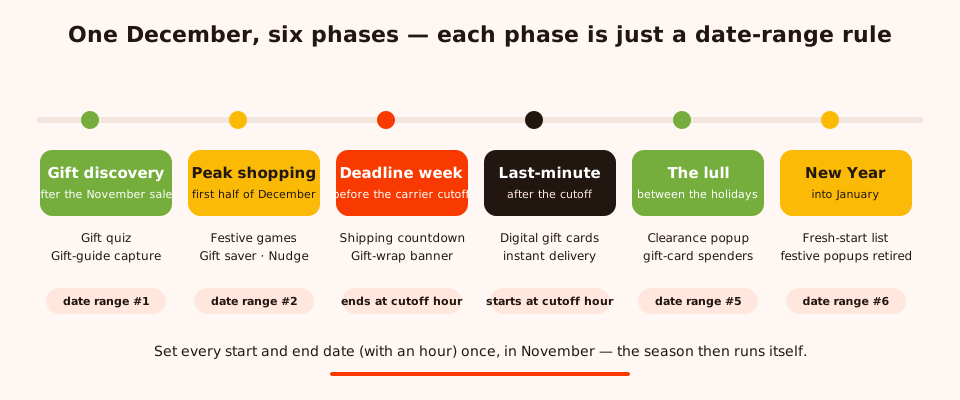
The season as a relay: six phases, six date ranges, zero mid-December scrambling.
| Phase | When | Popups that run | The rule that flips it |
|---|---|---|---|
| Gift discovery | Right after the November sales end | Gift-guide quiz, gift-guide email capture | Date range + new-visitor targeting |
| Peak shopping | First half of December | Festive games, exit-intent gift saver, "still deciding?" nudge | Date range + frequency caps + stop after conversion |
| Deadline week | The days before your carrier cutoff | Shipping countdown, gift-wrapping banner | Countdown timer + end date at the cutoff hour |
| Last-minute | After the cutoff, through Christmas Eve | Digital gift-card popup | Date range starting at the cutoff hour |
| The lull | Between Christmas and New Year | Clearance popup for gift-card spenders | Date range + returning-visitor targeting |
| New Year handoff | Into January | Fresh-start list popup; everything festive retired | Date range; hard end dates on all Christmas campaigns |
The hinge move: the shipping countdown's end date and the gift-card popup's start date are the same hour. The moment "arrives in time" stops being true, your site automatically changes its story instead of breaking its promise.
Gift-discovery popups (ideas 1–4)
Early December belongs to shoppers who don't yet know what they're buying. These four popups convert by being useful.
1. The "find the perfect gift" quiz
A two-question quiz built from multiple-choice blocks: "Who are you shopping for?" (Partner / Parent / Friend / Kids) and "What's the budget?" (Under $25 / $25–$75 / The splurge). The last step collects an email and the button links to the matching collection.
Trigger: time delay of 12–15 seconds on your homepage and gift or collection pages. Copy: "Stuck on someone? Two questions and we'll point you at the right gift." Why it works: every submission arrives tagged with both answers, so your email tool can send "gifts for him under $25" instead of a generic blast — and the quiz Results view shows you exactly which recipients and budgets your December traffic cares about.
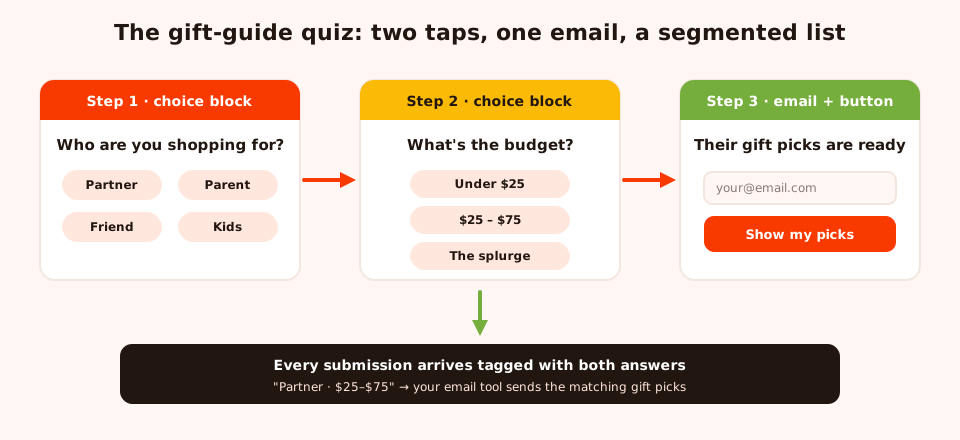
Two taps and an email: the quiz segments gift shoppers by recipient and budget as it captures them.
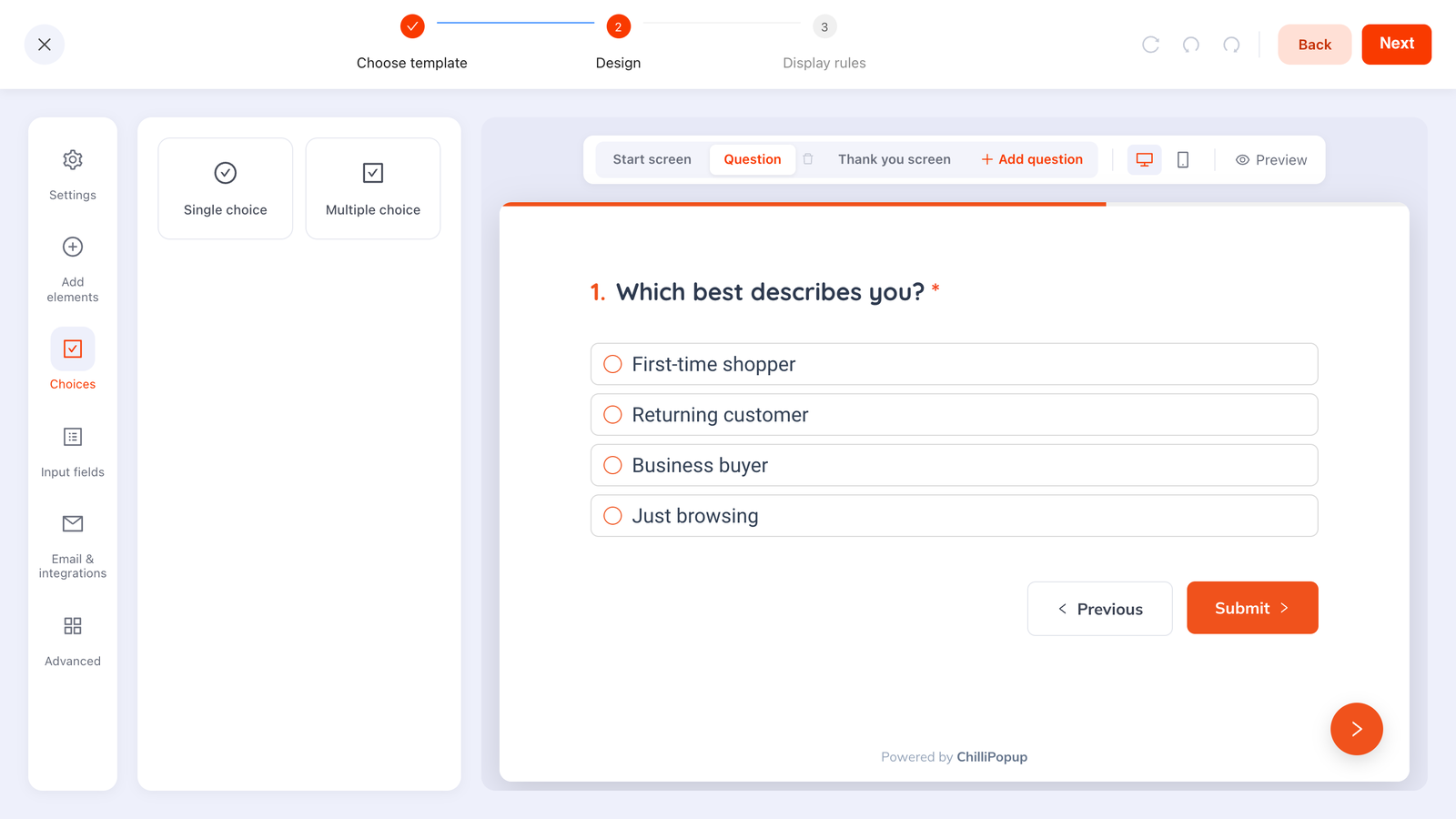
Choice blocks in the quiz editor — each option is one tap, and the answers come back as clean values you can segment on.
2. The holiday gift guide lead magnet
A classic email-capture popup with a seasonal twist: instead of "10% off", the offer is your gift guide — a curated list your team can assemble in an afternoon. Trigger: 50% scroll, new visitors only. Copy: "Steal our gift list — the presents that always land, sorted by budget. Where should we send it?" Build it with: a popup, one email input, one button; submissions land in your dashboard and your email tool delivers the guide. Turn off "show again after conversion" so subscribers never see it twice.
3. The exit-intent gift-idea saver
Gift shoppers browse in short bursts between other errands — and forget what they found. Catch the exit on product pages and offer to save the idea. Trigger: exit intent, page targeting URL contains your product path. Copy: "Don't lose this gift idea. Leave your email and we'll send you a link back to it — before the shipping cutoff." Build it with: exit-intent trigger + email input; the reminder itself goes out from your email tool. It converts abandonment into a warm, deadline-aware follow-up.
4. The returning-visitor "still deciding?" nudge
Someone back for a third look at the same category is circling a decision. Help them land. Trigger: returning visitors, shown once every few days. Copy: "Back again? That's usually a sign. Here's 10% to make the call — the shipping cutoff won't wait." Build it with: display frequency set to returning visitors, plus a coupon code block so the code is right there to copy. This is the one gift-discovery popup where a discount earns its keep: it's spent on someone already close to buying.
Festive game popups (ideas 5–7)
December is the one month when playfulness is on-brand for almost everyone. ChilliPopup's gamified widgets — spin wheel, scratch card, slot machine, claw machine — all come with themed designs, and every prize is decided server-side, so the odds you configure are the odds that run.
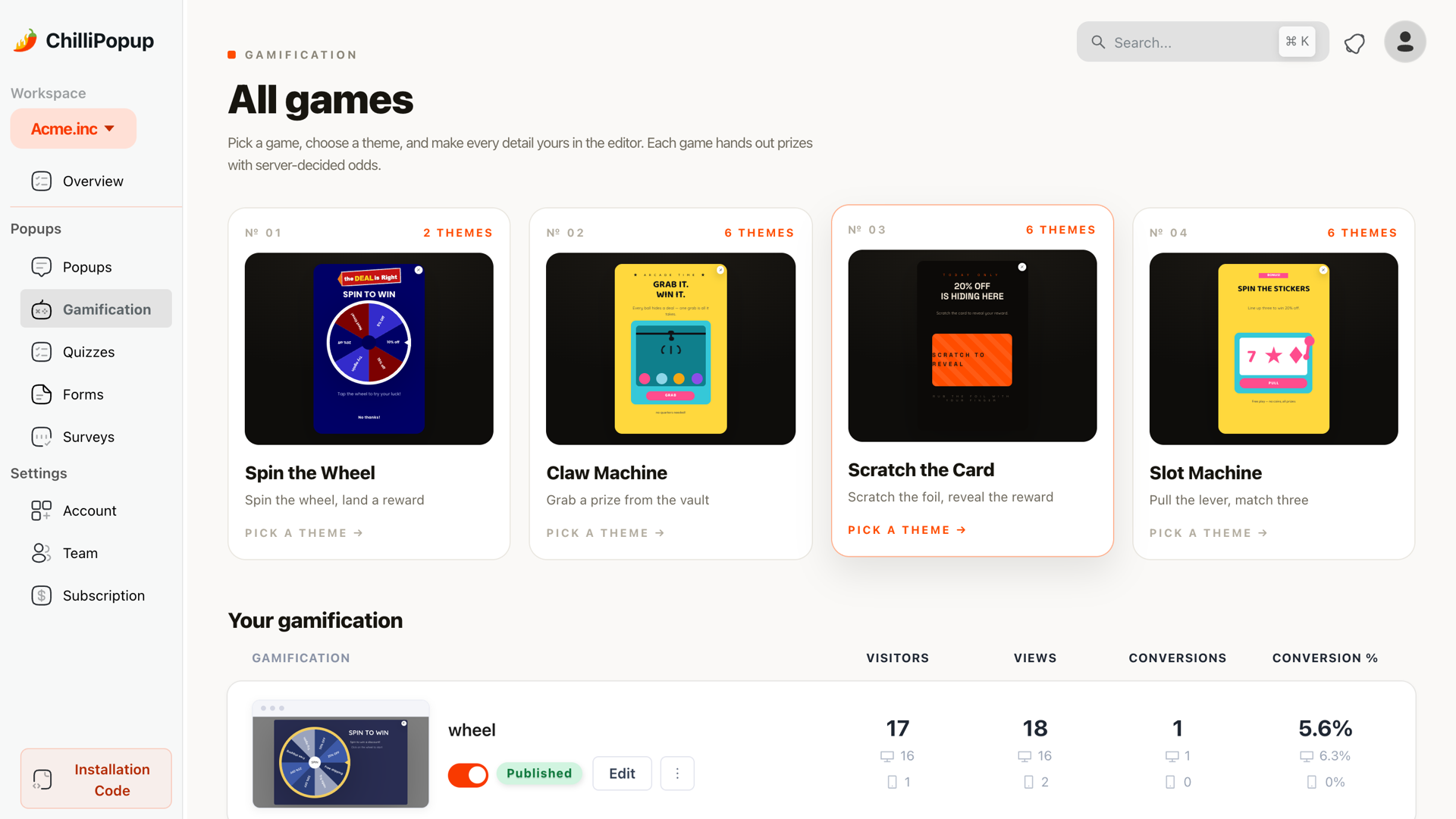
Four game formats, one December job: make a modest prize feel like an occasion.
5. The "12 Days of Deals" spin wheel
A spin wheel wrapped in a twelve-day promo window, with festive prize labels doing the storytelling: Stocking stuffer — 5% off, Under the tree — 15% off, Golden bauble — free shipping, Elf's pick — free gift with order. Trigger: time delay, once per session, with a date range covering the promo window. Copy: "12 Days of Deals — spin for today's prize. One spin per visit, winners drawn fairly." The email ask sits on the claim screen, so the address arrives attached to a prize someone actually wants.
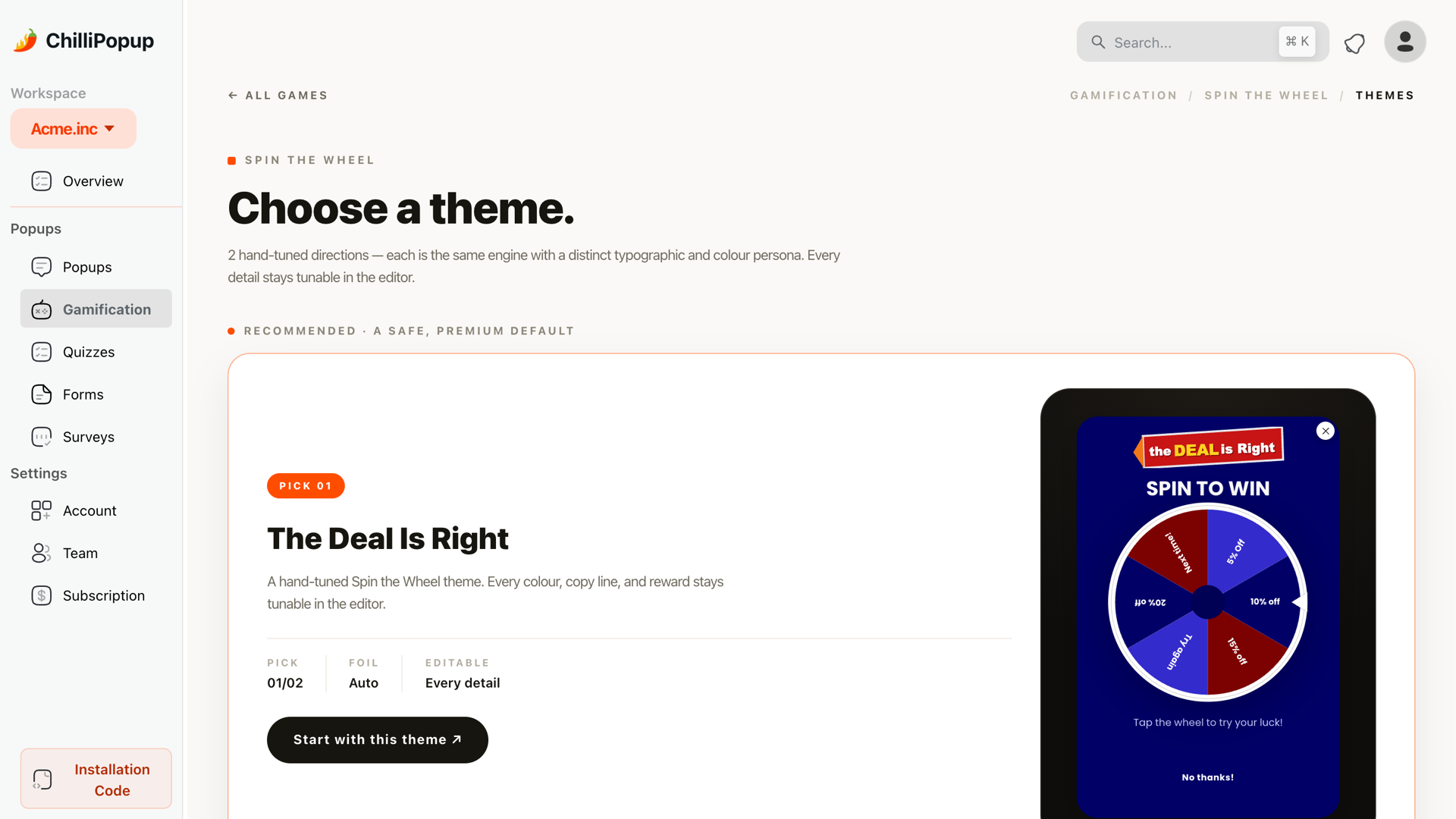
Every game ships with themed designs — pick one, swap the prize labels for festive ones, and schedule it.
6. The secret-Santa scratch card
The scratch card is the most Christmas-shaped mechanic you can run: a hidden gift, revealed. Trigger: exit intent, or a time delay on collection pages. Copy: "Your Secret Santa left something under the tree. Scratch to see what's inside." Build it with: the scratch card widget, festive prize names, and the email ask on the claim screen. Because the reveal feels personal, it suits stores where a spinning wheel would feel too loud — think boutique, craft or premium brands.
7. The advent-style daily deal announcement
An advent calendar, as popups: a different deal each day, announced by a slim popup with a news ticker block scrolling the day's offer — "🎄 Today only: 25% off knitwear · ends at midnight · free wrapping on everything". Build it with: duplicate the popup once per deal window and give each copy its own date range (start and end date with an hour), so today's deal swaps in automatically at midnight. It's more setup than one evergreen popup — and that's exactly why visitors come back to check it.
Urgency popups with a real deadline (ideas 8–9)
Shoppers have learned to ignore manufactured countdowns. December hands you the rare thing that fixes this: a deadline that is physically true.
8. The free gift-wrapping banner
A slim, banner-style popup that stays out of the way and answers a question every gift shopper silently asks. Trigger: show immediately, on every page, all visitors. Copy: "Free gift wrapping on every order until the shipping cutoff — added at checkout, no code needed." Build it with: a small text-and-button popup with a date range for the offer window. No email ask, no discount — just a service message that removes a reason to buy elsewhere.
9. The shipping-deadline countdown
The most important Christmas popup on this list. Put a countdown timer block on a popup, point it at your carrier's real cutoff, and say what the deadline means in plain words. Trigger: show immediately during deadline week, once per day per visitor. Copy: "Order in time for Christmas — standard shipping ends soon. After that, it won't arrive in time." Button: "Shop gifts that arrive in time", linked to a ready-to-ship collection.
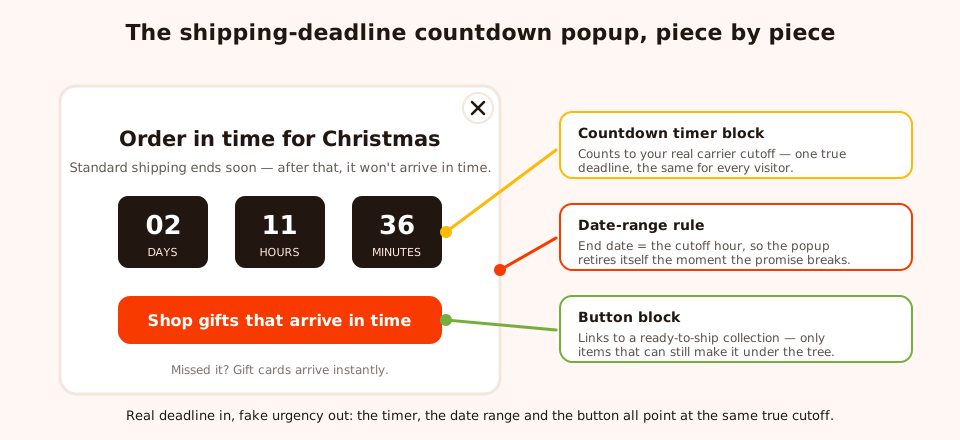
One true deadline, three pieces: the timer counts to it, the date range retires the popup at it, the button routes around it.
Set the popup's end date to the cutoff hour so it can never show a dead promise, and run separate popups per shipping speed if you offer express — the express countdown simply starts when the standard one ends. For the full honest-urgency playbook, see our countdown timer popups guide.
After the cutoff: last-minute and post-holiday popups (ideas 10–12)
Most stores go quiet the day shipping ends. That's backwards — some of December's highest-intent traffic arrives after the cutoff, and the week between the holidays is full of people holding gift cards.
10. The last-minute digital gift card popup
The date-range switch from the planning calendar: this popup's start date is the countdown popup's end date, to the hour. Trigger: show immediately, all pages, from the cutoff hour through Christmas Eve. Copy: "Missed the shipping cutoff? A gift card lands in their inbox in seconds — and they get to pick." Build it with: a popup with a button straight to your gift-card product. No capture, no friction — the visitor is out of time, so the popup's only job is to route them to the one thing that still works.
11. The post-Christmas clearance popup
Between the holidays, two audiences show up: gift-card recipients deciding where the balance goes, and shoppers who know clearance season has started. Trigger: show immediately, with a date range covering the lull; consider returning-visitor targeting so it leans toward people who shopped you in December. Copy: "Got a gift card burning a hole? The year-end clearance is where it goes furthest — while stock lasts." "While stock lasts" is honest scarcity here — clearance stock genuinely doesn't come back.
12. The New Year handoff popup
The campaign that ends the season on purpose. When the clearance window closes, a fresh popup takes over — no snow, no red-and-green — and points at January. Trigger: show immediately or 50% scroll, date range starting around New Year. Copy: "New year, fresh start. Join the list and be first in line for what's coming in January." Its real function is structural: because it starts exactly when the festive campaigns' end dates land, your store never has that awkward week of tinsel in mid-January.
Set up the whole season in advance
Every idea above shares one operational trick: nothing is switched on by hand in December. Three rules do the work.
- Date ranges run the calendar. Each campaign gets a start and end date with an hour. Build all twelve popups in November, schedule them, and the relay runs itself — including the countdown-to-gift-card switch at the cutoff hour.
- Stop after conversion keeps frequency sane. On every capture popup — quiz, gift guide, gift saver, games — turn off "show again after conversion". December visitors see plenty of messages; none of them should be a popup they already answered.
- A/B test the offer, not the decoration. ChilliPopup's built-in A/B testing splits traffic between two variants. Use it on the question that matters: does free gift wrapping beat 10% off? Does "arrives in time" beat "last chance"? Those answers carry into next year; a test of two shades of red doesn't.

Each phase reports its own views, clicks, submissions and conversion rate — so you can see which act of December actually converted.
Check the numbers between phases, not during them. Each campaign's views, submissions and conversion rate tell you which phase pulled its weight — the gift quiz's conversion rate against the gift guide's is next year's plan, written for you.
The mobile Christmas shopper
A large share of December browsing happens on phones — on the couch, in queues, between errands. Two adjustments keep the ideas above working there:
- Duplicate your key campaigns into a mobile variant using device targeting: smaller type, one message, a full-width button in thumb reach, and the close button easy to hit. The quiz and the games already suit phones — taps, not typing.
- Swap the trigger. Exit intent relies on a cursor leaving the page, which phones don't have — so on the mobile variant of the gift saver, trigger on scroll percentage or a time delay instead.
The full small-screen checklist — including the interstitial rules search engines care about — is in our mobile popup best practices guide.
Six Christmas popup mistakes to avoid
- Running Christmas popups past the season. A snowflake popup in mid-January reads as neglect. Every festive campaign gets a hard end date the day you build it — the New Year handoff exists so something is always ready to take over.
- Fake urgency. An evergreen timer that resets per visitor, dressed up as a shipping deadline, is the fastest way to teach shoppers your countdowns mean nothing. Count down only to the real cutoff — December is the one month you don't need to invent pressure.
- Burying the shipping deadline. If the cutoff only lives on a shipping-policy page, it isn't protecting anyone from disappointment. Put the date on the popup, in the headline, in plain words.
- Launching everything at once. Twelve ideas is a season, not a homepage. Never let a visitor meet more than one overlay per session — stagger campaigns with date ranges, frequency caps and page targeting.
- Re-asking subscribers. Leaving "show again after conversion" on means your most loyal December buyers see the same signup popup on every gift run. Turn it off everywhere.
- Discounting when help would convert. A gift shopper who can't decide doesn't need 15% off — they need the quiz, the guide or the deadline. Spend discounts only where hesitation is about price, like the returning-visitor nudge.
Build your December in one afternoon
Popups, quizzes, spin wheels, scratch cards and countdowns from one editor — scheduled with date ranges so the season runs itself. Free plan, no credit card required. Paid plans from $29/month.
Start free →Related reading
Frequently asked questions
When should I start showing Christmas popups?
As soon as your November sale ends. The quiet week that follows is when gift discovery starts, so the gift-guide quiz and gift-guide email capture should be live from early December. Build everything earlier than that: create the campaigns in November, give each one a date range, and let the rules switch the phases on and off for you.
Are Christmas popups different from Black Friday popups?
Yes. Black Friday shoppers hunt discounts for themselves; December shoppers buy gifts for other people against a hard shipping deadline. That changes the popup's job: help visitors choose a gift and make the real cutoff visible, rather than just shouting a bigger percentage. November needs its own four-phase plan — see the Black Friday guide for that.
How do I schedule Christmas popups in advance?
Give every campaign a date range — in ChilliPopup that's a start and end date, down to the hour. Build the whole season in one sitting: the gift quiz for early December, the shipping countdown ending at your carrier's cutoff hour, the digital gift-card popup starting that same hour, the clearance popup for the week after Christmas, and the New Year popup to close the season.
What should a Christmas popup offer besides a discount?
Help and certainty. A gift-finder quiz, a downloadable gift guide, free gift wrapping, a visible order-by deadline and instant digital gift cards all convert in December without touching your margin the way a deeper discount does. Games help too: a festive spin wheel or scratch card makes a modest prize feel like an occasion.
When should I turn my Christmas popups off?
The moment their promise expires. The shipping countdown must end at the real carrier cutoff, festive games and gift messaging should end by Christmas Eve, clearance ends when the stock or the season does, and nothing red-and-green should still be showing in mid-January. An end date on every campaign makes all of that automatic.
Do countdown timers work for Christmas popups?
Better than at any other time of year, because the deadline is real: after the carrier cutoff, parcels genuinely stop arriving in time. Count down to that true date, say what the deadline is on the popup itself, and let the popup retire the hour it passes. An evergreen timer that resets for each visitor is exactly the fake urgency shoppers have learned to ignore.