
An A/B test answers one question honestly: would a different version of this campaign convert better? Instead of guessing, you show version A to part of your traffic and version B to the rest, and let the numbers decide. In ChilliPopup this takes one click to set up and works on every content type — popups, forms, surveys, quizzes and the four prize games.
Key takeaways
- One click creates the test — the ⋮ menu on any campaign row has "Create A/B test".
- Variant B is a full copy you edit like any campaign, and it stays a draft until you publish it.
- Visitors are assigned once and keep their version on every later visit.
- The results view refuses to guess — it calls a winner only after at least 100 views per version and 20 conversions.
- Ending a test keeps both versions — nothing is deleted.
Watch it end to end
The two-minute walkthrough below shows the whole flow live: creating the test, the A/B badges, the results view, the traffic-split slider, and a real website where one visitor gets version A while the next gets the orange Variant B — and keeps it on reload.
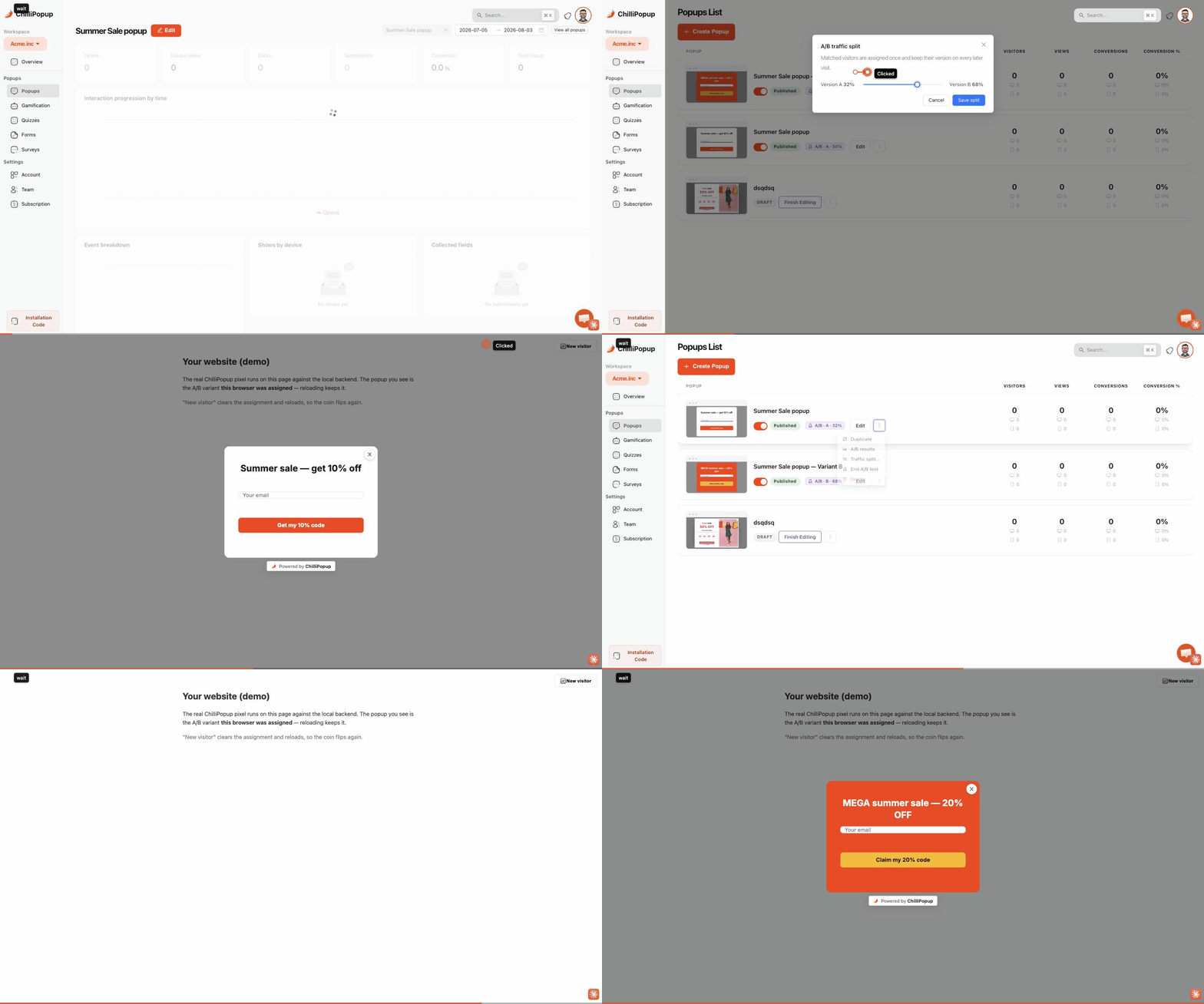
Create the test → set the split → visitors are split between the white version A and the orange Variant B, and each visitor keeps theirs.
Set up a test in five steps
1 Create the test
Open any content list — Popups, Gamification, Quizzes, Forms or Surveys — and click
the ⋮ menu on the campaign you want to improve, then Create A/B test.
Two things happen: your original becomes version A (badge A/B · A · 50%),
and a linked copy called "— Variant B" appears right under it as a draft.
2 Edit Variant B
Click Finish Editing on the Variant B row and change what you want to test — the headline, the offer, the colors, the number of fields. Variant B is a complete, independent campaign, so anything the editor can do is fair game.
Test one meaningful change at a time. If B differs from A in five ways and wins, you won't know which change did the work. "10% off" vs "free shipping" teaches you something; a full redesign teaches you nothing repeatable.
3 Publish Variant B
Variant B starts as a draft so nothing reaches visitors before it's ready. While it's a draft, everyone simply sees version A. Publish and enable Variant B — that's the moment the split actually starts.
4 Set the traffic split
In the ⋮ menu, open Traffic split… and drag the slider — 50/50 by default, or any ratio you prefer (e.g. send only 20% to a risky new idea). Each visitor is assigned once, at random, and keeps their version on every later visit, so nobody sees the popup flip-flop.
Split changes take up to a minute to reach your site — the player caches the campaign payload for 60 seconds. Visitors already assigned keep their version; the new split only affects new assignments.
5 Read the results — then end the test
Open A/B results in the ⋮ menu for a side-by-side of the last 30 days: views, conversions and conversion rate per version. The verdict line underneath is deliberately honest — it names a leader with a confidence percentage only once each version has at least 100 views and the test has 20 conversions overall; below that it tells you to keep the test running. Below 95% confidence, treat the lead as provisional.
When you have your answer, click End test. Both campaigns survive as normal, independent campaigns — keep the winner running and pause or delete the loser whenever you like.
How the split behaves
| Situation | What visitors see |
|---|---|
| Both versions published & enabled | Traffic splits by your ratio; each visitor is sticky to their assigned version |
| Variant B still a draft (or paused) | Everyone sees the live version — the test idles safely |
| Returning visitor | The same version they got the first time, always |
| Private window / cleared browser / second device | Counts as a new visitor and gets a fresh assignment |
| Test ended | Both campaigns act independently again — whatever is published and enabled shows normally |
One practical consequence: because each version reports its own views and conversions in the analytics dashboard, you can also open either row's full analytics page at any time — the A/B results modal is just the side-by-side shortcut.
What to test first
- The offer — "10% off" vs "free shipping" is the classic highest-impact test (our coupon popup guide covers choosing the discount type).
- The headline — benefit-first vs curiosity-first; see the popup copywriting guide for patterns.
- The ask — one field vs two; every extra field costs conversions.
- The format — a plain discount popup vs a spin wheel or scratch card with the same reward.
- The trigger — exit intent vs a time delay (the popup triggers guide explains when each fires).
Run your first A/B test today
Build popups, forms, surveys, quizzes and games from one editor — and one pixel. Free plan, no credit card required. Paid plans from $29/month.
Start free →Related reading
Frequently asked questions
Which content types can I A/B test?
All of them: popups, forms, surveys, quizzes and the four prize games (spin wheel, scratch card, slot machine, claw machine). Every content list has the same Create A/B test action in the row's ⋮ menu.
How many variants can a test have?
Exactly two — the original (A) and Variant B. If you want to try a third idea, end the current test and start a new one against the winner.
Do visitors keep seeing the same version?
Yes. Each visitor is assigned once and keeps their version on every later visit, stored in their browser. A cleared browser or a private window counts as a new visitor, and someone on a second device may be assigned again.
What happens while Variant B is still a draft?
Nothing changes for visitors — they all see the published version. The split only starts once both versions are published and enabled, so you can take your time editing Variant B.
How quickly do split changes reach my website?
Within about a minute. The player caches the campaign payload for up to 60 seconds, so a new split applies to visitors on their next page load after the cache refreshes.
What does End test do — do I lose a version?
No. End test only unlinks the two campaigns; both keep existing as normal, independent campaigns with their own stats. Keep the winner published and pause or delete the loser whenever you choose.