A Halloween claw machine popup: press GRAB, take a treat
Trick or treat is already a game, and a claw machine is the arcade version of it. A cabinet appears over your costume, candy or décor store, the shopper presses GRAB, the moving claw stops, drops, closes and lifts. On a treat the plush friend rides up and a code is theirs once they leave an email; on the trick the plush friend slips at the last second. Our server decides which, not the browser. This page is the full setup: a treat-bag prize table with the trick built in, the copy for the four screens, the display rules for 24 to 31 October 2026, and what to read in the report on 1 November.
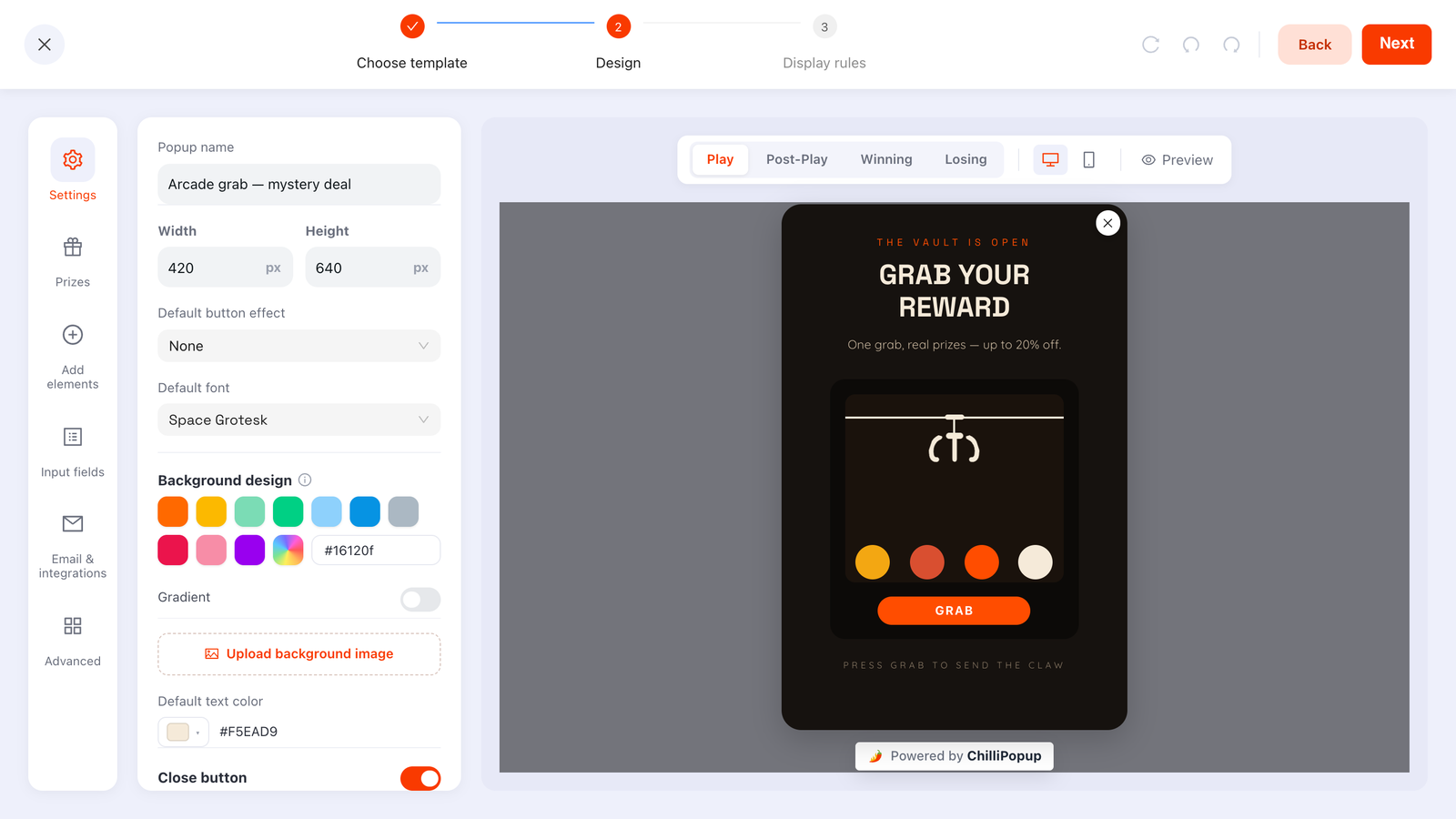
A claw machine in the ChilliPopup editor: Play, Post-Play, Winning and Losing are separate screens, and the Prizes panel holds the odds and reward codes. For Halloween you pick Inferno Vault or Neon Vault as the cabinet and write the campaign around it.
Why a claw machine at Halloween
The one week of the year a shopper expects a trick
Most prize games have to apologise for their losing outcome. At Halloween the losing outcome is the joke: a plush friend that slips out of the claw is the trick, and the shopper knew one was in the pit. That lets you run an honest table where almost every grab pays and the rare miss still lands well.
The trick is a prize you flag
Any prize in the table can be marked as a Losing option. It keeps its label and its share of the draw, but when the roll lands on it the claw lifts the plush friend, lets it slip and drops it back, the Losing screen shows and no code is attached. You decide how often the trick happens, to the percent.
Eight days, then it packs up
The week before Halloween is when costumes, candy and décor get bought, and 1 November is when nobody wants to see a pumpkin. Display rules take a start and an end date in your time zone: set Saturday 24 to Saturday 31 October 2026 and the machine arrives and leaves on its own.
A grab nobody can rig
When GRAB is pressed the button locks and the browser asks our server for the outcome. The server reads your saved prize table, rolls a weighted draw, records the play and answers win or lose; only then does the claw animate to the result. Codes travel only inside a winning answer, and if the server cannot be reached the grab resolves as a loss.
The prize table
A treat-bag prize table you can copy
Five treats and one trick, adding up to exactly 100%. Type the labels, codes and chances into the Prizes panel like this and flag the last row as a Losing option.
In the pit
Reward code
Win chance
Why it is there
10% off
TREAT10
40%
The everyday treat. Most grabs bring this one up, and each one arrives with an email.
Free shipping
TREATSHIP
20%
A fixed cost to you, and the prize that matters most in the last week, when a costume has to arrive before the 31st.
15% off
TREAT15
15%
A step up that still leaves margin on full-price costumes and décor.
Free candy bag
TREATBAG
10%
A gift with purchase, set up however your checkout handles one. Small cost, and the prize that fits the week.
30% off
TREAT30
5%
The prize people mention. Five grabs in a hundred, with a minimum basket on the code to cap what each one costs.
The trickLosing option
none
10%
Flagged as a Losing option: it keeps its label and its share of the draw, but the claw lets the plush friend slip and the Losing screen shows. No code is ever attached to it.
Read across the table and the arithmetic is plain: with these odds, every hundred grabs bring up roughly forty 10% codes, twenty free-shipping codes, fifteen 15% codes, ten candy-bag codes and five 30% codes, and ten shoppers watch the plush friend slip. Because the rows total 100% there is no leftover: the trick is the only way to lose, and you set how often it happens. Change any percentage and the editor shows the chance of not winning as you type.
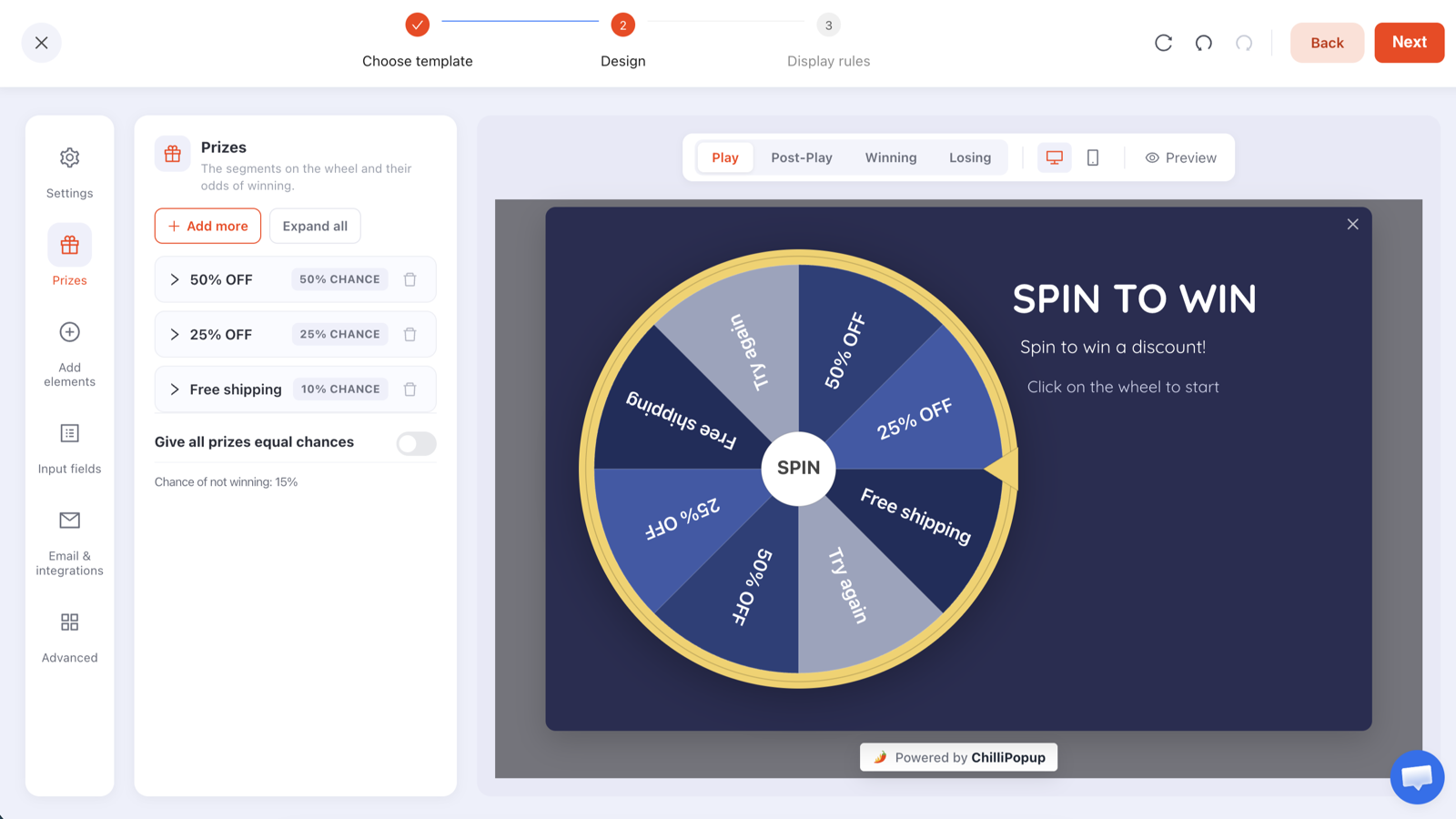
The Prizes panel, shown here on a wheel. A claw machine uses the same panel: a label, a reward code and a win chance per prize, the Losing option flag for the trick, and the chance of not winning computed for you.
Create the codes in your store first: Shopify Discounts, WooCommerce Marketing → Coupons, or Wix Marketing → Coupons. Give each one 31 October as its end date and TREAT30 a minimum basket. The trick needs no code.
ChilliPopup never creates or applies codes: it reveals the code you pasted, and only inside a winning result. The configuration that reaches the browser has every code stripped out.
Want an all-treat pit? Delete the trick row and spread its 10% across the others, or switch on "Give all prizes equal chances". Every grab then rides up and every shopper leaves with a code.
Keep the trick rare. The pleasure of a claw machine is the lift. A plush friend that slips one time in ten is a joke the shopper is in on; one that slips every third grab is a machine people stop pressing.
Copy for the four screens
What each screen says
A claw machine has four screens: Play, Post-Play, Winning and Losing. Each is its own canvas in the editor. Write {{prize_label}} and {{prize_code}} anywhere in the Post-Play or Winning copy and the prize the claw brought up fills them in.
Play
Grab a treat
Headline: Trick or treat? Press GRAB and find out.
Sub-line: One grab. Up to 30% off costumes, candy and décor until midnight on the 31st.
GRAB is the game's one control; its label comes with the theme and it locks after one play, so the copy has one job: say what is in the pit and how long the code lasts.
Post-Play
The claw came up with {{prize_label}}
Headline: Treat: {{prize_label}}.
Sub-line: Enter your email and your code appears here. It is good until 31 October, 23:59.
One email field and one button. This screen appears only after a winning grab, so the trick never asks anyone for anything.
Winning
Your code is {{prize_code}}
Headline: Your treat: {{prize_label}}. Code {{prize_code}}.
Sub-line: Order by Tuesday 27 October for delivery before the 31st.
Confetti is on by default here. Swap 27 October for your own last shipping date, and add a button pointing at the costume collection so the code gets used while the claw is still on screen.
Losing
The trick
Headline: The plush slipped. That was the trick.
Sub-line: The treats are still in the shop: the Halloween collection is reduced all week, and orders by the 27th arrive in time.
The trick row and any leftover both land here after the slip. The Losing screen is where a claw machine is most remembered; keep it good-humoured and give the shopper a door.
Display rules
Rules for the last week of October
A claw machine carries the same display rules as every ChilliPopup popup: six triggers, targeting, frequency caps and a schedule. This is the set that fits eight days of costume shopping.
Schedule: start Saturday 24 October 2026 at 00:00, end Saturday 31 October at 23:59, in your time zone. On 1 November the machine is gone without anyone touching it.
Triggers: exit intent for desktop shoppers who are leaving, and scroll depth at about 40% so a mobile shopper who has scrolled into the costume grid gets the machine too. The first trigger to fire opens it.
Pages: a single page-URL rule, contains your Halloween collection's path (/halloween in the card), shows it there and nowhere else, so the cart and checkout never see it. Page rules are any-match: a campaign shows wherever at least one of its page rules is true, so use either contains rules for the pages you want or a single doesn't-contain rule, never both.
Frequency: once every 3 days, plus "hide from visitors who already claimed". A shopper who got the trick on Saturday gets a second grab midweek; a shopper who won does not see the machine again.
Audience and devices: everyone, on desktop and mobile. The machine is plain DOM that scales with the popup, so GRAB is an ordinary tap on a phone.
Display rules
📅
Schedule24 Oct 00:00 → 31 Oct 23:59
⏏
Exit intentWhen the cursor leaves the page
📜
Scroll depthAfter 40% of the page
🔗
Page URLContains /halloween
🔁
FrequencyOnce every 3 days
🎃
Already claimedHidden after a claimed prize
How it works
Codes, cabinet, rules: three steps
A claw machine is a popup with a game on its Play screen. If you have built a ChilliPopup popup before, you already know the editor.
1
Create the codes in your store
Make one discount code per treat (TREAT10, TREATSHIP, TREAT15, TREATBAG, TREAT30) in Shopify, WooCommerce, Wix or whatever runs your checkout. Set each to expire on 31 October and give TREAT30 a minimum basket. The trick needs no code.
→
2
Fill the pit
Pick Inferno Vault or Neon Vault, type the prize table into the Prizes panel, flag "The trick" as a Losing option, then write the four screens and restyle the popup around the cabinet. Every block is drag-and-drop, and your own fonts are welcome.
→
3
Set the rules and publish
Enter the schedule, triggers, page rule and frequency above, then publish. If the ChilliPopup pixel is already on your site there is nothing else to install: the machine appears on Saturday 24 October on its own, and changing a prize or its odds later needs no redeploy.
Design
Pick the cabinet, then dress the popup
Start from any of the six claw themes, then open the Machine panel. Repaint the 3D cabinet, trim and claw, write your own sign, and choose three plush friends from the rotating toy cards. Try cats in pumpkin colours, drag to pivot the preview, and enjoy the gentle rotation for a playful October cabinet.
Start from Inferno Vault or Neon Vault, the two machines whose names already sound like the season, and compare them in the theme picker, which previews each cabinet live before you commit.
Restyle the popup, not the cabinet: a deep purple or near-black background behind the machine, one orange accent for the headline, a display font with some bite from Google Fonts or your own, and the popup's width, height, position, corner radius, shadow and overlay opacity to taste.
Let the headline do the trick-or-treat work: "TRICK OR TREAT? UP TO 30% OFF" stops the scroll; the claw settles who gets what. Keep the sub-line to the shipping cut-off, which is the real deadline in costume week.
Give the Losing screen its own look: every screen inherits the Play step's background and font by default; switch that off on the Losing screen and give it its own colour, image, font or text colour, so the trick reads as a joke rather than an error.
A/B test the cabinet: one click creates a Variant B at the split you set, each visitor sticks with the version they saw first, and the two machines' results sit side by side with a confidence indicator. Inferno Vault against Neon Vault, or the 30% code against the candy bag as the prize people talk about.
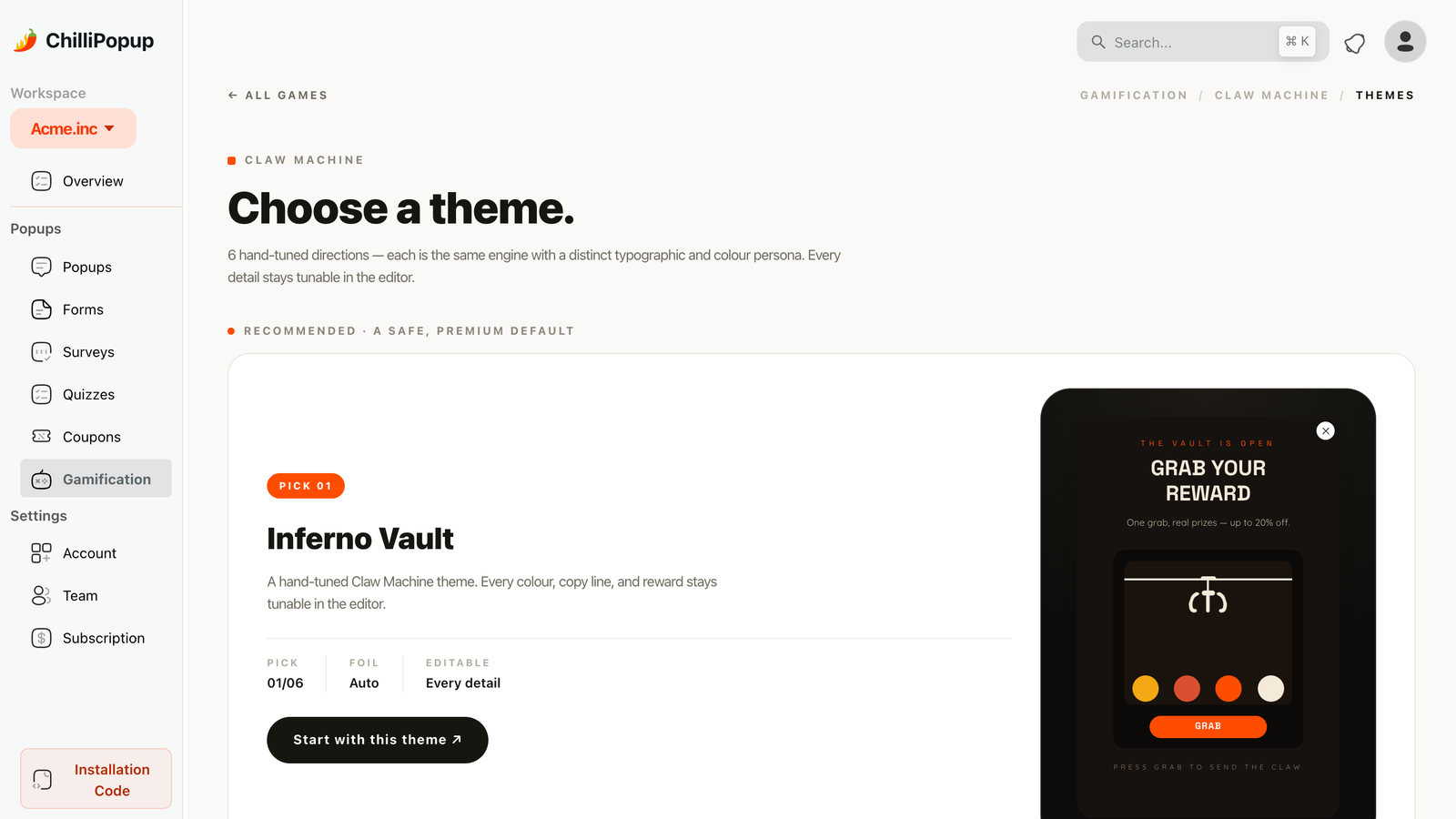
The claw machine theme picker: a recommended pick first, then the rest of the grid, each a live preview. The theme sets the cabinet; the copy, the screens and the popup around it are yours.
1 November
What to read when the pumpkins come down
A claw machine gets two reports: the popup report every ChilliPopup campaign has, and a game report built from the server's own record of each grab.
Opens against submissions: how many shoppers saw the cabinet, how many pressed GRAB and how many left an email, by day and by device. That is the conversion rate of the week's offer.
Plays by outcome: the win-versus-lose split of every grab, straight from the server's records. With the table above it should sit near ninety wins in a hundred; the losses are the trick, and nothing else.
Claimed wins by prize: whether the candy bag or the 30% code was the treat people actually claimed. A prize nobody claims stands out, and tells you what to put in the pit next October.
The claims table: each winner's email, prize, code, device and time. It lives in your dashboard; ChilliPopup does not send emails and has no Mailchimp, Klaviyo, HubSpot, Zapier or CSV export connector today.
Redemptions are counted where the codes live, in your store's discount report. Then duplicate the campaign, swap the codes, copy and dates, and the claw is ready for 27 November.
The standard popup report. A claw machine adds a Plays, Wins, Losses and Claimed wins section, the claimed-wins-by-prize chart and the claims table underneath it.
Claw Machine Popups: The Arcade Grab That Collects Emails
How the cozy 3D cabinet, plush prizes and odds work, where the email ask belongs, the display rules to pair it with, and the copy that makes visitors press GRAB.
What is the trick in a trick-or-treat claw machine?
A prize you flag as a Losing option. It keeps its label and its share of the draw, but when the server's roll lands on it the claw lifts the plush friend, lets it slip and drops it back into the pit, and your Losing screen shows with no code attached. Any share your prizes leave short of 100% ends the same way. In the table on this page the trick is 10%, so nine grabs in ten come up with a treat.
Does the machine switch itself off after Halloween?
Yes. Display rules take a start date and an end date in your time zone, so a machine scheduled for 24 to 31 October 2026 opens for nobody on 1 November. You can also unpublish it by hand at any time, and a duplicate of the campaign with new codes and new dates is the quickest way to bring the claw back for Black Friday.
Can a shopper keep pressing GRAB until the 30% comes up?
No. The GRAB button locks after one play, and how soon the machine comes back is set by your frequency rule: once a day, every visit, every session, or once every few days or visits. A separate switch hides it from visitors who have already claimed a prize. Once every 3 days plus that switch gives a shopper who lost a second try midweek, and a shopper who won no further grabs.
Does the claw machine work on phones?
Yes. The machine is built into your page from plain DOM elements, with no iframe, and it scales with the popup, so GRAB is an ordinary tap. Device targeting lets you show it on desktop only, mobile only or both; for Halloween week, both.
Is there a Halloween claw machine template?
Not a dedicated one. The six claw themes are the starting points, and Inferno Vault and Neon Vault are the two to compare for October. The Machine panel lets you change cabinet, trim, claw and toy colours, choose plush toys, edit the sign and GRAB label, and turn the cabinet in 3D; the background, copy, fonts, the popup's size and shape and all four screens around the machine are yours in the editor. ChilliPopup's AI drafts popups, forms, surveys and quizzes from a sentence, but the four prize games start from their themes rather than from a prompt.
What does a Halloween claw machine cost to run?
It runs on the Free plan: $0 per month, forever, no credit card and no time limit, with all four prize games, the full editor, A/B testing and analytics for 1,000 visitors a month on one domain. Pro is $29 per month and Business $79 per month, each with a 14-day free trial. A small "Powered by ChilliPopup" badge shows on the popup on every plan. See the plans →
Fill the pit before the costumes sell out
Type in the prize table, flag the trick, write the four screens, set 24 to 31 October and publish. The machine opens itself on the Saturday before Halloween, our server decides every grab, and every treat you hand out comes with an email.