A spin-to-win wheel for WordPress, installed by a free plugin
The free ChilliPopup plugin does one job: it adds the ChilliPopup pixel to every front-end page of your WordPress site, tied to your workspace by a single Workspace ID. Everything else, the wheel, its prizes and odds, the four screens and the display rules, is built in the ChilliPopup dashboard and appears on your site the moment you publish, with nothing added to header.php or functions.php. This page is the setup for a WordPress or WooCommerce site: the install, where the wheel shows, a prize table built on WooCommerce coupons, the copy, the rules and the report.
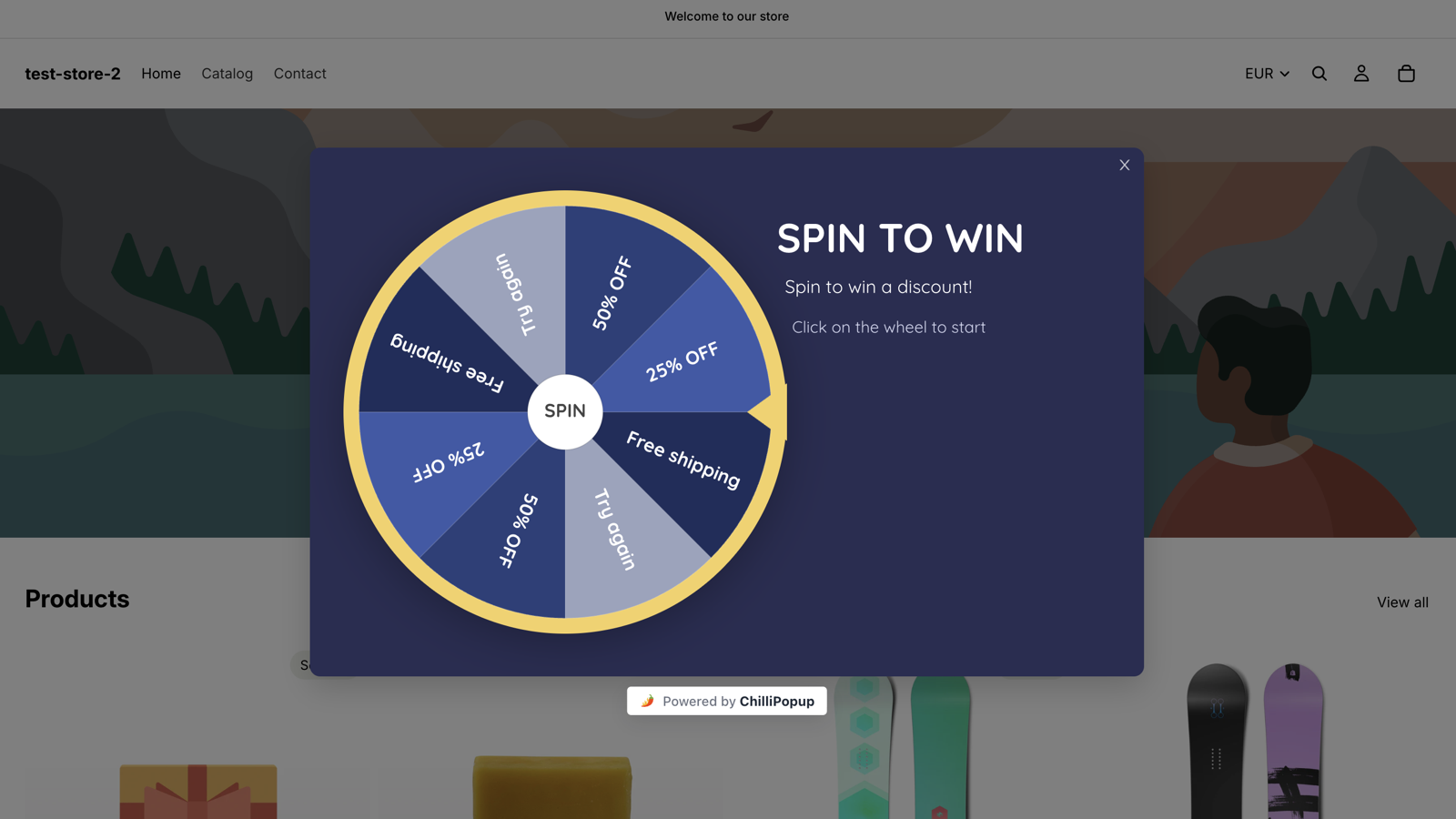
The Spin to Win theme live on a storefront. On WordPress the plugin prints the one script tag that draws it, and nothing else in your theme changes.
Why a wheel on WordPress
A signup a visitor will actually stop for
WordPress sites run on content and WooCommerce stores run on coupons, and a wheel serves both: a blog trades a spin for a subscriber, and a store spreads its welcome coupon across tiers and asks for an email before it hands one over.
One plugin, one ID, no theme edits
Install the plugin, paste the Workspace ID from your dashboard's Install screen, save. The plugin prints one asynchronous script tag on every front-end page and nothing else: no bundled CSS or JavaScript, no iframe, and a connection that survives theme switches and theme updates.
WooCommerce coupons as prizes
Every slice carries a coupon you created under Marketing → Coupons in WooCommerce, with its own expiry, minimum spend and usage limit. ChilliPopup never creates or applies a coupon; it reveals the code you pasted, only inside a winning result, and WooCommerce validates it at the cart or checkout.
Odds you set, a roll nobody can rig
Each prize has a win chance in percent; the leftover to 100% is the chance of a Try again. The spin is decided on our server, codes are stripped from what reaches the browser, and if the server cannot be reached the spin resolves as a loss, so a coupon never leaks from the page source.
Install on WordPress
Three steps from wp-admin to a spinning site
The plugin is free in the WordPress plugin directory and needs exactly one value from you. If you have ever used a headers-and-footers plugin, this is simpler.
1
Install and activate the plugin
In wp-admin go to Plugins → Add New, search for ChilliPopup, click Install Now, then Activate. A ChilliPopup entry appears in your admin menu.
→
2
Paste your Workspace ID
In your ChilliPopup dashboard open Install, choose WordPress and copy your Workspace ID. Paste it into the plugin's ChilliPopup screen and save; you can paste the whole install snippet and the plugin extracts the ID. Leave Load ChilliPopup on this site ticked: unticking it pauses every campaign without losing your settings.
→
3
Build the wheel and publish
Pick a wheel theme, type the prize table below into the Prizes panel, write the four screens, set the display rules and set the wheel to Published; drafts never serve. Reload your site. The dashboard's Install screen shows a green Installed & live check once it detects the pixel on your domain.
Screenshots for every step: How to install ChilliPopup on WordPress → Everything else the plugin puts on a WordPress site is on the WordPress platform page → Use one install method only: if the snippet is also in a headers-and-footers plugin or a Google Tag Manager tag, the pixel loads twice and a spin can be rendered or counted twice.
Front-end pages only: the pixel loads on your public site, never inside wp-admin, and the wheel renders as an overlay on top of the page rather than inside your theme's layout, so pages built with Elementor or Divi need nothing changed.
WooCommerce product and shop pages: two page-URL rules, contains /product/ and contains /shop/. A wheel shows on any page that matches at least one of its rules, so these two cover product pages and the shop page and never match /cart/, /checkout/ or the order-received page. Paths are the default permalinks; check yours once if they were renamed.
A blog instead of a store: swap the rules for starts with /blog/ or contains /category/, and trade the coupon slices for a download or a template pack. The wheel does not care what the prize is.
Caching plugins: if WP Rocket, LiteSpeed Cache, W3 Total Cache or Autoptimize defers or combines third-party scripts, exclude player.chillipopup.com from JavaScript optimisation and purge the cache, or the wheel may never appear.
The prize table
A WooCommerce prize table you can copy
Five coupons and a leftover, for a store's welcome wheel. Create each coupon in WooCommerce first, then type the labels, codes and chances into the Prizes panel exactly like this.
Slice
Reward code
Win chance
Why it is there
10% off
SPIN10
35%
A percentage discount coupon: the welcome offer most stores make anyway, so most spins land here.
Free shipping
SPINSHIP
25%
A coupon with "Allow free shipping" ticked. A fixed cost to you, and the prize small baskets like most.
$5 off
SPIN5
15%
A fixed cart discount coupon with a minimum spend, so it never applies to a $6 basket.
20% off
SPIN20
8%
The tier that gets mentioned. Rare enough to protect margin; set a minimum spend and a usage limit per user.
35% off
SPIN35
2%
The headline slice. Two spins in a hundred, with a minimum spend, an expiry date and a usage limit of one per user in WooCommerce.
Try again
none
15% (leftover)
Added by the editor as a grey slice because the prizes total 85%. Raise the chances to 100% if you would rather every spin won.
The arithmetic reads straight off the table: with these odds, every hundred spins hand out roughly thirty-five 10% coupons, twenty-five free-shipping coupons, fifteen $5 coupons, eight 20% coupons and two 35% coupons, and fifteen visitors see the Losing screen. Change any percentage and the editor shows the new chance of not winning as you type.
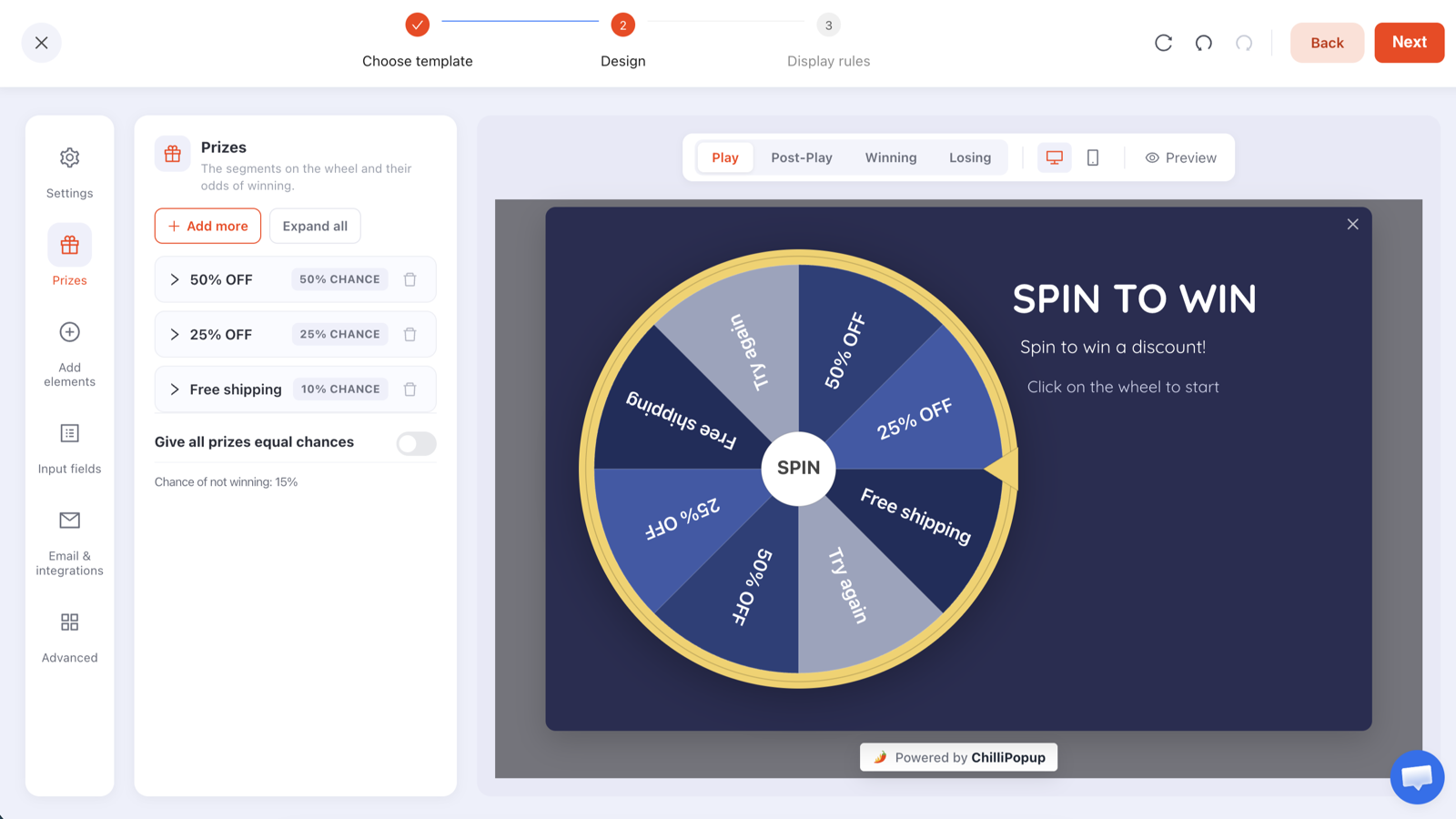
The Prizes panel where the table above goes. Codes typed here are stripped from the configuration that reaches the browser and travel only inside a winning response.
Create the coupons in WooCommerce first: Marketing → Coupons → Add coupon. Pick the discount type (percentage discount, fixed cart discount, or a coupon that allows free shipping), set an expiry date that matches the wheel's schedule, and under Usage restriction and Usage limits give the bigger tiers a minimum spend and one use per user.
ChilliPopup never creates or applies coupons: it does not touch WooCommerce. It reveals the code you pasted into the Prizes panel, only inside a winning result, and the shopper enters it in the coupon field at the cart or checkout, where WooCommerce validates it.
Redemptions are counted in WooCommerce: each coupon's usage count sits next to it under Marketing → Coupons. Match it to the claims table in ChilliPopup to see what the wheel cost and what it brought in.
No WooCommerce? The reward code is any text you choose. A blog can put the password to a password-protected downloads page in the code field, and the Winning screen reveals it exactly as it would a coupon.
Copy for the four screens
What each screen says on a WooCommerce store
A wheel has four screens: Play, Post-Play, Winning and Losing, each its own canvas in the editor. Write {{prize_label}} and {{prize_code}} anywhere in the Post-Play or Winning copy and the won prize fills them in.
Play
Spin for a welcome coupon
Headline: Welcome. Spin the wheel for up to 35% off.
Sub-line: One spin per visitor. Your coupon works on today's order.
The disc itself is the button, so a hint like "Click the wheel to start" is all the instruction it needs.
Post-Play
You landed on {{prize_label}}
Headline: {{prize_label}} is yours to claim.
Sub-line: Enter your email and your coupon code appears right here.
One email field and one button. The screen only appears after a win, so nobody is asked for an email in exchange for nothing.
Winning
Your coupon is {{prize_code}}
Headline: Enter {{prize_code}} in the coupon field for {{prize_label}}.
Sub-line: It works at the cart or at checkout on orders over $30, until 31 October 2026.
Confetti is on by default here. Add a "Shop now" button pointing at your shop page; the coupon field is on the cart page, so the shopper needs a way to get there.
Losing
Not this time
Headline: No coupon on this spin, but shipping is free over $75.
Sub-line: Have a look at what arrived this week.
Point the button at the shop page or a product category. A losing spin should still end somewhere useful, or it is the part of the wheel visitors remember.
Display rules
Rules for a WooCommerce welcome wheel
A wheel carries the same display rules as every ChilliPopup popup: six triggers, targeting, frequency caps and a schedule. WordPress lays out its URLs predictably, and the page rules read them.
Pages: contains /product/ and contains /shop/, so the wheel opens while a shopper is browsing and never on /cart/, /checkout/ or the order-received page, which match neither rule.
Triggers: exit intent for desktop shoppers, and a scroll depth of 40% so mobile shoppers, who have no cursor to leave with, see it once they have looked at the product. The first trigger to fire opens the wheel.
Audience: new visitors only. It is a welcome coupon, and a shopper who came back to buy does not need interrupting.
Frequency: once every 30 days, plus "hide from visitors who already claimed", so each shopper gets one spin and one coupon.
Schedule: none for an always-on wheel. For a sale, give it a start and an end date in your time zone that match the coupons' expiry in WooCommerce.
Display rules
🔗
Page URLContains /product/
🔗
Page URLContains /shop/
⏏
Exit intentWhen the cursor leaves the page
📜
Scroll depthAfter 40% of the page
🧑
AudienceNew visitors only
🔁
FrequencyOnce every 30 days
🎁
Already claimedHidden after a claimed prize
Design
Your theme's palette, your fonts, the coupon in the headline
There is no WordPress-specific wheel template, and you do not need one. Both wheel themes are fully editable, and a wheel that looks like part of your theme is a few minutes of recolouring.
Start from The Deal Is Right for a portrait, mobile-first card, which suits most WooCommerce stores. Spin to Win is the landscape alternative, with the wheel on the left and the headline on the right.
Match the theme: popup background to your theme's background, rim, pointer and hub to your accent colour, and slices alternating between the accent and a neutral so the labels read. Pick the Google font your theme uses, or upload your own font files.
Headline the top prize: "Up to 35% off" is what stops the scroll; the slices tell the truth about the odds.
A/B test one thing: one click creates a Variant B, you choose the split, every visitor keeps their version and the results sit side by side with a confidence indicator. Test scroll depth against exit intent, or free shipping against $5 off as the second tier.
The same editor for all four games: Play, Post-Play, Winning and Losing are tabs, Prizes is a panel, and every colour, block and font is yours to change.
After the first month
What to read next to your WooCommerce reports
A wheel gets two reports: the popup report every ChilliPopup campaign has, and a game report built from the server's own record of each spin. Neither lives in your WordPress database; both are in the ChilliPopup dashboard.
Opens against submissions: how many visitors saw the wheel on product and shop pages, how many spun and how many left an email, by day and by device.
Claimed wins by prize: whether the coupons were claimed in the proportions the table predicted, and which tier drove the claims.
The claims table: each winner's email, prize, code, device and time. ChilliPopup does not send emails and has no Mailchimp, Klaviyo, HubSpot, Zapier or CSV export connector, so you read the list in the dashboard and send the welcome email from your own tool.
Redemptions: each coupon's usage count in WooCommerce. Matching it to the claims table tells you what the wheel cost in coupons and what it brought in orders.
The popup report every wheel gets. The game report adds spins, wins, losses and claimed wins by prize.
Is the ChilliPopup WordPress plugin free, and is the wheel included?
Yes to both. The plugin is free in the WordPress plugin directory, and the workspace it connects to has a permanent Free plan: $0 a month, no credit card, no time limit, 1,000 visitors a month on one domain, with all four prize games, the full editor, A/B testing and analytics. Pro at $29 a month and Business at $79 a month add visitors, domains and seats, each with a 14-day free trial. A small "Powered by ChilliPopup" badge shows under the wheel on every plan. See the plans →
Do I have to edit my theme to add the wheel?
No. The plugin prints the ChilliPopup pixel on every front-end page, so you never open header.php, functions.php or a child theme, and the connection survives theme switches and updates. You paste your Workspace ID once; every wheel, popup, form, survey or quiz you publish afterwards appears on its own. Prefer code? The same snippet works through a headers-and-footers plugin or a Google Tag Manager Custom HTML tag, but use one method only: two copies of the pixel can render or count a spin twice. The Tag Manager route →
Can the wheel give out WooCommerce coupons?
Yes. Create each coupon under Marketing, Coupons in WooCommerce with its discount type, expiry date, minimum spend and usage limits, then paste the code as the prize's reward code in the Prizes panel. ChilliPopup never creates or applies coupons; it reveals the code you gave it, only inside a winning result, and WooCommerce validates it at the cart or checkout. Redemptions show in each coupon's usage count in WooCommerce.
Can I show the wheel only on shop and product pages?
Yes. Page-URL rules match with contains, doesn't contain, exact, not equal, starts with and ends with, and a wheel shows on any page that matches at least one of its rules. Contains /product/ plus contains /shop/ covers WooCommerce product pages and the shop page with default permalinks and never matches /cart/ or /checkout/. On a blog, starts with /blog/ or contains /category/ does the same job.
Why is the wheel not showing on my WordPress site?
Check four things in order: the wheel is Published in ChilliPopup (drafts are never served); the plugin is active with the correct Workspace ID saved and the Load ChilliPopup on this site box ticked; you are on a page its URL rules match and the trigger has fired, since exit intent only fires when the cursor leaves; and no caching plugin is serving a page generated before you installed. Purge WordPress and CDN caches, exclude player.chillipopup.com from JavaScript optimisation, then test in a private window without ad-blocking extensions. Full troubleshooting list →
Where do the winners' emails go?
Into your ChilliPopup dashboard, not your WordPress database. The game report lists every claim with its email, prize, code, device and time, alongside spins, wins, losses and claimed wins by prize. ChilliPopup does not send emails and has no Mailchimp, Klaviyo, HubSpot, Zapier or CSV export connector, so you read the list in the dashboard and send the welcome email from your own tool.
Put a wheel on your WordPress site today
Install the free plugin, paste your Workspace ID, type your WooCommerce coupons into the prize table and publish. The wheel opens on your shop and product pages, the server decides every spin, and every coupon you give away comes with an email.