A restaurant spin-to-win popup that pays out in desserts, not discounts
People who open a restaurant's website are hungry now or planning to be. They read the menu, check the hours and the delivery radius, and most of them leave without ordering or booking. A prize wheel gives them a reason to act tonight, at a cost you set in the kitchen, and asks for an email before it hands over the prize. This page is the whole setup for a restaurant, café or food-ordering site: a prize table of dishes and perks with odds you can copy, the copy for each of the four screens, display rules built around lunch and dinner service and your ordering and reservation pages, and what to read in the report at the end of the week.
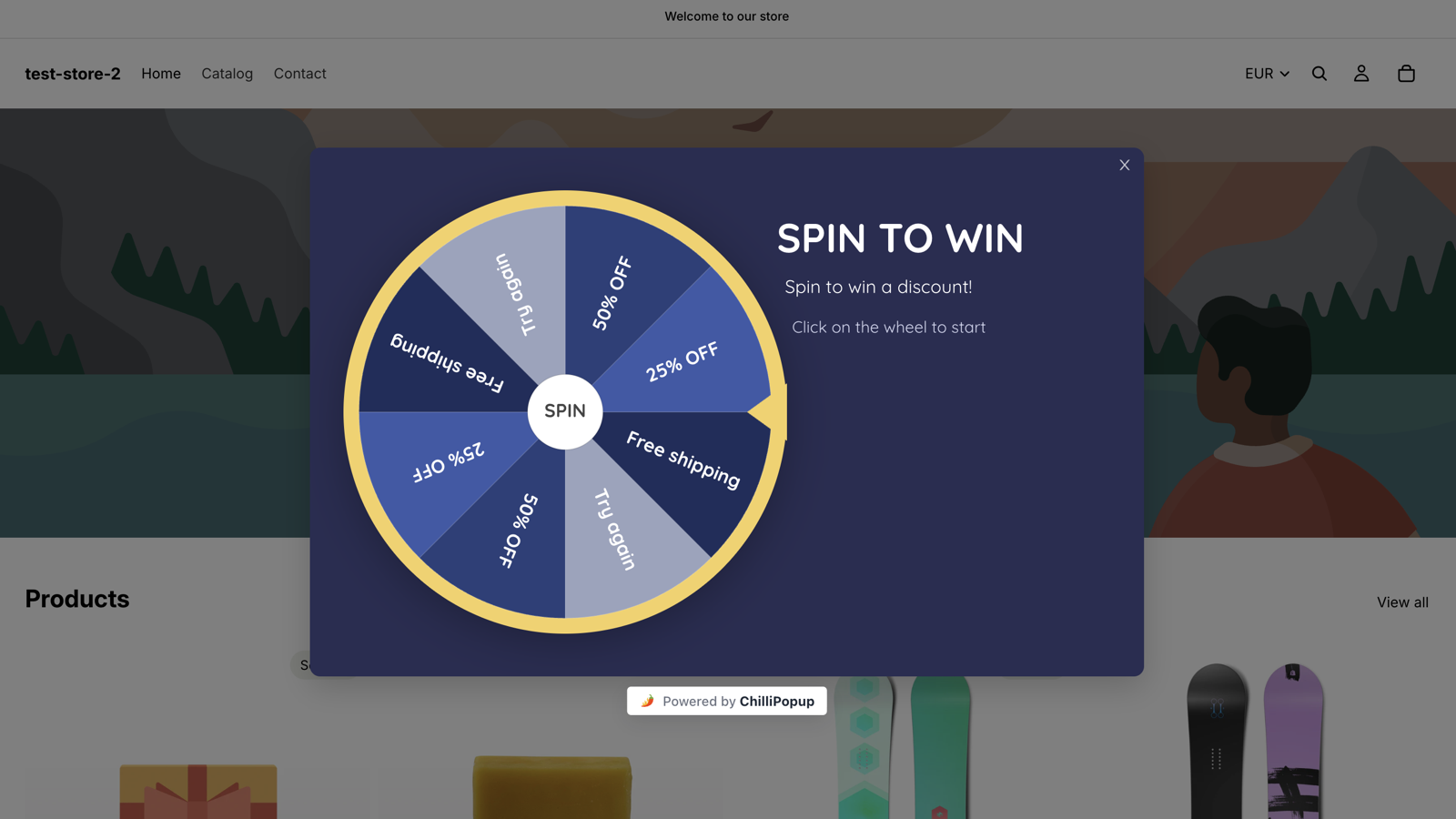
The Spin to Win theme live on a storefront. For a restaurant you keep the mechanics and change what the slices say: a dessert, a drink, free delivery, a lunch deal, dinner for two.
Why a wheel on a restaurant site
The prizes are already on your menu
A restaurant does not need to take 20% off the bill to make a visitor act. A free dessert, a drink with a main or free delivery on tonight's order costs a few dollars of ingredients or a fee you already absorb on larger orders, and each one has an obvious next step: order, book, come in.
Prizes from the kitchen, not the till
Every slice is a dish or a perk you already make: a dessert, a drink with a main, a set lunch, free delivery over a minimum order. The cost of each is the cost of ingredients, and the only way to use it is to eat with you.
Open when the kitchen is
Display rules take weekday and hour windows in your time zone on top of a start and an end date. A wheel that shows every day from 17:00 to 21:30, and a lunch version that shows Monday to Friday from 11:00 to 14:00, offers the prize exactly when the visitor can act on it.
A local list, one spin at a time
A win asks for an email on the Post-Play screen before the Winning screen reveals the code, so every dessert you give away comes with the email address of someone who was already reading your menu. The claims table in your dashboard lists each one with the prize, the code, the device and the time.
The prize table
A restaurant prize table you can copy
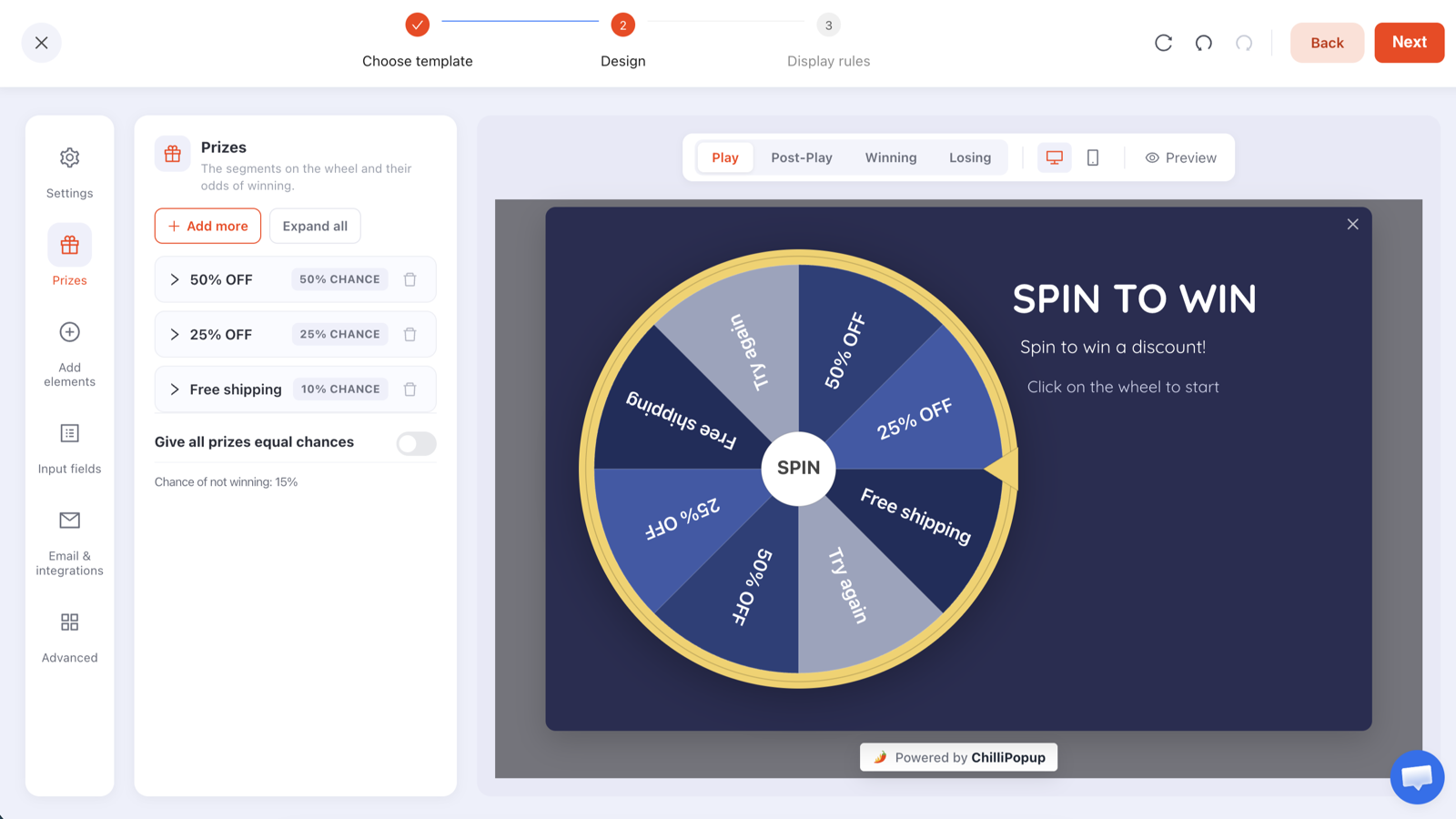
Five prizes and a leftover, all of them things a kitchen can hand over on the next order or the next visit. Type the labels, codes and chances into the Prizes panel like this and the wheel draws itself, Try again slice included.
Slice
Reward code
Win chance
Why it is there
Free dessert with any main
DESSERT
35%
The workhorse prize. It costs a few dollars of ingredients, adds a course to the bill and gives the table a reason to stay.
A drink on the house
DRINK
25%
A soft drink, a coffee or a house glass with a main. Cheap to pour, and it brings the winner to a table rather than to a delivery app.
Free delivery tonight
FREEDEL
15%
Removes the fee that makes a small order feel expensive. Give the code a minimum order in your ordering system so it only applies to baskets worth driving.
Weekday lunch deal
LUNCHDEAL
10%
A main and a drink at a set price, valid Monday to Friday before 14:00. It fills the quiet hours instead of discounting the busy ones.
Dinner for two, on us
DINNER2
3%
The headline prize. Three in a hundred spins keeps the cost predictable, and making it valid Sunday to Thursday fills a quiet night rather than a Saturday you would have sold anyway.
Try again
none
12% (leftover)
Drawn automatically as a grey slice because the prizes add up to 88%. The Losing screen still ends on tonight's menu, so nobody leaves without a next step.
Read across the table and the arithmetic is plain: with these odds, every hundred spins hand out roughly thirty-five desserts, twenty-five drinks, fifteen free deliveries, ten lunch deals and three dinners for two, and twelve visitors see the Losing screen. Price it against your own menu: sixty desserts and drinks at ingredient cost against 15% off a hundred bills, and each one can only be used by eating with you. Change any percentage and the editor shows the new chance of not winning as you type.
The Prizes panel where the table above goes: a label, a reward code and a win chance per prize, and the chance of not winning computed for you.
Create the codes where you take orders first: as promotions in your online ordering system, and as words your floor staff recognise for dine-in. Give each code the same end date as the wheel, FREEDEL a minimum order, and DINNER2 its valid days.
ChilliPopup never creates or applies codes: it reveals the code you pasted, and only inside a winning result. The configuration that reaches the browser has every code stripped out, so nobody reads DINNER2 out of the page source.
Want every visitor to win something? Raise the chances until they total 100%, or switch on equal chances. The Try again slice disappears. A wheel whose smallest prize is a free coffee, and where everyone wins, is a sensible way to greet regulars.
Keep the slice labels short: they are read on a phone in the minute before someone decides where to eat. "Free dessert", "Drink on us" and "Free delivery" fit on a slice; the conditions go in the Winning screen copy. Sparse wheels are repeated so the disc looks full, so five prizes already read as a proper wheel.
Copy for the four screens
What each screen says
A wheel has four screens: Play, Post-Play, Winning and Losing, each its own canvas in the editor. Write {{prize_label}} and {{prize_code}} anywhere in the Post-Play or Winning copy and the won prize fills them in.
Play
Spin for tonight's treat
Headline: Hungry? Spin for something on the house.
Sub-line: One spin, one prize, valid on your next order or table: a dessert, a drink, free delivery or dinner for two.
The disc itself is the button, so "Tap the wheel to spin" is all the instruction a phone screen needs.
Post-Play
You won {{prize_label}}
Headline: {{prize_label}} is yours.
Sub-line: Enter your email and your code appears right here. Show it when you order or mention it when you book.
One email field and one button. This screen only appears after a win, so nobody is asked for an email in exchange for nothing.
Winning
Your code is {{prize_code}}
Headline: Show {{prize_code}} for your {{prize_label}}.
Sub-line: Enter it at checkout when you order online, or tell your server when you order at the table. Valid until Sunday, one per table.
Confetti is on by default. Add two buttons, "Order now" and "Book a table", pointing at your ordering page and your reservation page, so the prize is used tonight rather than remembered next month.
Losing
Not this time
Headline: No prize on this spin, but the kitchen is open.
Sub-line: Tonight's menu is up, and we deliver until 22:00.
End on the menu, not on a dead end. Add a "See tonight's menu" button; a losing spin that leaves someone staring at a closed card is the one part of a wheel people hold against you.
Display rules
Rules for lunch and dinner service
A wheel carries the same display rules as every ChilliPopup popup: six triggers, targeting, frequency caps and a schedule. On a restaurant site the schedule does most of the work, because the prize is only worth winning while an order can be placed.
Hours: weekday and hour windows in your time zone. Show the dinner wheel every day from 17:00 to 21:30. Then duplicate the campaign for lunch, set it to Monday to Friday from 11:00 to 14:00, raise the lunch deal's chance and drop the dinner for two. Outside those windows the wheel opens for nobody.
Triggers: a time delay of about 10 seconds, long enough to read the top of the menu, and exit intent for desktop visitors about to leave for a delivery app. The first to fire opens the wheel; on a phone, which has no cursor to leave with, that is the delay.
Pages: contains rules for the menu, ordering and reservation paths (the card shows /menu) show it on those pages and nowhere else, so a checkout step on your own domain never sees it. Page rules are any-match: a campaign shows wherever at least one of its page rules is true, so use either contains rules for the pages you want or a single doesn't-contain rule, never both.
Frequency: once every 7 days, plus "hide from visitors who already claimed", so a regular gets one spin a week rather than a dessert with every order.
Audience: everyone. Regulars are the visitors most likely to redeem, and a weekly spin is as much a loyalty gesture as a way to win new customers.
Dates: give the campaign a start and an end date as well, for example Monday 21 September to Saturday 31 October 2026, and review the prize table when it ends.
Display rules
📅
ScheduleEvery day · 17:00 → 21:30
⌛
Time delayAfter 10 seconds on page
⏏
Exit intentWhen the cursor leaves the page
🔗
Page URLContains /menu
🔁
FrequencyOnce every 7 days
🎁
Already claimedHidden after a claimed prize
How it works
Codes, wheel, hours: three steps
A wheel is a popup with a game on its Play step, built in the editor you would use for any ChilliPopup popup.
1
Create the codes where you take orders
Make one promotion per prize (DESSERT, DRINK, FREEDEL, LUNCHDEAL, DINNER2) in your online ordering system, and brief the floor staff on the same words for dine-in. Set each to expire when the wheel does, give FREEDEL a minimum order and DINNER2 its valid days.
→
2
Build the wheel
Pick The Deal Is Right, recolour it in your brand or the warm palette below, type the prize table into the Prizes panel and write the four screens. Set a photo of the dessert as the Play background; the editor takes images, gradients, Google fonts and your own fonts.
→
3
Set the hours and publish
Enter the hour windows, triggers, page rules and frequency above, then publish, and duplicate the campaign for the lunch version. If the ChilliPopup pixel is already on your site there is nothing else to install; otherwise it is one script tag, the WordPress plugin or the Wix app.
Design
Warm colours, a photo of the food, the prize in the headline
There is no restaurant template, and you do not need one. Both wheel themes are fully editable, and a wheel starts to look like your place after a handful of changes.
Start from The Deal Is Right: it is a portrait, mobile-first card, built for the visitor deciding where to eat from a phone. Spin to Win is the landscape choice if the wheel will mostly show on a desktop menu page.
Recolour the popup background to a deep warm tone (aubergine, bottle green, dark terracotta) or the cream of your printed menu, keep the rim, pointer and hub in your brand colour, and alternate the slices between that colour and an off-white so the dish names stay legible.
Put the food in the picture: set a photo of the dessert or the signature dish as the Play screen background or as an image block beside the wheel. The Winning screen can carry its own background, so the reveal can look like the dessert counter rather than the menu.
Name the prizes in the headline: "Free dessert, a drink or dinner for two" says more than "Spin to win". The slices tell the truth about the odds.
A/B test one thing: one click creates a Variant B, you pick the split, every visitor sticks with their version, and results sit side by side with a confidence indicator. Test the dessert against free delivery as the most common prize, or a 10-second delay against exit intent.
The same editor for all four games: Play, Post-Play, Winning and Losing are tabs, Prizes is a panel, and every colour, block and font is yours to change.
End of the week
What to read when the week is over
A wheel gets two reports: the popup report every ChilliPopup campaign has, and a game report built from the server's own record of each play.
Opens by day and by device: opens, unique views, clicks, closes, submissions and conversion rate, split by day and by device, so you can see whether the lunch window or the dinner window does the work, and whether phones or desktops spin more.
Claimed wins by prize: the chart shows which dishes were actually claimed. If desserts are claimed and drinks are not, move the odds towards what people want.
The claims table: each winner's email, prize, code, device and time. It lives in your dashboard; ChilliPopup does not send emails or SMS and has no Mailchimp, Klaviyo, HubSpot, Zapier or CSV export connector today, so you read the list there and use it from there.
Redemptions are counted where the codes live: in your ordering system's promotion report, and at the till for dine-in. Matching them to the claims table tells you what the week's desserts cost and how many orders and tables they brought in.
The popup report every wheel gets. The game report adds spins, wins, losses and claimed wins by prize.
Reservation nudges, menu capture, waitlists, catering enquiries and feedback popups, with the copy, timing and mobile rules to use on a restaurant site.
Can the wheel show only during lunch and dinner hours?
Yes. Display rules include weekday and hour windows in your time zone alongside the start and end date, so a wheel can open every day between 17:00 and 21:30 and at no other time. For a lunch window with different prizes, duplicate the campaign and set its hours to Monday to Friday, 11:00 to 14:00, with its own prize table. Outside those windows the wheel opens for nobody.
How does a winner use a free dessert code at the table?
The Winning screen shows the reward code you typed into the Prizes panel, for example DESSERT, with whatever instructions you write around it. For online orders, create the same code in your ordering system's promotions so it applies at checkout. For dine-in, the code is a word your floor staff recognise; brief them before the wheel goes live and state the expiry in the Winning copy. ChilliPopup does not create or apply codes anywhere. It reveals the one you gave it, and only inside a winning result.
Does the wheel work on a Wix, Squarespace or WordPress restaurant site?
Yes. The wheel is a triggered overlay rendered by the same script tag as every ChilliPopup popup. Install it with the WordPress plugin, the Wix app, a Google Tag Manager tag, or by pasting the single script tag into any site, including Squarespace or a site an agency built for you. Use one install method per site, never two. How to install on any website →
What if my online ordering runs on another company's domain?
The wheel opens on the pages where the ChilliPopup script is installed, so it shows on your own site, on the menu or the page that links out to ordering, and the visitor carries the code over to that checkout. Create the code in the ordering system so it is accepted there. Redemptions are then counted in that system's own report, and you match them against the claims table in your ChilliPopup dashboard.
Can I stop regulars spinning every time they order?
Yes. Frequency rules limit the wheel to once a day, once per visit, once per session, or once every few days or visits, and a separate switch hides it from visitors who have already claimed a prize. Once every 7 days plus that switch gives each visitor one spin and one prize a week, which is a loyalty gesture rather than a dessert with every order.
What does a restaurant wheel cost to run?
The Free plan is $0 per month, forever, needs no credit card and includes all four prize games with the full editor, A/B testing and analytics; it covers 1,000 visitors a month on one domain. Pro is $29 per month and Business $79 per month, each with a 14-day free trial. A small "Powered by ChilliPopup" badge shows under the wheel on every plan. The prizes cost whatever the kitchen spends on them. See the plans →
Put the wheel on the menu page before Friday service
Type in the prizes from your menu, write the four screens, set the hours you serve, and publish. The wheel opens itself at 17:00, the server decides every spin, and every dessert you give away comes with an email.