A Valentine's Day spin-to-win popup for one gift, one person, one date
A Valentine's shopper is buying a single gift for a single person, and the date cannot move. The discount matters less than whether the parcel looks like a present and whether it arrives by Sunday 14 February 2027. A prize wheel hands out exactly those reassurances, one spin per shopper, in exchange for an email. This page is the whole campaign: a prize table built around gift wrap, a card and shipping, copy for the four screens, a rule set with your last shipping date in the middle of it, and what to read in the report on the 15th.
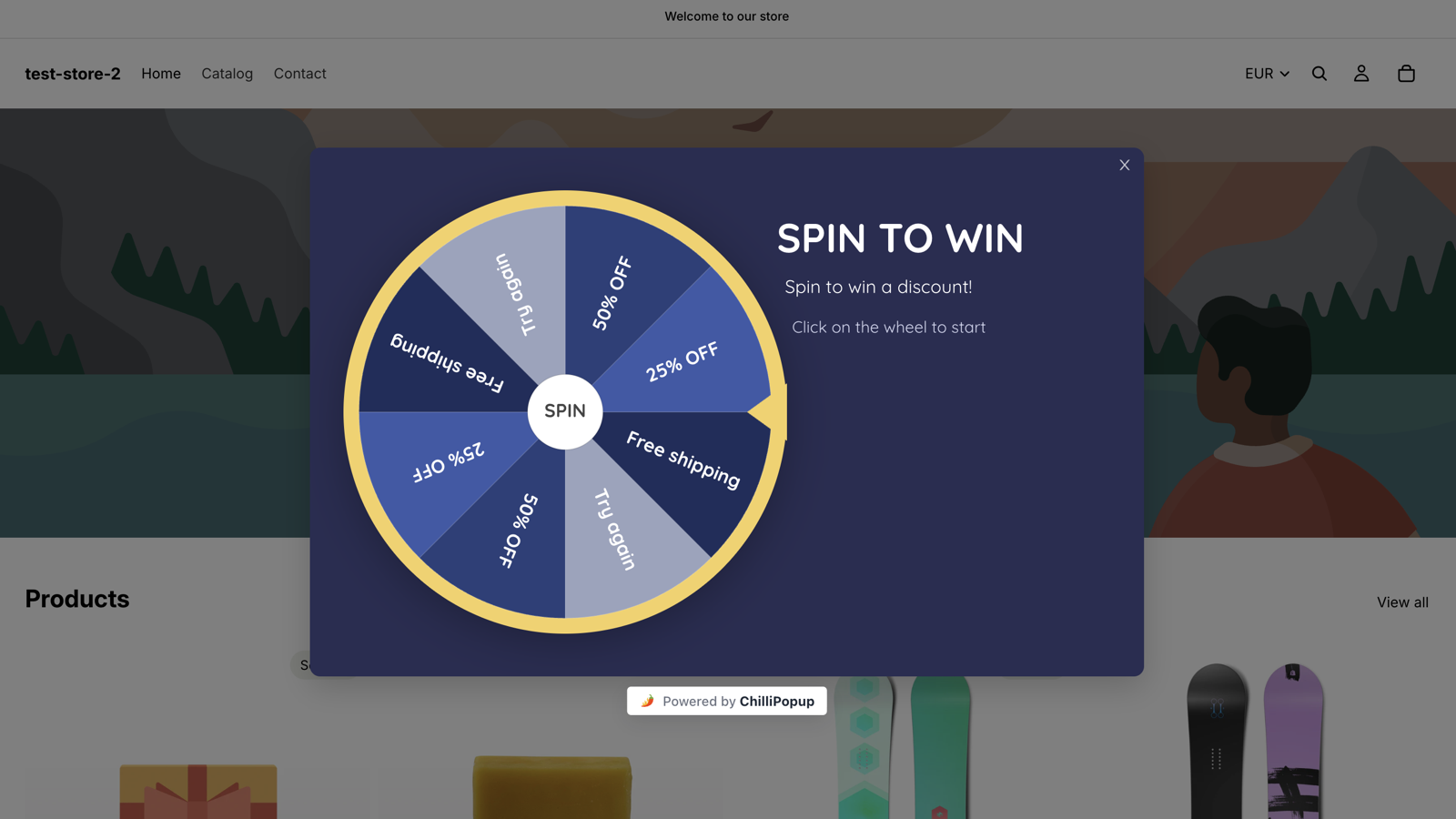
The Spin to Win theme live on a storefront. For Valentine's Day you keep the mechanics and recolour it: a blush background, a deep red rim and pointer, red and plum slices with white labels carrying your codes.
Why a wheel in early February
One gift, one person, one date that will not move
The fortnight before Valentine's Day is short, and the shopper is anxious about two things: will it look like a gift, and will it arrive in time. A wheel can answer both as prizes, and it collects an email while it does.
Prizes that finish the gift
Free gift wrap, a free card and free shipping cost you little and turn an order into a present. Percent-off slices sit beside them for the shopper buying two things, and a win asks for an email on the Post-Play screen before the code appears.
Two wheels, one cut-off
Run the wheel from Monday 1 February to your last standard-shipping date, then a duplicate from the next day to Sunday 14 February with prizes a late shopper can still use. Both are ordinary start and end dates in your time zone; the handover happens without you.
Odds that protect a thin margin
Each prize has its own win chance in percent, and whatever is left of 100% is the chance of a Try again. The roll happens on our server and the browser only animates to the result, so the 6% slice comes up six times in a hundred whoever is spinning.
The prize table
A Valentine's Day prize table you can copy
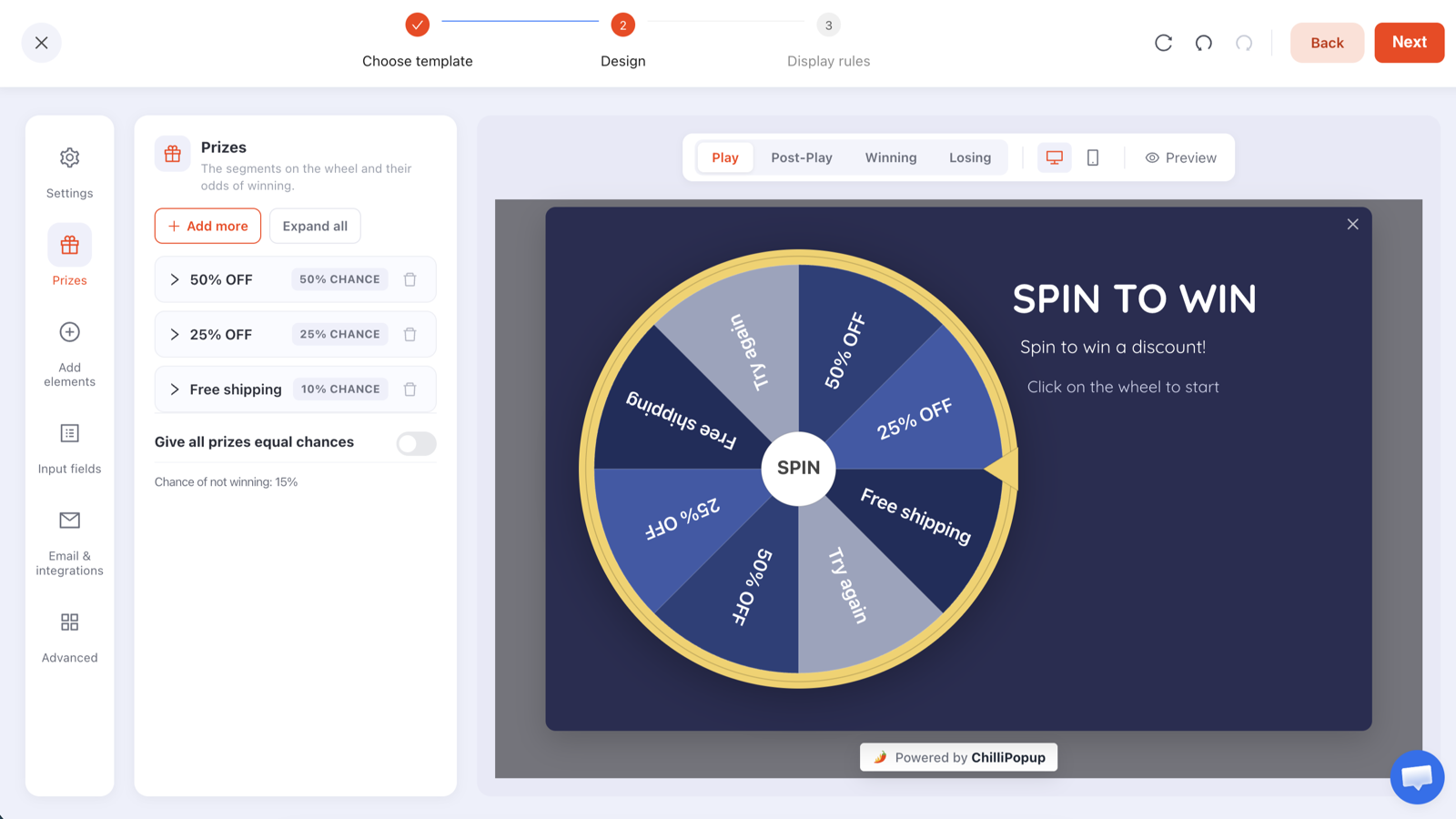
Five prizes and a small leftover, weighted towards the things that make a parcel a present. Type the labels, codes and chances into the Prizes panel exactly like this and the wheel draws itself, Try again slice included.
Slice
Reward code
Win chance
Why it is there
Free gift wrap
LOVEWRAP
30%
The prize that turns an order into a gift. It costs you paper and a minute, and most spins land here.
Free card
LOVECARD
20%
If you sell greeting cards, a code that makes one free means the shopper adds a card and a message to the basket without thinking twice.
10% off
LOVE10
22%
The February discount for the shopper who adds something for themselves. Still leaves margin on full-price gifts.
Free shipping
LOVESHIP
15%
Takes the delivery cost off a single gift, and answers the "will it arrive" worry until your cut-off.
20% off
LOVE20
6%
The prize people mention to a friend. Rare enough to protect margin.
Try again
none
7% (leftover)
Drawn automatically as a grey slice because the prizes add up to 93%. Kept small on purpose; this is a fortnight for goodwill.
Read down the chances and the arithmetic is plain: with these odds, every hundred spins hand out roughly thirty gift-wrap codes, twenty card codes, twenty-two 10% codes, fifteen free-shipping codes and six 20% codes, and seven shoppers see the Losing screen. Change any percentage and the editor shows the new chance of not winning as you type.
The Prizes panel where the table above goes: a label, a reward code and a win chance per prize, and the chance of not winning computed for you.
Create the codes in your store first: Shopify Discounts, WooCommerce Marketing → Coupons or Wix Marketing → Coupons. Restrict LOVEWRAP and LOVECARD to the gift-wrap and card products, and give every code the same end date as the wheel, 14 February at 23:59.
ChilliPopup never creates or applies codes: it reveals the code you pasted, and only inside a winning result. The configuration that reaches the browser has every code stripped out, so the page source never gives away LOVE20.
After your cut-off, change one row: in the duplicate that runs the final days, turn Free shipping into a free express upgrade (LOVEFAST) with a higher chance, and add a code valid to the end of February for a shopper whose gift can arrive after the day.
Want nobody to lose? Raise the chances until they total 100%, or switch on "Give all prizes equal chances". The Try again slice disappears and every spin wins something.
Copy for the four screens
What each screen says in February
A wheel has four screens: Play, Post-Play, Winning and Losing. Each is its own canvas in the editor. Write {{prize_label}} and {{prize_code}} anywhere in the Post-Play or Winning copy and the won prize fills them in.
Play
Spin for something extra in the parcel
Headline: A little extra for the one you're buying for.
Sub-line: Spin once for free gift wrap, a free card or up to 20% off, valid until 14 February.
The disc itself is the button, so "Click the wheel to start" is all the instruction it needs. Lead with the wrap and the card; they tell the shopper this wheel understands what they are doing.
Post-Play
You won {{prize_label}}
Headline: {{prize_label}}, on us.
Sub-line: Leave your email and your code appears right here. Use it on any order before Sunday 14 February.
One email field and one button. The screen only appears after a win, so nobody is asked for an email in exchange for nothing.
Winning
Your code is {{prize_code}}
Headline: Add {{prize_code}} at checkout for {{prize_label}}.
Sub-line: Order by Tuesday 9 February and it arrives before the 14th.
Put your own last shipping date in that sub-line, and rewrite it in the duplicate for the final days. Confetti is on by default here and suits the occasion. Add a "Find a gift" button pointing at your Valentine's collection.
Losing
Not this spin
Headline: No prize this time, but there is still time.
Sub-line: Order by Tuesday 9 February and it arrives before Valentine's Day. Gift wrap is available at checkout.
The Losing screen still has to solve the delivery worry. Say the cut-off, say wrap is available, and point the button at the gift finder or your most popular gifts.
Display rules
Rules for a fortnight with a cut-off in the middle
A wheel carries the same display rules as every ChilliPopup popup: six triggers, targeting, frequency caps and a schedule. This is the set for the first wheel, with the duplicate's dates noted where they differ.
Schedule: start Monday 1 February 2027 at 00:00, end on your last standard-shipping date at 23:59, in your time zone; Tuesday 9 February in this example. The duplicate starts Wednesday 10 February at 00:00 and ends Sunday 14 February at 23:59.
Triggers: a page-view count of two, so the wheel opens for the shopper who has looked at a second product and is now choosing rather than browsing, plus exit intent for desktop shoppers on their way out. The first trigger to fire opens the wheel.
Pages: one page-URL rule, doesn't contain /checkout, keeps it off the checkout, where a spin only interrupts someone already paying; product and collection pages all keep it. Page rules are any-match: a campaign shows wherever at least one of its page rules is true, so use either contains rules for the pages you want or a single doesn't-contain rule, never both.
Frequency: once every 14 days, plus "hide from visitors who already claimed", so each shopper gets one spin and one code for the fortnight.
Audience: everyone, on desktop and mobile. Gift searches bring first-time visitors, and a returning customer buying for a partner is not someone to exclude.
Display rules
📅
Schedule1 Feb 00:00 → 9 Feb 23:59
📄
Page viewsOn the 2nd page of the visit
⏏
Exit intentWhen the cursor leaves the page
🔗
Page URLDoesn't contain /checkout
🔁
FrequencyOnce every 14 days
🎁
Already claimedHidden after a claimed prize
How it works
Codes, wheel, rules, duplicate
A wheel is a popup with a game on its Play step. If you have built a ChilliPopup popup before, you already know the editor.
1
Create the codes in your store
Make one discount code per prize (LOVEWRAP, LOVECARD, LOVE10, LOVESHIP, LOVE20, and LOVEFAST for the duplicate) in Shopify, WooCommerce, Wix or whatever runs your checkout. Restrict the wrap and card codes to their products, and set every code to expire when its wheel does.
→
2
Build the wheel
Pick Spin to Win or The Deal Is Right, recolour it in blush and deep red, type the prize table into the Prizes panel and write the four screens with your cut-off date in them. Every block is drag-and-drop, and a serif from the Google catalogue or your own font suits the occasion.
→
3
Set the rules, publish, duplicate
Enter the schedule, triggers, page rules and frequency above and publish. Then duplicate the campaign, give the copy the dates from your cut-off to the 14th, swap free shipping for the express upgrade and rewrite the deadline on the Winning and Losing screens. If the ChilliPopup pixel is already on your site there is nothing else to install.
Design
Blush and deep red, a serif headline, the date on every screen
There is no dedicated Valentine's Day template, and you do not need one. Both wheel themes are fully editable, and the changes that make a wheel read as February take a few minutes.
Start from Spin to Win if you want the date in a headline beside the wheel: it is a landscape layout, wheel on the left, headline on the right. Start from The Deal Is Right if most of your traffic is on phones; it is a portrait, mobile-first card.
Recolour the popup background to blush or cream, set the rim, pointer and hub to deep red, alternate the slices between deep red and plum, and set the slice text colour to white so the labels read on both. Keep the pinks for the background, not the slices.
Put the reassurance in the headline: "Gift wrap on us, until 14 February" does more for a gift shopper than "Save 20%". The slices tell the truth about the odds.
Pick a serif from the Google fonts catalogue, or upload your own, for the headline; keep the body copy and the email field in a plain sans so the form stays easy to fill in on a phone.
A/B test one thing: one click creates a Variant B, you choose the split, every visitor sticks with their version and the results sit side by side with a confidence indicator. Test gift wrap against 20% off as the headline prize, or the serif headline against the sans.
The same editor for all four games: Play, Post-Play, Winning and Losing are tabs, Prizes is a panel, and every colour, block and font is yours to change.
15 February
What the two wheels tell you
A wheel gets two reports: the popup report every ChilliPopup campaign has, and a game report built from the server's own record of each spin. With two campaigns you get two of each, and the comparison is the useful part.
Opens against submissions, by day, for each wheel: whether the first nine days or the final five did the work decides where next year's cut-off wheel starts, and how much of the fortnight the ordinary popups can carry.
Claimed wins by prize: the chart shows whether gift wrap and the card were claimed in the proportions the table predicted. A prize won but rarely claimed is one shoppers did not value; it comes off the Mother's Day table.
The claims table: each winner's email, prize, code, device and time. It lives in your dashboard; ChilliPopup does not send emails and has no Mailchimp, Klaviyo, HubSpot, Zapier or CSV export connector today.
Redemptions are counted where the codes live, in your store's discount report. Set the LOVE codes against the claims table and you know what each wheel cost and what it brought in.
The popup report every wheel gets. The game report adds spins, wins, losses and claimed wins by prize.
The next gift date on the calendar: nine campaign ideas on a four-week timeline, from early-access lists to last-minute gift cards, with copy and scheduling rules.
With two schedules. End the first wheel on your last standard-shipping date, Tuesday 9 February 2027 in the example on this page, then duplicate the campaign and schedule the copy from the next day to Sunday 14 February. Swap free shipping for a free express upgrade, add a code valid to the end of February for a gift that can arrive late, and rewrite the deadline on the Winning and Losing screens. Both wheels use ordinary start and end dates in your time zone, so the handover happens without anyone logging in.
Can gift wrap or a card be a prize?
Yes, as long as gift wrap and cards are products your checkout can discount. Create a code in your store that makes the gift-wrap product free, restricted to that product, and another for the card, then paste each as a prize's reward code in the Prizes panel. The Winning screen reveals the code after the shopper leaves an email, and your store's discount report counts the redemption. ChilliPopup does not create or apply codes in your store; it reveals the code you gave it, and only inside a winning result.
Does the wheel stop on 14 February?
Yes. Display rules take a start date and an end date in your time zone, so a wheel scheduled to end on Sunday 14 February 2027 at 23:59 opens for nobody on the 15th. You can also unpublish it by hand at any time. The report stays in your dashboard afterwards, and a duplicate of the campaign carries the design into the next gift season with new codes and dates.
Should a Valentine's wheel have a losing slice?
Only if you want one. Prizes whose win chances add up to 100%, or the "Give all prizes equal chances" toggle, mean every spin wins. Leave a leftover below 100% and the wheel grows a grey Try again slice for exactly that chance; the table on this page leaves 7%, and the editor shows the chance of not winning as you type. You can also mark any prize as a Losing option that keeps its own label and colour, counts as a loss and never returns a code.
Is there a Valentine's Day wheel template?
Not a dedicated one. The two wheel themes, The Deal Is Right and Spin to Win, are the starting points; you recolour the rim, pointer, hub and slices, change the background, pick a font from the Google catalogue or upload your own, and rewrite the copy on each screen in the editor. ChilliPopup's AI drafts popups, forms, surveys and quizzes from a sentence, but the four prize games start from their themes rather than from a prompt.
Where do the winners' emails go?
Into your dashboard. The game report lists every claim with its email, prize, code, device and time, alongside spins, wins, losses and claimed wins by prize, for each of the two wheels. ChilliPopup does not send emails or SMS and has no Mailchimp, Klaviyo, HubSpot, Zapier or CSV export connector today, so you read and use the list from the dashboard.
Build both wheels before February starts
Type in the prize table, write the four screens, set the first schedule, publish, then duplicate for the final days. On 1 February the wheel opens itself, the server decides every spin, and every code you give away comes with an email. The Free plan includes all four prize games.