A spin-to-win popup for fashion stores, from first order to new drop
Apparel is won on the first order and kept on the second. A prize wheel does both jobs: it turns the welcome discount every clothing store gives anyway into something a new visitor wins, with an email attached, and a duplicate of it aimed at returning customers turns a new drop into an event. This page is the setup for both: a first-order prize table with odds you can copy, copy for the four screens, display rules that keep the wheel away from anyone mid-checkout, and what to read in the report after launch week.
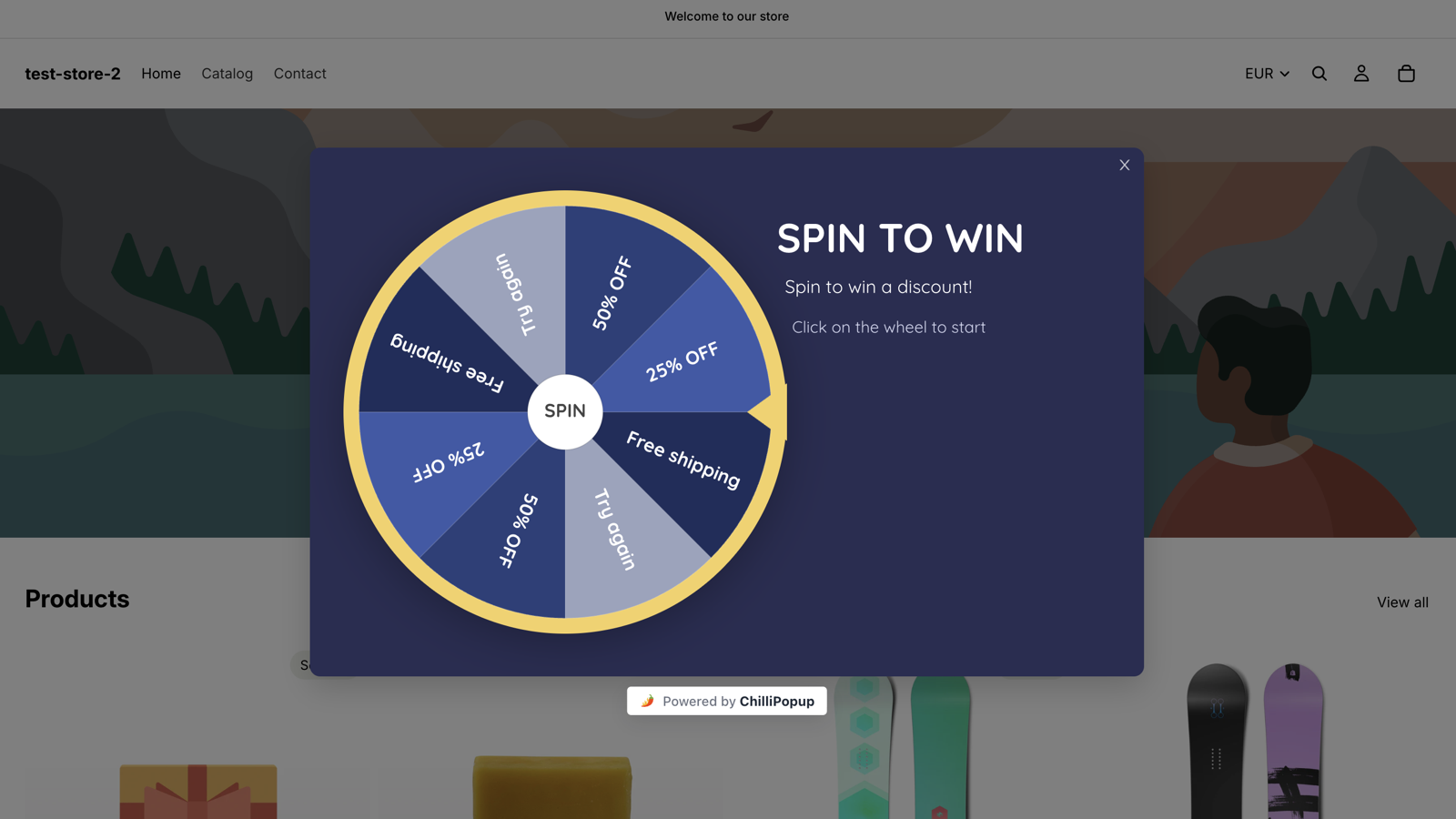
The Spin to Win theme live on a storefront. For a fashion store you keep the mechanics and strip it back: your typeface, one accent, a lookbook photograph behind the wheel.
Why a wheel on a fashion store
The welcome discount is a given. Make it a win.
Nearly every clothing store greets a new visitor with 10% off in exchange for an email. A wheel offers the same trade with better manners: the shopper plays for it, the odds decide how generous you are, and the email is asked for only after a win.
First orders, at odds you set
Most slices carry the 10% you would have offered anyway; one carries 25%, at odds low enough to protect margin on full-price stock. The roll happens on our server and the browser only animates to the result, so the 8% slice comes up eight times in a hundred, whoever is spinning.
New drops for returning shoppers
Display rules target new and returning visitors separately. Duplicate the welcome wheel, switch its audience to returning visitors, swap the slices for drop-week prizes and schedule it for launch week. The people who already bought get a wheel of their own, and the new-in collection gets a launch.
A losing slice in your colours
Fashion stores care what the wheel looks like. Any prize can be marked a Losing option, so it keeps its own label and colour instead of the grey Try again slice, and the Losing screen points the shopper at the new-in collection rather than at a dead end.
The prize table
A first-order prize table you can copy
Five prizes and a styled losing slice, adding up to exactly 100%. Type the labels, codes and chances into the Prizes panel like this, mark the last row as a Losing option, and the wheel draws itself without a grey slice.
Slice
Reward code
Win chance
Why it is there
10% off your first order
HELLO10
35%
The welcome offer every apparel store already trades for an email. Here it is the most common win, and it still comes with the email.
Free shipping
ONUS
20%
One tee or one pair of jeans is a small basket, and shipping is the objection on a small basket.
15% off New In
NEWIN15
15%
Points the win at full-price stock rather than the sale rail. Limit the code to the new-in collection in your store.
Free pair of socks with your order
SOCKS
12%
The cheapest gift you stock, set up in your store as a free-product-with-purchase discount, and the prize people mention to friends.
25% off your first order
HELLO25
8%
The headline slice. Rare enough to protect margin, and its code carries a minimum basket in your store.
Not this time
none
10% (Losing option)
Marked as a Losing option: it keeps its label and your colour, counts as a loss and never returns a code. Because the chances total 100%, no grey Try again slice is drawn.
The arithmetic reads straight off the table: with these odds, every hundred spins hand out roughly thirty-five 10% codes, twenty free-shipping codes, fifteen New In codes, twelve pairs of socks and eight 25% codes, and ten shoppers land on Not this time and see the Losing screen. Move the losing slice's 10% onto the two first-order slices and every spin wins; the editor shows the chance of not winning as you type.
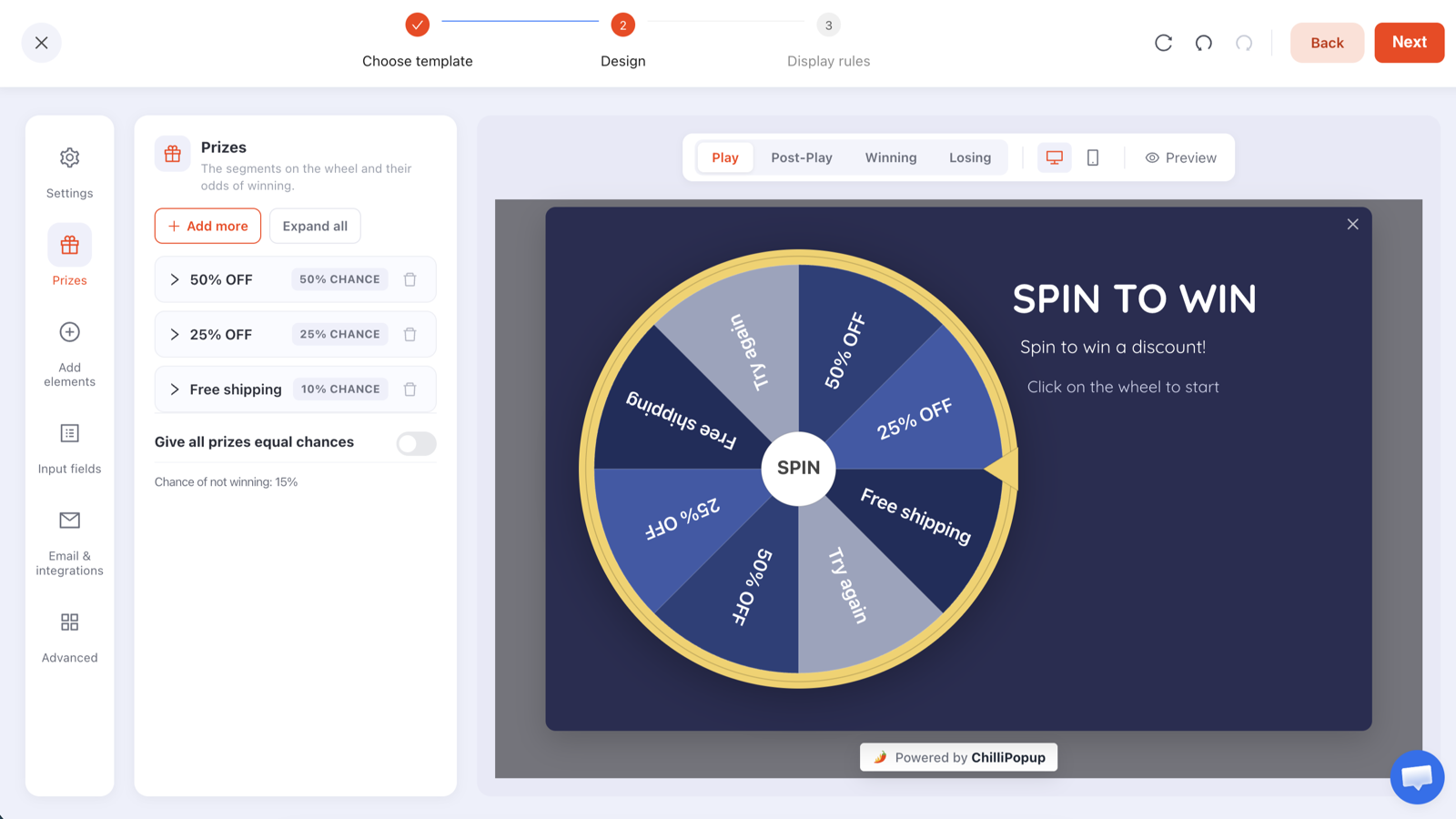
The Prizes panel where the table above goes: a label, a reward code and a win chance per prize, and the chance of not winning computed for you.
Create the codes in your store first: Shopify Discounts, WooCommerce Marketing → Coupons, or Wix Marketing → Coupons. Set the two first-order codes to one use per customer, limit NEWIN15 to the new-in collection, and give HELLO25 a minimum basket.
ChilliPopup never creates or applies codes: it reveals the code you pasted, and only inside a winning result. The configuration that reaches the browser has every code stripped out, so nobody reads HELLO25 out of the page source.
The losing slice is yours to style: mark Not this time as a Losing option and give it a colour from your palette. If you would rather have the grey Try again slice, leave the row out and let the leftover draw it.
Sizes are the real objection: a discount does not fix a missing size. If your store offers free returns or exchanges, say so on the Losing screen, where a shopper who has just lost is reading for a reason to stay.
Copy for the four screens
What each screen says
A wheel has four screens: Play, Post-Play, Winning and Losing, each its own canvas in the editor. Write {{prize_label}} and {{prize_code}} anywhere in the Post-Play or Winning copy and the won prize fills them in.
Play
Spin for your first order
Headline: New here? Spin for your first order.
Sub-line: One spin, one code. Up to 25% off your first order, or a pair of socks on us.
The disc is the button. Keep the copy to two lines and let the lookbook photograph behind the wheel do the talking.
Post-Play
You landed on {{prize_label}}
Headline: {{prize_label}}, yours.
Sub-line: Enter your email and your code appears here. It is good for 14 days on your first order.
One email field and one button. The screen appears only after a win, and the email lands in the claims table with the prize and code beside it.
Winning
Your code is {{prize_code}}
Headline: Use {{prize_code}} at checkout for {{prize_label}}.
Sub-line: Every piece, every size, free returns within 30 days.
Confetti is on by default. Add a "Shop New In" button: a first order from the new drop at full price is the outcome the wheel is built for. Swap the returns line for whatever your policy actually is.
Losing
Not this time
Headline: No code on this spin. The new drop does not need one.
Sub-line: New In landed this week, in every size. Free returns on all of it, always.
Point the button at the new-in collection, not the homepage. The shopper who just lost is reading this screen for a reason to stay; give them the drop and the returns promise rather than a consolation code.
Display rules
Two wheels, two audiences
A wheel carries the same display rules as every ChilliPopup popup: six triggers, targeting, frequency caps and a schedule. A fashion store runs the welcome wheel all year for new visitors, and a drop wheel for returning ones whenever there is something new to launch.
Audience: new visitors only for the welcome wheel. The first-order codes are for people who have not bought; returning customers get the drop wheel instead, and never see a discount meant for someone else.
Triggers: a page-view count of 2, so the wheel waits until the shopper has browsed more than a single page, and exit intent for desktop shoppers about to leave. The first to fire opens the wheel. Let them see the clothes first.
Pages: one page-URL rule, doesn't contain /checkout, keeps it off the checkout. A wheel that interrupts someone paying full price is a discount you did not need to give. Page rules are any-match: a campaign shows wherever at least one of its page rules is true, so use either contains rules for the pages you want or a single doesn't-contain rule, never both.
Frequency: once every 30 days, plus "hide from visitors who already claimed". A new visitor gets one spin; a winner is not asked again.
The drop wheel: duplicate the campaign, switch the audience to returning visitors, swap the slices (15% off the drop, free shipping, free socks, a styled losing slice) and give it a start and end date for launch week. Campaigns can be duplicated, so the design and rules come with it.
Devices: desktop and mobile both on. If your shoppers arrive from social links on their phones, check the card on a phone before you publish.
Display rules
🧑
AudienceNew visitors only
📄
Page-view count2 pages into the visit
⏏
Exit intentWhen the cursor leaves the page
🔗
Page URLDoesn't contain /checkout
🔁
FrequencyOnce every 30 days
🎁
Already claimedHidden after a claimed prize
How it works
Codes, wheel, audiences: three steps
A wheel is a popup with a game on its Play step. If you have built a ChilliPopup popup before, you already know the editor.
1
Create the codes in your store
Make one code per prize (HELLO10, ONUS, NEWIN15, SOCKS, HELLO25) in Shopify, WooCommerce, Wix or whatever runs your checkout. Set the first-order codes to one use per customer, limit NEWIN15 to the new-in collection and give HELLO25 a minimum basket.
→
2
Build the wheel
Pick Spin to Win or The Deal Is Right, strip it back to your palette and typeface, type the prize table into the Prizes panel, mark the last row as a Losing option and write the four screens. Every block is drag-and-drop, and your own fonts are welcome.
→
3
Set the rules, publish, duplicate
Set the audience to new visitors, the triggers, page rules and frequency above, then publish. When the next drop is ready, duplicate the campaign, switch the audience to returning visitors, swap the slices and schedule it for launch week.
Design
Your typeface, one accent, a photograph behind the wheel
There is no fashion template, and a fashion store would not want one. Both wheel themes are fully editable, and the point is to make the wheel look like your site rather than like a game show.
Start from Spin to Win for a landscape card with the wheel on the left and room on the right for a headline and a photograph. Start from The Deal Is Right if your traffic is mostly phones, and remove its game-show banner.
Use your own font: Google fonts and your own custom fonts are both supported, so the headline can be set in the typeface your labels and lookbook use.
Recolour to a monochrome: an off-white or black background, the rim, pointer and hub in black or your one accent, slices alternating black and white with the slice text in the opposite colour, and the styled losing slice in a muted tone from the same palette.
A photograph behind the wheel: background images are standard in the editor. Put the drop's hero shot behind the wheel and keep the headline to a few words; "Spin for your first order" says enough.
A/B test the top prize: one click creates a Variant B, you choose the split, every visitor sticks with their version and the results sit side by side with a confidence indicator. Test 25% off against free socks as the headline slice, or a black wheel against a white one.
The same editor for all four games: Play, Post-Play, Winning and Losing are tabs, Prizes is a panel, and every colour, block and font is yours to change.
After launch week
What to read after a drop
A wheel gets two reports: the popup report every ChilliPopup campaign has, and a game report built from the server's own record of each play. With two wheels running, read them side by side.
Opens against submissions, per wheel: how many new visitors saw the welcome wheel, how many spun and how many left an email, and the same three numbers for the drop wheel among returning shoppers. That is the conversion rate of each offer.
Claimed wins by prize: whether the socks were claimed as often as their 12% predicted, and whether the New In codes were claimed at all. A prize nobody claims is a slice to swap before the next drop.
The claims table: each winner's email, prize, code, device and time, in your dashboard. ChilliPopup does not send emails and has no Mailchimp, Klaviyo, HubSpot, Zapier or CSV export connector today.
Redemptions: counted in your store's discount report, code by code. HELLO10 against HELLO25 tells you what the first orders cost; NEWIN15 tells you whether the wheel sold the drop.
The popup report every wheel gets. The game report adds spins, wins, losses and claimed wins by prize.
Back-in-Stock Popups: Capture the Demand You Already Have
A sold-out size is the highest-intent page on a clothing store. How to capture restock requests with a popup, identify the product without an inventory sync, and send the alert.
Customer Retention Popups: Turn Buyers Into Regulars
Popups for people who already bought: the five moments worth a campaign, the display rules behind each, the copy to use, and the honest limits of what a popup can know.
Can I show one wheel to new visitors and another to returning customers?
Yes. Display rules target everyone, new visitors or returning visitors, so the welcome wheel runs for new visitors and a duplicate with drop-week prizes runs for returning ones. Each campaign has its own schedule, frequency, pages and prize table, and campaigns can be duplicated so the second wheel starts from the first one's design and rules.
Can the losing slice match my brand instead of being grey?
Yes. Mark any prize as a Losing option: it keeps its own label and colour on the wheel, counts as a loss and never returns a code. When the chances of every slice, losing ones included, add up to 100%, no grey Try again slice is drawn at all. Leave a leftover below 100% and the grey slice comes back for exactly that chance.
How do I keep the first-order code away from existing customers?
Two rules working together. Set the welcome wheel's audience to new visitors, so returning shoppers are shown the drop wheel instead, and set the code itself to one use per customer in your store when you create it. The audience rule decides who sees the wheel; your store decides who may redeem the code. ChilliPopup reveals the code you pasted and never creates or applies it.
Can the wheel send shoppers to a specific collection?
Yes. The Winning and Losing screens are canvases you lay out yourself, and a button block can link anywhere on your site: New In for the shopper who lost, the drop collection for the one who won. Limiting a code to a collection is done in your store when you create the code, not in ChilliPopup.
Is there a fashion wheel template?
Not a dedicated one. Start from The Deal Is Right or Spin to Win, then recolour the rim, pointer, hub and slices, put a photograph behind the wheel, set the headline in your own font and rewrite each screen. ChilliPopup's AI drafts popups, forms, surveys and quizzes from a sentence, but the four prize games start from their themes rather than from a prompt.
What does the wheel cost a small clothing store?
The Free plan is $0 per month, forever, needs no credit card and includes all four prize games with the full editor, A/B testing and analytics; it covers 1,000 visitors a month on one domain. Pro is $29 per month and Business $79 per month, each with a 14-day free trial. A small "Powered by ChilliPopup" badge shows under the wheel on every plan. See the plans →
Give the welcome discount a wheel to live on
Type in the first-order prize table, write the four screens, aim the wheel at new visitors and publish. When the next drop lands, duplicate it for the customers who already know you, and read the two reports side by side.