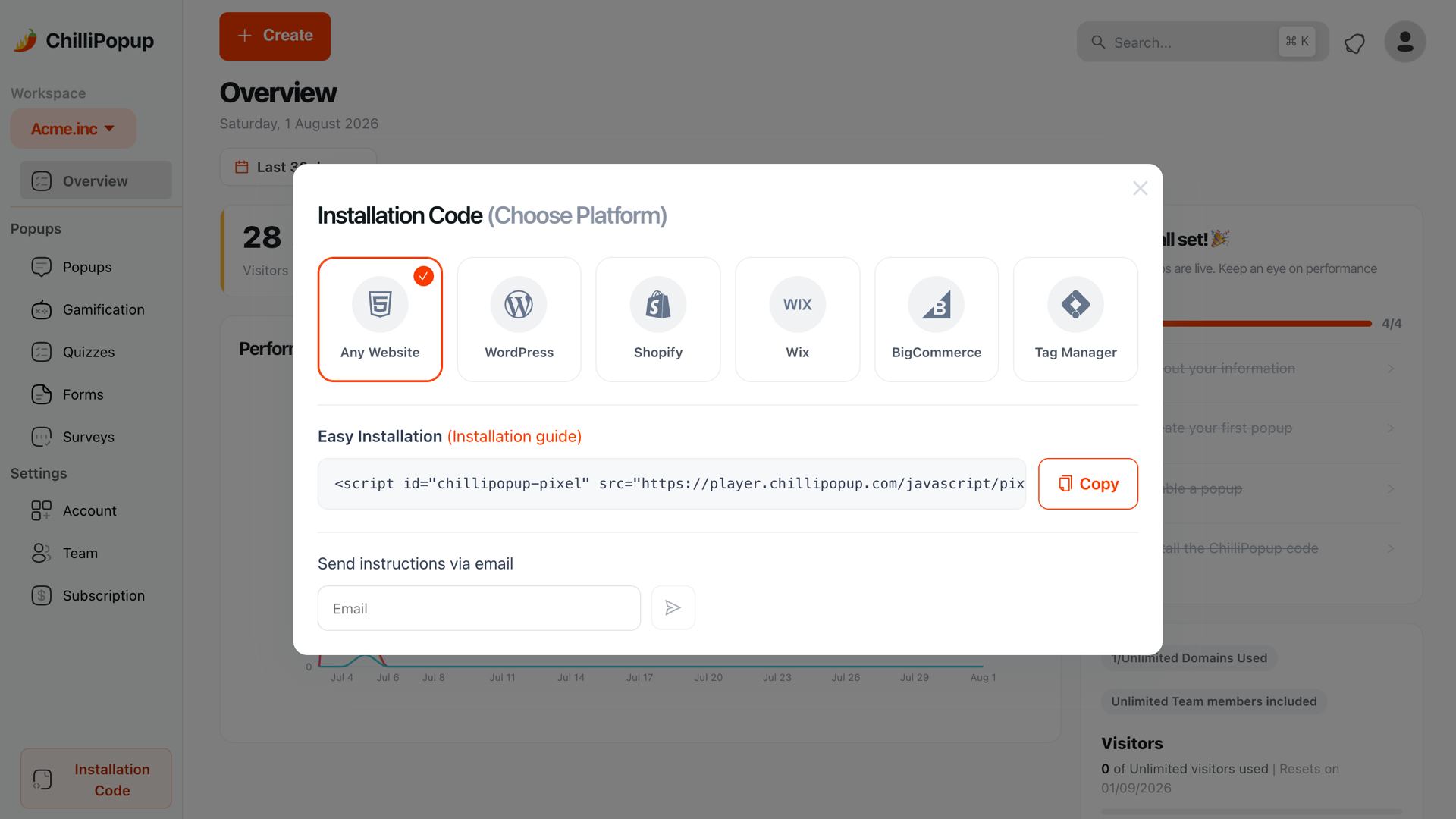
To add a popup to an Ecwid store you paste one script tag into the site that hosts your storefront — the host website if Ecwid is embedded, or the custom-code field in your Ecwid control panel if you run an Instant Site — and then build the popup itself in a separate editor. Ecwid handles catalogue, cart and checkout; the marketing layer on top of it is yours to add.
That split is the thing worth understanding before you start. Ecwid is unusual among ecommerce platforms because your storefront may not live on a domain Ecwid controls at all. Get the paste location right and everything else is ordinary popup work.
Key Takeaways
- One paste, on the host site. The script belongs in the
<head>of whatever site renders your storefront, not inside a product description. - Ecwid has no popup targeting of its own — no exit intent, no new-versus-returning rule, no signup conversion rate.
- The storefront is a single-page widget. Display rules are read once, when the page loads, so URL targeting matches the page the visitor arrived on.
- A small catalogue changes the offer, not the mechanics. Restock alerts and first-order discounts beat generic "join our newsletter".
- Coupons stay in Ecwid. The popup collects the email and reveals a code you created in Ecwid; nothing needs to sync.
What Ecwid gives you, and what it does not
Ecwid is a storefront you drop into a site you already have. That is its whole appeal, and it is also why the list below looks the way it does — the store is complete, the visitor-marketing layer around it is not.
| Capability | Ecwid on its own | With a popup script |
|---|---|---|
| Catalogue, cart, checkout, discount codes | Yes | Unchanged — Ecwid still owns all of it |
| Collect emails before someone buys | Only at checkout | Yes, on any page, at a moment you choose |
| Trigger on exit intent, scroll, delay or inactivity | No | Yes |
| Show only to new or returning visitors | No | Yes, with your own definition in days |
| Stop showing to people who already signed up | No | Yes, one switch |
| Conversion reporting for a signup | No | Views, submissions, conversion rate, per campaign |
| Surveys, quizzes and prize games | No | Yes, from the same script tag |
The gap that costs the most money is the second row. On a small store, most visitors arrive from a link, look at one or two products and leave without buying. If the only place you can capture an address is checkout, you are collecting email addresses exclusively from people who already gave you money — which is the smallest and least useful slice of your traffic.
Where the popup script goes on Ecwid
Ecwid stores come in two shapes, and the paste location follows the shape. Work out which one you have before you touch anything.

Same snippet, two homes. The rule is simple: it goes wherever the page your customer loads is built.
Shape one: Ecwid embedded in a site you own
Your storefront sits inside a WordPress, Wix, Squarespace or hand-built page. The browser loads
your site, and Ecwid renders the catalogue into it. The popup script therefore belongs in
your site's <head>, installed exactly the way you would install any analytics
tag — through your theme, a header-scripts plugin, or your site builder's custom-code panel. Our
install guide for any website
covers the generic case, and there are dedicated guides for
WordPress,
Wix and
Squarespace.
Shape two: an Ecwid Instant Site
Ecwid hosts the whole site for you. In this case the script has to go in through the Ecwid control panel — look for the settings section that accepts tracking or custom code for the storefront, which is where analytics snippets go. Menu labels move between Ecwid releases, so search the control panel for "tracking" or "custom code" rather than following a screenshot from a blog post.
In ChilliPopup, open Installation Code in the left sidebar and choose Any Website. Copy the snippet — your workspace id is already baked into it.
Paste it into the site that hosts your storefront, immediately before
</head> — the host site's header for an embedded store, or the custom code
field in the Ecwid control panel for an Instant Site.
Save, then open your live store in a private window. Publish a popup and it appears without you touching Ecwid again — the same script serves every popup, form, survey, quiz and prize game you build from now on.
<script id="chillipopup-pixel"
  src="https://player.chillipopup.com/javascript/pixel.js?id=YOUR_WORKSPACE_ID"
  data-api="https://api.chillipopup.com"
  async="true"></script>
Do not paste it into a product description. It is tempting, because product descriptions accept HTML. But the script would then load only on that one product, sometimes twice, and disappear the moment you edit the description. One paste, at site level, once.
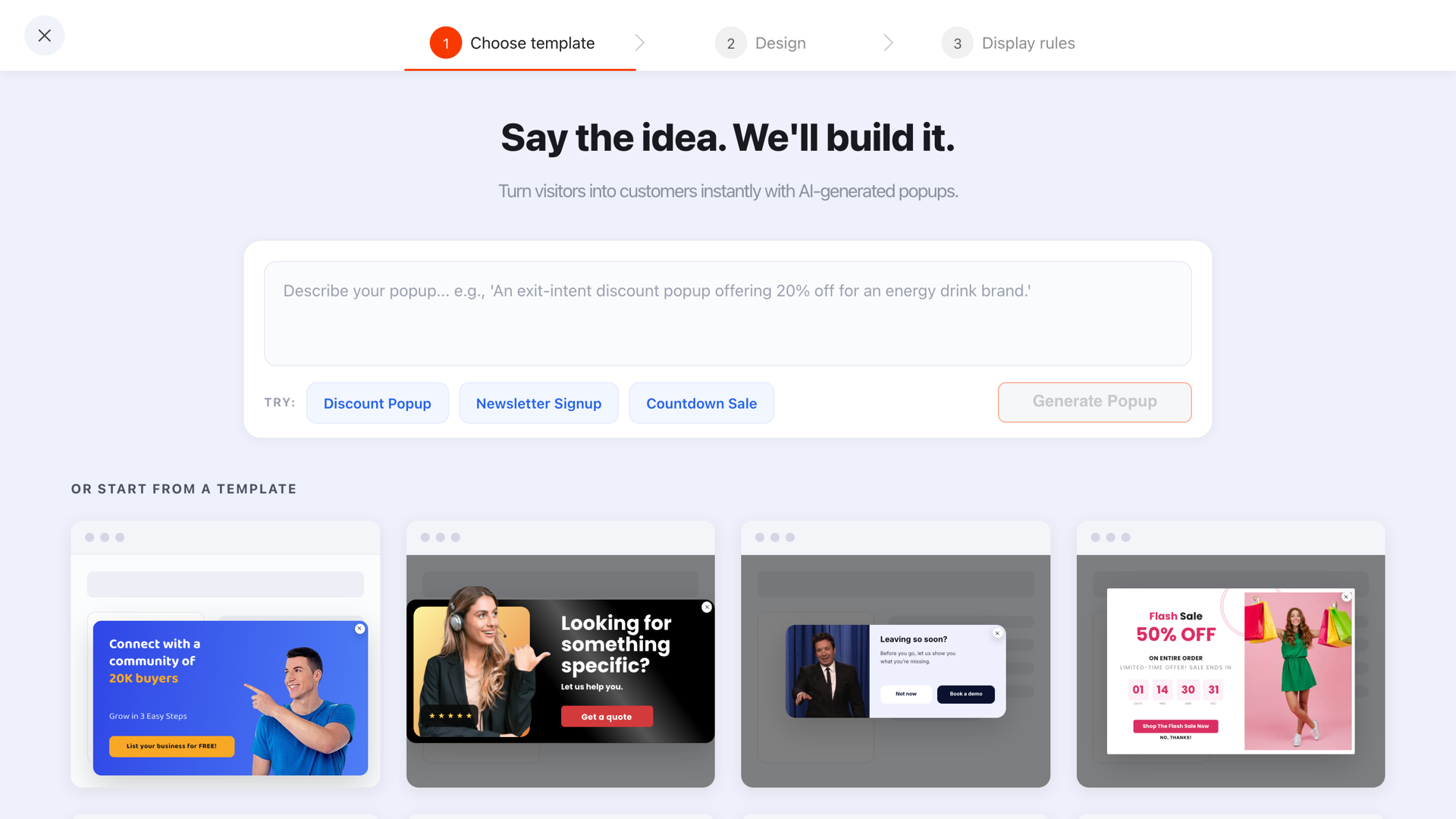
Start from a template, or describe the popup you want and edit the result block by block until it matches your store.
The single-page storefront trap
This is the one Ecwid-specific thing that trips people up, and it is worth two minutes of your attention because the symptom looks like a broken popup rather than a rules problem.
An Ecwid storefront is a JavaScript widget. When a visitor moves from your category listing to a product, the URL changes but the browser usually does not load a new page. Display rules — page targeting, triggers, the page-count rule — are read once, when the page first loads. So a rule that says "only show on URLs containing /products/" is asking a question about the address the visitor arrived at, not the one showing in the bar three clicks later.

The rules are read at load. Browsing inside the storefront does not re-run them.
Three ways to work with that instead of against it:
- Prefer triggers over URL rules. Exit intent, a time delay, a scroll depth or an inactivity timer all keep working normally inside the storefront, because they watch the visitor rather than the address.
- Target the entry point, not the journey. Product pages shared on social, category links in an ad, your blog — those are real page loads, and URL targeting works perfectly on them.
- Use a click trigger for anything catalogue-specific. The pixel exposes a small JavaScript API, so a "notify me" button in your storefront can open a specific popup on demand rather than relying on a URL match.
Rule of thumb for Ecwid. If a popup should appear somewhere in the store, use a trigger. If it should appear only on one landing page, use URL targeting and check it in a private window with that page loaded directly.
Six popups worth running on an Ecwid store
Ecwid stores skew small and specific: a maker, a local shop, a side business with forty products. The mechanics below are identical to any store; the offers are chosen for a short catalogue and a modest traffic number.
1. First-order discount, on exit intent
"Before you go — 10% off your first order. Enter your email and the code is yours." Create the coupon in Ecwid, put the code on the popup's thank-you screen, and let Ecwid validate it at checkout. One email field, one button, one visible "No thanks" link.
2. Restock and drop alerts
On a small catalogue, sold out is common and painful. A popup that offers to tell someone when an item returns turns a dead end into a list — and the list tells you what to make next. Our back-in-stock popup guide covers how to identify the product without any inventory integration.
3. Free-shipping threshold reminder
A small bar or corner popup carrying the one number people actually care about. Keep it quiet, keep it accurate, and never let it cover the add-to-cart button on a phone.
4. A one-question quiz that segments the list
Three or four tappable options — what they shop for, what size, which category. One tap gives you a clean value you can segment on later, which a free-text field never will. See the quiz builder for the shape.
5. A spin-to-win wheel on high-traffic days
A prize game earns attention that a plain form does not, which is why it suits sale weekends and launch days. The outcome is decided server-side, so nobody can rig a win from the browser.
6. A post-purchase question on the thank-you page
One question, on the page where the visitor is happiest: "How did you hear about us?" or "What almost stopped you buying?" That is genuinely the only place the first question is worth asking — anywhere earlier it is pure friction.
Run one popup at a time. Two campaigns competing on the same page is the fastest way to make a small store feel spammy. Pick the single most valuable ask, and add the second only once the first has numbers you trust.
A worked example: a forty-product ceramics shop
Ecwid embedded in a WordPress site. Around 3,000 visits a month, mostly from Instagram, and a catalogue where half the items are sold out at any moment. Here is the whole setup.
| Campaign | Trigger | Audience & frequency | The ask |
|---|---|---|---|
| Drop list | Exit intent on desktop, 50% page scroll on mobile | New visitors, once every 7 days, off after conversion | Email only — "Hear about the next kiln opening first" |
| Sold-out capture | Time delay, 6 seconds | Everyone, once a day, off after conversion | Email + which piece they wanted |
| Post-purchase question | Time delay, 4 seconds, targeted at the order-confirmation URL | Everyone, every visit | One choice question: where they found the shop |
Three campaigns, one script tag, no Ecwid changes after the first paste. The drop list is the one that compounds: every sold-out product that used to be a dead end now adds a name to the launch email that sells the next batch out in a day.
Give your Ecwid store an email list
Popups, forms, surveys, quizzes and prize games from one editor — and one script tag. Free plan, no credit card required. Paid plans from $29/month.
Start free →Ecwid gotchas worth knowing
- Changing host sites loses the script. If you move your Ecwid store from one website to another, the script tag does not travel with it. Keep the snippet somewhere outside both systems and re-paste it after any migration.
- Two installs are worse than none. If you paste the snippet into both the host site and the Ecwid control panel, the pixel can load twice. Pick one location.
- Checkout is not a good place for a popup. Exclude your cart and checkout URLs. Interrupting a payment to ask for a newsletter signup costs more than the address is worth.
- Mobile exit intent does not exist. Exit intent watches the mouse leave the top of the window; phones have no mouse. Use a scroll depth or a delay for mobile, and set the desktop and mobile device toggles accordingly.
- Coupon codes live in Ecwid. The popup reveals a code you already created; it does not generate one. Check the code is active before you publish the popup, and set an expiry so the discount cannot be shared forever.
Five mistakes that flatten a small store's popup
- Firing instantly on mobile. A popup that lands before the first product image does is an intrusive interstitial — bad for the visitor and a real SEO risk on mobile.
- Asking for four fields. On a store this size, one field converts and four do not. Name, phone and birthday can be collected later, once you have delivered something.
- Leaving "show again after conversion" on. Your subscribers keep meeting the signup popup forever, which reads as a shop that does not recognise its own customers.
- Offering a discount you cannot afford. On handmade goods, 20% off is often the margin. Early access, a restock alert or a free sample can be worth more to the visitor and cost you less.
- Never opening the analytics. Two weeks of data tells you whether the offer or the timing is wrong. Guessing tells you nothing.
How to tell whether it worked
Ecwid reports orders. The popup reports its own funnel, and you need both to judge it.

Views, submissions and conversion rate per campaign — the reporting an Ecwid storefront does not have on its own.
- Views — if this is low, your rules are wrong, not your copy. Nothing else matters until people are seeing the popup.
- Conversion rate — submissions divided by views. Compare a campaign against itself over time rather than against someone else's benchmark.
- Subscribers per 1,000 visits — the number that survives a traffic spike. Conversion rate alone flatters a low-traffic month.
- Coupon redemptions in Ecwid — the honest end of the chain. A popup that collects addresses nobody ever spends is a list, not revenue.
Give it two weeks, change one thing, give it two more. If you want a structured way to compare two versions, the A/B testing guide covers what is actually worth testing on low traffic — which is far less than most people assume.
Related reading
Frequently asked questions
Does Ecwid have a popup feature?
Ecwid gives you the storefront, the cart and the checkout, but it does not include a targeted email popup builder — there is no exit-intent trigger, no new-versus-returning visitor rule and no conversion reporting for a signup. You add those with a small script tag that runs on whichever site hosts your storefront.
Where do I paste a popup script on Ecwid?
It depends on where your storefront lives. If Ecwid is embedded in a WordPress, Wix or Squarespace site, the script goes into that site's head, exactly like an analytics tag. If you use an Ecwid Instant Site, paste it into the custom code or tracking field in the Ecwid control panel so it loads on every storefront page.
Will a popup slow my Ecwid store down?
Not measurably. The ChilliPopup pixel loads asynchronously, so the browser never waits for it before rendering your catalogue. It is one small request that runs after your storefront has painted.
Why does my popup show on the wrong Ecwid page?
Because an Ecwid storefront is a JavaScript widget: moving from a category to a product often changes the URL without a full page load, and display rules are evaluated once when the page first loads. Target the page the visitor arrives on, not the one they browse to, or drop URL targeting and use a trigger instead.
Can I run a discount popup on Ecwid?
Yes. Create the discount coupon in Ecwid, then build a popup that reveals that code on its thank-you screen once someone enters an email. The popup collects the address and shows the code; Ecwid validates it at checkout as it would for any other coupon.
Do popups hurt SEO on an Ecwid store?
Not when they behave. Google penalises intrusive interstitials that cover the content a mobile visitor arrived for. A popup that waits for exit intent or a scroll depth, closes easily and does not fire immediately on a mobile landing page is fine.