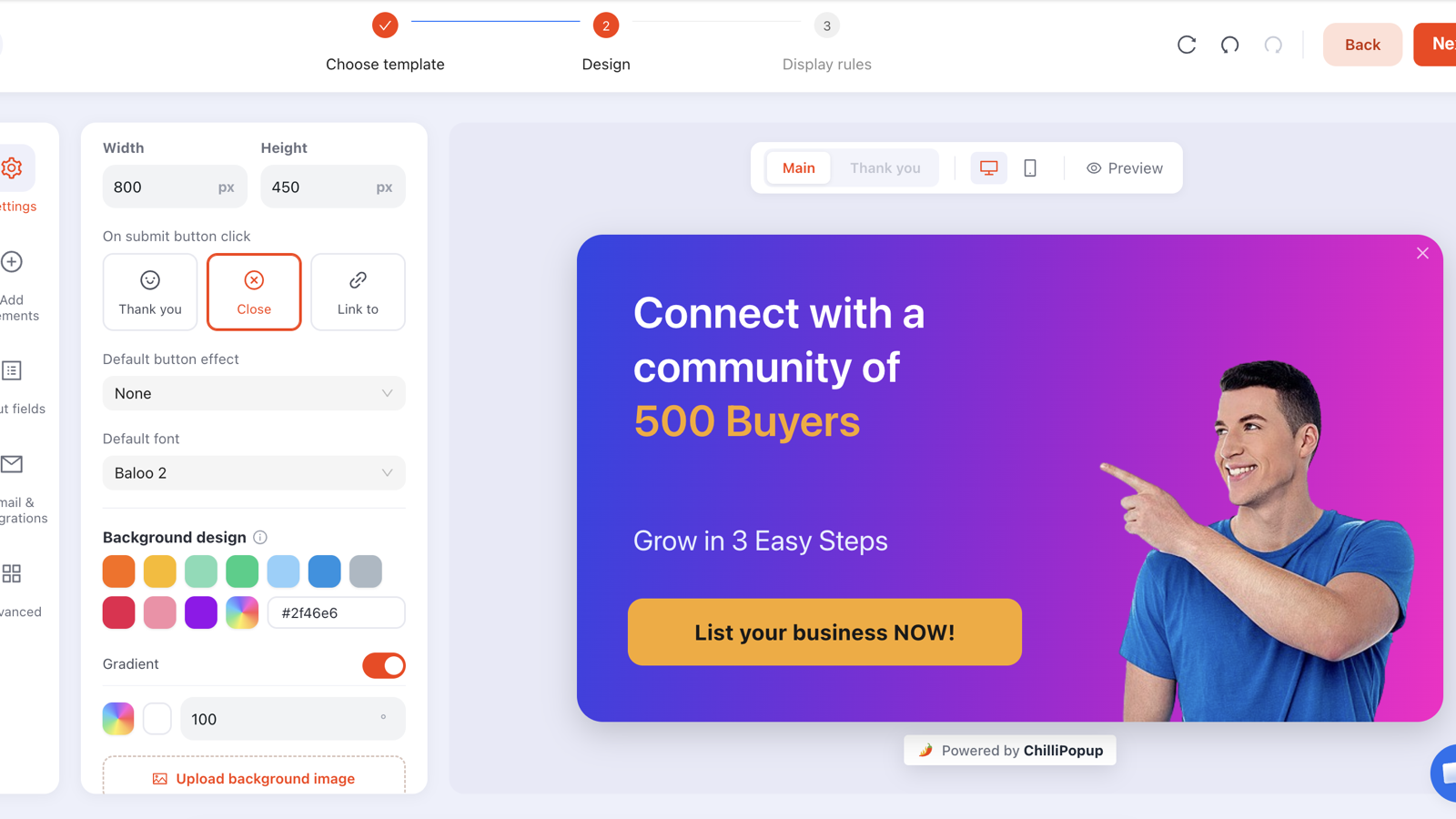
To add a popup to a Squarespace site, either switch on the built-in promotional pop-up under Marketing, or paste a popup tool's script once into Settings → Advanced → Code Injection → Header and build your popups there. The first route takes two minutes and gives you one pop-up for the whole site. The second takes about ten and gives you as many targeted popups as you need.
Which one you want depends entirely on whether "one message for every visitor" is good enough. For a personal portfolio, it usually is. For a Squarespace store, a blog with traffic, or any site where the homepage visitor and the checkout visitor deserve different offers, it usually isn't — and that's the gap this guide fills.
Key Takeaways
- Squarespace gives you one promotional pop-up — one design, site-wide, same message for everyone.
- Code Injection is the door. One script in the Header box covers every page, forever, no matter how many popups you build later.
- Page targeting is the whole point of upgrading. Rules like URL contains /shop are what let a store and a blog live on the same domain without fighting.
- Turn off "show again after conversion" so people who already signed up stop seeing the signup popup.
- Test on the live site, not the editor preview — Squarespace's builder does not run injected scripts.
What Squarespace's built-in pop-up gives you
Squarespace's promotional pop-up lives under Marketing → Promotional Pop-Up. Switch it on, pick a layout, write your headline, choose when it shows, and it appears across your site. Submissions go into Squarespace's own form storage or your connected email service.
For a lot of sites that is genuinely enough. It is free, it is already there, it matches your fonts, and it will collect email addresses today. If you have never run a popup before, switch it on this afternoon and come back to this guide when it starts to feel restrictive.
The honest test. Write down the three popups you actually want: a welcome offer for new visitors, a cart reminder on the shop, an announcement during a sale. If that list has more than one item on it, the built-in pop-up cannot express your plan — there is only one of it.
When you outgrow the promotional pop-up
The limit that bites first is not design, it's arithmetic: one pop-up, one audience. Everything else follows from that.
- You can't split by page. The visitor reading a blog post and the visitor staring at a product page want different things, and one pop-up has to pick a side.
- You can't split by visitor. A first-time reader and a returning customer get the same offer, which means the returning customer keeps getting asked to join a list they already joined.
- You can't run two campaigns at once. A permanent newsletter signup and a two-week sale announcement can't coexist — the sale evicts the signup, then you forget to put it back.
- You can't A/B test. With one pop-up there is no version B, so "does the discount beat the free-shipping offer?" stays an opinion.
- You can't move past a form. No quiz, no survey, no spin-to-win — the interactive formats that make a small site's popup feel like a reason to stop rather than an interruption.

One site-wide pop-up has to average every visitor. Targeted campaigns don't.
| What you want to do | Built-in promotional pop-up | A popup tool via Code Injection |
|---|---|---|
| Run more than one campaign | One pop-up, site-wide | Unlimited popups, forms, surveys and quizzes |
| Show a different offer on /shop and /blog | Not available | URL rules: contains, is exactly, starts with, ends with, is not |
| Skip people who already subscribed | Not available | Turn off "show again after conversion" |
| Different rules for phones | A device toggle | Device, OS and browser targeting, plus mobile-only triggers |
| Test two versions | Not available | A/B split with a sticky variant per visitor |
| Games, quizzes, multi-step surveys | Not available | Spin wheel, scratch card, slot machine, claw machine, quizzes, surveys |
| Setup effort | Two minutes, zero code | Ten minutes, one pasted line |
How to add ChilliPopup to a Squarespace site
Squarespace doesn't have an app store you install from, so every third-party widget arrives the same way: a script in Code Injection. You paste it once and it covers every page on the site — including pages you create next year.
In ChilliPopup, open Installation Code in the left sidebar and choose Any Website. Copy the snippet — it already contains your workspace ID.
In Squarespace, go to Settings → Advanced → Code Injection and paste it into the Header box. Save.
Open your live site in a private window. The pixel loads on every page from that moment, and every popup you publish afterwards goes live without touching Squarespace again.
<script id="chillipopup-pixel"
  src="https://player.chillipopup.com/javascript/pixel.js?id=YOUR_WORKSPACE_ID"
  data-api="https://api.chillipopup.com"
  async="true"></script>
Two things that trip people up. First, the Squarespace editor preview does not run injected scripts — always test on the published URL in a private window. Second, if Code Injection isn't in your Settings menu, your plan doesn't include it; that's a billing decision, not a missing checkbox.
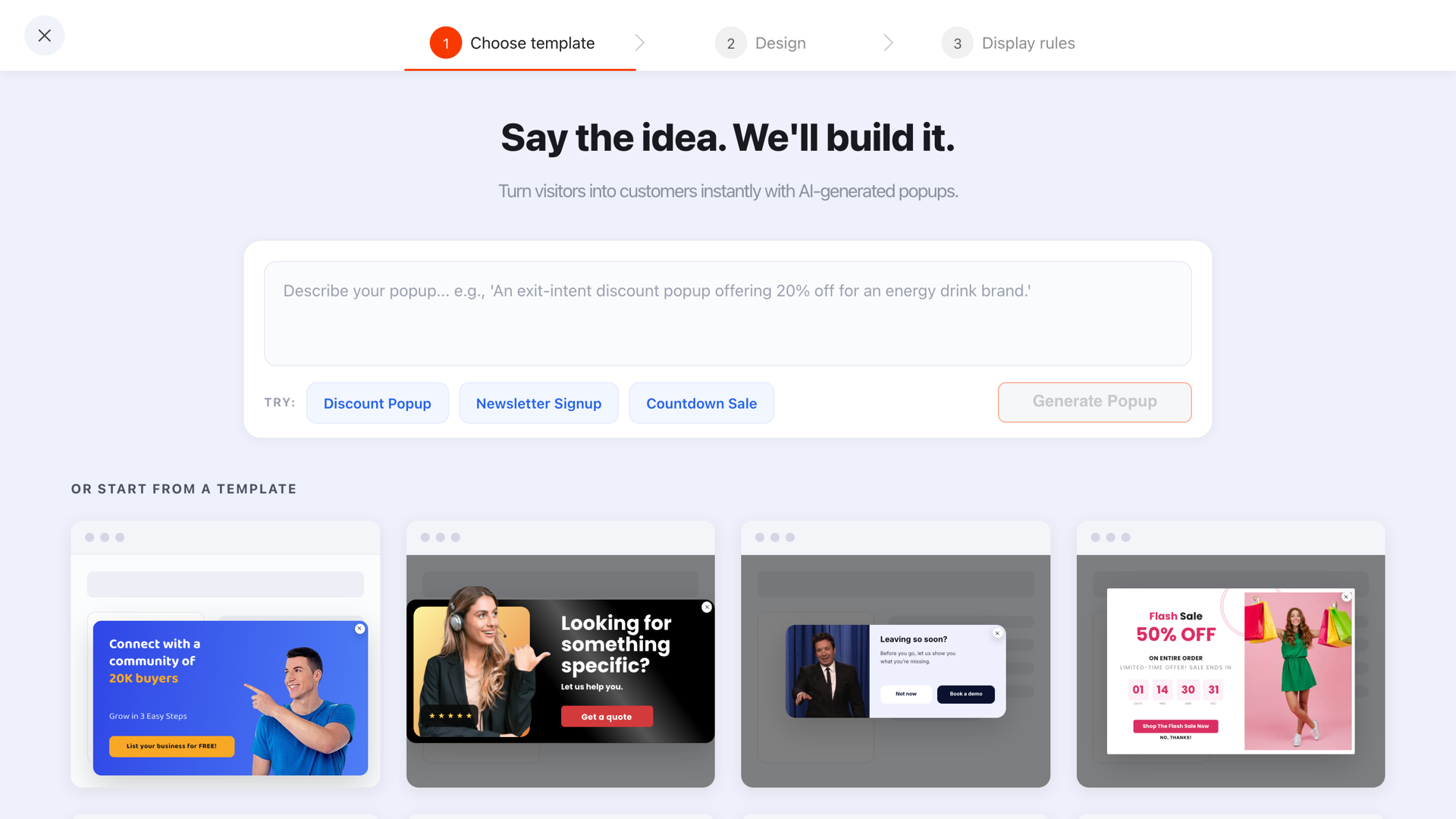
Start from a template or describe the popup you want — then edit it like any other Squarespace block.
Six popup types that fit Squarespace sites
Squarespace sites skew towards design-led brands: studios, shops, restaurants, photographers, writers. These six earn their place on that kind of site.
- The welcome offer. New visitors only, exit intent on desktop and roughly 50% scroll on mobile. One email field, one clear reward, one button.
- The announcement bar. A slim bar anchored to the top or bottom for shipping deadlines, studio holidays or a sale window — the format that interrupts least.
- The abandoned-cart catch. On
/cartand/checkout, on exit, with a reason to finish rather than a discount by default. - The content upgrade. On blog posts only, after 60% scroll: a checklist or guide in exchange for an email, from someone who has proven they read to the end.
- The enquiry form. For studios and service businesses — name, email, one "what do you need?" field, triggered on the pricing or contact page.
- The spin-to-win. A prize wheel where a plain discount box gets ignored. The outcome is decided on the server, so it can't be rigged from the browser, and the claim screen collects the email.
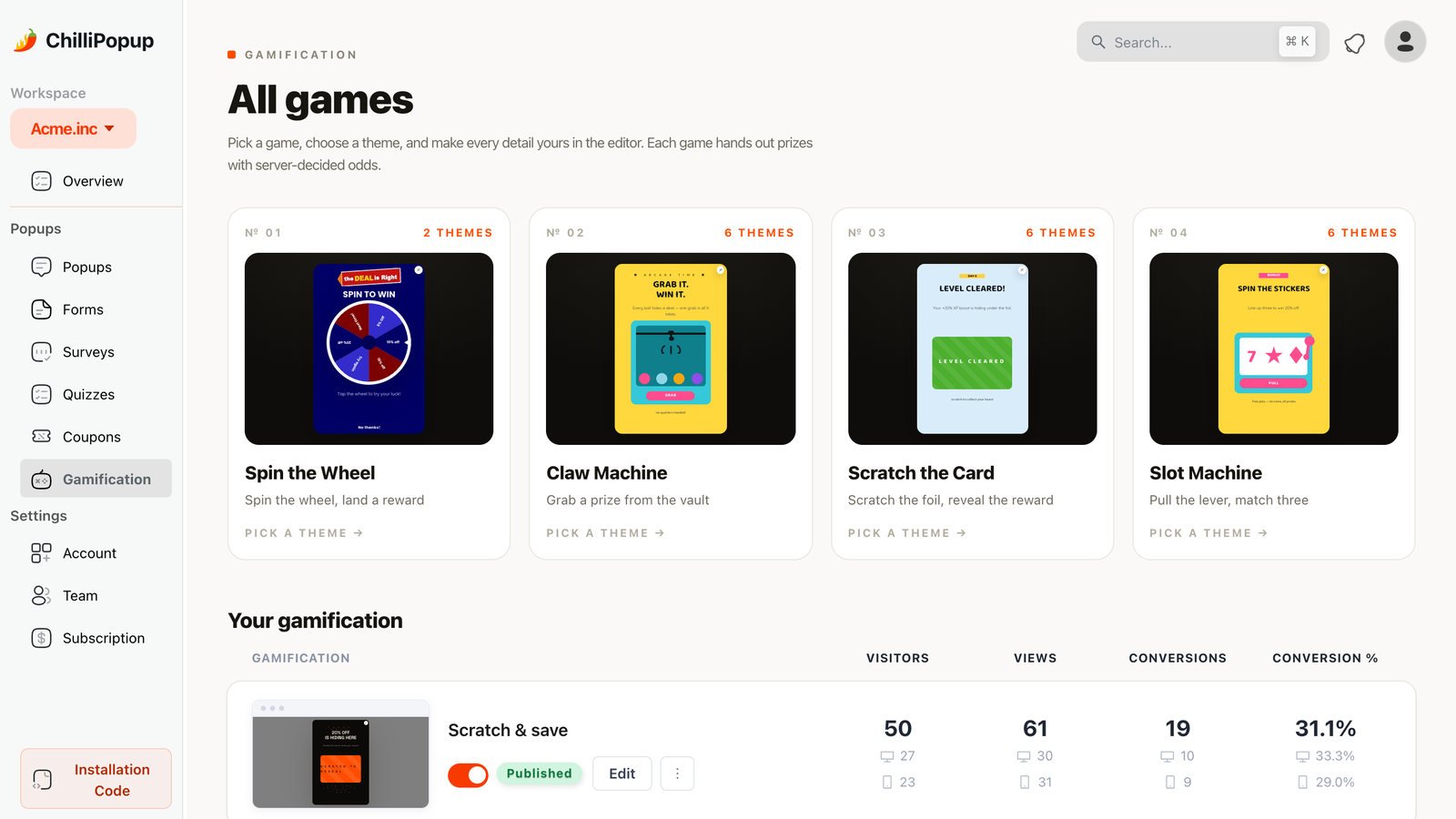
Games are the one popup format visitors actively engage with — useful when a Squarespace store's discount box has stopped working.
Worked example: a welcome offer for a Squarespace store
A ceramics studio selling on Squarespace. Traffic comes from Instagram to product pages, bounces, and never returns. Here is the whole campaign.
The popup. A centred card, product photo on the left, copy on the right:
"First order? Take 10% off."
"Enter your email and the code lands instantly — plus first look at new drops."
[ email field ] [ Send my code ]
"No thanks, I'll browse"
The rules.
- Trigger: exit intent on desktop; a second copy of the campaign at 50% page scroll for mobile, where exit intent barely exists.
- Pages: URL contains
/shop— product and collection pages only, never the contact page. - Audience: new visitors.
- Frequency: once every 7 days, and "show again after conversion" off.
The discount code appears on the thank-you screen straight away, so nobody has to wait for an email to shop. That one detail — reward now, not later — matters more than any headline rewrite.
Display rules for Squarespace URLs
Squarespace URLs are unusually predictable, which makes page targeting easy. Collections live under their slug and products underneath them, so a handful of rules covers most sites.
| Where you want the popup | Rule | Value |
|---|---|---|
| Shop and product pages | URL contains | /shop |
| Blog posts only | URL starts with | /blog |
| Homepage only | URL is exactly | your domain root |
| Cart and checkout | URL contains | /cart |
| Everywhere except contact | URL does not contain | /contact |
| One campaign page | URL ends with | /spring-sale |
Layer the other rules on top — they combine as AND gates, so each one you enable narrows the audience further: a trigger (exit intent, a delay in seconds, scroll percentage, page count, click count or inactivity), an audience (everyone, new or returning visitors), a frequency, and optionally device, browser, a date window or a weekday-and-hour schedule. The full breakdown is in the popup targeting rules guide.
Squarespace-specific gotchas
The editor preview isn't your site
Injected scripts don't run inside Squarespace's builder. If you test there, you'll conclude the popup is broken. Publish, open the live URL in a private window, and test there.
Ajax page loading
Some Squarespace templates load pages without a full browser refresh. Rules are evaluated when the page actually loads, so with Ajax loading on, a visitor clicking around your nav may not tick over page-count triggers as you expect. If a page-count or per-page rule behaves oddly, switch Ajax loading off in your site style settings and re-test — it's the standard fix for third-party scripts on Squarespace.
Don't run two popup systems at once
If you keep Squarespace's promotional pop-up switched on and publish a welcome popup, a visitor can meet both in the same session. Pick one system. Usually that means switching the built-in one off the day your first campaign goes live.
Cookie banners and consent
If you use Squarespace's cookie banner, make sure your popup doesn't land on top of it — two overlays at once is how people learn to hit Escape reflexively. Delay the popup past the banner, and if you're collecting marketing consent, do it with an explicit consent checkbox in the popup rather than assuming it.
Mobile deserves its own campaign. Exit intent is a desktop signal — it reads a cursor leaving towards the browser chrome, and phones have no cursor. Build the mobile version as a separate campaign on a scroll or time trigger, and keep it small enough to leave the page readable behind it.
Seven mistakes with Squarespace popups
- Firing on load. A popup that covers the page before it has been read is the exact pattern search engines call an intrusive interstitial. Give it a delay, a scroll, or an exit.
- One popup on every page. The whole reason you installed a tool was to stop doing this.
- Leaving "show again after conversion" on. Subscribers keep getting asked to subscribe.
- Pasting the script twice — once in Code Injection and once in a page-level code block. Loading the pixel twice can render or count a popup twice.
- A discount with no code on screen. Show the reward on the thank-you screen; don't make people go to their inbox mid-purchase.
- Six fields. On a phone, every extra field is a keyboard, a scroll jump and a decision. Ask for the email; ask for the rest later.
- Never checking mobile. Squarespace themes look beautiful on a laptop. Test the popup at 375px wide before you decide it's finished.
How to tell whether it worked
Four numbers, read weekly, in this order: views (is it even being shown?), submissions, conversion rate (submissions divided by views) and the desktop-vs-mobile split. That last one explains more bad results than anything else — a campaign that converts fine on desktop and dies on mobile is a rules problem, not a copy problem.

Views, clicks, submissions and conversion rate per campaign — plus the device split that usually explains a weak result.
When the numbers are ambiguous, stop guessing and split-test: run two variants of the same campaign, keep every rule identical, change one thing, and let the traffic decide. Our guide to what to test lists the changes that actually move a number, in order.
Build your Squarespace popup step by step
Twenty-five minutes, start to finish, and you only do the install part once.
1. Create the popup and copy the code
Create a free account, build a popup from a template or describe it in a prompt, then open Installation Code → Any Website and copy the snippet.
2. Paste it into Code Injection
Squarespace: Settings → Advanced → Code Injection → Header. Save. Full walkthrough in the install guide.
3. Set the display rules
Trigger, page targeting, audience, frequency — and turn off "show again after conversion". Start narrow: one page group, one audience.
4. Publish and test live
Only published campaigns are served, so check the status toggle. Then open the live site in a private window on both a laptop and a phone.
5. Read it in two weeks, change one thing
Views, submissions, conversion rate, device split. Fix the single worst number, then leave it alone for another two weeks.
Put a proper popup on your Squarespace site
One script in Code Injection, then as many targeted popups, forms, surveys, quizzes and prize games as your site needs. Free plan, no credit card required. Paid plans from $29/month.
Start free →Related reading
Frequently asked questions
Does Squarespace have a built-in popup?
Yes. Squarespace includes a promotional pop-up you can switch on from the Marketing panel, with a single design, a small set of timing options and its own form storage. The catch is structural: it is one pop-up for the entire site, so every visitor sees the same message regardless of which page they landed on or whether they have already signed up.
How do I add a custom popup to Squarespace?
Paste a popup tool's script into Settings → Advanced → Code Injection → Header, then build and target your popups in that tool. The script loads on every page of the site, so you only paste it once, no matter how many popups you later create. If you cannot see Code Injection, your Squarespace plan does not include it.
Can I show different popups on different Squarespace pages?
Not with the built-in promotional pop-up, which is site-wide. With a popup tool you can, using URL rules: target a campaign to pages whose address contains /shop, starts with /blog, or is exactly your homepage. That is the main reason store owners and bloggers outgrow the built-in option.
Will a popup slow down my Squarespace site?
It should not, if the script loads asynchronously. An async script sits off the critical path, so the browser paints your page without waiting for it, and the popup layer is drawn on top rather than pushing content around. Loading the same script twice is the common self-inflicted problem — paste it in one place only.
Do popups hurt Squarespace SEO?
Popups that appear on a timer or exit and are easy to dismiss are fine. What search engines dislike is an intrusive interstitial that covers the content a mobile visitor arrived to read, immediately on load. Delay the popup, keep it small on mobile, and give it a clear close button.
Which Squarespace plan do I need for Code Injection?
Code Injection is not available on Squarespace's entry-level personal tier — it appears on the business and commerce tiers. Open Settings → Advanced and look for Code Injection: if the panel is missing, that is a plan limitation rather than a setting you have hidden somewhere.