A waitlist popup asks for one email address so you can tell someone when the thing they wanted is available. That is all it does — and it is the difference between launching to silence and launching to a list of people who already put their hand up.
The mistake is treating it as a consolation prize for not being ready. A waitlist is not a holding pattern. It is a demand signal, a launch-day audience and a sanity check on whether the thing is worth building — collected from traffic you already have.
Key Takeaways
- Specific beats early. "Early access on the 14th, before it goes public" converts; "be the first to know" does not.
- One field, one optional question. The variant they want is worth asking; their phone number is not.
- Give the campaign an end date so it switches itself off at launch instead of relying on your memory.
- The signup rate is data. A waitlist that grows slowly is telling you something before you spend the money.
- Send something before launch, or your launch email arrives from a stranger.
The four kinds of waitlist
They look identical and behave completely differently. Knowing which one you're running decides the copy, the page and the end date.
| Kind | The situation | Where it goes | The promise |
|---|---|---|---|
| Pre-launch | The business or store isn't open yet | Every page, or a hosted link if there's no site | Founding-customer status, launch discount |
| New product | The store is live, one product isn't | The product page and its collection | First pick before it goes public |
| Back in stock | They want it, you've sold out | The sold-out product page only | An email the moment it returns |
| Capacity-limited | Beta, cohort, booking, membership | Pricing and signup pages | A place in the queue, in order |
Back-in-stock is the highest-intent list you will ever collect. Everyone on it has already chosen the product and been refused. Treat those emails as pre-orders, not as newsletter subscribers.
The anatomy of a waitlist popup
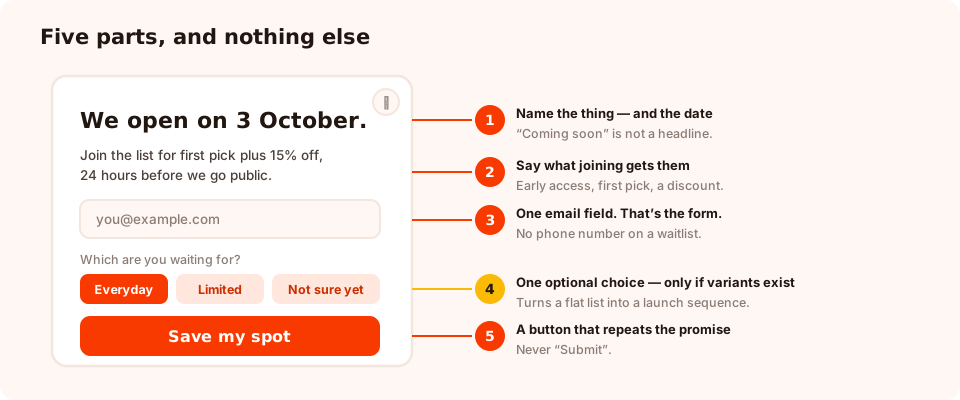
Five parts. Anything you add beyond these is competing with the email field.
- A headline that names the thing. Not "Coming soon" — the actual product, collection or date.
- One line about what joining gets them. Early access, first pick, a launch discount, a reserved place. If you can't name it, you don't have a waitlist, you have a mailing list.
- One email field. That's the whole form.
- An optional segmenting question — a single tappable choice, only when there are real variants to choose between.
- A button that says what happens next. "Email me when it drops" beats "Submit" every time, because it repeats the promise at the moment of clicking.
Two blocks are worth adding when they're honest. A countdown timer earns its place if you know the real launch date — and only then; a countdown to a date you invent is the fastest way to lose the trust you just built. And a coupon block works on the thank-you screen when the promise includes a launch discount, so the code is visible immediately rather than buried in an email.
Don't ask for a phone number on a waitlist. The trade is uneven: they get an email one day, you get a channel they consider personal. Save it for after they've bought.
The copy, word for word
Pre-launch, a new store
"We open on 3 October."
"Join the list and you'll get first pick plus 15% off, twenty-four hours before we go
public."
One email field. Button: "Save my spot".
Thank-you screen: "You're in. Watch for an email from us on the 2nd — that's your early
access link."
Back in stock, a sold-out product
"Sold out — but not for long."
"Leave your email and we'll tell you the moment the Small is back. No newsletter, just this
one."
Button: "Tell me when it's back".
That second sentence — no newsletter, just this one — is doing most of the work. It removes the only real objection to joining a back-in-stock list, and it costs you nothing as long as you keep the promise.
Beta access, software
"We're opening 50 places in the private beta."
"Tell us what you'd use it for and we'll invite the closest fits first."
One email field, one choice question with four use cases. Button: "Request an invite".
Here the segmenting question does double duty: it makes the list sortable and it makes the ask feel like an application rather than a form, which raises the perceived value of getting in. Turn on business-email validation if you want the list to skew towards buyers.
Where to put it, and the rules that go with it
A waitlist popup that shows everywhere is a waitlist popup that annoys people looking for something else. Four rule decisions cover nearly every case.
- Page targeting. A back-in-stock waitlist belongs on that product's URL and nowhere else — use a contains rule with the product handle. A pre-launch waitlist can run site-wide.
- Trigger. A short time delay on the product page, or a scroll percentage around 40% on longer pages. For a pre-launch site with one page, a delay of a few seconds is right.
- Frequency, and show-again-after-conversion off. Nobody should be asked to join a list they've already joined. This switch is what stops it.
- The date window. Set the start and end dates, with the GMT offset you actually operate in, and the campaign turns itself on and off. This is the rule most people skip and then regret.
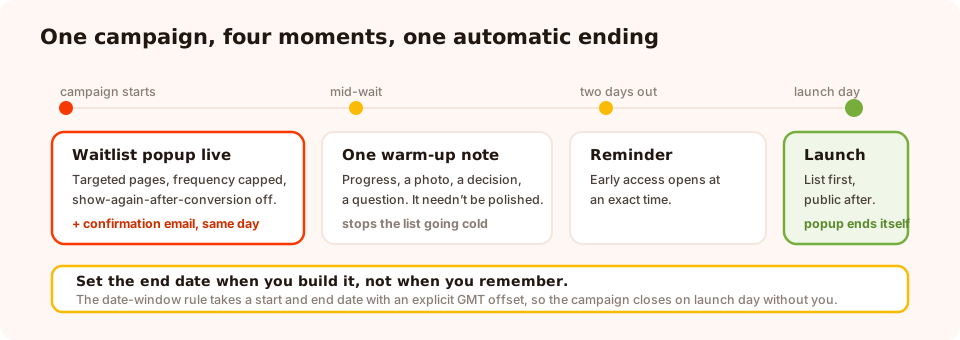
The end date is not admin. It's what stops a waitlist popup outliving the launch it was built for.
The classic waitlist failure is a "coming soon" popup still running three weeks after the thing came out. Set the end date when you build it, not when you remember.
No website yet? Run it from a link
Pre-launch waitlists have a chicken-and-egg problem: the popup needs a site, and the site is the thing you haven't built. There's a way around it.
A form, survey or quiz can be published as its own hosted page — a real URL you can put in an Instagram bio, a DM, an ad, or on a printed card via the QR code generated alongside it. There are no display rules to configure because there's no page to target: the content simply renders full-screen when someone opens the link.
That gives you a waitlist running today, from a link, with no website. When the site launches, the same content becomes an embedded form or a popup on it — the signups you collected stay exactly where they were. The shareable link guide covers the whole approach.
Start collecting before you launch
Popups, forms, surveys, quizzes and games from one editor — and one pixel. Free plan, no credit card required. Paid plans from $29/month.
Start free →Keeping the list warm
A waitlist decays. Someone who signed up in March and hears nothing until September has forgotten who you are, and your launch email lands as spam from a stranger. The fix is not clever — it is just sending something.
- Immediately: a confirmation that repeats the promise and the date. This is the single highest-open email you will send them.
- Once in the middle: progress, a photo, a decision you're making, or a question. One email. It does not have to be polished.
- Two days before: a reminder that early access is about to open, with the exact time.
- On the day: the link, sent to the waitlist before anyone else. Whatever you promised, honour it visibly — being on the list has to have been worth it.
Be clear about where the sending happens. The popup collects the addresses and shows them in your dashboard; it does not send the emails. There is no autoresponder or built-in email platform connection today, so plan the sending side — even if that is you, pasting addresses into your email tool once a week. A list nobody has a plan for is the actual failure mode.
What the numbers are telling you
A waitlist reports the usual popup metrics — views, unique views, clicks, submissions, conversion rate and the per-field breakdown — plus a Collected input data table with one row per signup. Three readings matter more than the rest:
- Conversion rate on a targeted page. A back-in-stock waitlist on the exact sold-out product should convert far better than a site-wide newsletter popup. If it doesn't, the promise is vague or the popup is firing on the wrong pages.
- Signups per day, over time. This is your demand curve. A flat line after the first week means the thing isn't pulling — better to learn that now than after the production run.
- The segment split. If 70% of the list wants one variant, you have just been told what to make more of, and what your launch email should lead with.
If you're unsure whether the promise or the design is the problem, run an A/B test with one changed headline and let it settle the argument.
Seven waitlist mistakes
- "Be the first to know" with no date and no benefit. It asks for something and offers nothing.
- A countdown to a date you made up. If it slips, everyone on the list watches you miss it.
- Four fields. Every one past the email costs you signups you'll never see.
- No end date, so the popup outlives the launch and makes a live product look unavailable.
- Silence between signup and launch. The list goes cold and the launch email underperforms.
- Breaking the "just this one" promise. A back-in-stock signup that gets added to your newsletter is the fastest unsubscribe you can engineer.
- Ignoring the signal. A waitlist that barely grows is telling you something useful. Listen before you spend.
Build the waitlist in ChilliPopup
About thirty-five minutes. If the pixel isn't installed yet, start with the one-line install guide — or skip it entirely and use the hosted link.
1. Write the promise first
One sentence naming what they get and when. If it takes you three attempts, that's the popup working — the vague version was never going to convert.
2. Build one email field and one button
Headline, promise line, email input, button that repeats the promise. Add a countdown block only if the date is real.
3. Add the segmenting question, if you have variants
One choice question with three to five tappable options. Skip it entirely if there is only one thing to wait for.
4. Target the pages and set the date window
A URL rule for the product or collection, display frequency on, show again after conversion off, and start and end dates so the campaign closes itself on launch day.
5. Write the first email before you publish
The confirmation that repeats the promise. Writing it now, while the promise is fresh, is what keeps the whole thing honest.
Related reading
Frequently asked questions
What is a waitlist popup?
A waitlist popup asks visitors for an email address so you can tell them when something becomes available — a product that hasn't launched, a size that's out of stock, a beta with limited places, or a store that isn't open yet. It converts interest that would otherwise leave into a list you can sell to the day you're ready.
Do waitlists actually work?
They work when the promise is specific and the wait is short. "Be first to know" with no date is a weak trade; "early access on the 14th, before it goes public" is a strong one. The longer the gap between signup and launch, the more the list cools — which is why what you send in between matters as much as the popup.
What should a waitlist popup say?
Name the thing, say what the person gets for joining, and say when they'll hear from you. Three lines. Everything else — features, story, roadmap — belongs on the page behind the popup, not inside it.
Should I ask for anything besides an email?
One optional question, at most, and only if the answer changes what you send. Which variant they want, which size, which plan — a single tappable choice turns a flat list into a segmented launch sequence. A phone number or a company field on a waitlist is friction with no payoff.
Can I run a waitlist before my website exists?
Yes. A form, survey or quiz can be published as its own hosted page with a shareable link and a QR code, so you can collect signups from social bios, DMs, ads and printed material with nothing to build. When the site launches, the same content becomes a popup on it.
How do I stop the waitlist popup showing after launch?
Set an end date on the campaign. The date-window rule takes a start and end date with an explicit time-zone offset, so the popup switches itself off at the moment you launch instead of relying on you remembering — which is the single most common waitlist mistake.
What should I send between signup and launch?
Something, at least once. A short note on progress, a behind-the-scenes photo, an early look at pricing, or a question. The purpose is not the content — it is to make sure your launch email arrives from a sender the person recognises rather than one they forgot signing up to.