A scroll-triggered popup appears once a visitor has scrolled past a percentage of the page you choose — 50%, say. It is the simplest engagement signal a website can read: nobody scrolls halfway through an article by accident, so the ask lands on someone who has already decided your page is worth their time.
That is the whole idea, and it is also where most people get it wrong. They pick a percentage that sounds sensible, never check how far readers actually get, and end up with a popup that either interrupts the first paragraph or fires so deep that almost nobody sees it. This guide fixes both.
Key Takeaways
- Scroll depth is a percentage of the whole page, not of the screen — how far you have scrolled divided by the total scrollable distance.
- Start at 50% on articles, 30–40% on product pages, 60–75% on long sales pages, then move the number once you have two weeks of views.
- It is the mobile answer to exit intent. Exit intent needs a mouse leaving the top of the window; a phone has neither.
- The first trigger to fire wins. Enable scroll and exit intent together and whichever happens first shows the popup — the other is switched off for that page load.
- Low views means the threshold is wrong, not the copy. Fix reach before you rewrite the headline.
What a scroll-triggered popup actually is
Scroll trigger, in two sentences
A scroll trigger fires a popup, form, survey or quiz when the visitor's scroll position passes a threshold you set as a percentage of the page. It replaces "show this after N seconds" with "show this once they have read this far", which is a far better proxy for interest than a clock.
Time delay measures patience. Scroll depth measures attention. Those are not the same visitor: someone who left the tab open while making coffee will trip a 20-second timer without reading a word, while someone who skims fast and scrolls to the halfway mark in eight seconds is genuinely interested. If your popup is asking for an email address, you want the second person.
In ChilliPopup the scroll trigger is one of six, listed in the Display rules step as Page Scroll — display after specific % scroll on the page. You enter a single number between 0 and 100. That number is the entire configuration, which is why it deserves more thought than it usually gets.
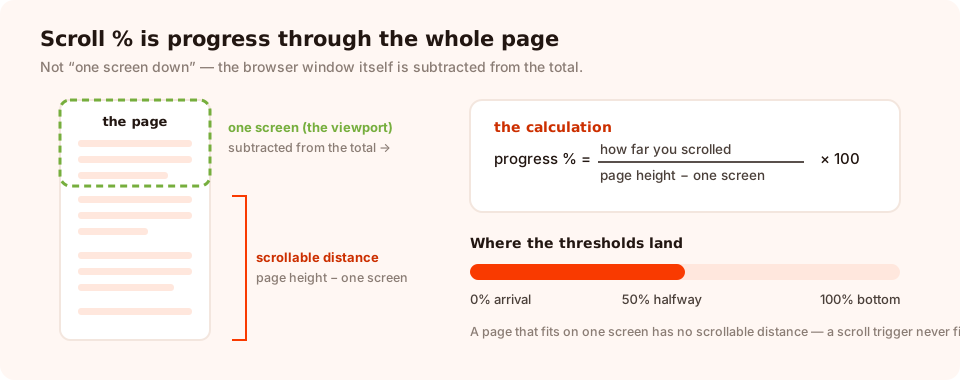
Scroll percentage is progress through the whole document — 100% is the very bottom, not one screen down.
How scroll depth is measured — and why it matters
This is the part that surprises people. The pixel does not count pixels scrolled or screens travelled. It computes progress through the document:
scrollable  = full page height − one screen height
progress %  = (how far you have scrolled ÷ scrollable) × 100

// 100% = the bottom of the page is on screen
// 50%  = you are exactly halfway through the scrollable distance
Three consequences worth internalising:
- 50% means different things on different pages. On a 900-word post, half is roughly three paragraphs in. On a 4,000-word guide, half is several minutes of reading. If both pages share one popup, they do not share one moment.
- A page that does not scroll never triggers. If the content fits on one screen there is no scrollable distance, so a scroll rule on a short landing page will simply never fire. Use a time delay or exit intent there instead.
- The check runs on scroll events. Someone who lands mid-page from a jump link, or returns to a restored scroll position, will not trigger the popup until they scroll at least once. In practice almost everyone does — but it explains the occasional "it didn't fire" report.
Long pages hide your popup. Sticky headers, comment sections, related-post grids and fat footers all inflate the page height, which pushes your 50% mark further into the article than you think. If a page ends with 2,000px of footer, 50% of the document is nowhere near 50% of the reading. Scroll your own page and watch where it fires before you trust the number.
The trigger also fires once per page load. Scroll past 50%, close the popup, scroll back up and down again — it does not come back. That is deliberate; a popup that re-opens every time you cross a line would be unbearable.
Which percentage for which page
There is no universal number, but there is a reliable principle: fire at the point where your offer has just become relevant, not at the point where the visitor has proven maximum loyalty. Waiting for 90% is not "more qualified", it is fewer people.
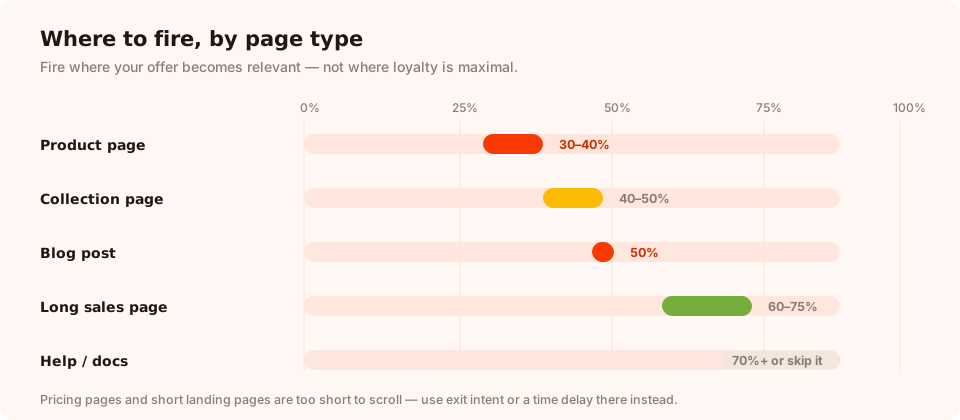
A starting point per page family. Move the number once, with data — not three times, on a hunch.
| Page type | Start at | Why there | What to offer |
|---|---|---|---|
| Blog post / article | 50% | Past the intro, into the substance — the reader has committed | The newsletter, or a resource that extends the article |
| Product page | 30–40% | Just past the gallery and price, where hesitation starts | First-order discount, size help, back-in-stock alert |
| Collection / category | 40–50% | They have browsed enough to have a taste but not a decision | A one-question quiz that narrows the choice |
| Long sales / landing page | 60–75% | After the proof and objections, before the final CTA | The same offer as the page, minus the scrolling |
| Documentation / help | 70%+ or don't | People here are working, not shopping | A one-tap "was this helpful?" rating, nothing more |
| Pricing page | Use exit intent instead | Pricing pages are short and read top-to-bottom | An answer to the objection that made them leave |
The one-page rule. Different page families deserve different thresholds, so build them as separate campaigns with their own URL targeting rather than one popup at a compromise percentage that is wrong everywhere.
Scroll depth vs the other five triggers
Scroll is one of six triggers, and picking between them is mostly a question of what signal your page actually produces.
| Trigger | Signal it reads | Works on mobile? | Best for |
|---|---|---|---|
| Page scroll % | Engagement with this page | Yes | Articles, product pages, anything long |
| Exit intent | The cursor heading for the tab bar | No — desktop only | Carts, checkouts, pricing, desktop last chances |
| Time delay | Seconds elapsed | Yes | Short pages that cannot scroll |
| Page count | Pages viewed this session | Yes | Browsers who are clearly shopping around |
| Click count | Clicks anywhere on the page | Yes | Interactive pages, filters, configurators |
| Inactivity | Nothing moving for N seconds | Yes | Visitors who stalled mid-decision |
The desktop-and-mobile pairing
Exit intent works by watching the mouse leave through the top of the window. A phone has no cursor, so exit intent is effectively a desktop-only trigger. The standard fix is two campaigns of the same offer:
- Desktop campaign — exit intent, device rule set to desktop only.
- Mobile campaign — page scroll at 50%, device rule set to mobile only.
Same popup design, same offer, two rule sets. Note that the device rule reads the viewport width (768px is the cut), so a narrow desktop window counts as mobile — which is fine, because a narrow window has the same problem exit intent does.
Enabling several triggers does not stack them. The first one to fire shows the content and switches the rest off for that page load. So scroll + exit intent means "whichever comes first", not "both must happen". That is usually the behaviour you want, but it does mean a 3-second time delay left enabled alongside a 50% scroll rule will win every single time and your scroll setting will look broken.
The rules that go around the trigger
A trigger decides when. Four other rule groups decide whether, and every one of them has to pass:
- Page targeting — restrict by URL with contains, doesn't
contain, equals, not equals, starts with or ends with. This is
how one scroll campaign belongs to
/blog/and another to/collections/. - Device — desktop, mobile, or both. Turning both off means the popup never shows, which is an easy accident.
- Audience and frequency — everyone, new visitors or returning visitors, plus how often the same person meets it: once a day, every visit, once every few days, once every few visits, or all pages all the time.
- Show again after conversion — switch it off and anyone who has already submitted stops seeing that campaign. On a scroll-triggered newsletter popup this is the difference between a growth tool and an annoyance.
Beyond those, an advanced set narrows further when you need it: operating system and browser, a date window with a GMT offset, and a weekday-plus-hour schedule. All the rules are AND gates — every enabled one must pass before the trigger is even armed.
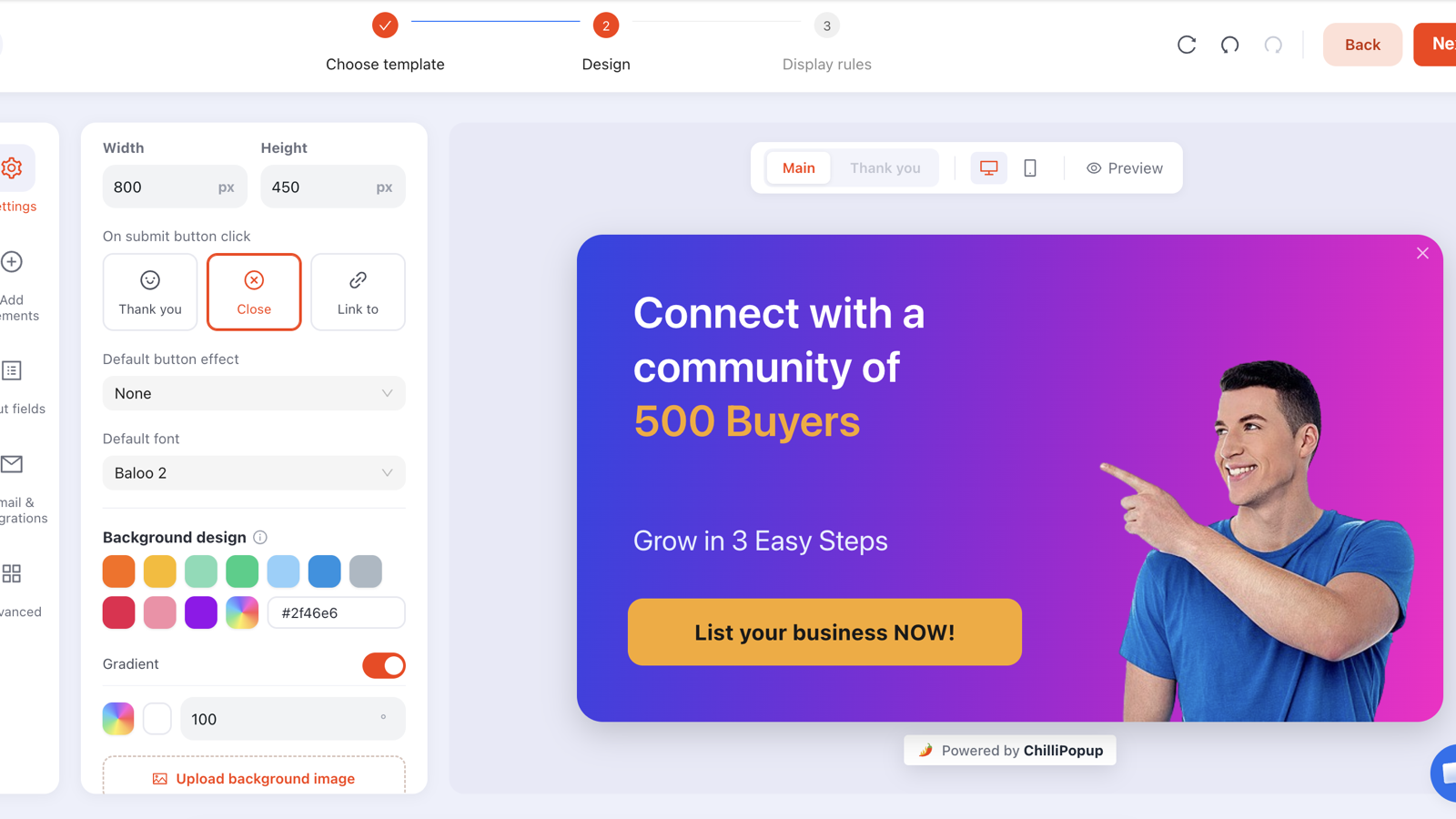
Design first, rules second. The same popup becomes a blog ask or a product-page ask depending entirely on its rules.
Three worked examples, with the copy
1. The article newsletter ask
Rules: Page Scroll 50% · page targeting contains /blog/
· frequency once every few days · show again after conversion off.
Copy: "Enjoying this? We send one of these a week." — subhead: "Practical conversion tactics, no fluff, unsubscribe in one click." One email field, button "Send me the good stuff".
The reason this works at 50% and not at 10% is that the compliment is only true at 50%. Ask someone who has read two lines whether they are enjoying it and you have written a lie into your own popup.
2. The product-page hesitation catch
Rules: Page Scroll 35% · page targeting contains /products/
· audience new visitors · frequency once a day.
Copy: "Not sure it's the right one?" — "Get 10% off your first order and take your time deciding." One email field, one button, and a visible "No thanks" link.
35% is roughly the point where a shopper has passed the images and the price and started reading the description — the moment doubt shows up. Firing at 70% on a product page means firing in the reviews, after the decision is already made.
3. The long-page mid-scroll quiz
Rules: Page Scroll 60% · page targeting starts with
/collections/ · device mobile · frequency once every few visits.
Copy: a one-question quiz: "Shopping for yourself or a gift?" with two tappable options. The answer routes them to the right page and gives you a segment you can use later — without a single keystroke.
What all three share: the offer matches the page, the threshold matches the moment on that specific page, and the popup asks for exactly one thing.
What to measure — and what the numbers mean
A scroll campaign has one extra failure mode that other triggers don't: it can be correct and invisible. So read reach before you read conversion.

Views tell you whether the threshold is reachable. Conversion rate tells you whether the offer is right. Read them in that order.
| What you see | What it means | What to change |
|---|---|---|
| Very few views | Most people never scroll that deep | Lower the percentage by 15–20 points, or add exit intent as a second trigger |
| Lots of views, low conversion | They see it but it isn't relevant yet | Raise the percentage, or change the offer to match the page |
| High close rate, fast | It landed as an interruption | Go deeper, shrink the popup, and check it isn't covering the text they were reading |
| Desktop converts, mobile doesn't | The design, not the trigger | Split into two campaigns and simplify the mobile one to a single field |
The dashboard gives you views, unique views, clicks, submissions, conversion rate and field inputs, plus a breakdown by device and a day-by-day interaction chart, over the last 7 days, 30 days, all time or a custom range. That is enough to answer both questions above.
If you want to settle the percentage argument properly rather than eyeball it, run an A/B test: create a variant, change only the scroll percentage, split the traffic 50/50 and let it run. The results view will not declare a winner until each side has enough views and conversions to mean anything — which is the point.
Set your first scroll trigger in five minutes
Build popups, forms, surveys, quizzes and games from one editor — and one pixel. Free plan, no credit card required. Paid plans from $29/month.
Start free →Seven scroll-popup mistakes
- One percentage for the whole site. A 50% rule spanning your homepage, product pages and a 5,000-word guide is three different moments wearing one number.
- Setting it at 10% because "more views is better". At 10% you have removed the only thing that made the trigger worth using. That is a time delay with extra steps.
- Leaving a time delay enabled next to it. The timer wins the race and your scroll setting never gets a chance.
- Covering the sentence they are reading. On mobile especially, a centre-screen popup at 50% lands directly on the text. Use a bottom slide-in or a bar for scroll triggers on phones.
- Forgetting the pages that cannot scroll. Short landing pages, thank-you pages and empty search results have no scrollable distance and will never fire.
- Leaving "show again after conversion" on. Your existing subscribers now meet the signup ask halfway down every article, forever.
- Judging it after three days. Scroll campaigns accumulate views slowly by design. Give it two weeks, then change one thing.
When not to use a scroll trigger
- Short pages. No scroll, no trigger. Time delay or exit intent instead.
- Checkout and cart. Never interrupt someone who is paying you. If you must, exit intent only.
- Landing pages from paid ads, where the visitor came for one specific thing. Let them reach the form; interrupting a page you paid to send them to is an expensive way to lose a click.
- Infinite-scroll feeds, where the page height changes as you scroll, so the percentage keeps moving underneath you. Use click count or inactivity there.
Build it in ChilliPopup
Thirty minutes, five steps, no code. If the pixel isn't on your site yet, start with the one-line install guide — one script serves every campaign you will ever build.
1. Pick one page family and one offer
Blog posts, one product collection, or one long landing page. Write the single sentence that says what the reader gets. If you cannot write it, the popup isn't ready for a trigger yet.
2. Turn on Page Scroll and enter one percentage
50% for articles, 35% for product pages, 70% for long sales pages. Make sure every other trigger on that campaign is switched off, or the first one to fire will steal the moment.
3. Add the URL rule
Contains /blog/ keeps it on articles. Starts with
/collections/ keeps it on browsing pages. Add a doesn't contain rule for
/checkout if there is any chance of overlap.
4. Set frequency, and turn off show-again-after-conversion
Enable display frequency — the audience and conversion controls only appear once it is on — then pick once every few days and switch show again after conversion off.
5. Publish, wait two weeks, move one number
Only published and enabled content is served, so remember to publish. Then leave it alone. After two weeks, read views first and conversion second, and change exactly one thing.
Related reading
Frequently asked questions
What is a scroll-triggered popup?
A scroll-triggered popup is a popup that appears once the visitor has scrolled past a set percentage of the page — 50%, for example. Instead of interrupting on a timer, it waits for a signal of engagement, so the ask only reaches people who actually started reading.
What scroll percentage should a popup use?
Start at 50% on blog posts and articles, 30–40% on product and collection pages where the buying decision happens early, and 60–75% on long sales or landing pages where the offer only makes sense after the argument. Then move the number once, based on how many views the popup actually gets.
How is popup scroll depth measured?
As a percentage of total scroll progress, not of the screen. The player divides how far you have scrolled by the total scrollable distance — the full document height minus one viewport — so 100% means the very bottom of the page. A long article and a short one both reach 50% halfway down.
Is a scroll popup better than an exit-intent popup?
They answer different questions. Exit intent asks "are you leaving?" and only works on desktop, where a mouse can travel to the browser chrome. Scroll depth asks "are you engaged?" and works everywhere, which makes it the practical substitute for exit intent on phones. Many sites run exit intent on desktop and scroll depth on mobile.
Do scroll popups hurt SEO?
Not in themselves. What Google penalises is an intrusive interstitial that hides the main content immediately on arrival from search, especially on mobile. A popup that fires only after someone has scrolled halfway down, covers part of the screen, and can be closed easily is a different thing — but keep it easy to dismiss and never full-screen on a phone.
Can a popup fire on scroll and on exit intent at the same time?
You can enable both, but only the first one to happen shows the popup — once any trigger fires, the others are switched off for that page load. That is usually what you want: scroll depth catches engaged readers, and exit intent catches the ones who bail before reaching your threshold.
Why is my scroll-triggered popup not showing?
Four usual causes: the page is too short to scroll, so the threshold is never crossed; the visitor arrived already scrolled and never scrolled again, since the check runs on scroll events only; a frequency or targeting rule is excluding them; or the content is still a draft. Only published, enabled content is served to the pixel.