
A countdown timer popup attaches a live, ticking deadline to an offer — a flip-clock counting down to the end of your sale, or to the expiry of a visitor's welcome code — and it converts because deadlines end deliberation. "I'll think about it" is where most conversions go to die; a visible clock is the one popup element built specifically to rescue them.
It's also the popup element with the shortest fuse. The first time a visitor catches your timer resetting on refresh, or discovers the "expired" code still works, urgency stops working on them — permanently, and for every campaign you run afterwards. So this guide covers both halves: how to make a countdown popup convert, and how to keep the deadline honest enough that it still converts next quarter.
Key Takeaways
- Deadlines convert the deferrers. A real countdown rescues the "I'll come back later" segment — the visitors who liked the offer but had no reason to decide today.
- Two modes, two jobs. A target-date timer counts to one real campaign end shared by everyone; a duration (evergreen) timer counts a fixed number of minutes per visitor for session-scoped offers.
- Evergreen timers are only honest if the code actually expires. If the offer quietly still works after 00:00, you've built a dark pattern — and visitors learn.
- The campaign must retire itself. Pair a target-date timer with a date-window display rule so nobody ever meets a dead clock or an expired sale.
- Name the deadline in the copy. "Sale ends Sunday midnight" is verifiable and believed; "Hurry!" is neither.
What is a countdown timer popup?
Countdown timer popup, in two sentences
A countdown timer popup is a website popup that pairs an offer with a live clock — flip-style cards counting down days, hours, minutes and seconds to a deadline. The clock either counts down to a target date you set (one deadline shared by every visitor) or counts a fixed duration per visitor (each person's own window, starting when they see it).
The timer itself is a block, like text or a button — you drop it into a popup next to a headline, an email input, a coupon chip, whatever the offer needs. That matters because a countdown is never the offer; it's the frame around the offer. "20% off" is the reason to buy. "20% off until Sunday midnight" is the reason to buy now. The clock's only job is to make the difference between those two sentences impossible to ignore.
And that job is narrower than most people assume. A countdown doesn't create desire — a visitor who doesn't want the product won't want it more because a clock is running. What it does is force a decision from the visitors who already wanted it and were about to postpone. That's a smaller audience than "everyone who sees the popup", but it's the audience that was otherwise walking out the door, which is why an honest timer earns its screen space.
Why deadlines convert: the psychology
Loss aversion does the heavy lifting
People weigh losses more heavily than equivalent gains. "Get 20% off" is a gain — pleasant, postponable. "Your 20% off disappears Sunday at midnight" is a loss in progress, and losses demand attention. The countdown makes the loss visible and moving: every second that flips over is the discount getting closer to gone. Same offer, entirely different emotional accounting.
Deadlines cure decision deferral
The bigger mechanism is duller and stronger: without a deadline, "later" is always the rational choice. Deferring costs nothing — the offer will presumably still be there — so visitors defer, and then they forget. Not because they decided against you; because nothing ever forced the decision. A real deadline changes the maths. Now "later" has a price, and the visitor has to actually choose: is this worth it or not? Some will decide no, and that's fine — they were never converting. The win is the segment that decides yes, today, instead of drifting off to think about it forever.
The honest-urgency thesis in one line: a countdown timer doesn't manufacture demand — it collects a decision from people who were going to postpone one. That only works if the deadline is real, because a decision extracted under a false pretext converts once and costs you the visitor's trust for every campaign after it.
Why fake urgency backfires so hard
Urgency is a claim about the future: "after this moment, things get worse for you." Visitors can't verify it in advance — but they verify it constantly in retrospect. They refresh the page and watch your timer restart. They come back Tuesday and yesterday's "last chance" is running again. They try the expired code and it works. Each of those is a small experiment, and the result generalises instantly: this store's deadlines are decoration. From then on your timers get the same treatment as a "SALE" banner that's been up for three years — visual noise. Fake urgency doesn't just fail; it inoculates your audience against the real thing.
The two timer modes: target date vs duration
ChilliPopup's countdown block runs in one of two modes, and choosing correctly is most of the work. The question that decides it: is the deadline the same for every visitor?
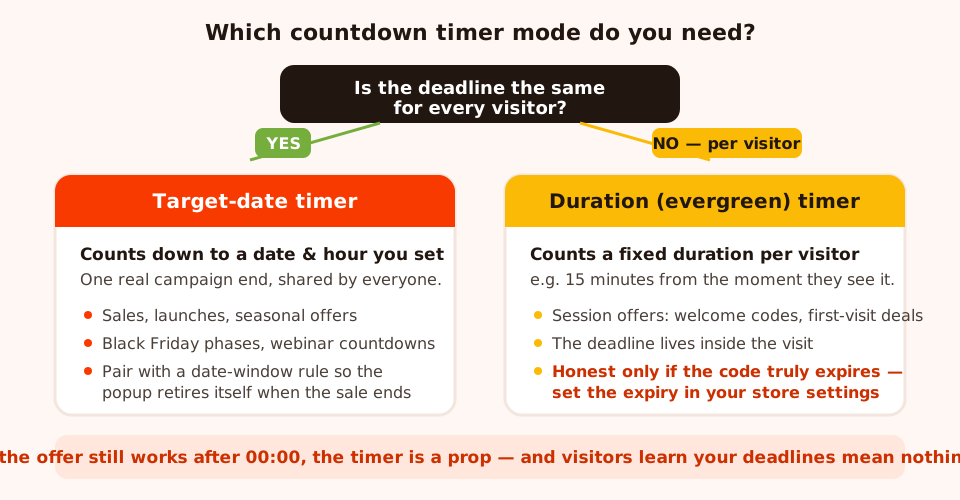
One question routes every campaign: shared deadline → target date; per-visit deadline → duration.
Target-date: one real deadline for everyone
In date mode, the timer counts down to a date and time you set — the actual end of your sale, launch or registration window. Every visitor sees the same clock, because there is only one deadline and it belongs to the campaign, not the visit. This is the mode for flash sales, seasonal offers, product launches, webinar registrations, and every phase of a Black Friday campaign plan, where the whole point is that a specific window closes at a specific hour.
Target-date timers are the easy ones to keep honest, because the deadline already exists — your sale genuinely ends when it ends. The one discipline they demand is retirement: the popup must stop appearing when the deadline passes. A countdown sitting at zero next to a "sale ends soon" headline on a Tuesday is the single most trust-destroying object in popup marketing. The clean solution is the date window display rule — more on it below — which starts and stops the campaign on schedule without you touching anything.
Duration: an evergreen, per-visitor deadline
In duration mode, the timer counts down a fixed span — say 15 minutes — for each visitor, starting when they see it. There's no shared campaign end; every visitor gets their own window. This is the mode for session-scoped offers: "Welcome! Your 10% code expires in 15 minutes", a first-visit free-shipping window, a bonus that rewards deciding within the visit. Marketers call this an evergreen countdown because the campaign never expires as a whole — it's always "live", and the urgency is generated fresh per visitor.
The evergreen honesty test — read this before you ship one. A duration timer is only honest if the deadline it displays is enforced somewhere real. If the welcome code genuinely stops working when the clock runs out — because you set its expiry in your store's coupon settings — then "expires in 15 minutes" is a true statement and the timer is legitimate. If the code quietly keeps working an hour later, a day later, forever, then the countdown is a prop and you're in dark-pattern territory. Visitors do test this — they let the timer die and try the code anyway — and once one of them learns your clocks are theatre, so does everyone they tell. If you can't or won't enforce the expiry, don't run the evergreen timer. Run a plain offer instead; it will convert less today and cost you nothing tomorrow.
| Target-date timer | Duration (evergreen) timer | |
|---|---|---|
| What it counts | Down to one date & hour you set | A fixed span per visitor — e.g. 15 minutes from when they see it |
| Whose deadline | The campaign's — identical for every visitor | The visitor's — each person gets their own window |
| Deadline truth | Real by default — the sale genuinely ends then | Real only if the offer is enforced to expire (code expiry set in your store) |
| Use cases | Flash sales, launches, seasonal offers, Black Friday phases, webinar countdowns | Welcome codes, first-visit offers, session-scoped bonuses |
| Rules to pair | Date window (auto start + stop), URL targeting for sale pages, once-a-day frequency | New-visitor audience, exit intent or delay trigger, show-once frequency, conversion switch off |
| Main risk | The popup outliving the sale — a dead clock still being served | Fake expiry — the code still working after 00:00 teaches visitors to ignore you |
Most campaigns land clearly on one side of that table. When one genuinely doesn't — an offer you could plausibly frame as a dated campaign or as a per-visitor window — you don't have to settle it by intuition: create an A/B test of the popup, switch the variant's timer to the other mode with copy to match, and let a 50/50 split show which deadline your visitors actually act on. Both versions still have to pass the honesty tests in this guide, though — splitting traffic between a real deadline and a fake one doesn't test urgency, it just measures how quickly trust burns.
One behaviour to know in both modes: when a duration timer runs out, it simply reads 00 : 00 — the popup doesn't remove itself. That's deliberate design territory for you to handle: an evergreen offer should be shown once (frequency rules, below), and a dated campaign should be retired by its date window so the zeroed clock is never served at all.
Designing the flip-clock display
The countdown block renders as flip-clock style cards — one card each for days, hours, minutes and seconds — and the handful of design choices it offers are worth making deliberately, because a timer is the loudest element on any popup it appears in.
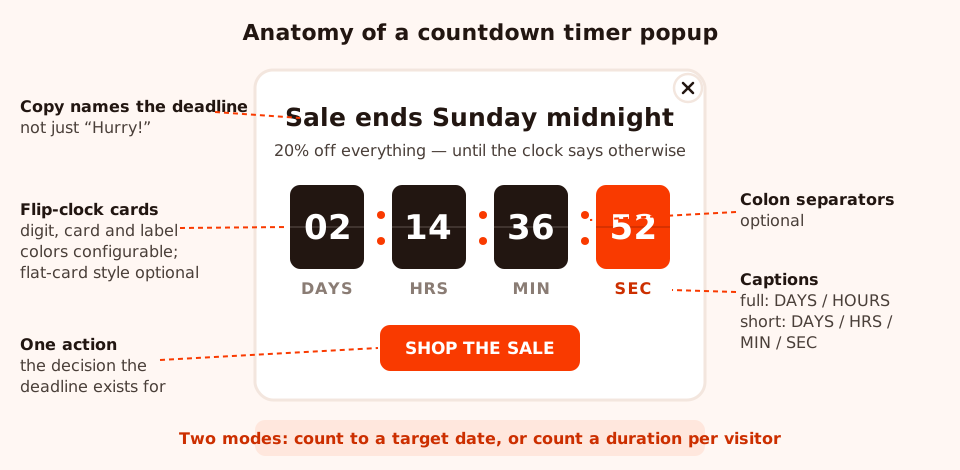
The pieces you can tune: cards, digits, labels, separators — and the copy above them, which does most of the persuading.
- Captions: full or short. Full labels (DAYS / HOURS / MINUTES / SECONDS) read calmly and suit multi-day sale countdowns. Short labels (DAYS / HRS / MIN / SEC) tighten the block for narrow popups and mobile, where four full words start to wrap.
- Colon separators, optional. Colons between the cards make the block read as one
clock (
02 : 14 : 36 : 52); without them, the cards read as four separate counters. Use colons when the timer is the hero, drop them when it's a quiet supporting element. - Flat cards, optional. The default flip-card look has depth and a split line; the flat style renders simple solid cards. Flat sits better on minimalist popups and inside top-bar-style layouts where a skeuomorphic clock would look like a sticker.
- Colors for digits, cards and labels are all configurable — so the timer can be the highest-contrast element on a sale popup (dark cards, white digits) or recede into a soft brand tint when the headline should lead. One rule: the digits must be readable at a glance from across the room. A timer you have to squint at creates no urgency at all.
Composition-wise, the pattern that works is boringly consistent: headline naming the deadline → timer → one action. Resist decorating around it. A countdown popup with two offers, three buttons and a news ticker isn't urgent — it's busy, and busy reads as ignorable.
Where countdown popups fit (and where they don't)
Sale announcements
The classic: a site-wide popup announcing the sale with a target-date timer to its end. Trigger it with a short delay on landing, cap it at once a day, and let the clock carry the message. This is the highest-traffic placement a timer will ever get, so it's also where the honesty rules matter most — thousands of people will personally witness whether your deadline meant anything.
Cart- and checkout-adjacent nudges
Use URL targeting to show a countdown only where the purchase decision actually happens — pages whose
URL contains /cart, or your checkout path. A visitor with items in the cart
and a live "sale ends tonight" clock has exactly the decision pressure a timer is for. Keep it
small and dismissible here; you're nudging a decision that's already in progress, not interrupting
browsing.
Black Friday and phased campaigns
Phased campaigns are where target-date timers compound: a "sale starts in…" teaser counting down to launch, the main sale popup counting down to the end, a final-hours push on the last day — each its own campaign with its own date window, so they hand over automatically as the phases roll. The four-phase Black Friday plan walks the whole calendar; the countdown block is the engine of phases two through four.
Webinar and launch countdowns
Registration deadlines and go-live moments are natural target dates — and they're self-honest, because the event genuinely happens at the hour on the clock. Pair the timer with a single registration input and a thank-you screen confirming the spot.
Where a timer doesn't belong
Anywhere there's no consequence at zero. A newsletter signup doesn't expire. Your standard product catalogue doesn't expire. A countdown on an offer that will be identical tomorrow is a lie with extra steps, and it spends the credibility your real campaigns need. If you want energy without a deadline, that's what gamified popups — a spin wheel or scratch card with a real prize pool — are for: excitement from chance, not from a clock you'd have to fake.
Triggers, frequency and the date window
A countdown popup's display rules do as much honesty work as its copy. Three decisions matter.
Pick the trigger for the offer, not the timer
A sale announcement wants a short time delay — a couple of seconds, so the page loads first and the popup reads as news. A cart-adjacent nudge wants URL targeting plus a delay. An evergreen welcome offer pairs naturally with exit intent on desktop — the moment someone is about to leave is precisely when "decide in the next 15 minutes" is relevant — with a scroll-percentage or delay trigger standing in on mobile, where exit intent is unreliable.
Frequency: never re-serve expired urgency
Here's the frequency trap specific to countdowns: a popup that re-shows daily is fine for a newsletter, but a countdown that re-appears after its own deadline passed is self-discrediting. Yesterday it said "last chance"; today it's back. So set frequency with the deadline in mind — for an evergreen offer, show it once (or once every many days at most) and turn "show again after conversion" off so buyers never see it again; for a dated sale, once a day is fine only because the date window below guarantees it stops at the deadline. A "limited time offer" a visitor meets on every visit is, observably, not limited.
The date window: campaigns that retire themselves
In the advanced display rules, the date window gives a campaign a start date and hour and an end date and hour, with a GMT offset. Set the window to your sale dates and the popup starts serving itself at launch and — critically — stops the moment the sale ends. No 3 a.m. deploy, no Monday-morning "the sale popup is still up" ticket, no visitor ever meeting a clock at zero. For a target-date countdown this isn't optional polish; it's the mechanism that keeps the promise the timer made. The same panel offers weekday-and-hour scheduling, which suits recurring windows like a weekend-only offer.
The pairing rule: every date-mode countdown ships with a date window whose end matches the timer's target. The clock makes the promise; the date window keeps it.
Copy that names the real deadline
Urgency copy fails in one of two directions: vague ("Hurry! Limited time!") or hysterical ("LAST CHANCE!!! DON'T MISS OUT!!!"). Both share the same flaw — they assert urgency instead of demonstrating it. The fix is to name the deadline and the consequence, specifically enough that the visitor could verify it:
- "Sale ends Sunday at midnight" beats "Sale ends soon" beats "Hurry!"
- "Your welcome code expires in 15 minutes" beats "Don't miss your discount"
- "Prices go back up Monday" beats "Last chance for savings"
Specificity is doing two jobs. It's more persuasive — a concrete deadline is checkable, and checkable claims are believed. And it disciplines you: writing "ends Sunday midnight" forces the sale to actually end Sunday midnight. If you find you can't finish the sentence "…and after that, ___" with something true, you've caught a fake-urgency campaign before it shipped. The button then collects the decision the headline set up — "Shop the sale", "Use my code" — never a second thought like "Learn more". For the fuller treatment of headlines, buttons and decline links, see the popup copywriting guide.
Two worked examples, copy included
Example 1: the weekend flash sale (target-date)
The setup. 20% off storewide, Friday 00:00 to Sunday 23:59.
- Timer: date mode, target Sunday 23:59 in your store's timezone. Full captions (DAYS / HOURS / MINUTES / SECONDS) — a multi-day countdown earns the formal labels. Colons on, dark cards, white digits.
- Copy: headline "20% off everything — until Sunday midnight." Subline "Storewide. No code needed. When the clock stops, so does the discount." Button "Shop the sale", linking to the sale collection.
- Rules: date window Friday 00:00 → Sunday 23:59 (matching the timer to the minute), time-delay trigger of 2–3 seconds, all pages, frequency once a day, device toggles on for both desktop and mobile.
- The honest part: Monday morning, prices are back up and — because of the date window — the popup is already gone. Nobody ever sees a clock at zero, and the next sale's countdown inherits the credibility this one earned.
Example 2: the evergreen welcome code (duration)
The setup. New visitors get a 10% first-order code that expires 15 minutes after it's revealed.
- Timer: duration mode, 15 minutes. Short captions (MIN / SEC), flat cards in a soft brand tint — this popup should feel like a welcome, not an air-raid siren.
- Copy: headline "Welcome — here's 10% off your first order." Subline "Your code is live for the next 15 minutes, then it's gone for good." A coupon chip with the code and click-to-copy, and a button "Start shopping". A visible decline link — "No thanks, I'll pay full price" — keeps the choice real.
- Rules: audience new visitors, exit intent on desktop with a 50% scroll trigger on mobile, frequency effectively once (once every 30 days), and "show again after conversion" switched off.
- The honest part — non-negotiable: the code's expiry is enforced in your store's coupon settings, because the popup displays the deadline but your store enforces it. Fifteen minutes on the clock, fifteen minutes in the coupon config. If a visitor lets the timer die and tries the code anyway, it must fail — that failure is what makes every future timer on your site believable.
Don't stretch the evergreen window to "improve" conversion. A 15-minute code that actually expires converts honestly. A "15-minute" code that secretly lasts a week converts slightly better this month and then never again — the audience that caught you is permanent. If 15 minutes genuinely feels too tight for your checkout, make it 30 and enforce 30 — and if you're torn between the two, that's a clean A/B test: 15 minutes against 30, each version's code expiring on its own clock. The number matters less than the match.
The honesty checklist: mistakes that kill urgency
Every item on the "don't" side of this list is something visitors catch — not hypothetically, but routinely, because testing a deadline costs them one refresh or one return visit.
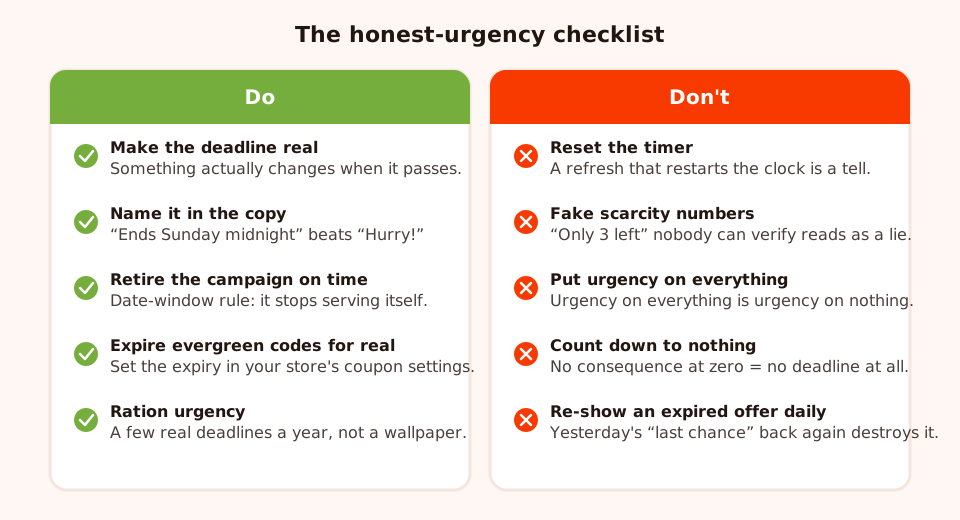
Print-worthy version of the rules: five habits that build deadline credibility, five that spend it.
- Resetting timers. A countdown that restarts on refresh or on the next visit is the fastest possible confession that the deadline is fake. If you can't keep a deadline stable, don't display one.
- "Only 3 left" fakery. Unverifiable scarcity numbers are the same lie in inventory form. If the count isn't real and live, don't claim one — a truthful time deadline beats a fictional stock deadline every time.
- Urgency on everything. When every popup, banner and product page carries a clock, visitors correctly conclude that none of the clocks matter. Urgency is a budget; spend it on the handful of moments a year when something genuinely ends.
- No consequence at zero. Counting down to nothing — the offer unchanged, the price the same — trains visitors that zero is safe. The whole mechanism depends on zero being expensive.
- Re-serving expired urgency. Frequency rules that resurface yesterday's "final hours" popup today turn your most urgent copy into your least credible. Date windows and show-once frequencies exist precisely for this.
- The clock outliving the campaign. A zeroed timer still being served is the static version of the same failure. Match the date window's end to the timer's target when you build the popup, not as a cleanup task for later.
Measuring whether the timer earned its place
A countdown popup makes a testable claim: that a deadline converts deferrers. So test it — properly. ChilliPopup reports views, clicks, closes, submissions and conversion rate per campaign, with a desktop-versus-mobile split, and can run two versions of the same campaign against each other as an A/B test — enough to answer the three questions that matter.

Views, clicks, closes, submissions and conversion rate per campaign — and the A/B results view puts the timer and timer-less versions of an offer side by side over the same days.
- Did the timer lift conversion? The honest way to measure this is an A/B test of the same popup with and without the countdown timer block — not a before-and-after comparison of separate periods, which confounds the timer with everything else that changed between them (traffic sources, promotions, season). Choose Create A/B test from the campaign's menu, delete the timer from Variant B, leave everything else identical, and publish it into a 50/50 split. Each visitor is assigned one version and sticks to it, and the A/B results view shows the two conversion rates side by side over the same days and the same traffic. Patience still applies — the built-in confidence check won't call a winner until each version has at least 100 views and the test has 20 conversions, and below 95% confidence it will tell you the lead can still flip. The A/B testing guide walks through the whole flow.
- Did conversions cluster near the deadline? A believed deadline shows up in the shape of the campaign: submissions accelerating as the end approaches, with the final day outperforming the first. A flat line says the clock was ignored — usually a believability problem before it's a design problem.
- Did closes spike? Compare the close rate against your non-urgent popups. A countdown that gets dismissed dramatically more often is reading as pressure rather than information — soften the copy, shrink the popup, or question whether this offer needed a clock at all.
And watch the long game: if each successive dated campaign converts a little better, your audience has learned your deadlines are real — that's compounding trust, the actual asset this whole guide protects. If each one converts worse, they've learned the opposite, and the fix is honesty, not a louder timer. If you're not live yet, the help center has install guides for every platform — one pixel script covers popups, timers and all.
Put a real deadline to work
Build popups, forms, surveys, quizzes and games from one editor — and one pixel. Free plan, no credit card required. Paid plans from $29/month.
Start free →Related reading
Frequently asked questions
What is a countdown timer popup?
A countdown timer popup is a website popup that pairs an offer with a live, ticking clock — flip-clock style cards counting down days, hours, minutes and seconds to a deadline. The timer either counts down to a target date you set (the same deadline for every visitor, like the end of a sale) or counts a fixed duration for each visitor (like a 15-minute welcome code). It converts by giving the 'I'll think about it' visitor a reason to decide now.
What is the difference between a target-date and an evergreen countdown timer?
A target-date timer counts down to one date and hour you set, so every visitor sees the same deadline — right for sales, launches and seasonal campaigns that end for everyone at once. An evergreen (duration) timer counts a fixed number of minutes for each visitor from the moment they see it, so every visitor gets their own deadline — right for session-scoped offers like a welcome code. If the deadline belongs to the campaign, use a target date; if it belongs to the visit, use a duration.
Are evergreen countdown timers dishonest?
Only when the deadline is fake. If your welcome code genuinely stops working when the countdown ends, a 15-minute evergreen timer is a truthful description of a real expiry. If the code quietly keeps working afterwards, the timer is a prop — and visitors who test it learn that your deadlines mean nothing, which weakens every future campaign. Set the code's expiry in your store's coupon settings so the clock and reality match.
What happens when the countdown timer reaches zero?
A duration timer simply reaches 00 — the popup does not remove itself. For date-based campaigns, use the date-window display rule: give the campaign a start and end date and hour (with a GMT offset) and the popup stops being served the moment the sale ends, so nobody ever meets a dead clock or an expired offer.
Do countdown timer popups actually increase conversions?
A real deadline reliably converts part of the 'I'll come back later' segment that would otherwise defer and forget — that segment is what a timer exists for. Measure it yourself with an A/B test: create one from the campaign's menu, remove the countdown timer block from Variant B, and split traffic 50/50 — the A/B results view compares views, conversions and conversion rate side by side, and won't call a winner until each version has at least 100 views and the test has 20 conversions. Then watch whether conversions cluster as the deadline approaches: if they don't, your deadline isn't believed — or isn't real.
How long should an evergreen countdown timer run?
Long enough to finish the purchase or signup it accompanies, short enough that the deadline is felt within the visit — 10 to 30 minutes covers most offers, and a 15-minute welcome code is a sensible default. A days-long evergreen timer defeats the point: if the deadline stretches beyond the visit, it belongs to the campaign, so use a target-date timer instead.