
A seasonal popup calendar is a one-page plan that says: this month we're talking about this, using this campaign shape, built by this date, ending on that one. That's the whole artefact. It takes an afternoon to write and it removes the single biggest cost of seasonal marketing — rebuilding from scratch, in a hurry, every time.
Below is a month-by-month version you can adapt, the four shapes that cover all of it, and the lead times that make the difference between a campaign and a scramble.
Key Takeaways
- One moment per month. Two competing campaigns in one month means neither gets built properly.
- Four shapes cover the year: countdown offer, prize game, gift-finder quiz, deadline bar.
- Reskin, don't rebuild. Duplicate last month's campaign, change the palette, the copy and the dates.
- Set the end date at build time. A date window is the only reliable way to stop a seasonal popup outliving its season.
- Real deadlines beat invented urgency — the last shipping date is the most valuable seasonal message you have.
The calendar, month by month
Adapt the moments to your market — a garden centre and a gift shop peak in opposite halves of the year — but keep the structure: one moment, one shape, one set of dates.
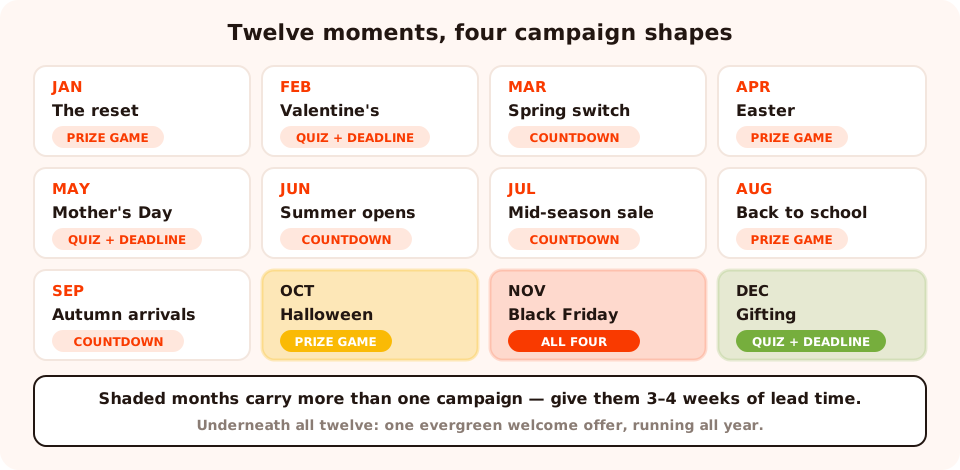
Twelve moments, four shapes. The loud months are shaded — that's where the lead time has to be longer.
| Month | The moment | Popup angle | Shape |
|---|---|---|---|
| January | The reset | New-year intentions, restock, "start as you mean to go on" | Prize game or quiz |
| February | Valentine's | Gifts with a deadline; gifts for friends, not just partners | Gift-finder quiz + deadline bar |
| March | Spring / season change | New season arrivals, the wardrobe or garden switch | Countdown offer |
| April | Easter & spring break | Family occasions, a hunt-style game, long-weekend sales | Prize game |
| May | Mother's Day / late spring | Gifting with a hard shipping cut-off | Gift-finder quiz + deadline bar |
| June | Summer opening | Holiday prep, outdoor season, Father's Day | Countdown offer |
| July | Mid-season sale | Clearance, the quiet-month push | Countdown offer |
| August | Back to school / back to work | Bundles, restock, the "get organised" angle | Prize game |
| September | Autumn arrivals | New season, the return of routine | Countdown offer |
| October | Halloween | A game with a costume on; the loudest reskin of the year | Prize game |
| November | Black Friday & Cyber Monday | Your biggest week; several campaigns, tightly ruled | All four |
| December | Gifting & shipping deadlines | Gift guides early, deadlines late, last-minute digital last | Gift-finder quiz + deadline bar |
Deep dives on the three loudest months already exist: Halloween, Black Friday and Christmas — plus New Year and Valentine's Day.
The four shapes you reuse all year
This is the part that makes a calendar survivable. Every campaign above is one of four things.
1. The countdown offer
A popup with a timer and a discount, ending on a real date. It works whenever there's a genuine cut-off, and it fails the moment the timer resets for the same visitor — which is why the timer should count down to a fixed target date rather than restarting per visit. Detail in the countdown timer guide.
2. The prize game
The cheapest seasonal campaign in existence, because you build it once and reskin it forever. The same wheel, scratch card, slot machine or claw machine gets a new palette, new prize names and a new headline four times a year — pumpkins in October, snowflakes in December, hearts in February, sun in June.
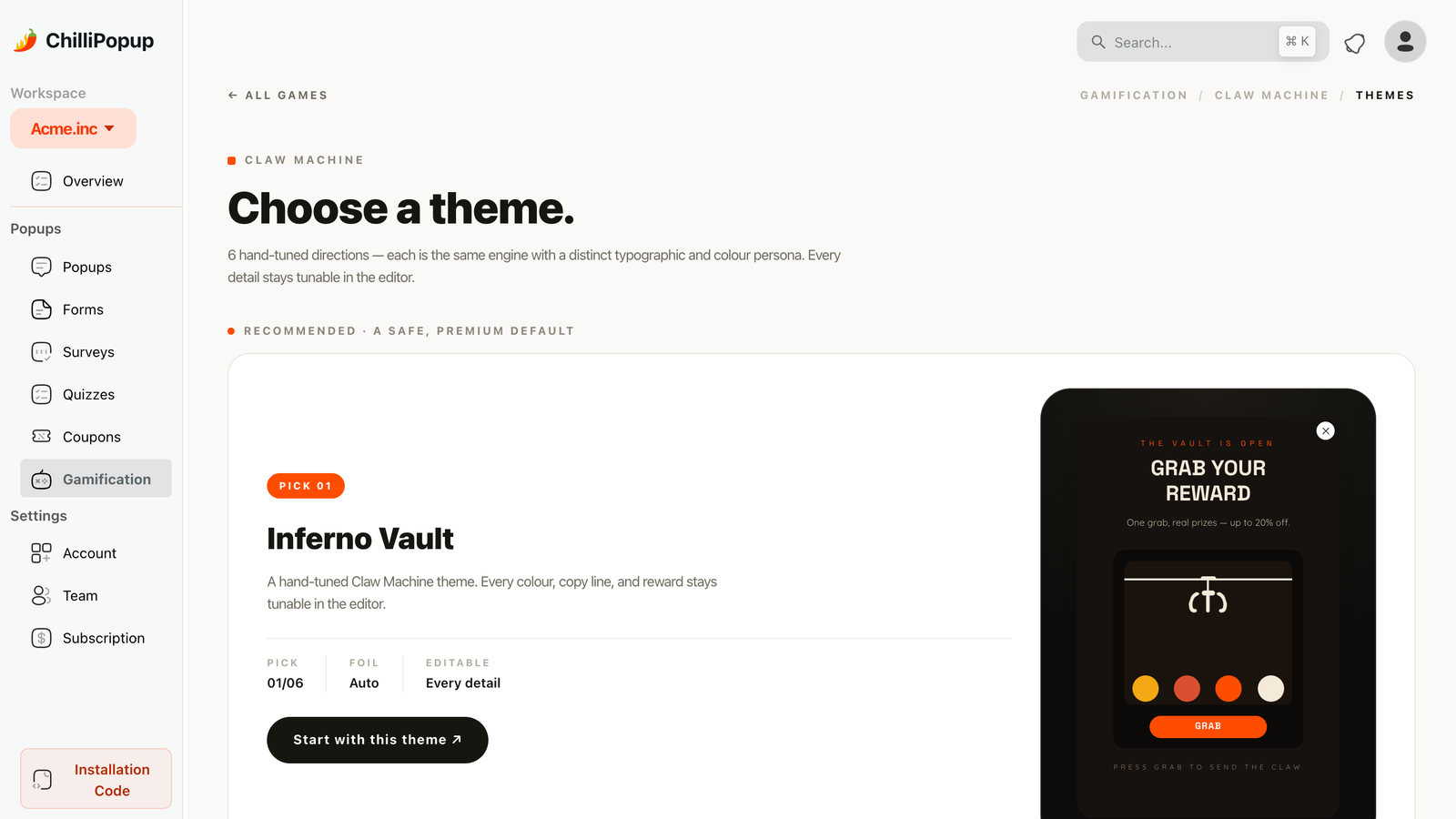
Start from a theme, recolour it per season. The mechanic and the prize logic never need rebuilding.
3. The gift-finder quiz
Two or three questions — who's it for, what's the budget, what are they into — ending on a recommendation and an email capture. It's the highest-value seasonal campaign for any store that sells gifts, because it converts the hardest visitor there is: someone who wants to buy but doesn't know what.
Build it as a quiz with tappable options rather than text inputs, so the answers come back as clean values you can segment on afterwards.
4. The deadline bar
The most under-used and most honest seasonal campaign: a small bar carrying the last order date for delivery. "Order by Thursday 6pm for delivery before the 24th." No discount, no ask, no form. It converts because it removes a real anxiety, and it's the one seasonal message that is never resented.
Lead times: build early, end automatically
The difference between a campaign that lands and one that limps is almost always three dates decided at the same moment.
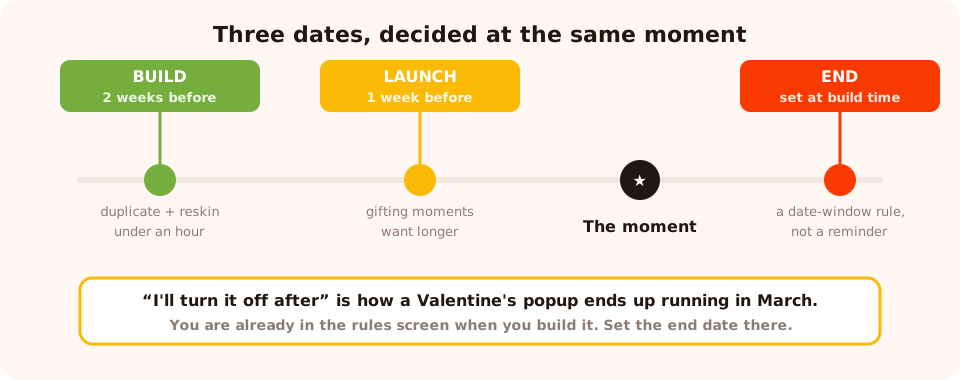
Three dates, decided together. The end date is the one people forget, and the one that costs trust.
- Build: two weeks out. Duplicating and reskinning an existing campaign takes under an hour, so two weeks is generous — which is exactly the point. It leaves room for the week that goes wrong.
- Launch: one week out for most moments. Gifting moments want longer, because people start looking earlier than they buy.
- End: set at build time. Every campaign can be limited to a date window. Do it while you're already in the rules screen, because "I'll turn it off after" is how a Valentine's popup ends up running in March.
November is not one campaign. Black Friday week carries an early-access capture, the sale announcement, a cart-recovery offer and a last-chance message — four campaigns with four sets of rules, all colliding on the same pages. Give it three to four weeks of lead time and a page-targeting plan, not the same afternoon you'd give a spring sale.
Rules that keep a seasonal campaign polite
Seasonal traffic is bigger, more distracted and more likely to be new. Four rules do most of the work:
- A date window on every campaign — start and end, set together.
- Page targeting so the sale popup lives on collection and product pages and never inside checkout.
- Frequency that respects a dismissal. Peak-season visitors return several times a week; a popup on every visit turns a good campaign into a nuisance by day three.
- Show again after conversion: off. Nothing undermines a seasonal offer like being asked to claim it twice.
There's also a scheduling rule worth knowing about for flash moments: campaigns can be limited by weekday and hour, which is how a "weekend only" sale popup stops appearing on a Tuesday.
The B2B version of the same calendar
Nothing above depends on retail. Swap the moments and the four shapes still work:
| Moment | Angle | Shape |
|---|---|---|
| January | New-year planning: the benchmark report, the checklist | Gated asset popup |
| Quarter ends | "Get it signed before the quarter closes" — a real deadline | Countdown offer |
| Budget season | The pricing and implementation guide, the business case template | Gated asset popup |
| Conference weeks | "Meet us there" / "Couldn't make it? Get the talk" | Deadline bar |
| Late August | Back to work: onboarding guides, team-setup content | Gift-finder quiz, reframed as a "which plan fits" quiz |
| December | The year in review, next-year planning content | Countdown offer on annual pricing |
What to run in the quiet months
The months with no obvious moment are the ones that decide how well the loud months perform, because that's when you build the list you'll sell to later. Three things worth running permanently underneath the calendar:
- The evergreen welcome offer — new visitors, one email field, running all year. This is the campaign that makes November work.
- A cart-recovery popup, which has no season at all. See the cart abandonment guide.
- One survey on the confirmation page. Quiet months are the right time to find out what nearly stopped people buying, so you can fix it before the busy ones.
Measuring a season, not a day
Seasonal campaigns get judged on the wrong timescale constantly. Three habits fix it:
- Compare a campaign to the same campaign last year, not to your evergreen popup. Seasonal traffic is a different mix of people.
- Watch views as well as conversions. A campaign that converted badly but was barely shown has a rules problem, not a copy problem.
- Write two lines in a doc when it ends — what you'd change, what to keep. Next year's version starts from that note, and that's what makes reskinning cheap.

Read each seasonal campaign against its own past, not against the evergreen popup running underneath it.
Six mistakes in seasonal popup planning
- Building from scratch every time. Duplicate and reskin — the structure was already proven.
- No end date. The single most common seasonal error, and the most visible to customers.
- Two campaigns in one month. They collide on the same pages and split the attention.
- Invented urgency. A timer that resets, or a "last chance" that comes back next week, teaches people to ignore all of them.
- Skipping the shipping deadline. It's the highest-converting seasonal message and it costs nothing to run.
- Nothing running in the quiet months. The evergreen welcome offer is what fills the list the seasonal campaigns sell to.
Build the calendar in ChilliPopup
An afternoon for the plan, an hour per campaign afterwards. One pixel serves every campaign all year — see the install guide if it isn't on your site yet.
1. Write the twelve moments down
One per month, in a doc, with the shape next to it. Adapt the table above to your market rather than copying it.
2. Build the four shapes once
Countdown offer, prize game, gift-finder quiz, deadline bar. These become the templates you duplicate all year.
3. Set three dates at build time
Build, launch and end — the end date as a date-window rule in the campaign itself, not a reminder in your calendar.
4. Duplicate and reskin for the next month
New palette, new copy, new dates. Keep the rules, the prize logic and the layout that already worked.
5. Keep the evergreen offer running underneath
New visitors, one field, all year. It's what makes the loud months pay.
Build once, reskin twelve times
Popups, countdowns, quizzes and prize games from one editor — with date windows, page rules and analytics built in. Free plan, no credit card required. Paid plans from $29/month.
Start free →Related reading
Frequently asked questions
What should a seasonal popup calendar include?
One marked moment per month, the campaign shape it uses, the build date and the end date. The moment is the reason to talk; the shape is one of a small number of reusable campaigns; the dates stop you from building four days out and from leaving a Valentine's popup live in March.
How far in advance should I build a seasonal popup?
Build two weeks before, launch one week before for most moments, and set the end date at the same time as the start date. Long-lead moments — the December gifting run and the Black Friday week — deserve three to four weeks because they carry several campaigns rather than one.
Do I need a new popup for every season?
No, and building one every time is why seasonal campaigns feel exhausting. Four shapes cover the whole year: a countdown offer, a gamified prize popup, a gift-finder quiz and a deadline bar. Duplicate the previous one, restyle it, change the dates and the copy.
What if my business is not seasonal?
Every business has a rhythm — quarter ends, budget season, conference season, back-to-school, the January reset. A B2B calendar uses the same four shapes against different moments: a quarter-end offer, a budget-planning guide, a conference-week campaign, a January "new plan" push.
How do I stop a seasonal popup running after the season?
Set the date window when you build it, not when you remember. Every campaign can be limited to a date range, and doing it at build time is the only version of this that actually happens. A Valentine's popup in March costs more trust than the campaign earned.
Which seasonal popup converts best?
The one attached to a real deadline. Urgency built on a genuine cut-off — the last shipping date, the last day of the sale — outperforms invented scarcity and does not damage trust when it ends. That is why the shipping-deadline bar is the single highest-value seasonal campaign most stores never build.