When should your popup appear? When the visitor's own behaviour says they're ready — mid-read on an article, on the way out of a product page, fifteen seconds into a pricing table — and never the instant the page loads. Popup triggers are how you encode that judgement: small behavioural conditions that hold the popup back until the right moment arrives.
Most popup advice obsesses over the offer and the design. Fair enough — but a mediocre popup shown at the right moment routinely beats a beautiful one shown at the wrong moment, because the wrong moment gets a reflex-close before anyone reads a word. This guide walks through all six triggers, the pages each one belongs on, and the mistakes that turn good campaigns into noise.
Key Takeaways
- Six triggers, one race. Exit intent, time delay, page scroll %, page count, click count, inactivity — enable several, and the popup appears when the first one fires.
- Match the trigger to the page's intent. Scroll % for readers, exit intent for leavers, time delay for deciders, page count for browsers.
- Exit intent is desktop-only in practice. It detects the cursor leaving the top of the viewport — on mobile, swap in scroll % or a time delay.
- Triggers decide when; the other rules decide whether. Device, URL, audience, frequency and schedule are all AND gates the visitor must pass first.
- The 0-second popup is the most common timing mistake — it asks a stranger for something before the page has given them anything.
What is a popup trigger — and why timing decides everything
Popup trigger, in one sentence
A popup trigger is the visitor behaviour that makes a popup appear — a cursor heading for the tab bar, a scroll depth reached, a number of seconds elapsed — as opposed to the targeting rules that decide who sees it and where.
It helps to separate the two jobs cleanly, because they're configured side by side and constantly confused:
- Triggers answer when, within a visit. Exit intent, time delay, scroll percentage, page count, click count, inactivity.
- Targeting and frequency rules answer whether at all. Which device, which URLs, new or returning visitors, how often, on which dates. Every enabled rule is an AND gate — the trigger only matters for visitors who pass all of them.
Why does the moment matter so much? Because a popup is an interruption, and the social cost of an interruption depends entirely on what it interrupts. Interrupt someone two seconds after arrival and you've interrupted nothing — they haven't read a headline, seen a product or formed a reason to care, so closing you is free. Interrupt the same person after they've read half your article and the offer lands on someone who is demonstrably interested. Same popup, same copy, wildly different outcome.
One default worth memorising before we start: without an explicit frequency rule, a campaign shows once per session. So a trigger isn't just "when the popup appears" — it's when the visitor spends the one impression you get this session. Spend it well.
The six popup triggers at a glance
ChilliPopup gives every popup, form, survey, quiz and game the same six triggers. Each one detects a different signal, and each signal implies a different state of mind:
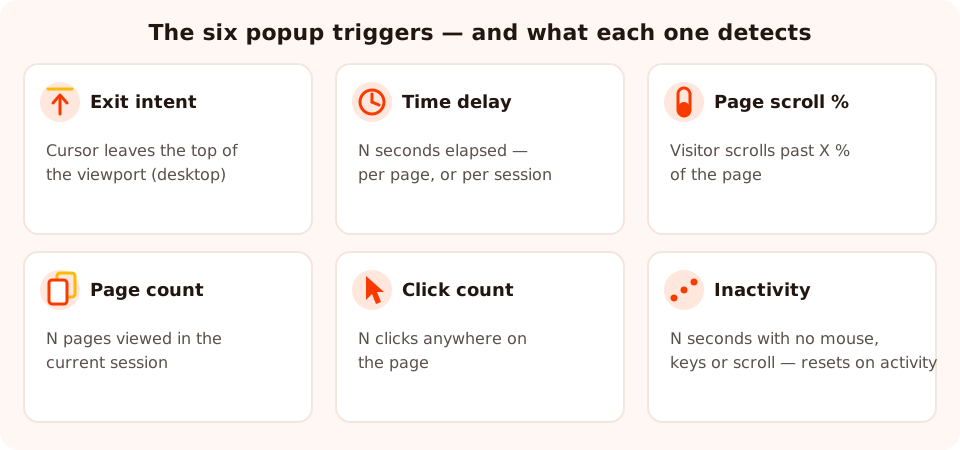
Six signals, six states of mind. The skill is picking the one that matches what the page is for.
| Trigger | What it detects | What it implies | Fires best on | Risk if misused |
|---|---|---|---|---|
| Exit intent | Cursor leaves the top of the viewport (desktop) | They're leaving — nothing left to lose | Product, cart and pricing pages | Silently never fires for mobile visitors |
| Time delay | N seconds elapsed — per page or per session | They've stayed long enough to be interested | Homepages, pricing, landing pages | Set to 0, it's an ambush, not a trigger |
| Page scroll % | Scrolled past X% of the page | They're actually consuming the content | Blog posts, guides, long pages | On short pages a low % fires almost instantly |
| Page count | N pages viewed in the current session | They're exploring, not bouncing | Stores, catalogues, multi-page sites | Never fires on single-page landing traffic |
| Click count | N clicks anywhere on the page | They're interacting, not skimming | Interactive pages — filters, galleries, configurators | Fires on rage-clicks and misclicks too |
| Inactivity | N seconds with no mouse, keyboard or scroll — the idle timer resets on activity | They've stalled, or stepped away | Long docs, dense comparison pages | Too short a window catches people mid-read |
You don't have to pick just one. Every trigger can be enabled or disabled independently on a campaign, and the content appears as soon as the first enabled trigger fires — more on that race below. But before combining anything, it's worth understanding what each trigger genuinely detects, because two of them are subtler than they look.
Exit intent: catch them on the way out
Exit intent fires when the cursor leaves the top of the viewport — the movement a desktop visitor makes toward the tab bar, the URL field or the close button. That's the whole mechanism, and it's worth being precise about, because both its power and its limits follow from it.
The power: it's the only trigger with zero cost to the people who stay. A reader who never heads for the exit never sees the popup. That makes exit intent the safest trigger to run broadly — it interrupts nothing except a departure that was already happening, which is why it's the default choice for last-chance offers on product pages, carts and pricing pages.
The limit: a touchscreen has no cursor. On a phone there is no top-of-viewport movement to detect, so exit intent is unreliable on mobile — a campaign that relies on it alone simply never appears for half your traffic, and your analytics will show the hole. The fix is a pair of campaigns: the exit-intent version device-targeted to desktop, and a mobile twin using page scroll % or a time delay. The mobile popup guide covers the small-screen half in detail.
Copy changes with the trigger. An exit popup is talking to someone who has decided to leave, so it can't open with "Welcome!". It opens with the thing they're about to lose: "Wait — your 10% welcome code is one email away." For the full treatment — offers, decline links, and when not to use it — see the complete exit intent guide.
Time delay: seconds on the page — or in the session
Time delay is the simplest trigger to state — show the popup after N seconds — and the one with the most important hidden setting: the scope. ChilliPopup counts the seconds either per page or per session, and the two behave very differently.
- Per page restarts the clock on every page. Use it when the offer belongs to a specific page: 15 seconds on the pricing page means 15 seconds actually looking at plans, which is a real signal of deliberation. Combine it with a URL rule so it only runs there.
- Per session lets the clock run across pages. Use it for site-wide offers — a newsletter, a first-order discount — where what matters is total engagement with your site, not which page they happen to be on when the timer runs out. A visitor who spends 10 seconds each on three pages hits a 30-second session delay; they'd never hit a 30-second per-page delay.
Reasonable starting values: around 10 seconds for a homepage or landing page, 15–20 seconds for a pricing page, longer for content pages (where scroll % is usually the better tool anyway). These are starting points, not answers — the analytics section below is how you find your number.
Never set the delay to zero. A popup that fires on page load asks a stranger for something before the page has given them anything. It also gets closed by reflex — the visitor's hand is already moving before they've read your headline — so you burn your once-per-session impression on the least receptive moment of the entire visit.
Page scroll %: the engagement trigger
The scroll trigger fires when the visitor has scrolled past a percentage of the page you choose. It's the natural trigger for anything meant to be read, because scroll depth is proof of consumption: someone 60% through a 2,000-word article didn't get there by accident. A scroll triggered popup at that point is offering more of something the visitor is actively enjoying — which is about as warm as an interruption gets.
Three practical calibrations:
- 50–60% for standard blog posts. Deep enough to filter out bounces, early enough that most genuine readers reach it.
- 70% for long guides. On a very long page, 50% already represents minutes of reading; push the threshold up so the trigger stays selective rather than firing on everyone who skims the intro at speed.
- Beware short pages. On a page barely taller than the viewport, "50% scrolled" happens on the first flick of the wheel — your thoughtful engagement trigger just became a 0-second popup in disguise. Scope scroll-triggered campaigns to long pages with URL rules.
If your site is content-led, this trigger is probably your workhorse: the blog popup strategy guide is built almost entirely around it. And if you're torn between two thresholds — fire at 50% or hold out for 70%? — that's a one-variable question an A/B test settles cleanly: keep Variant B's design identical and change only the scroll percentage in its display rules.
Page count, click count and inactivity: the behaviour trio
Page count — the browser's trigger
Fires after the visitor has viewed N pages within the current session. Three pages deep into a store, someone is comparing, not bouncing — which is exactly the moment a "still deciding?" nudge or a one-question quiz earns its interruption. It's also the gentlest possible first-visit trigger: setting it to 2 or 3 pages guarantees the popup never touches single-page bounces, who were never going to convert anyway. The obvious corollary: on a one-page landing site, this trigger never fires at all.
Click count — the interaction trigger
Fires after N clicks anywhere on the page. Clicks measure a different kind of engagement than scrolling — manipulation rather than reading — so this trigger suits pages visitors operate: product galleries, filter sidebars, configurators. Someone five clicks into your colour and size options is invested. Keep the threshold generous (5+); at 2 or 3 you're mostly catching misclicks, and a popup that appears mid-fumble reads as punishment.
Inactivity — the stall detector
Fires after N seconds with no mouse, keyboard or scroll activity — and the idle timer resets the moment any activity resumes, so it only ever catches a genuine pause. That pause usually means one of two things: the visitor is stuck (staring at a dense comparison table, unsure what to do next) or they've stepped away. Either way, a well-aimed prompt — a simplifying offer, a one-question survey asking what's missing — can restart a session that was quietly dying.
The calibration risk runs the other way from click count: too short a window catches people who are simply reading without scrolling. 45–60 seconds is a sane floor; below 30 you will interrupt readers mid-paragraph and they will not thank you for it.
First trigger wins: how triggers combine with the other rules
Enable several triggers on one campaign and they race: the popup appears as soon as the first enabled trigger fires, and the others never run. There's no queue and no stacking — one campaign, one appearance, whichever condition its visitor happens to meet first.
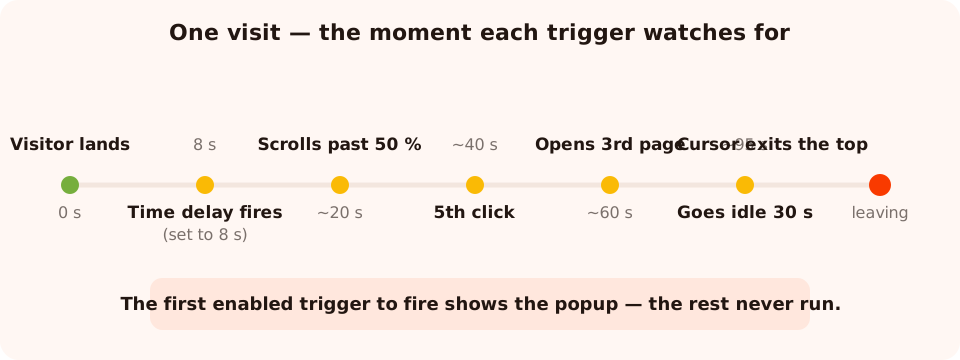
One visit, six candidate moments. Enable several triggers and the earliest one to fire spends your impression.
That mechanic makes trigger combinations a deliberate design choice, because the most permissive trigger you enable effectively sets your timing. Two pairings that work:
- Exit intent + a generous time delay. The classic. Leavers get caught on the way out; visitors who stay a long time without ever heading for the exit get the offer after, say, 60 seconds. Each visitor meets the popup at whichever moment comes first for them.
- Scroll % + exit intent. On an article: readers meet it mid-read at 60%, skimmers who bail early meet it on the way out. Both moments beat a timer.
And one that doesn't: a short time delay plus anything. A 5-second timer wins the race against every other trigger almost every time, so the careful scroll threshold you configured next to it is decorative.
The gates around the race
Triggers only fire for visitors who pass every other enabled rule first — and every rule is an AND gate. The full set: device toggles (desktop/mobile), page URL rules (contains, does not contain, is exactly, is not, starts with, ends with), audience (everyone, new visitors, or returning visitors, with "returning" defined in days), frequency (once a day, every visit, every session, once every N days, once every N visits, or all pages all the time), show again after conversion on or off, plus advanced targeting by date window, OS & browser, and a weekday-and-hour schedule.
Two footnotes that save real debugging time. First, new-versus-returning is computed from the
visitor's own browser storage — someone in a private window or on a second device looks new. Second,
window.ChilliPopup.open('UUID') is a forced open that bypasses every rule and
trigger — perfect for previewing a design, useless for testing your timing. To test triggers
honestly, open a fresh private window and behave like a visitor. There's also a copyable direct link
per campaign that launches it on arrival — handy for email traffic, where the click itself is the
trigger.
Which trigger for which page: the decision table
Pages differ in what visitors come to do, and the right trigger is the one that detects that activity going well — or about to end. Here's the map:
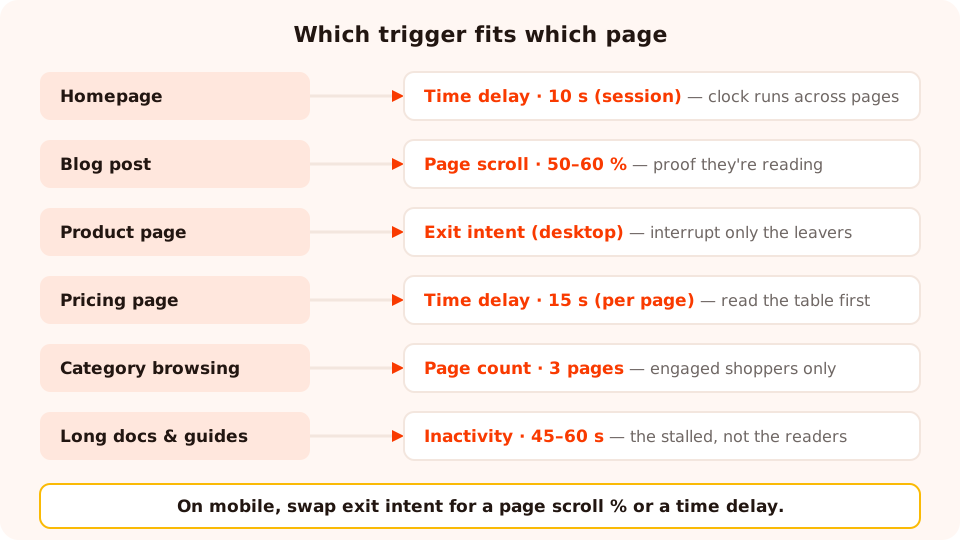
The trigger should detect the page's own activity — reading, browsing, deciding — not a generic countdown.
| Page type | Visitor's job there | Best trigger | Starting setting | Offer that fits |
|---|---|---|---|---|
| Homepage | Orienting | Time delay (session scope) | 10 s | Newsletter, welcome offer |
| Blog post | Reading | Page scroll % | 50–60% | Related content, newsletter |
| Long guide / docs | Deep reading | Scroll 70% — or inactivity | 70% / 45–60 s | Save-for-later signup, help survey |
| Product page | Evaluating | Exit intent (desktop) + scroll twin on mobile | 60% on the mobile twin | First-order discount, spin wheel |
| Category / collection | Browsing | Page count | 3 pages | Guidance quiz, curated picks |
| Pricing page | Deciding | Time delay (page scope) | 15–20 s | Trial nudge, objection-handler |
| Landing page (paid) | One decision | Exit intent only | Desktop, with a mobile scroll twin | Last-chance version of the page's own offer |
| Checkout | Paying | Exit intent only — or nothing | Desktop only | Reassurance, not distraction |
Checkout deserves its own caution. Any popup that appears while someone is mid-payment competes with your own conversion. If you run one at all, exit intent is the only defensible trigger there — it fires only when the sale is already walking away. The cart abandonment guide covers that scenario end to end.
Treat the map as a strong default, not a verdict. When two rows genuinely compete for the same page — exit intent versus a 15-second delay on a pricing page, say — you no longer have to pick on instinct: create an A/B test from the campaign's ⋮ menu, keep Variant B's design identical, and change only the trigger in B's display rules. Publish B and traffic splits between the two versions (each visitor is assigned one and sticks with it), while the results view compares their conversion rates side by side — here's the full A/B testing walkthrough.
Three worked examples, with the copy
1. Apparel store, product pages — exit intent with a mobile twin
Setup: two campaigns sharing one design. Campaign A: exit intent, device-targeted to
desktop, URL rule contains /products/. Campaign B: page scroll 60%, mobile
only, same URL rule. Audience: new visitors. "Show again after conversion" off on both.
Copy: "Leaving without your 10%? Drop your email and the code appears right here." One email input, one button, and the code delivered on the thank-you screen — plus a visible decline link, "No thanks, I'll pay full price."
Why it works: desktop leavers are caught at zero cost to everyone else; mobile visitors — where exit intent can't fire — get an equivalent moment defined by engagement instead of departure. One offer, two honest triggers.
2. SaaS pricing page — 15-second per-page delay
Setup: time delay, 15 seconds, page scope, URL rule is exactly your pricing URL. Frequency: once every 3 days, so a returning decider isn't nagged on every visit.
Copy: "Still comparing plans? Start the 14-day trial and decide with real data — no card needed up front." One button, one close.
Why it works: fifteen seconds on the pricing page specifically filters for genuine deliberation — the per-page scope is doing the targeting. The popup doesn't sell features; it removes the reason they're hesitating.
3. Recipe blog — 60% scroll into a newsletter ask
Setup: page scroll 60%, URL rule contains /blog/, audience
everyone, frequency once every 7 days, conversion gate off.
Copy: "You're halfway to dinner. Get one recipe like this in your inbox every Sunday." Email field, one-word button — "Send it".
Why it works: the ask arrives as a continuation of what the reader is already doing. The copy names the moment ("halfway"), which only works because the trigger guaranteed it — write the trigger and the copy together, not separately. More on that pairing in the popup copywriting guide.
Seven popup timing mistakes
- The 0-second popup. Firing on page load spends your once-per-session impression on the visit's least receptive moment. If you truly must show something immediately, it had better be the page's entire point — and then it's a landing page, not a popup.
- Stacking campaigns in one visit. Three published campaigns with permissive triggers all fire in the same session — welcome popup, then newsletter, then exit offer — and together they read as harassment. Stagger them: different URL rules, different audiences, different frequencies, so any one visit meets at most one interruption.
- Exit intent as the only trigger for all traffic. Exit intent detects a cursor; phones don't have one. Solo, it silently excludes your mobile visitors. Always give it a mobile twin on scroll % or time delay.
- A low scroll % on short pages. 30% of a short page is one wheel-flick — you've rebuilt the 0-second popup with extra steps. Scope scroll campaigns to long pages by URL.
- An inactivity window under 30 seconds. People read without scrolling. A short idle threshold interrupts them mid-paragraph, which is the opposite of what the trigger is for. Remember the timer resets on any activity, so a longer window costs you almost nothing.
- Testing with the forced open — or in a stale session.
ChilliPopup.open()bypasses every trigger and rule, so it proves nothing about your timing; and revisiting in the same session runs into the once-per-session default, which makes a working trigger look broken. Test in a fresh private window, behaving like a visitor. - Forgetting frequency and the conversion gate. Triggers decide the moment, but frequency decides the repetition. Leave "show again after conversion" on and subscribers meet the signup popup forever — perfectly timed, completely pointless.
Read the analytics, then tune the timing
Every campaign reports views, clicks, closes, submissions, conversion rate (submissions ÷ views), field inputs and a desktop-vs-mobile breakdown. For timing questions, three patterns cover most diagnoses:

Views tell you the trigger is firing; closes versus submissions tell you whether it's firing at the right moment.
- High views, high closes, low conversion → firing too early. Plenty of people see the popup, and they dismiss it. The offer might be wrong, but the cheaper first experiment is timing: raise the delay, raise the scroll threshold, or move from a timer to an engagement trigger — and run the new timing as Variant B of an A/B test, so both moments face the same traffic at the same time instead of this week being compared to last week.
- Low views → the trigger or gates are too strict. Barely anyone sees it at all. Either the threshold is too demanding (an 80% scroll point most readers never reach, a page-count bar your session depth can't clear) or an AND gate — device, URL rule, audience, schedule — is filtering out more traffic than you intended. Loosen one thing at a time.
- A lopsided device split → a trigger that can't fire on mobile. If a campaign's views are overwhelmingly desktop on a site with mobile traffic, you've probably shipped exit intent without a mobile twin. The breakdown makes this failure visible in one glance.
The tuning discipline is the same as any experiment: change one timing variable at a time and judge on conversion rate — not on views, which mechanically go up as you make a trigger more permissive. A trigger change that doubles views and halves conversion rate has gained you nothing but annoyance. The built-in A/B test is the honest instrument for that comparison: the original keeps its timing, Variant B carries the new one, and both are judged on the same days and the same traffic. Patience still applies — the confidence check won't call a winner until each version has at least 100 views and the test at least 20 conversions, and below 95% confidence it will tell you the lead can still flip. For the full metric-by-metric walkthrough, see the popup analytics guide.
Where to start today: open your busiest campaign and check two things — that its trigger would actually fire for a mobile visitor, and that its delay or threshold gives the page time to make its case first. Those two checks fix the majority of underperforming popups before a single word of copy changes. If you're not installed yet, the pixel takes one script tag — here's the install guide.
Put the right moment to work
Build popups, forms, surveys, quizzes and games from one editor — and one pixel. Free plan, no credit card required. Paid plans from $29/month.
Start free →Related reading
Frequently asked questions
What is a popup trigger?
A popup trigger is the visitor behaviour that makes a popup appear — for example the cursor leaving the top of the viewport (exit intent), a number of seconds on the page (time delay), scrolling past a set percentage of the page, viewing a set number of pages, clicking a set number of times, or going idle for a set number of seconds. In ChilliPopup you can enable several triggers on one campaign, and the popup appears as soon as the first enabled trigger fires.
What is the best time delay for a popup?
Long enough for the visitor to understand the page, short enough to catch them before they leave. Start around 10 seconds on a homepage and 15 to 20 seconds on a pricing page, and never use zero — a popup that fires on page load interrupts someone who hasn't seen anything worth staying for yet. Then read the analytics: high views with fast closes and few submissions means the delay is too short. And when two delays both look reasonable, run them head to head as an A/B test — same design, different timing — rather than changing the setting and waiting to compare.
Do exit intent popups work on mobile?
Not reliably. Exit intent detects the cursor leaving the top of the viewport, and a touchscreen has no cursor to track. On mobile, use a page scroll percentage or a time delay instead — and use device targeting to run the exit-intent version of the campaign on desktop only.
What is a scroll triggered popup?
A scroll triggered popup appears once the visitor has scrolled past a percentage of the page that you choose — say 50%. It is the best trigger for blog posts and long guides, because scrolling is proof of engagement: someone halfway through your article is reading it, which makes them far more receptive to a related offer than someone who arrived two seconds ago.
Can I use more than one trigger on the same popup?
Yes. Enable several triggers and the popup appears as soon as the first one fires — whichever that turns out to be for each visitor. A common pairing is exit intent plus a generous time delay: engaged leavers meet the popup on the way out, and long-stayers meet it after the delay. Your frequency rule still applies, so the popup doesn't reappear when a second trigger fires later.
How often does a triggered popup show?
Triggers decide when a popup appears within a visit; frequency rules decide whether it appears at all. Without an explicit frequency rule, ChilliPopup shows a campaign once per session. You can change that to once a day, every visit, every session, once every N days, or once every N visits — and turn off "show again after conversion" so visitors who already submitted stop seeing it.