Joomla has no shortage of ways to inject a script, which is exactly the problem: pick the wrong one and your popup vanishes at the next template update, with nothing in any log to tell you why.
This guide covers the three routes for adding a Joomla popup, which one to choose, how to target Joomla's URLs, the six campaigns worth running on a typical Joomla site, and the caching and update traps that account for almost every "it stopped working" report.
Key Takeaways
- A custom HTML module assigned to all pages is the safest route for most Joomla sites.
- Template files get overwritten by updates. If you edit the template, use an override.
- Turn off content preparation on the module, or Joomla can rewrite your script tag.
- Clear the cache before you debug anything. Nine times out of ten that is the whole problem.
- Load the pixel everywhere, target per campaign. Then you never have to open Joomla again.
The three ways to add a popup to Joomla
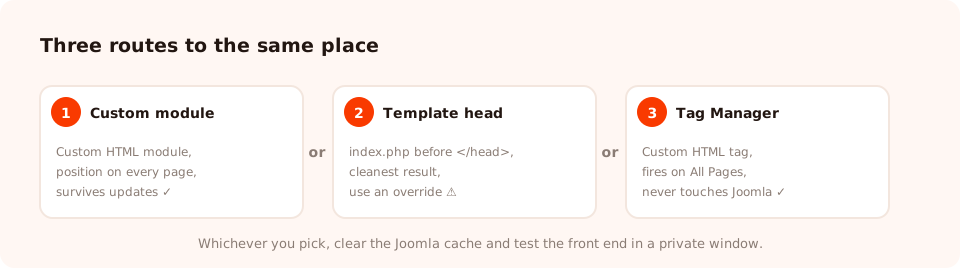
All three end in the same place — the script on every page. They differ in what happens at the next update.
| Route | Survives a template update? | Needs code access? | Best for |
|---|---|---|---|
| Custom HTML module | Yes | No | Almost everyone — the default recommendation |
| Template head | Only if you use an override | Yes | Developers who already maintain overrides |
| Google Tag Manager | Yes | No | Sites already running Tag Manager |
Route 1 — a custom HTML module (recommended)
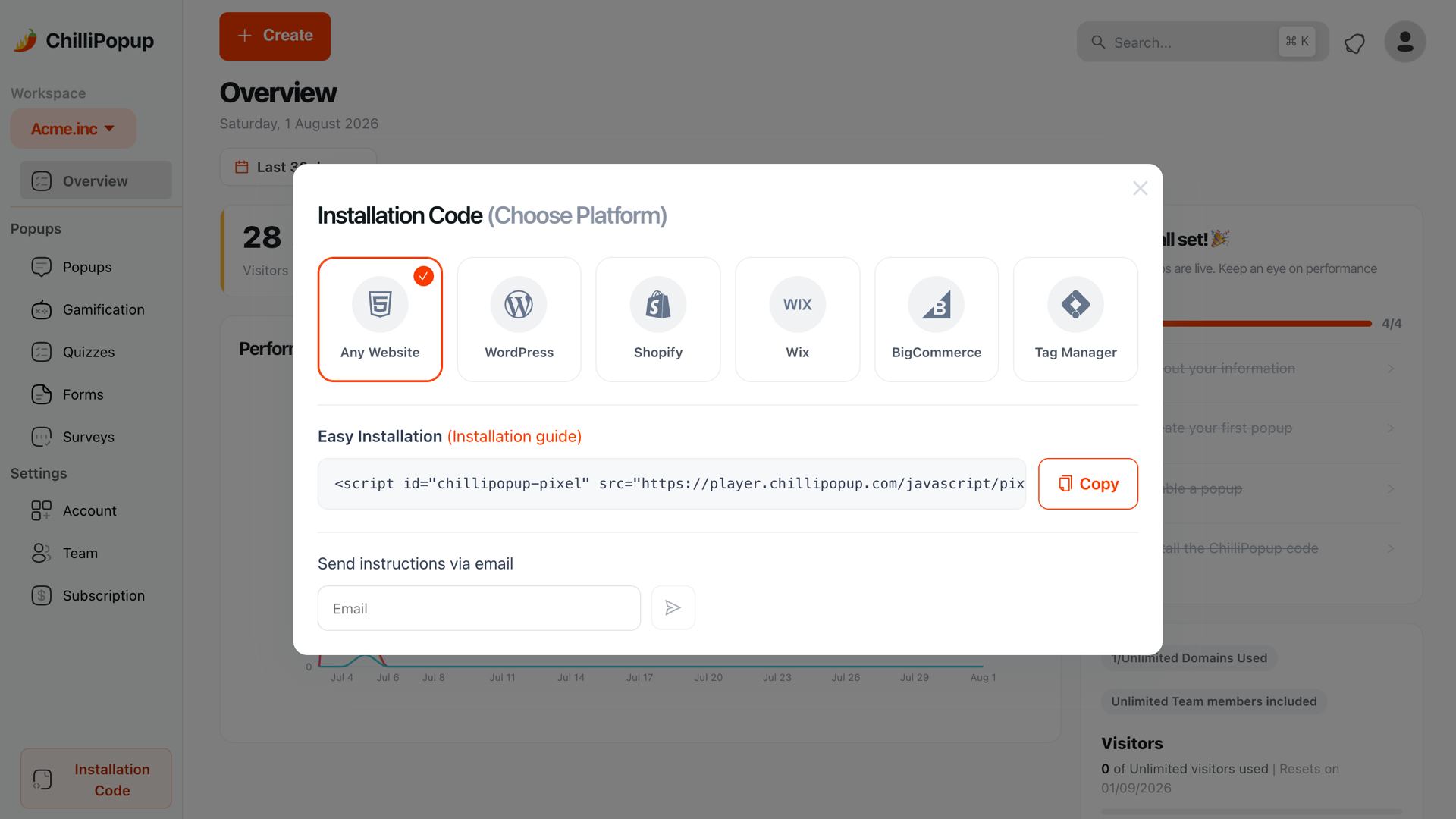
In ChilliPopup, open Installation Code and choose Any Website. Copy the snippet — it already contains your workspace id.
In Joomla, create a new Custom module. Switch the editor to source / code view before pasting, or the rich-text editor will mangle the tag.
Paste the snippet. In the module's options, turn Prepare Content off so Joomla does not run its content plugins over your script.
Assign the module to a position your template renders on every page — a footer or debug position is fine, since the script has no visible output — set Menu Assignment to On all pages, publish it, and clear the cache.
<script id="chillipopup-pixel"
  src="https://player.chillipopup.com/javascript/pixel.js?id=YOUR_WORKSPACE_ID"
  data-api="https://api.chillipopup.com"
  async="true"></script>
Route 2 — the template head
If you would rather the script sat in the head itself, add it to your template's
index.php just before the closing head tag. This is the cleanest result and the most fragile
route: a template update replaces that file. Put the change in a template override or a
child template, not in the shipped files, and keep a copy of the snippet somewhere you will find it again.
Route 3 — Google Tag Manager
If Tag Manager is already on the site, add the pixel as a Custom HTML tag firing on All Pages. Nothing in Joomla changes at all, and the marketing team can manage it without touching the CMS — see the Tag Manager install guide.
Clear the cache, then test in a private window. Joomla's page cache, a caching plugin, and your own browser will all happily serve you a version of the page from before you made the change. More "the popup isn't showing" reports end here than anywhere else.
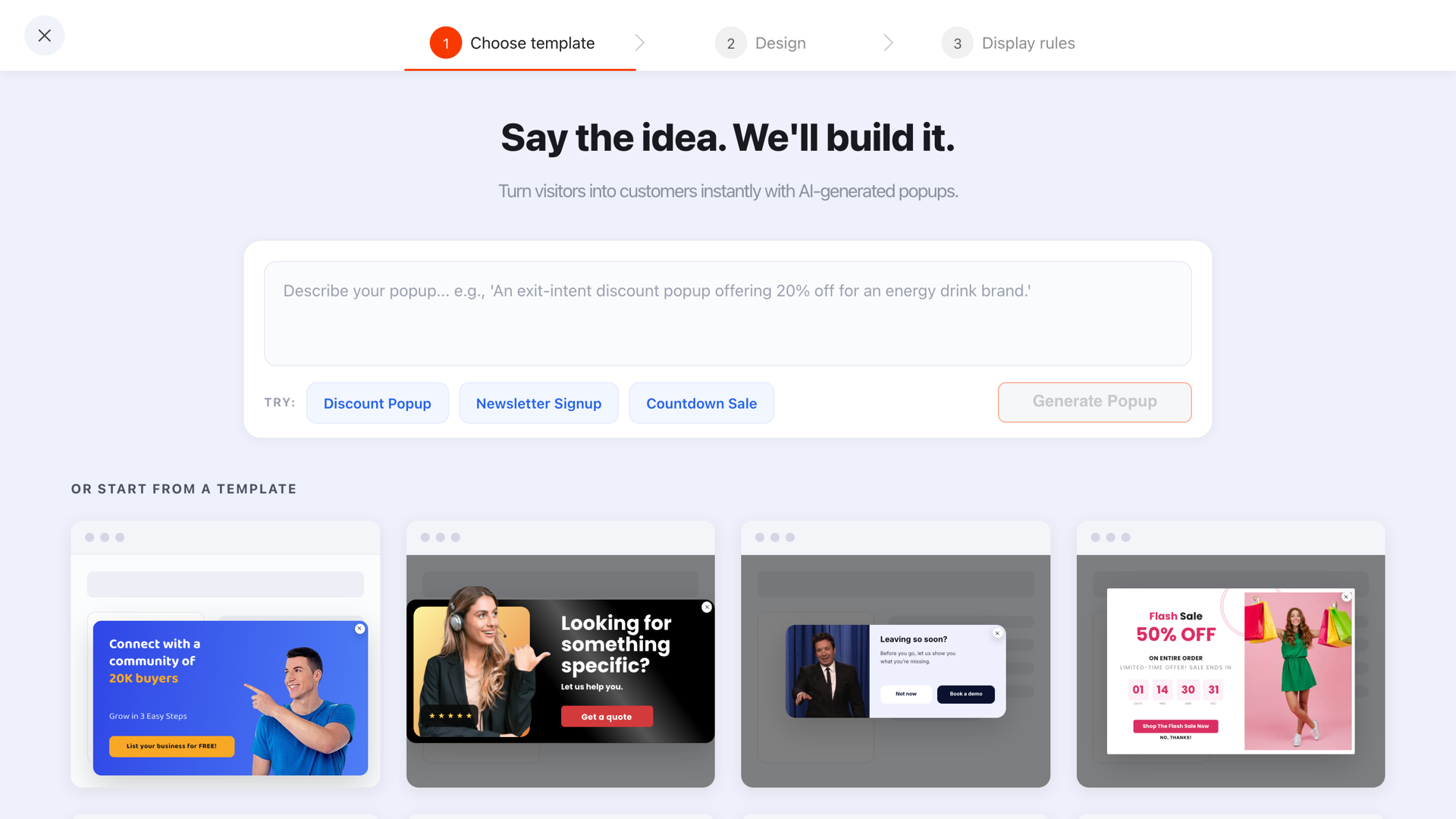
Once the pixel is on the site, everything else happens outside Joomla — start from a template and edit it.
Six popups worth running on a Joomla site
Joomla is over-represented among associations, membership organisations, education, public bodies, multilingual sites and long-lived business sites. These fit that profile.
- The newsletter signup. The obvious one, and still the one that pays. Exit intent on desktop, scroll depth on mobile, new visitors, "show again after conversion" off.
- The membership or enquiry nudge. On the pages that explain what you do, not on the homepage. "Not sure which membership fits? Two questions and we'll tell you."
- The document download. A prospectus, a report, a price list. A short form in exchange for the link is the oldest lead-capture trade there is, and it still works.
- The event registration bar. A slim bar with a date window so it disappears by itself the day after the event.
- The satisfaction question. One CSAT rating after a form submission or a support page. Public-sector and membership sites are asked for this kind of number constantly.
- The language nudge. Joomla runs a lot of multilingual sites — see our guide to multilingual popups for the one-campaign-per-language pattern.
Targeting Joomla URLs
Joomla URLs vary enormously depending on whether search-engine-friendly URLs are on and which router the site uses. Check the address bar first, then write rules against what you actually see.
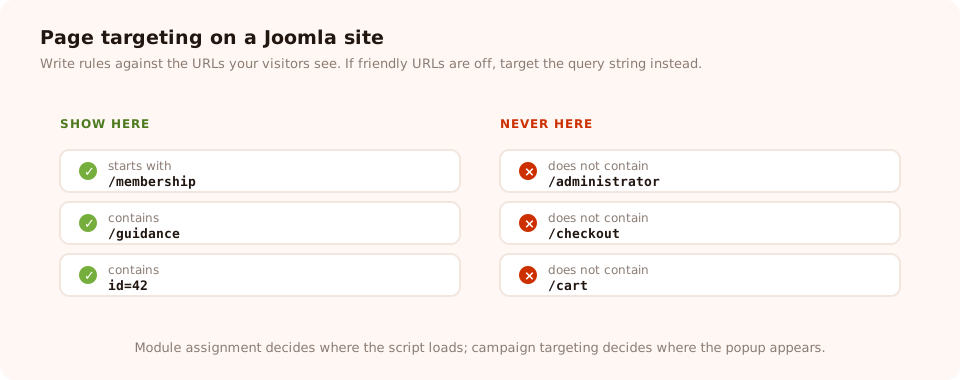
Write the rules against the URLs your visitors actually see, not the ones Joomla generates internally.
| Goal | Condition | Value |
|---|---|---|
| A whole section of the site | starts with | the menu alias, e.g. /membership |
| One article | is exactly | the full article URL |
| Shop product pages | contains | your component's product path |
| Never on the cart or checkout | does not contain | /cart, /checkout |
| Never in the admin | does not contain | /administrator |
| One language | contains | /fr/ |
If search-engine-friendly URLs are off and your pages look like
index.php?option=com_content&view=article&id=42, target on the query string instead —
contains id=42 works perfectly well. Two layers of control are available: Joomla's
module assignment decides which pages load the script, and each campaign's page targeting decides where it
appears. Load the script everywhere and do all the routing in the campaign, and you will not need to open
Joomla again.
A worked example: a membership association
The situation. A professional association on Joomla. Plenty of traffic to its guidance articles, almost no enquiries.
Campaign 1 — the guidance-page capture. Page targeting starts with the guidance section, 50% scroll trigger, new visitors, once every 14 days.
"Get the quarterly briefing — plain-English updates for members and non-members alike." One email field.
Campaign 2 — the membership qualifier. The membership pages only, 15-second delay, once per visitor. A three-question quiz:
"Which membership fits you?" — job type, years in the field, employer size. The last screen shows the recommended tier and a link.
Campaign 3 — the annual conference bar. A top bar on all pages with a date window covering the six weeks before the event, then it retires itself.
Popup copy you can paste
Joomla sites are usually informational rather than transactional, so the offer is rarely a discount. Four that work, written for the kind of visitor a Joomla site actually gets:
| Where | Headline | Button | Why it works |
|---|---|---|---|
| Guidance or knowledge articles | "Plain-English updates, four times a year." | Send me the briefing | Names the frequency, so it does not read as a commitment |
| Membership or service pages | "Not sure which option fits? Two questions and we'll say." | Show me | Replaces a form with a decision the visitor already wants made |
| Publications and reports | "The full report, as a PDF — where should we send it?" | Email me the PDF | Concrete deliverable, and the email has an obvious purpose |
| Event pages | "Registration closes Friday. 40 places left." | Reserve a place | A real deadline beats an invented one every time |
One rule holds across all four: say what arrives and how often. Public bodies, associations and education sites carry more scepticism about email than a shop does, and specificity is what buys you the address. Our popup copywriting guide goes deeper on the structure.
Add a popup to Joomla in ten minutes
One module, one script, and then popups, forms, surveys, quizzes and prize games from a single editor — with targeting and reporting Joomla does not have. Free plan, no credit card required. Paid plans from $29/month.
Start free →Joomla gotchas
- Template updates overwrite template files. The single biggest cause of a popup silently disappearing. Use a module, or a proper override.
- The rich-text editor eats script tags. Always switch to source view before pasting, and check the module after saving.
- Content plugins can rewrite your snippet. Turn Prepare Content off on the module.
- Menu assignment is not the same as targeting. "On all pages" means the script loads everywhere; where the popup appears is decided by the campaign.
- Caching hides changes. Clear Joomla's cache and any caching plugin, and test in a private window.
- Multilingual sites need one campaign per language. Do not put two languages in one popup.
Five mistakes on Joomla sites
- Installing an extension for something a module can do. Every extension is another thing to update and another possible conflict.
- Editing the template directly. It works until the day it does not, and then nobody remembers what changed.
- Firing the popup instantly. Joomla sites are usually content sites; let people read something first.
- Leaving "show again after conversion" on. Members who signed up years ago get asked to join the list again.
- Not testing after a Joomla or template update. Add it to your post-update checklist alongside your forms and your analytics.
How to tell whether it worked

Views, submissions and conversion rate per campaign — none of which Joomla reports on its own.
- Zero views means the script is not loading. Check the module is published, assigned to all pages, and that the cache is clear.
- Views but no submissions means the offer or the copy is wrong — the plumbing is fine.
- A sudden drop to zero almost always follows a template or CMS update. Check the snippet is still there.
Related reading
Frequently asked questions
Do I need a Joomla extension to add a popup?
No. A popup that ships as a script tag needs somewhere to live in the page head, and Joomla gives you three places without installing anything: a custom HTML module published to a site-wide position, the template's own head, or a tag manager you already run. An extension is one more thing to keep updated for no additional capability.
Where is the best place to put a script in Joomla?
For most sites, a custom HTML module assigned to all pages. It survives template updates, it can be turned off from the module manager without touching any code, and anyone on the team can find it. Edit the template head instead if you want the script in the head itself and you are comfortable maintaining a template override.
Why did my Joomla popup stop working after an update?
Almost always because the script lived in a template file that the update overwrote. This is the classic Joomla trap. Either move the snippet into a custom HTML module, or put your change in a template override rather than in the template's own files, so the next update leaves it alone.
Does Joomla caching affect popups?
It can hide your changes rather than break them. If you have added the script and see nothing, clear the Joomla cache and any page-cache plugin before you start debugging anything else, and always test in a private window. The popup content itself is fetched by the script at runtime, so it is never cached by Joomla.
Can I show a popup on specific Joomla pages only?
Yes, and in two independent ways. Joomla's module assignment controls which pages load the script at all, while the campaign's own page targeting controls which URLs it appears on, using six conditions — contains, does not contain, is exactly, is not, starts with and ends with. Use module assignment for site-wide loading and campaign targeting for everything else, so you never have to touch Joomla again.
Will this work with VirtueMart or another Joomla shop component?
Yes. The pixel runs on the rendered page, so it does not care which component produced it. Point your page-targeting rules at the URL patterns your shop component generates for product and category pages, and exclude the cart and checkout paths.