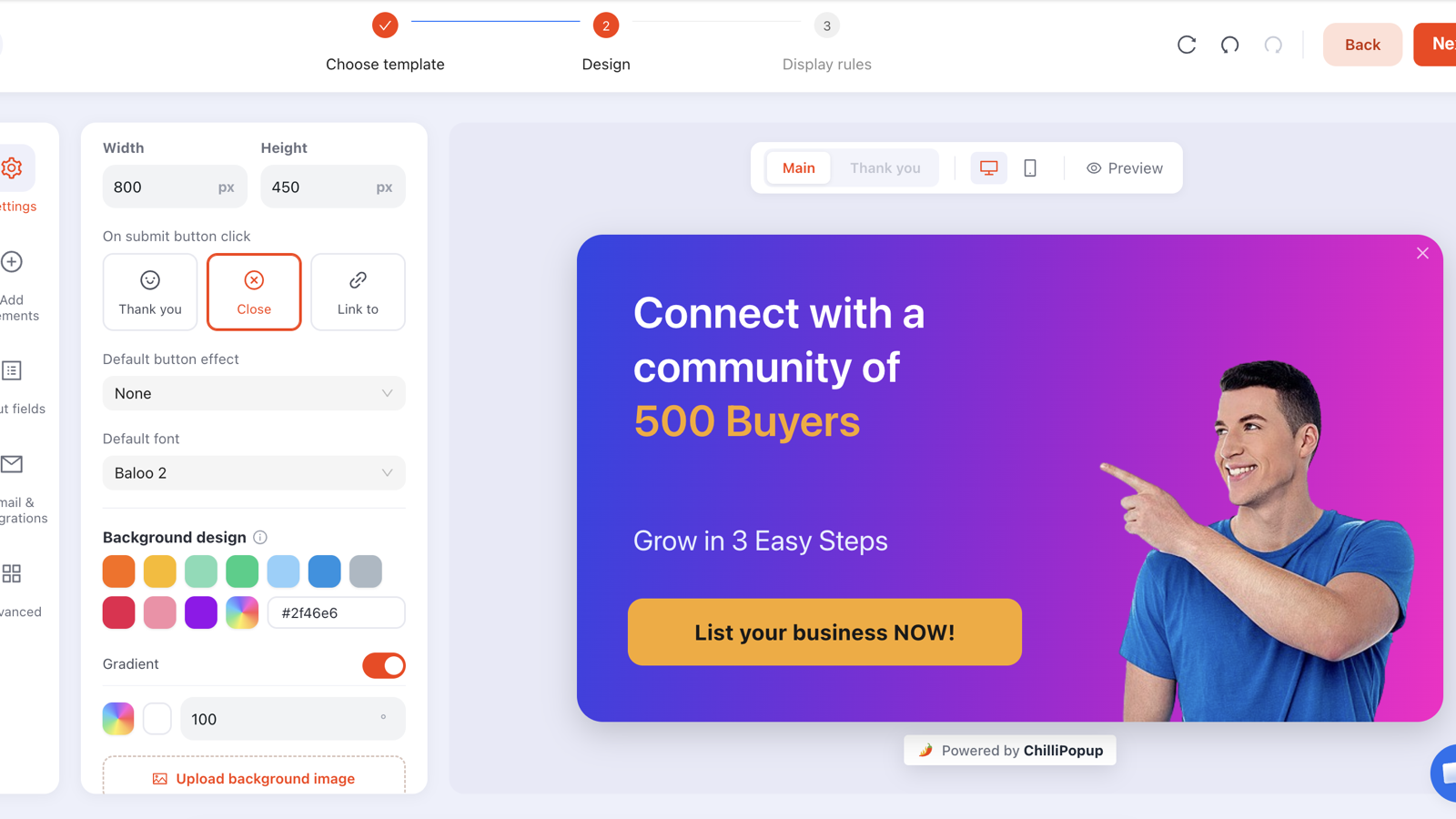
Your site is translated. Your checkout is translated. Then a popup slides up in English over a German product page and quietly undoes all of it. Multilingual popups are the piece of localisation that gets forgotten most often, because popups usually live in a separate tool from the rest of the site.
The fix is not a translation setting — it is a routing decision. Build one campaign per language, then use the targeting rules you already have to make sure each one only ever appears on its own pages. This guide covers exactly how, on all three ways a site can separate its languages.
Key Takeaways
- One campaign per language. Never two languages inside one popup.
- Route on the URL, not on the browser: URL paths, subdomains and country domains are all targetable, and they always match what the visitor is reading.
- Add the inverse rule to your master campaign or the English one keeps showing everywhere alongside the translations.
- Translate the small strings too — placeholders, consent line, thank-you screen, decline link. That is where English leaks.
- Read results per market. A blended conversion rate hides the one language that is failing.
Why a translated popup is not optional
A popup is the most interruptive thing on the page, so it is also the most closely read. An untranslated one costs you three separate things:
- Conversions. People do not hand over an email address in response to a sentence they had to decode.
- Trust. A stray English overlay signals a half-finished localisation, and that suspicion transfers straight to your returns policy and your delivery promise.
- Consent quality. If the consent line is not in the visitor's language, the consent is worth much less — and in the EU, arguably worth nothing.
The cheapest possible version of this project: translate the one popup that runs on your highest-traffic market, ship it, and measure. You do not need all nine languages to find out whether this matters for your site.
Step one: find out how your site separates languages
Every multilingual site uses one of three URL shapes, and that shape decides which rule you use. Look at the address bar on a translated page and match it against this table.
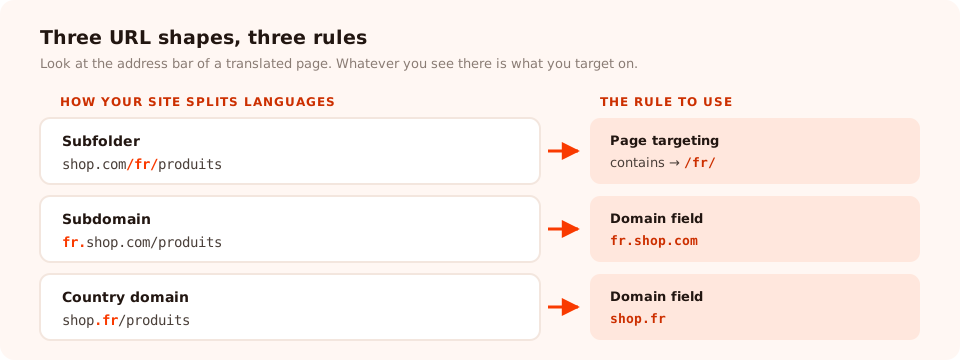
Find your URL shape in the left column; the rule you need is on the right. That is the entire routing decision.
| URL shape | Example | Rule to use | Setting |
|---|---|---|---|
| Subfolder (most common) | shop.com/fr/produits |
Page targeting | contains → /fr/ |
| Subdomain | fr.shop.com/produits |
Domain field | fr.shop.com |
| Country domain | shop.fr/produits |
Domain field | shop.fr |
| Query parameter | shop.com/produits?lang=fr |
Page targeting | contains → lang=fr |
Page targeting supports six conditions — contains, does not contain, is exactly, is not, starts with and ends with — which is enough to describe any language routing scheme you are likely to have. The domain field matches against the host of the page the pixel is running on, so one workspace can serve several storefronts and keep each campaign on its own.
Watch the slashes. A rule of contains /fr will also match
/france-shipping and /frames. Always include the trailing slash —
/fr/ — or use starts with against the full path prefix. This is the single most
common multilingual targeting bug.
Step two: build the master, then duplicate
Do not build five popups in parallel. Build one — in your primary language — and get everything right: the layout, the offer, the image, the triggers, the frequency, the conversion gate. Then duplicate it once per language from the campaign list and translate each copy.
Two reasons this order matters:
- Mistakes multiply. A cramped mobile layout built five times is five things to fix.
- Consistency is free. Duplicates start identical, so the only intended difference between markets is the words.
Name them so the list stays readable: Welcome 10% — EN,
Welcome 10% — FR, Welcome 10% — DE. You will thank yourself in three
months when the offer changes and you have to find all five.
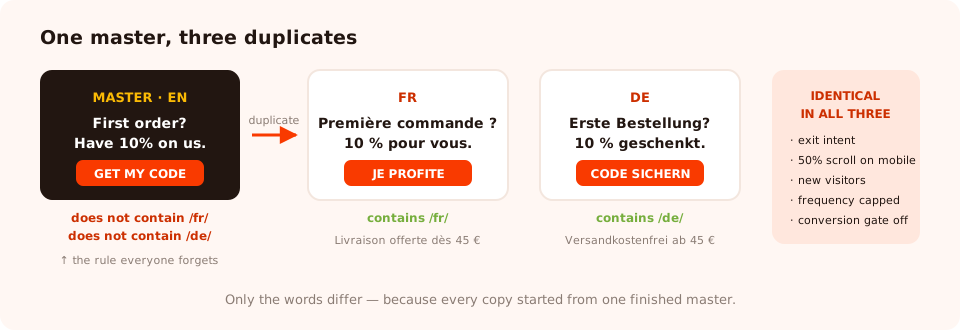
One master, three duplicates, four rules. Note the inverse rule on the master — without it, English shows everywhere.
Step three: the rule everyone forgets
Adding contains /fr/ to the French campaign does not stop the English one from firing on
French pages. Unless you tell it otherwise, your master campaign still matches every URL on the site — so
French visitors now get two popups, or worse, whichever one wins the race.
Fix it in one of two ways:
- Exclude explicitly. Give the English campaign does not contain rules for each translated prefix:
/fr/,/de/,/es/. - Include explicitly. Give the English campaign its own positive rule — does not contain is unnecessary if English lives under
/en/and you can simply target that.
The second is cleaner if your site puts every language behind a prefix, including the default one. The first is what you need on the very common setup where English sits at the root and translations sit in folders beneath it.
Remember that every enabled rule is an AND gate. Device, page targeting, audience, frequency, date window, schedule — each one you switch on narrows the campaign further. Multiple page rules within page targeting are how you list several prefixes; other rule groups stack on top.
What to translate (the list that catches the leaks)
Everyone translates the headline. English leaks through the parts nobody looks at. Work down this list for every campaign:
| Element | Usually forgotten? | Note |
|---|---|---|
| Headline and body | No | German runs roughly 30% longer than English — recheck the layout, not just the words. |
| Button label | Sometimes | "Get my code" is idiomatic; a literal translation often is not. |
| Input placeholder | Yes | The most common leaked string on the entire web. |
| Consent / small print | Yes | Untranslated consent is weak consent. See the GDPR guide. |
| Thank-you screen | Yes | It is a separate screen, so it is missed constantly. |
| Decline link | Yes | "No thanks" is short, visible, and always in English when it is wrong. |
| Error messages | Sometimes | Type an invalid email into each translated popup and read what comes back. |
| Prices and currency | Yes | "$10 off" in a euro store reads as an error, not an offer. |
| Images with text on them | Yes | A banner with baked-in English defeats the whole exercise. |
Localise the offer, not only the sentence
Free shipping thresholds differ by market. So do holidays: a Black Friday campaign lands differently in countries where the date means nothing, and a Mother's Day promotion runs on a different date in half of Europe than it does in the US. Because every campaign has its own date window — with a GMT offset — and its own weekday-and-hour schedule, you can run the same idea on the right day in each market without touching the others.
Fonts, scripts and layout
A translated popup can be word-perfect and still look broken. Three things to check before you publish:
- Glyph coverage. Many display fonts contain Latin characters only. Set a Cyrillic, Greek, Arabic or CJK string in one and the browser silently substitutes another face. Pick a family from the editor's font catalogue that covers the script, or upload the exact family your site uses as a workspace custom font so every campaign matches.
- Length. German and Finnish expand; Chinese and Japanese contract dramatically. A headline sized for English will wrap, overflow or look lost. Resize the block, do not shrink the font to 11px.
- Direction. For Arabic and Hebrew, set the block text alignment to the right so the copy reads naturally. Blocks are positioned on a canvas rather than flowed, so nothing mirrors automatically — mirror the layout yourself once and save it as that language's campaign.
Preview with the real string. Not "Lorem ipsum", not the English placeholder — paste the actual translated sentence into the editor and look at it. Every layout problem in this section is invisible until you do.
A worked example: one offer, three markets
A homeware store sells at shop.com (English), shop.com/fr/ and
shop.com/de/. It wants a welcome discount everywhere.
| Campaign | Page targeting | Headline | Offer |
|---|---|---|---|
| Welcome 10% — EN | does not contain /fr/does not contain /de/ |
"First order? Have 10% on us." | Free delivery over £40 |
| Welcome 10% — FR | contains /fr/ |
"Première commande ? 10 % pour vous." | Livraison offerte dès 45 € |
| Welcome 10% — DE | contains /de/ |
"Erste Bestellung? 10 % geschenkt." | Versandkostenfrei ab 45 € |
Everything else — exit intent on desktop, 50% scroll on mobile, new visitors, frequency capped, "show again after conversion" off — is identical across the three, because they were duplicated from one finished master. The German popup is 40 px taller than the English one, because the headline is longer and someone checked.
Run every market from one dashboard
Duplicate a campaign, translate it, point it at a URL — popups, forms, surveys, quizzes and games, all from one pixel. Free plan, no credit card required. Paid plans from $29/month.
Start free →Testing before you publish
Ten minutes, and it catches almost everything:
- Visit one URL per language and confirm exactly one popup appears — not zero, not two.
- Check the root URL and any page that sits outside the language folders. This is where a missing inverse rule shows up.
- Complete the flow in each language: submit, read the thank-you screen, check the error message on a bad email.
- Open one translated page on a phone. Longer strings break mobile layouts first.
- Read the decline link and the placeholder in every language, out loud. That is where the English will be.
Reading the results per market

Each language is its own campaign, so each one reports its own views, submissions and conversion rate. That separation is the point.
Because every language is a separate campaign, you get a separate conversion rate for free — and that is far more useful than one blended number. Read it like this:
- A market well below the others usually has a copy problem, not a targeting problem. Get a native speaker to read the popup aloud.
- A market with almost no views has a rule problem. Check the prefix and the slashes.
- A market with views but no submissions often has a mismatched offer — a currency, a shipping threshold or a holiday that means nothing there.
Do not average across languages when deciding what to change. Two markets improving and one collapsing looks like "roughly flat" in a blended figure, and you will never find the collapse.
Seven mistakes with multilingual popups
- Forgetting the inverse rule on the master. Every visitor now gets English as well.
- Using
/frwithout the trailing slash. It matches/framestoo. - Two languages in one popup. Twice the height, half the clarity.
- Machine-translating the button. Buttons are idiom, and a wrong one reads as spam.
- Leaving the currency alone. The wrong symbol invalidates the whole offer.
- Never retiring a translation. A stale French sale is worse than no French popup.
- Judging all markets on one blended number. The average always hides the failure.
Related reading
Frequently asked questions
How do I show a popup in a different language for each country?
Build one campaign per language and restrict each with a targeting rule that matches only the URLs for that language. On a site where languages sit on URL paths, a page rule of "contains /fr/" is all it takes. On subdomains or separate country domains, set the campaign's domain field to that host instead. There is no automatic browser-language rule, so the URL is what you route on — which is also what your visitors and Google see.
Can one popup hold several languages at once?
You can, and you should not. Stacking two languages inside one popup doubles its height, halves the readability and forces every visitor to skip past text that is not for them. One campaign per language is easier to write, easier to measure and easier to retire.
Does ChilliPopup detect the visitor's browser language automatically?
No — targeting is done on the URL, the device, the operating system and browser, the date window and a weekday-and-hour schedule. In practice URL routing is the more reliable signal anyway: browser language often disagrees with the language a visitor is actually reading, whereas the page they are on never does.
What about right-to-left languages like Arabic or Hebrew?
Write the copy in the language and set the block text alignment to the right so it reads naturally. The editor positions each block on a canvas rather than flowing them, so there is no automatic mirroring of the layout — you place the elements where an RTL reader expects them, which in practice means mirroring the design once and saving it as that language's campaign.
Which font should I use for non-Latin scripts?
One that actually contains the glyphs. A font chosen for a Latin headline may have no Cyrillic, Greek, Arabic or CJK coverage at all, and the browser will silently substitute something that does not match your brand. Pick from the font catalogue in the editor, or upload the exact family you use elsewhere as a workspace custom font, and preview the real translated string before publishing.
How many languages is too many?
As many as you genuinely maintain. Each campaign is a thing that has to be updated whenever the offer changes, and a French popup still advertising last season's sale does more damage than no French popup. Start with the two or three markets that produce real revenue and add the rest when the process is boring.