Popup targeting rules decide who sees a popup, where on your site it may appear, at which moment it fires, and how often it is allowed to come back. Get them right and a popup feels like good timing. Get them wrong and the same popup — same copy, same design, same offer — reads as an ambush.
Most popups that "don't work" are not badly written. They are badly targeted: shown to someone who already subscribed, on a page where the offer makes no sense, two seconds after landing, on every single page view. This guide walks through every targeting layer you actually have, what each one is good for, and six rule sets you can copy today.
Key Takeaways
- Targeting is five layers, not one setting — trigger, page, audience, frequency and device/schedule. Each one narrows the other.
- Triggers are an OR, targeting is an AND. The popup fires on the first trigger that hits, but only if every enabled targeting rule passes.
- The single highest-value switch is "show again after conversion." Turn it off and subscribers stop seeing the signup popup forever.
- Page targeting beats clever copy. A shipping offer on a product page outperforms a brilliant generic popup on every page.
- New vs returning is browser-storage based — a second device or a private window looks like a brand-new visitor. Design for that, don't fight it.
What popup targeting rules actually are
Popup targeting, in two sentences
Popup targeting rules are the conditions a visitor and a page view must satisfy before a popup is allowed to appear. They cover the moment (the trigger), the place (which URLs), the person (new, returning or everyone), the rhythm (how often) and the context (device, browser, day and hour).
It helps to picture the rules as a stack of filters that a page view falls through. If it clears all of them, the popup shows. If any enabled rule blocks it, nothing happens — and the visitor never knows there was a campaign at all.
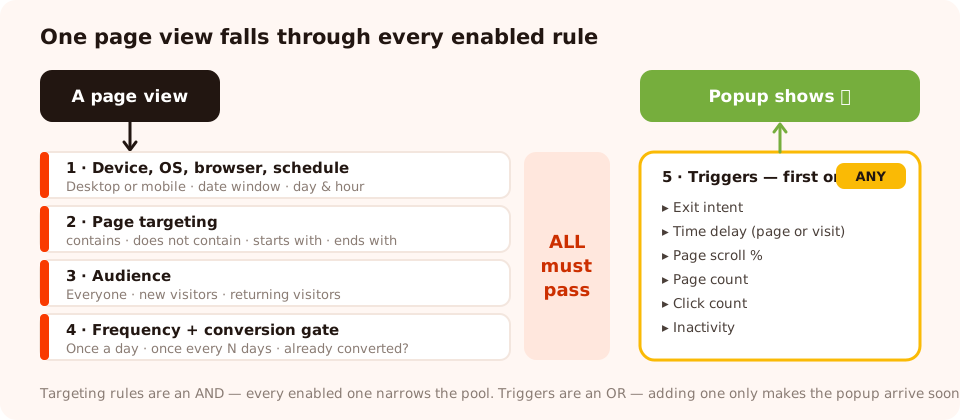
Every enabled targeting layer is an AND gate. The triggers at the bottom are an OR — the first one to fire opens the popup.
That distinction trips people up constantly, so it is worth stating plainly:
- Triggers are an OR. Turn on exit intent and a 20-second delay and the popup appears at whichever comes first — not at both, and not only when both happen.
- Targeting rules are an AND. Restrict to mobile, to
/collections/URLs and to returning visitors, and all three must be true.
There is also a master switch above all of it. Turn auto-trigger off and none of the automatic triggers run at all — the campaign can then only be opened deliberately, from a link or a button click. That is how you build an "open the discount popup" button in your own page, or a shareable direct link that opens the campaign on arrival, without the popup ever interrupting anyone unprompted.
Layer 1 — Triggers: choosing the moment
The trigger is the only targeting layer your visitor can feel. Six are available, and they answer very different questions.
| Trigger | Fires when | Best used for | Watch out for |
|---|---|---|---|
| Exit intent | The cursor moves toward the top of the window | Last-chance offers, cart recovery, "before you go" discounts | Desktop only in practice — a phone has no cursor to track |
| Time delay | After N seconds, counted on the page or across the whole visit | Newsletter and welcome offers on content pages | Under ~8 seconds it lands before anyone has read anything |
| Page scroll | The visitor scrolls past N% of the page | The mobile substitute for exit intent; blog and article pages | On a short page, 50% arrives almost instantly |
| Page count | After the visitor has viewed N pages in the session | Rewarding genuine interest instead of interrupting arrival | Single-page-visit traffic never reaches it |
| Click count | After N clicks on the page | Configurator, filter and gallery pages where clicks mean engagement | Clicks are noisy — set the bar higher than you think |
| Inactivity | After N seconds of no mouse, scroll or keyboard activity | Catching the reader who drifted off mid-page or opened a tab and left | Firing at 5 seconds punishes people who are simply reading |
The pairing that works almost everywhere: exit intent for desktop plus a scroll trigger around 50% for mobile, in the same campaign. Whichever the visitor's device supports fires first, and you have covered both without building two popups.
A time delay can also be scoped to the whole visit rather than the current page. That is the difference between "20 seconds on this article" and "20 seconds anywhere on the site" — the second is far more forgiving on a site where people skim several short pages. For a deeper tour of each trigger and the numbers to start from, see our popup triggers guide.
Layer 2 — Page targeting: choosing where
Page targeting is the single biggest lever on relevance, and the one most people leave switched off. A popup restricted to the pages where its offer makes sense will beat a beautifully written generic popup shown everywhere, every time.
You build it as a list of URL rules using six operators:
- contains — the workhorse.
/collections/,/blog/,?utm_source=newsletter. - does not contain — the exclusion you will use most: keep the popup off
/checkout,/cartand/account. - is exactly — homepage-only campaigns.
- is not — everywhere except one specific URL.
- starts with — a whole section, cleanly:
https://yourstore.com/en/. - ends with — file or slug patterns, e.g. every
/thank-youpage.
Never show an interrupting popup on checkout. Anything that covers a payment step
costs you an order far more often than it earns an email. Add a
does not contain /checkout rule to every campaign as a matter of habit — and
the same for /cart unless the popup is specifically a cart-recovery offer.
The rule people get wrong
Page rules are matched against the URL string, so decide deliberately whether you want the query string
included. contains /blog/ will match
/blog/popup-targeting-rules-guide?ref=twitter — usually what you want. But
is exactly against a bare homepage URL will not match the same homepage with a
campaign parameter glued on the end. If you are targeting ad traffic, use contains with the
UTM value instead.
Layer 3 — Audience: new, returning, or everyone
The audience rule splits your traffic into three buckets, and you decide what "new" and "returning" mean in days:
- Everyone — no split. Correct for announcements, cookie-style notices and site-wide news.
- New visitors — has not been to the site in the last N days. This is your welcome-offer audience.
- Returning visitors — has been to the site in the last N days. This is where second asks, loyalty offers and "welcome back" campaigns live.
Recognition is computed from the visitor's own browser storage. That has one honest consequence worth planning around: a second device, a different browser or a private window looks like a brand-new visitor. Your "new visitor" popup will occasionally greet a loyal customer on their phone. Write the copy so that is survivable — a welcome offer that says "new here?" is fine; one that says "you've never bought from us" is not.
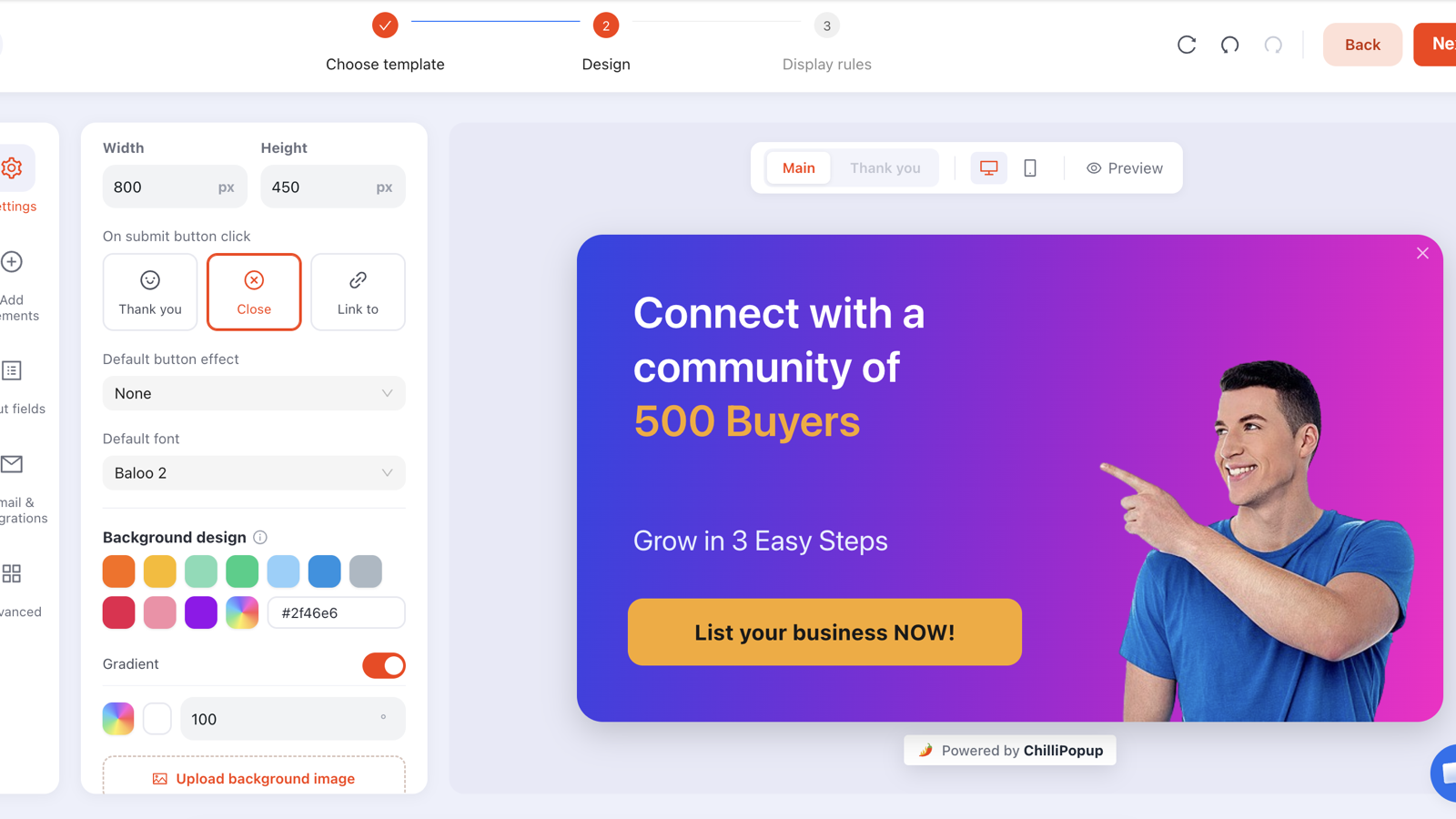
Design and targeting are separate steps: the same popup can be re-targeted at a new audience without touching a pixel of the design.
Layer 4 — Frequency: how often it may come back
Frequency is where popups earn their reputation, good or bad. Six settings are available: once a day, every visit, every session, once every N days, once every N visits, and all pages, all the time.
| Frequency | Use it for | Avoid it for |
|---|---|---|
| Once a day | The sensible default for a signup or discount offer | Nothing much — this is the safe starting point |
| Every session | Time-limited sale campaigns you want people to notice | Anything running for more than a week or two |
| Once every N days | A second ask that should feel spaced out — 7 or 14 days | Short campaigns that end before N days elapse |
| Once every N visits | High-frequency visitors: news, blogs, forums | Sites where most people visit once and never return |
| Every visit / all pages all the time | Genuinely critical notices — a shipping cut-off, an outage | Every marketing popup you will ever build |
The one setting to check before you publish anything: "show again after conversion." Turn it off and the campaign stops appearing to anyone who already submitted it. Leave it on and your existing subscribers get asked to subscribe, forever. It is per campaign — it suppresses that popup for someone who submitted that popup.
Frequency, audience and the conversion switch live together, and the audience and conversion controls only appear once the display-frequency rule itself is switched on — so if you cannot find them, that toggle is why. Our popup frequency guide goes deeper on picking the number.
Layer 5 — Device, OS, browser and schedule
The last layer is context. Four independent rules, each with its own on/off switch, all additive:
- Devices — desktop, mobile, or both. The most-used rule in this group by a wide margin, because mobile popups need different sizes, different triggers and often a different offer entirely.
- Date window — a start and end date with hours, in a chosen GMT offset. This is how a seasonal campaign switches itself off at midnight instead of at whatever time you remember to log in.
- OS and browser — Windows, macOS, Linux, iOS or Android; Chrome, Safari, Firefox, Edge or Opera, set separately for desktop and mobile. Genuinely useful for app-install prompts ("Get the iOS app" on iOS only) and browser-extension offers.
- Day and hour schedule — one or more weekday + hour windows, each in its own GMT offset. Good for "order before 3pm for same-day dispatch", live-chat availability notices, and weekend-only offers.
Every enabled rule narrows the pool. Stack device + OS + browser + schedule + returning visitors and you can easily build a campaign that technically works and is shown to eleven people. Add one rule at a time, and check the view count in analytics before adding the next.
Worth knowing what is not in the list: there is no country or geo-location rule, and no
traffic-source rule. Both are usually achievable anyway — target the URL of your localised section
(starts with /fr/) for language, and target the UTM parameter
(contains utm_source=newsletter) for source. Those cover most of what people
actually want geo and source targeting for.
Six popup targeting recipes you can copy
1. The welcome offer
Trigger: exit intent + page scroll 50%. Pages: does not contain
/checkout, does not contain /cart. Audience: new visitors.
Frequency: once a day, show again after conversion off.
The safest, highest-volume campaign on almost any site.
2. The cart-recovery catch
Trigger: exit intent. Pages: contains /cart.
Audience: everyone. Frequency: once a day, conversion switch off.
Narrow, high intent, and the one place a cart-page popup is justified. Pair it with our
cart abandonment guide.
3. The blog reader capture
Trigger: page scroll 60%. Pages: contains /blog/.
Audience: everyone. Frequency: once every 7 days.
Scroll depth is the honest engagement signal on an article. Someone 60% down a post is reading it.
4. The returning-visitor second ask
Trigger: page count, 2 pages. Audience: returning visitors.
Frequency: once every 14 days, conversion switch off.
A one-question segmenter, not a second signup form. One tap, then out of the way.
5. The category-specific offer
Trigger: time delay 25 seconds (page scope). Pages: contains
/collections/outdoor. Devices: both.
Frequency: once a day.
This is the whole point of page targeting: the offer names the thing they are already looking at.
6. The deadline announcement
Trigger: time delay 5 seconds. Audience: everyone.
Frequency: every session. Schedule: a date window that ends the night the
sale ends.
The only category of popup where "every session" is defensible — and the date window means you do
not have to be awake to turn it off.
Target your next popup properly
Triggers, page rules, audiences, frequency and scheduling — all on one screen, no code. Free plan, no credit card required. Paid plans from $29/month.
Start free →Eight popup targeting mistakes
- Leaving "show again after conversion" on. The most common and most damaging mistake on this list. Your best customers see the "join our list" popup every week.
- No page exclusions. A popup over checkout is not a targeting error, it is a revenue error.
- A 2-second time delay. The visitor has not read your headline, let alone decided anything. Give the page a chance to do its job first.
- Relying on exit intent for mobile. There is no cursor. Add a scroll or inactivity trigger or half your traffic never sees the campaign.
- Every trigger switched on at once. Because triggers are an OR, that is effectively "show immediately" — the earliest one always wins.
- Stacking so many rules the campaign never fires. If views are near zero after two days, the rules are wrong, not the copy.
- Two campaigns targeted at the same moment. Two popups in one page view reads as an interrogation. Give overlapping campaigns different pages or different triggers.
- Never revisiting the rules. Targeting is not set-and-forget: seasonal date windows expire, URL structures change after a replatform, and a rule quietly stops matching anything.
How to check your targeting is working
Targeting problems and copy problems look completely different in analytics, which makes them easy to tell apart:
- Very few views → a targeting problem. Something in the AND chain is blocking. Disable rules one at a time, newest first.
- Plenty of views, few clicks → an offer or design problem. The rules are fine.
- Clicks but few submissions → a form problem — too many fields, or a validation rule rejecting people silently.
- Good conversion rate but tiny volume → your targeting is too narrow. Loosen the least important rule and watch what happens to the rate.

Views tell you whether the rules fire. Everything after views tells you whether the popup deserves to.
The full diagnostic walkthrough lives in our popup analytics guide.
Build your targeting rules step by step
Fifteen minutes, five steps, no code. If the pixel is not on your site yet, start with the one-line install guide — one script serves every campaign you will ever build.
1. Write the sentence first
Before you touch a toggle, finish this sentence: "Show this offer to this kind of visitor on these pages when this happens, at most this often." If you cannot finish it, the campaign is not ready to be targeted — it needs a clearer offer.
2. Set the trigger pair
Exit intent for desktop, page scroll around 50–60% for mobile. Resist switching on a third — triggers are an OR, and every extra one only makes the popup arrive earlier.
3. Add page rules, including the exclusions
One contains rule for where the offer belongs, and a does not contain rule for
/checkout. That pair alone removes most of the reasons people complain about popups.
4. Switch on display frequency, then set audience and the conversion gate
The audience and conversion controls only appear once the display-frequency rule is enabled. Set the audience, choose once a day, and turn "show again after conversion" off.
5. Publish, then read views after 48 hours
Views near zero means a rule is blocking; loosen the newest one. Views healthy means the targeting is done and everything from here is a copy and offer question. Then leave it alone for two weeks.
Related reading
Frequently asked questions
What are popup targeting rules?
Popup targeting rules are the conditions a visitor and a page view must meet before a popup is allowed to appear. They cover the trigger (the moment), page targeting (which URLs), audience (new, returning or everyone), frequency (how often it may reappear) and context rules such as device, operating system, browser and a day-and-hour schedule.
Do multiple popup triggers work together or separately?
Triggers work as an OR: the popup appears as soon as the first enabled trigger fires. Targeting rules work as an AND: every enabled rule must pass. That means switching on several triggers makes a popup appear earlier, not more selectively — if you want a popup to be more selective, add targeting rules, not triggers.
How do I stop a popup showing to people who already signed up?
Turn off 'show again after conversion' on that campaign. It suppresses the popup for anyone who has already submitted it. The setting is per campaign, so it stops that specific popup for people who submitted that specific popup — it does not link different campaigns together.
Can I target popups by country or location?
There is no built-in country or geo-location rule. In practice most location targeting is really language or storefront targeting, which you can do with a page rule: target URLs that start with your localised section, such as /fr/ or /en-gb/. For traffic source, target the UTM parameter in the URL with a 'contains' rule.
How does a popup know whether a visitor is new or returning?
It is computed from the visitor's own browser storage, using the number of days you set for 'new' and 'returning'. That means the same person on a second device, in a different browser, or in a private window will look like a brand-new visitor. Write welcome-offer copy so that is survivable rather than embarrassing.
My popup gets almost no views. What should I change?
That is a targeting problem, not a copy problem. Something in the AND chain is blocking it — most often a page rule that no longer matches your URLs, an over-tight schedule or date window, or an audience plus frequency combination that excludes nearly everyone. Disable the rules one at a time, newest first, and watch views recover.
Should popups ever show on the checkout page?
No. A popup that covers a payment step costs orders far more often than it earns emails. Add a 'does not contain /checkout' page rule to every campaign as a habit, and exclude /cart too unless the campaign is specifically a cart-recovery offer.