Labor Day weekend is three days of unusually motivated traffic. It is the end of summer, the start of the school year, and the weekend a lot of people have finally decided to buy the expensive thing they have been researching since June — all arriving at your store at the same time.
Most stores meet that with one sitewide banner and one popup saying 20% OFF. Below are nine campaigns that do better, the copy for each, and the timeline and rules that let you build the whole thing in an afternoon and forget about it until Tuesday.
Key Takeaways
- Four different shoppers, one weekend. Clearance hunters, last-summer buyers, back-to-school parents and big-ticket researchers all want different things.
- Start two weeks out with a list, not a discount — early access is what makes the weekend land.
- Target by page, not by whole site. The sale collection and the help centre should not see the same popup.
- Set the end date when you build it, so the sale closes itself on Monday night.
- Capture the researchers. Anyone comparing mattresses on Saturday is worth an email address even if they don't buy.
Who is actually shopping over the long weekend
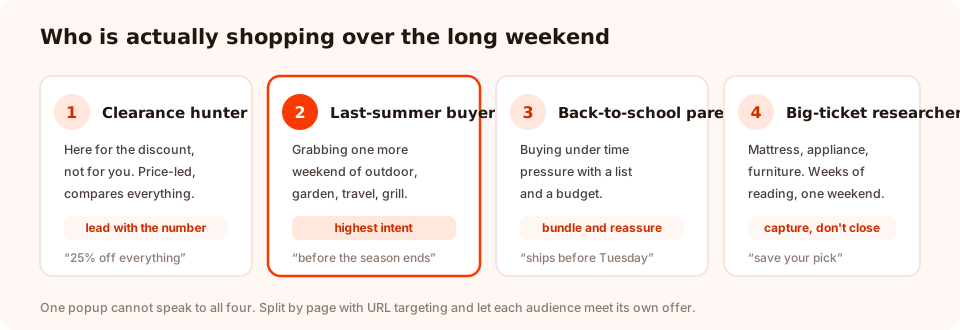
One popup cannot speak to all four. URL targeting is what lets each of them meet their own offer.
The clearance hunter came for the number and will compare it with three other tabs. The last-summer buyer wants one more weekend of outdoor, garden or travel and has genuine deadline pressure. The back-to-school parent is working from a list with a hard delivery date. The big-ticket researcher has spent weeks reading and is now looking for permission.
Those are four different jobs. The campaigns below are grouped by which one they serve.
Nine Labor Day popup ideas
1. The early-access waitlist (two weeks out)
Before any discount exists, run a one-field popup: "Our Labor Day sale opens on Thursday for the list — a day before everyone else." You are not giving anything away yet, and you arrive at the weekend with an audience instead of hoping for traffic. Everything in the waitlist popup guide applies.
2. The clearance-collection popup
Targeted at your sale or clearance URLs only. "End of summer, end of the line — up to 60% off while it lasts." These visitors have already self-selected for price, so lead with the number and get out of the way. One button, straight to the collection.
3. The last-weekend-of-summer nudge
On outdoor, garden, travel and seasonal categories: "One more weekend of it. Order by Sunday and it's yours for the last of the sunshine." This is the only genuine urgency of the weekend — the season really is ending — so it doesn't need a fake timer.
4. The back-to-school bundle
Targeted at the relevant category, with the one thing parents actually care about in the subhead: "Everything on the list, in one box — ordered today, delivered before Tuesday." Delivery certainty converts better than a bigger discount for this audience.
5. The big-ticket capture
On mattress, furniture and appliance pages, don't try to close. Try to keep: "Not ready to decide? Save your pick and we'll hold the Labor Day price for you until Monday night." Exit intent on desktop, a scroll trigger around 40% on mobile. You are trading a discount you'd have given anyway for an email address you would not have got.
6. The spin-to-win weekend
A sale weekend is one of the few times a game genuinely fits — the visitor is already in a browsing, entertain-me mood. A spin wheel or scratch card with real prizes (free shipping, 10%, 15%, a bundle upgrade) collects the email on the claim screen and gives you a discount range instead of one flat number. The outcome is decided server-side, so it can't be rigged from the browser.
7. The "what are you shopping for?" quiz
On collection pages, a single question with four tappable options — Outdoor, Home, Kids, Gifts. It routes the visitor to the right place and hands you a segment for the autumn campaigns. One tap, no typing, and it works far better on a phone than a search box.
8. The final-hours countdown
Monday evening only, sitewide: "Sale ends at midnight." Use a countdown block pointed at your real end time. This is the single highest-converting hour of the weekend for most stores, and it is also where the temptation to lie about the deadline is strongest. Don't — extend-the-sale emails are remembered.
9. The Tuesday pivot
The campaign nobody builds. When the sale ends, one popup should replace it: "Missed it? The autumn range lands next week — want first look?" It converts the disappointed tail of the weekend into a list instead of a bounce.
Build fewer, target harder. Three well-targeted campaigns beat nine that all show everywhere. If you only build three, make them numbers 1, 2 and 8.
The four-window timeline
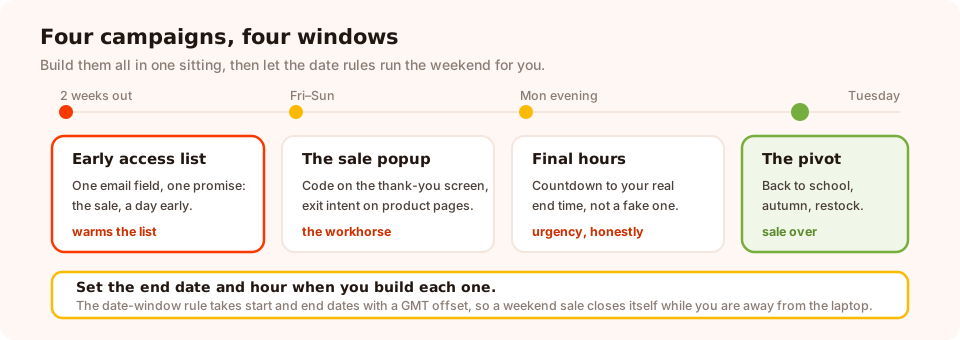
Build all four in one sitting, then let the date rules run the weekend for you.
The point of building them together is that you are not logging in on a public holiday to switch popups on and off. Each campaign carries its own start and end date, so the weekend runs itself.
The display rules for a holiday weekend
Five settings do almost all the work.
| Rule | Set it to | Why |
|---|---|---|
| Date window | Start Friday 00:00, end Tuesday 00:00, in your own GMT offset | The campaign opens and closes itself — no one has to remember |
| Page targeting | The sale collection, or the category the offer is about | Keeps the discount off help pages and blog posts |
| Trigger | Exit intent on desktop, scroll ~40% on mobile | Exit intent needs a mouse leaving the window, which a phone doesn't have |
| Frequency | Once a day, over a three-day weekend | Someone browsing all Saturday shouldn't meet it six times |
| Show again after conversion | Off | People who already took the code stop being asked |
If you want the offer to change through the weekend — a lunchtime deal, an evening one — the weekday-and-hour schedule rule handles that from the same campaign set without you touching anything.
Only one overlay shows at a time. If a sale popup and a final-hours countdown are both eligible on the same page, one of them wins and it may not be the one you meant. Give each campaign a window that doesn't overlap the next.
Build the weekend in one afternoon
Popups, forms, surveys, quizzes and games from one editor — and one pixel. Free plan, no credit card required. Paid plans from $29/month.
Start free →Copy that works over a sale weekend
- Put the number in the headline, not the subhead. Clearance traffic is scanning, not reading.
- Say when it ends, precisely. "Ends Monday at midnight" beats "this weekend only" because it is checkable.
- Give the decline link real words. "No thanks, I'll pay full price" performs because it makes the choice explicit — and it keeps the popup honest.
- Show the code immediately. On the thank-you screen, not only in an email that arrives after they've left.
- Name the season, not the holiday. "End of summer" means something to a shopper; "Labor Day Event" is a category name.
Six mistakes that make a holiday popup look careless
- The same popup on every page. A sale banner on your returns policy page is noise.
- A countdown to a deadline you'll extend. One extension teaches everyone to ignore the next timer.
- Leaving it live on Tuesday. Advertising an expired sale is worse than advertising nothing.
- No mobile version of the plan. Exit intent does nothing on a phone, and most of the weekend's traffic is on one.
- Asking for four fields during a sale. They're here for a code. One email field.
- Forgetting the people who don't buy. A sale weekend is the cheapest list-building opportunity of the quarter, and most stores capture none of it.
What to measure — and what to keep
Over three days you'll have enough views for the numbers to mean something. Check conversion rate per campaign rather than in aggregate, and look at the device split — a big desktop/mobile gap almost always means the mobile version is too heavy rather than the offer being wrong.
The thing worth keeping is not the revenue number, which you'll remember anyway. It's the list. Every email captured this weekend costs you nothing to email in October, and the segment answers from idea seven tell you what to send. That is what makes the next holiday easier than this one — and it is what the seasonal calendar is built on.
Related reading
Frequently asked questions
When should a Labor Day popup campaign start?
About two weeks before the weekend, with a list-building campaign rather than a discount. The sale popups themselves go live on the Friday. Starting the discount early trains people to wait and flattens the weekend you were trying to create.
What discount works for Labor Day?
Whatever you can defend and repeat. A flat sitewide percentage is easy to communicate and easy to erode margin with; a tiered offer, a bundle, or a clearance section with steeper cuts on genuinely end-of-season stock usually protects more profit while looking just as generous.
Is Labor Day only relevant to US stores?
The first-Monday-in-September holiday is US and Canadian, and it functions as the end-of-summer sale weekend there. Many other countries mark Labour Day on 1 May with a very different tone. If you sell internationally, target the campaign by page or by a date window in the right time zone rather than showing one holiday's copy to everyone.
Should I run one popup or several over the weekend?
Several, targeted at different pages, but only ever one visible at a time. Build a clearance popup for the sale collection, a back-to-school one for the relevant category, and a lead-capture one for browsers, then let URL targeting decide which a visitor sees.
How do I stop the sale popup running after the weekend?
Use the date-window rule when you build it. Set the start and end dates with your time-zone offset, and the campaign ends itself on Monday night. Relying on someone logging in on Tuesday morning is how a live store advertises an expired sale.
What should a Labor Day popup say on a non-sale page?
Nothing about the sale. On blog posts, guides and support pages, run a normal list-building ask — or nothing at all. A holiday discount on a help page is noise, and it teaches visitors to dismiss your popups on sight.
Is Labor Day a good time to launch something new?
It is a good time to open a waitlist and a poor time to launch. Attention over the long weekend belongs to discounts; a new product competing with a store-wide sale usually loses. Collect the interested emails now and launch into a quieter week.