Every gifting holiday has the same trap: one campaign, aimed at "everyone", shown for a month. It converts the people who were going to buy anyway and irritates the rest.
Father's Day punishes that approach more than most, because the traffic splits into clearly different buyers with different problems. The partner planning ahead needs ideas. The kid buying two days before needs speed and a low price. The man browsing for himself needs permission. And an unusually large share of the whole season lands in the final seventy-two hours, when the only thing that matters is whether it will arrive.
Key Takeaways
- Segment by buyer, not by product. Partner, child, self-gifter and last-minute shopper want four different things.
- The shipping deadline is the campaign. Find the real date first; every schedule hangs off it.
- Solve choosing, not price. A gift finder beats a discount on gift traffic almost every time.
- Digital gift cards own the last 48 hours — and that window converts far above its size.
- Set a date window on every campaign so the season retires itself without anyone remembering.
The four buyers of Father's Day
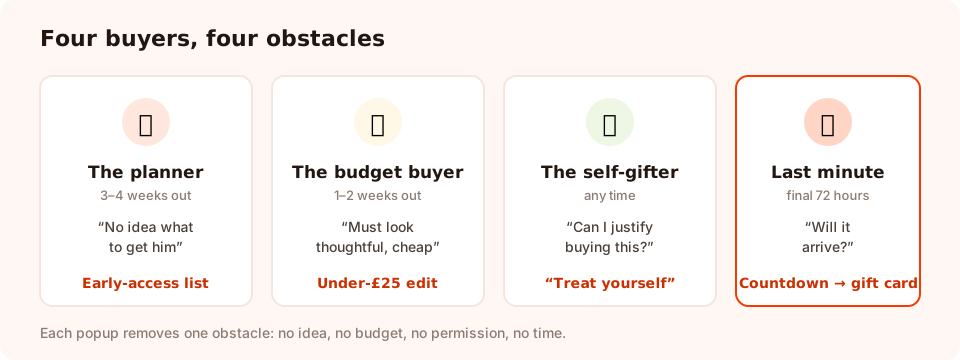
Four buyers, four asks. One campaign for all of them speaks to none of them.
| Buyer | Arrives | Their problem | The popup that helps |
|---|---|---|---|
| The planner (partner, adult child) | 3–4 weeks out | Wants a good idea, has time | Early access to the gift edit |
| The child (or the budget shopper) | 1–2 weeks out | Low budget, needs it to look thoughtful | "Gifts under £25" edit |
| The self-gifter | Any time | Needs a reason, not a discount | "Treat yourself" framing on relevant collections |
| The last-minute shopper | Final 72 hours | Will it arrive? If not, what else? | Countdown, then digital gift cards |
Nine Father's Day popup ideas
For the planner (three to four weeks out)
1. The early-access list. The cheapest campaign of the season, and the one most stores skip.
"The Father's Day edit drops next Tuesday. Want first look?" One email field, no discount. Target returning visitors, trigger on 50% scroll or exit intent, and close the campaign when the guide goes live. You end the season with a list you can reuse next year.
2. The gift-finder quiz. The centrepiece.
Three tappable questions — who is it for, budget, what is he into — ending in one recommendation plus an email field to send it to. A quiz outperforms a flat discount on gift traffic because the visitor's actual problem is choosing, and because you learn the answers. Keep it to three questions; a fourth is where people quit.
3. The price-band edit.
"Gifts he'll actually use, under £50." Page-target your Father's Day collection, trigger after a few seconds of scrolling, and link straight to the filtered view. This is the popup that rescues a shopper who is browsing 400 products with no idea where to start.
For the budget and family shopper (one to two weeks out)
4. The under-£25 rescue.
Exit intent on collection pages: "Small budget, big idea — everything here is under £25." No email required. A campaign whose only job is to stop an exit is still worth running.
5. Free gift wrapping or a card.
Gift shoppers buy reassurance as much as product. "Add free gift wrap at checkout — it looks like you planned it." Cheap, memorable, and it converts the shopper who is worried the parcel will arrive looking like a delivery rather than a present.
6. A prize game with a gifting prize.
For stores whose static offers have stopped landing: a spin wheel or scratch card where the prizes are gifting-relevant — free wrapping, express delivery, a small discount, a bonus item. The visitor plays, then the claim screen collects the email and reveals the win. The outcome is decided server-side, so the odds cannot be rigged from the browser.
For the self-gifter (all season)
7. The permission popup.
A large, quiet slice of this season is men buying for themselves. Do not offer them a "gift for dad" edit — offer them the thing they were already looking at, with a reason. "Everyone's buying gifts this week. Get yours too — free delivery on orders over £40." Target returning visitors on the categories that skew to self-purchase.
For the last-minute shopper (final 72 hours)
8. The shipping-deadline countdown. The highest-converting popup of the season.
"Order in the next 6h 12m for delivery before Sunday." A timer counting to the real cut-off, on collection and product pages. Two rules make it work rather than backfire: the deadline must be genuine, and the campaign's date window must end when it passes. A countdown that resets on refresh trains people to ignore every future one.
9. The digital gift-card rescue.
The moment the deadline passes, swap the countdown for this: "Too late for delivery? A digital gift card arrives in his inbox in minutes." Page-target site-wide, trigger on exit intent, and run it right through the morning of the day itself. The window is tiny and the conversion rate is not.
The pattern behind all nine: each one names the buyer's actual obstacle — no idea, no budget, no time, no permission — and removes exactly that. None of them opens with a percentage.
The four-week timeline
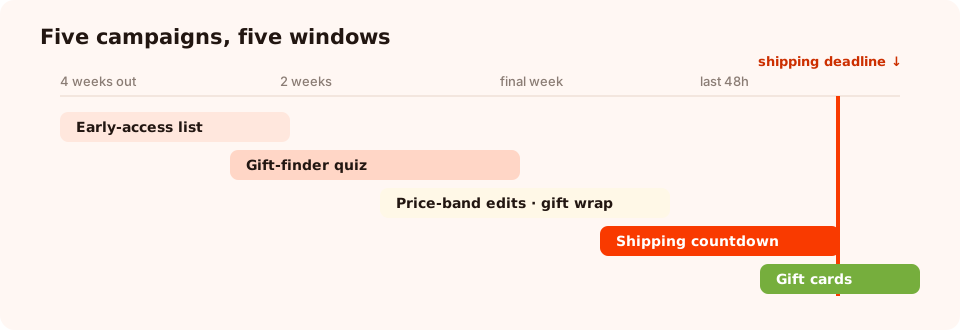
Five campaigns, five windows. Nothing runs for the whole month, and nothing runs after its own deadline.
| Window | Campaign | Trigger | Audience |
|---|---|---|---|
| 4 weeks out | Early-access list | Scroll 50% | Returning visitors |
| 2–3 weeks out | Gift-finder quiz | 10s delay | Everyone |
| 1–2 weeks out | Price-band edits, gift wrap | Exit intent | Everyone |
| Final week | Shipping countdown | Scroll 40%, or on load in a bar | Everyone |
| Final 48 hours | Digital gift cards | Exit intent | Everyone |
Dates are not universal. Many countries — including the US and the UK — mark Father's Day on the third Sunday of June, but plenty of markets use a different date. If you ship internationally, schedule per market rather than running one global window, and check the date before you set the timer.
The display rules for a seasonal campaign
Seasonal popups need one setting that standing campaigns can live without: an end date. The rest is the usual discipline.
- Date window. A start and end date with hours in a chosen GMT offset. Set it while you are building, not "later" — later is how a Father's Day bar ends up live in August.
- Page targeting. Keep the gift-guide campaigns on gifting pages, and the countdown on collection and product pages. Use contains, does not contain, is exactly, is not, starts with or ends with.
- Frequency. Once a day during the build-up; every session in the final 48 hours, when the message is genuinely urgent.
- Show again after conversion. Off, on every campaign that captures an email — nobody who just joined the early-access list should be asked again.
- Pause the standing offer. If you normally run a welcome discount, pause it during the peak instead of stacking two offers. Two discounts in one session teaches shoppers to wait for a third.
- Devices. Gift shopping skews heavily to phones in the final week. Use scroll or delay triggers rather than exit intent there, and check the close control with a thumb.
Copy that works for gifting
EARLY ACCESS
  The Father's Day edit drops Tuesday. Want first look?
  → Send me the edit

GIFT FINDER
  Not sure what to get him? Three taps and we'll pick.
  → Find his gift

PRICE BAND
  Gifts he'll actually use, all under £50.
  → See the edit

GIFT WRAP
  Free gift wrap at checkout — it'll look like you planned it.
  → Add it to my order

COUNTDOWN
  Order in the next 6h 12m for delivery before Sunday.
  → Shop gifts now

GIFT CARD RESCUE
  Too late for delivery? A digital gift card lands in his inbox in minutes.
  → Send a gift card
Notice what is missing: the word "celebrate", exclamation marks, and any claim about how much he will love it. Gift shoppers are anxious, not excited. Calm and specific beats enthusiastic every time.
Five mistakes that make a seasonal popup look careless
- No end date. The single most common seasonal error, and the most visible.
- A countdown to a fake deadline. It works once. Then it never works again.
- The same campaign for four weeks. The planner and the panic-buyer need opposite messages.
- Stacking the seasonal offer on the standing one. Pause one; do not run both.
- Forgetting the day after. Run one post-day campaign — a thank-you, a returns reminder, or the start of the next season's list — and then retire everything.
What to measure, and what to keep
Each campaign reports its own views, clicks, submissions and conversion rate, plus the values collected per field. For a season this short, two numbers matter: how many emails the early-access and quiz campaigns collected, and how the countdown's conversion rate compared with the week before it.
The thing worth keeping is not the discount code. It is the quiz answers: who the shopper was buying for, what budget they had, what he was into. That is next year's segmentation, already collected — and it is why the gift finder earns its place over a flat percentage.

Read the season per campaign, then keep the quiz answers for next year.
Build the four-week plan in an afternoon
Popups, quizzes, bars and prize games from one editor, each with its own schedule. Free plan, no credit card required. Paid plans from $29/month.
Start free →Related reading
Frequently asked questions
When should Father's Day popup campaigns start?
Three to four weeks before the date for the early-access and gift-guide campaigns, two weeks out for the gift finder, and the final week for the shipping-deadline countdown. After the deadline passes, switch everything to digital gift cards — that window is short but converts unusually well.
What is a good Father's Day popup offer?
Anything that solves the choosing problem rather than shaving the price: a curated gift edit under a price point, a quiz that recommends one product, free gift wrapping, or guaranteed delivery before the date. Discounts work, but gift shoppers are far more sensitive to “will it arrive and will he like it” than to ten percent.
Is Father's Day on the same date everywhere?
No. Many countries including the US and the UK mark it on the third Sunday of June, but other countries use different dates entirely. If you ship internationally, check the dates for your main markets and use a scheduled date window per campaign rather than one global run.
How do I stop a seasonal popup from running after the event?
Set the campaign's date window when you build it: a start and end date with hours, in your chosen time zone. That way the campaign retires itself at the moment the offer expires instead of depending on someone remembering to switch it off on a Sunday night.
Should Father's Day campaigns exclude anyone?
It is worth being thoughtful. Some brands offer an opt-out link in their Father's Day emails, and the popup equivalent is simply not making the campaign unavoidable: keep a visible close control, a frequency cap, and no content gate. A day that is difficult for some people is not a reason to skip the campaign, but it is a reason not to force it.