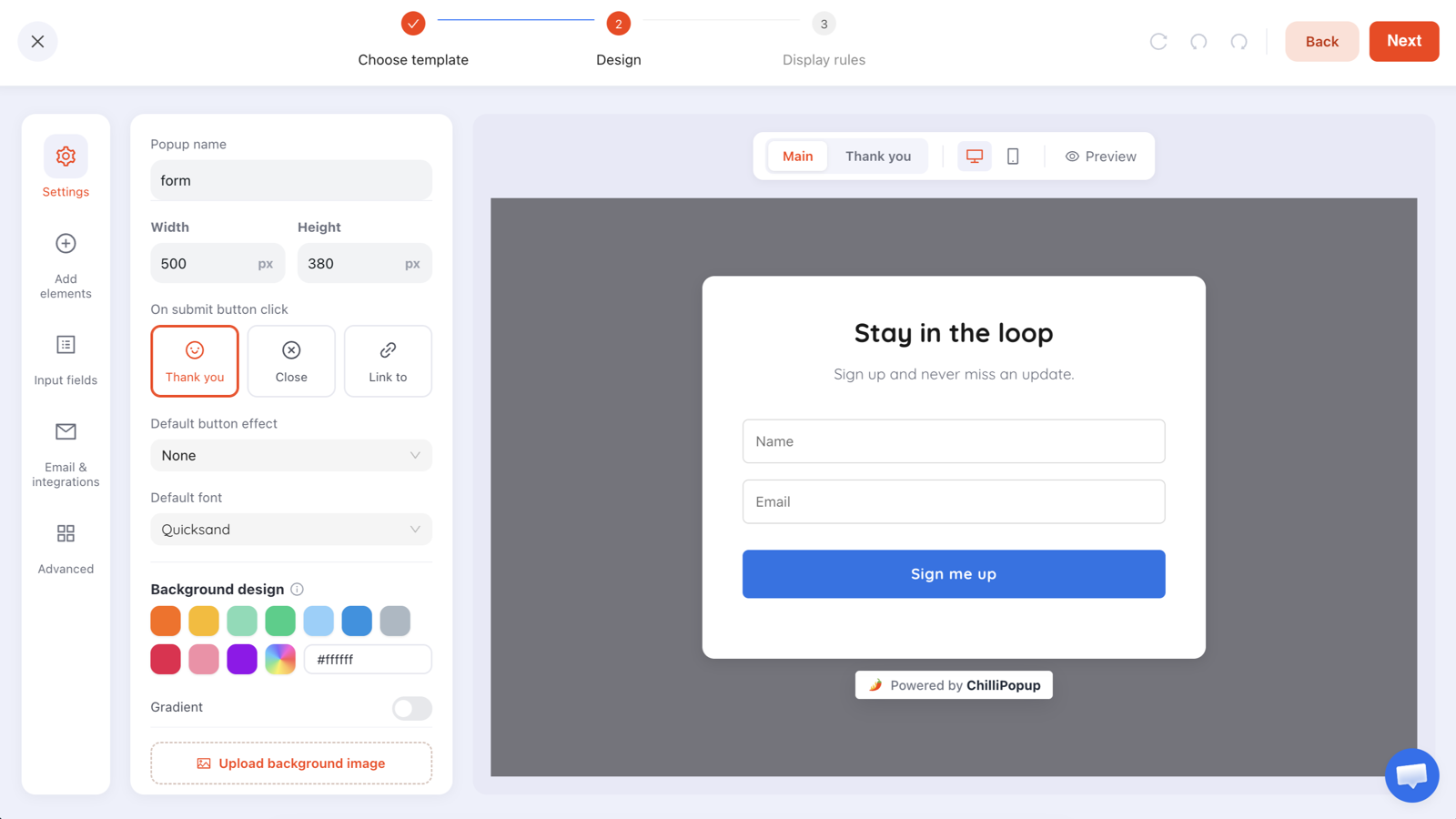
Junk signups from a popup come from three completely different places: honest typos, real people using throwaway addresses to grab a discount, and automated submissions from scripts that fill in any public form they find. They look identical in a spreadsheet and they need entirely different fixes.
So the first job isn't to add filters. It's to work out which one you actually have — because two of the three are fixed inside the popup, and the third can only really be fixed after it.
Key Takeaways
- Three causes, three fixes. Typos, throwaways and automation are different problems wearing the same costume.
- Typos are the biggest and easiest. Format-and-typo validation catches
gmial.comand.conbefore the visitor submits. - Business-email-only is a B2B setting, not a spam filter — on a consumer store it rejects your real customers.
- Views are the tell. Real signups arrive with views. Submissions without views mean automation.
- Double opt-in in your email tool is the durable defence. No popup setting can prove a human filled in a form.
Diagnose before you filter
Every over-filtered signup form started with someone adding rules in a panic. Spend ten minutes reading the data first — the campaign's analytics shows the values collected per field, which is where the answer is.
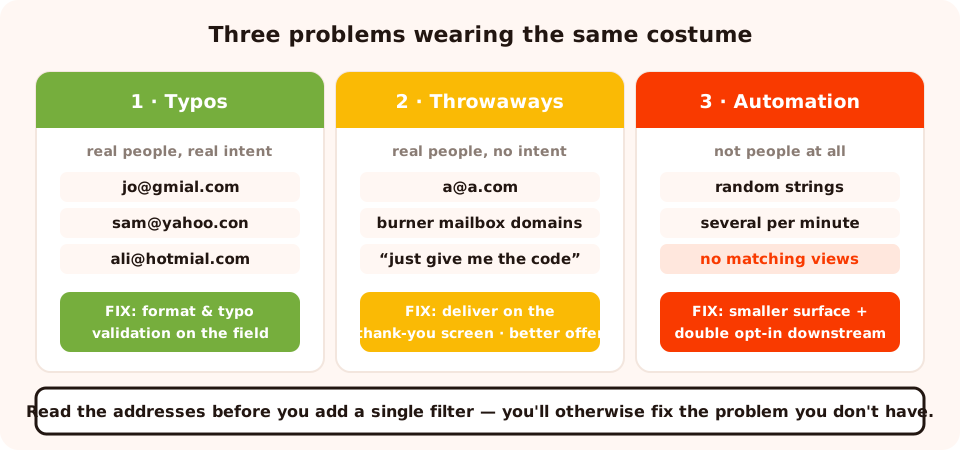
Read the addresses, not the total. The pattern in the domains tells you which problem you have.
| What you see | What it is | Where the fix lives |
|---|---|---|
Near-miss domains: gmial.com, hotmial.com, …@yahoo.con |
Typos — real people, real intent | Email field validation |
Disposable / burner domains, or a@a.com |
Throwaways — real people, no intent to hear from you | The offer, plus double opt-in |
| Random strings, several per minute, no matching views | Automation — not people at all | Targeting, consent step, and downstream confirmation |
0000000000 in the phone field, asdf in company |
Required-field compliance — you asked for too much | Delete the field |
The views test. A human has to see a popup before they can fill it in, so submissions and views move together. If submissions jump while views stay flat, you're not having a good week — you're being submitted to by something that never rendered the popup.

Views, clicks and submissions per campaign — plus the top values collected per field, which is where junk shows itself.
Fix 1 — Typos: the biggest win, and it's a dropdown
Typos are almost always the largest slice, and they're the most painful because these are people who wanted your emails. They're just never going to get them.
Every email field in ChilliPopup has a validation setting with four options:
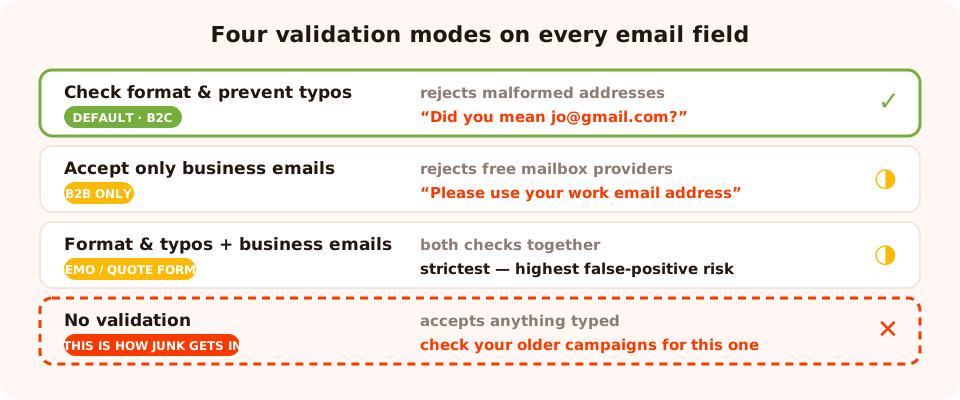
Four modes. "Check format & prevent typos" is the right default for almost every consumer form.
| Mode | What it does | Use it when |
|---|---|---|
| Check format & prevent typos | Rejects malformed addresses and offers a "Did you mean…?" correction for common misspellings | Default for consumer stores, blogs, anything B2C |
| Accept only business emails | Rejects the common free mailbox providers with "Please use your work email address" | B2B lead forms where a work address is the qualification |
| Format & typos + business emails | Both checks together | B2B demo and quote forms |
| No validation | Accepts anything typed | Effectively never — this is how junk gets in |
The typo catcher covers the misspellings people actually make — gmial.com,
gnail.com, hotmial.com, yaho.com, and mistyped endings like
.con, .cmo and .co. The visitor sees "Did you mean
jo@gmail.com?" and fixes it themselves, which is the ideal outcome: you keep the subscriber
and the address works.
Check your existing campaigns. New email fields start with format validation on, but a campaign someone built months ago may have been switched to "no validation" to make testing easier and never switched back. It takes thirty seconds per popup to check.
Fix 2 — Throwaway addresses: a strategy problem, not a settings problem
A burner address is a real person telling you something specific: I want the discount, I don't want the relationship. No validation rule fixes that, because the address is technically valid.
Three things that actually reduce it:
- Deliver the value in the popup, not the inbox. If the code appears on the thank-you screen, the person who only wanted the code has no reason to fake an address — and the people who do give you a real one are self-selecting as interested.
- Make the promise specific. "One useful email a week" attracts a different person from "subscribe for updates". Vague promises are what burner addresses are a defence against.
- Change the offer. A discount attracts discount-hunters; a genuinely useful asset — a size guide, a template, a restock alert — attracts people who want to hear from you again. There's a fuller list in lead magnet ideas.
On B2B forms, the business-email mode does genuinely help here, because it removes the easiest throwaway route. On a consumer store it would reject most of your customers — a huge share of real shoppers use Gmail, Outlook or iCloud — so it's the wrong tool for that job.
Fix 3 — Automated submissions: reduce the surface, then confirm downstream
Let's be direct about this: no popup setting can prove a human filled in a form. ChilliPopup does not have a CAPTCHA, and a CAPTCHA would cost you real conversions if it did. What you can do is make your forms a smaller target and make fake addresses harmless.
Reduce the surface area
- Lock each campaign to your domain. A campaign can be restricted to the site it belongs on, so it doesn't render anywhere else.
- Give every campaign a page rule. A popup that only exists on three page types is a smaller target than one that renders on every URL.
- Cap the frequency and turn off "show again after conversion". Both cut the number of times any given browser can be presented with the form.
- Disable campaigns you're not running. An old popup nobody looks at is the one that collects junk quietly for six months.
- Require the consent checkbox. An extra required interaction is a step naive automation often skips — and you want the documented consent anyway.
Then make fake addresses harmless
The durable fix lives in your email tool, not your popup tool: turn on double opt-in. An address that never confirms never receives a campaign, never bounces and never damages your sender reputation. It sits inert instead of costing you deliverability.
Why deliverability is the real stake. Fake addresses don't just pad a number — they bounce and they generate complaints, and mailbox providers judge your domain on both. A thousand junk addresses can measurably reduce the inbox placement of the emails your genuine subscribers wanted. That's the cost, and it's why the cleanup matters even if the junk is "only" 5%.
Fix 4 — Stop asking for fields that manufacture junk
A large share of "bad data" is data you asked for and nobody wanted to give. Required fields don't produce
information — they produce compliance. Ask for a phone number nobody wants to share and you get
0000000000. Ask a browsing consumer for "company name" and you get asdf.
Before a field earns a place on a popup, name the exact email, segment or recommendation that changes because of the answer. If you can't, the field isn't collecting data — it's manufacturing noise and costing conversions at the same time. Move the genuinely necessary ones to a later ask with progressive profiling.
The cost of over-filtering
Every filter has a false-positive rate, and popup filters are applied at the exact moment someone has decided to convert. Three things to keep in view:
- Business-email-only on a consumer form rejects the majority of real customers. It's a qualification rule, not a hygiene rule.
- An error message that doesn't explain itself loses the signup entirely. "Please use your work email address" works because it tells the person what to do next.
- Extra required fields as a spam defence cost you far more genuine conversions than the junk they block. Friction is a terrible filter — it's felt hardest by the people who were going to be your best subscribers.
A five-minute audit
- Open each live campaign and check the email field's validation setting. Anything on "no validation" gets moved to format-and-typos.
- Delete any field you can't name a downstream use for.
- Confirm every campaign has a page-targeting rule and is locked to your domain.
- Turn off "show again after conversion" everywhere.
- Disable campaigns you're no longer running.
- Check double opt-in is on in your email tool.
- Read the collected values for the last two weeks and note which of the three problems you actually have.
Six mistakes when cleaning up signups
- Adding filters before reading the data. You'll fix the problem you don't have.
- Turning on business-email-only in a consumer store. The complaint volume arrives within a day.
- Adding fields to "make it harder for bots". It's harder for everyone, and the people it deters most are the polite ones.
- Skipping double opt-in because it costs list size. A list of addresses that never confirm isn't a list, and it damages the deliverability of the real one.
- Ignoring the thank-you screen. Delivering the reward there removes most of the reason to fake an address in the first place.
- Leaving old campaigns enabled. Unwatched forms are where junk accumulates.
Set it up in ChilliPopup
Thirty minutes for a full audit. If the pixel isn't installed yet, start with the one-line install guide.
1. Read the collected values first
Open each campaign's analytics and look at the addresses themselves. Near-misses, disposables and gibberish each point somewhere different.
2. Set email validation on every email field
Select the field, open its settings, and choose "check email format & prevent typos". This is the single highest-return change on the list.
3. Switch B2B forms to business emails
Only on forms where a work address is the qualification — demo requests, quote forms, gated B2B assets.
4. Tighten the rules
Page targeting on every campaign, locked to your domain, frequency capped, "show again after conversion" off, and anything stale disabled.
5. Turn on double opt-in downstream
In your email tool. This is what makes the remaining fake addresses harmless.
6. Re-read in two weeks
If junk persists after validation and confirmation, the offer is attracting the wrong people. Change the offer, not the form.
Collect addresses you can actually email
Email validation, typo correction and consent fields are built into every popup, form, survey and quiz. Free plan, no credit card required. Paid plans from $29/month.
Start free →Related reading
Frequently asked questions
Why am I getting fake email addresses from my popup?
Usually one of three causes. Typos — someone meant gmail.com and typed gmial.com. Throwaway addresses — a real person who wanted the discount but not the emails. Or automated submissions from scripts that fill in any public form they find. Each has a different fix, so identify which one you have before changing anything.
How do I stop typos in email fields?
Set the email field validation to "check email format & prevent typos". It rejects malformed addresses and catches common misspellings — gmial.com, hotmial.com, a .con or .cmo ending — with a "Did you mean…?" prompt so the visitor corrects it themselves before submitting.
Should I block free email addresses like Gmail?
Only on B2B forms, and only when list quality genuinely matters more than volume. ChilliPopup has an "accept only business emails" mode that rejects the common free mailbox providers. On a consumer store it would reject most of your actual customers, so leave it off there.
Does ChilliPopup have a CAPTCHA?
No. Nothing in a popup can prove a submission came from a human, so the durable defence against automated signups is downstream: turn on double opt-in in your email tool so nothing gets mailed until the address confirms itself. That single setting neutralises fake addresses regardless of how they got in.
How can I tell if my signups are bots?
Look at the ratio in your popup analytics. Real signups always come with views — a person had to see the popup to fill it in. A sudden run of submissions with no matching rise in views, or a burst of them within seconds, is the signature of automation rather than a good marketing day.
Does a consent checkbox reduce spam?
It helps a little, and it is worth having anyway. A required email-consent checkbox adds a step that naive automated submissions often skip, and it gives you a documented record of consent for the addresses that do come through. Treat it as hygiene, not as a security control.