Every marketing team has had the same meeting. Sales wants the phone number. The CRM has a company size field sitting empty. Someone suggests adding "How did you hear about us?" And so the popup that used to ask for an email now asks for six things — and quietly stops converting.
Progressive profiling popups solve that argument. Instead of one popup that asks everything, you build a short ladder of asks: one field now, one more on the next visit, the expensive ones once you've actually given the visitor something. You end up with the same profile — you just collect it at the speed a stranger is willing to give it.
Key Takeaways
- One ask per visit. Stage 1 takes the email, stage 2 takes the field that changes what you send, stage 3 takes the field your revenue team wants.
- Fields are decisions, not keystrokes. A phone number or a qualifier question costs far more conversions than an email input does.
- Multi-step ≠ progressive profiling. Multi-step splits one session into screens; a profiling ladder splits one relationship across visits, and only the ladder needs visitor recognition.
- The second ask must follow delivered value — a used discount code, a read email, a completed order — never precede it.
- Every rung that lands is a lead you keep, even if the visitor never climbs the next one. That's the whole point.
What is a progressive profiling popup?
Progressive profiling, in two sentences
Progressive profiling asks a visitor for one or two pieces of information at a time, spread across several visits, instead of demanding everything in one form. A progressive profiling popup puts that on your website: the first popup captures an email, and later ones ask returning visitors only for the extra details you will actually act on.
It helps to think of a customer profile as three layers, collected in this order:
- Identity — how you reach them. Email, or a phone number if SMS is genuinely your channel.
- Context — who they are. Shopping category, role, company type, the segment that decides which content they get.
- Intent — what they want next. Budget, timeline, team size, size and fit, birthday month.
Almost every popup that underperforms is trying to grab all three layers from a stranger in one interaction. A profiling ladder collects them in the order a relationship actually forms.
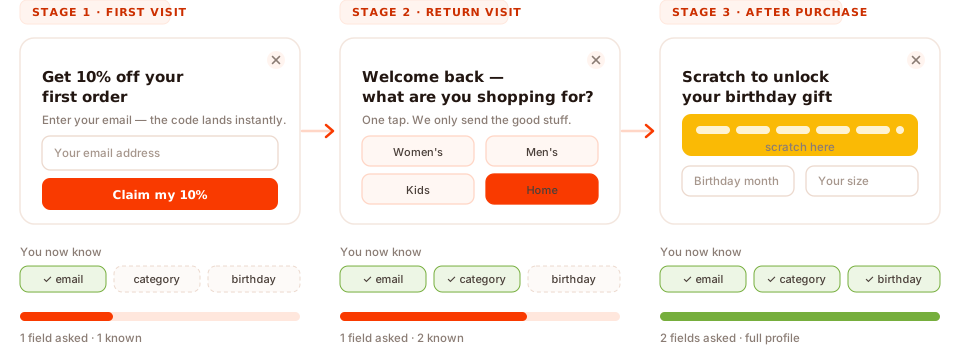
The same profile, collected one rung at a time — never more than one ask per visit.
Note what progressive profiling is not: it isn't a feature you switch on. It's a sequencing and targeting decision. The same popup builder produces a bloated six-field form or a clean three-rung ladder depending entirely on how you split and rule it.
Why one long popup form loses conversions
Every field is a decision, not a keystroke
A form field costs the visitor three things: a decision ("what do they want here, and why?"), the typing itself, and — on a phone — a keyboard that covers half the screen and a scroll jump that loses their place. That's why a five-field popup on mobile stops feeling like a signup and starts feeling like paperwork.
Not all fields cost the same
Per-field cost is wildly uneven. Once someone has decided to take your 10% off, typing an email is nearly free — they were always going to give you a way to send the code. A phone number, a budget range or a company size behaves completely differently: it reads as an objection, not a step. Count cost per field, not number of fields.
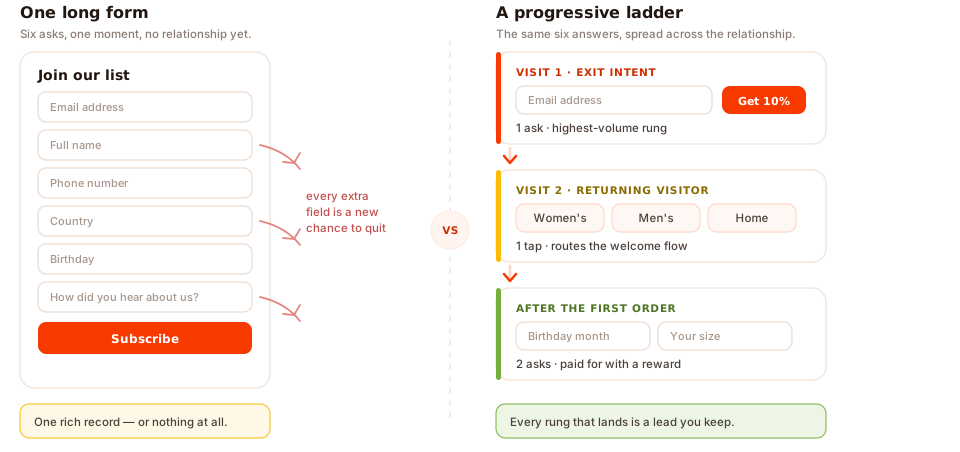
Same six answers. One version gives you a rich record or nothing; the other banks a lead at every rung.
The quality tax nobody measures
Required fields don't produce data — they produce compliance. Ask for a phone number nobody wants to
give and you get 0000000000. Ask "company name" of a browsing consumer and you get
asdf. So a long form charges you twice: once in the conversions you never made, and again
in the junk you now store, segment on and email.
Popups are the harshest possible environment for a long form, too. The visitor didn't ask for the interruption, so the socially acceptable ask is smaller than it would be on a landing page they chose to open. The root cause is almost always organisational: the popup gets designed around the CRM schema (what sales wants to see) instead of around the moment (what this visitor will give right now) — and the schema always wins the meeting.
The working rule. Stage 1 contains only what you need to (a) reach them and (b) send one genuinely relevant first message. Everything else belongs on rung two or three.
Multi-step popups vs a progressive profiling ladder
These get conflated constantly, and the difference matters because only one of them needs to recognise a returning visitor.
- A multi-step popup splits one form into several screens inside a single session. The visitor answers everything before they close it. No memory required.
- A progressive profiling ladder splits the questions across separate visits. It depends entirely on recognising someone who came back.
| Approach | What the visitor sees | Needs visitor recognition? | Best for | Main risk |
|---|---|---|---|---|
| One long form | Six fields, one screen, one decision | No | High-intent moments only (demo requests, quote forms) | A small, skewed sample — and no lead at all from everyone who bounced |
| Multi-step popup (a survey or quiz) |
One question per screen, same visit | No | Single-session traffic, paid campaigns, segmentation quizzes | Losing the partial answers if the tool only saves on final submit |
| Progressive ladder | One small ask per visit, over weeks | Yes | Sites with real returning traffic — stores, blogs, SaaS | Rung two never firing, so you're left with emails and nothing else |
| The hybrid (recommended) | Two-step ask now, one more ask later | Only for the later rungs | Almost everyone | Slightly more to build and maintain |
Multi-step has one underrated mechanic worth knowing about: partial answers. In ChilliPopup, if someone answers question one and two of a survey or quiz and then closes it without submitting, what they typed is still recorded as a partial response — shown in the dashboard under "Answers visitors entered before leaving without submitting." A step-2 abandon still teaches you something.
Worth checking in any tool: partial capture applies to stepped content — surveys and quizzes. A standard popup or inline form that someone types into and closes leaves no partial record, so don't design a stage around data you assume is being saved.
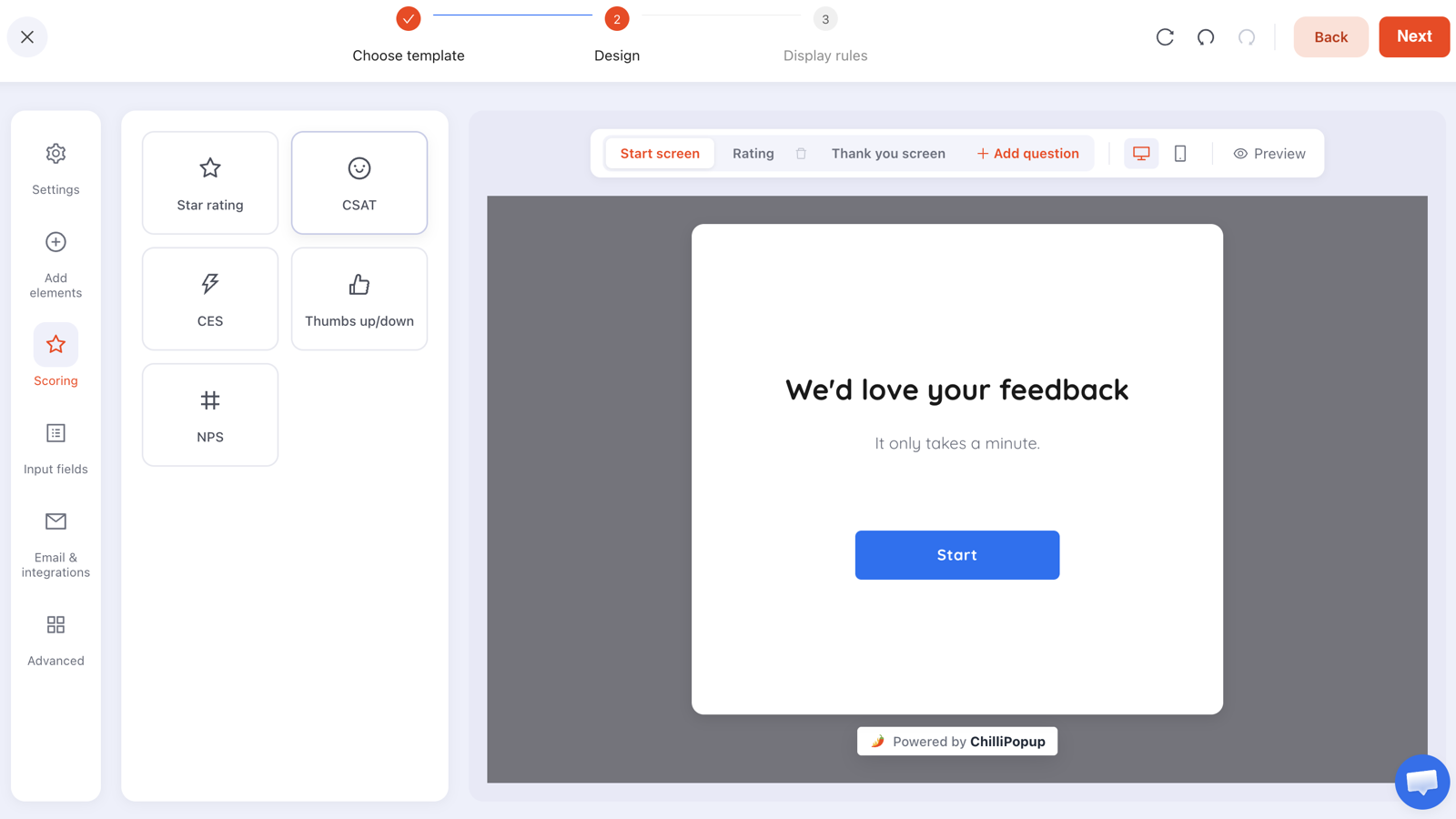
Stepped content is built one screen at a time — start screen, question, thank-you. That's still one visit, so it's still one rung: several screens, one ask flow.
For most sites, run the hybrid: build stage 1 as a two-step survey or quiz — screen one asks for the email and is required, screen two asks one optional segmenter — then add a genuine second and third rung on later visits. Everything answered arrives as one submission at the end, so single-session traffic still gives you something and returning visitors gradually fill in the rest.
One quirk to design around: a rating or choice answer stays selected if the visitor steps backwards, but a text or email field comes back empty and has to be retyped before they can move on. Put the required identifier on the screen they are least likely to revisit.
How to design the ladder: which field first, second, third
Stage 1 — one identifier
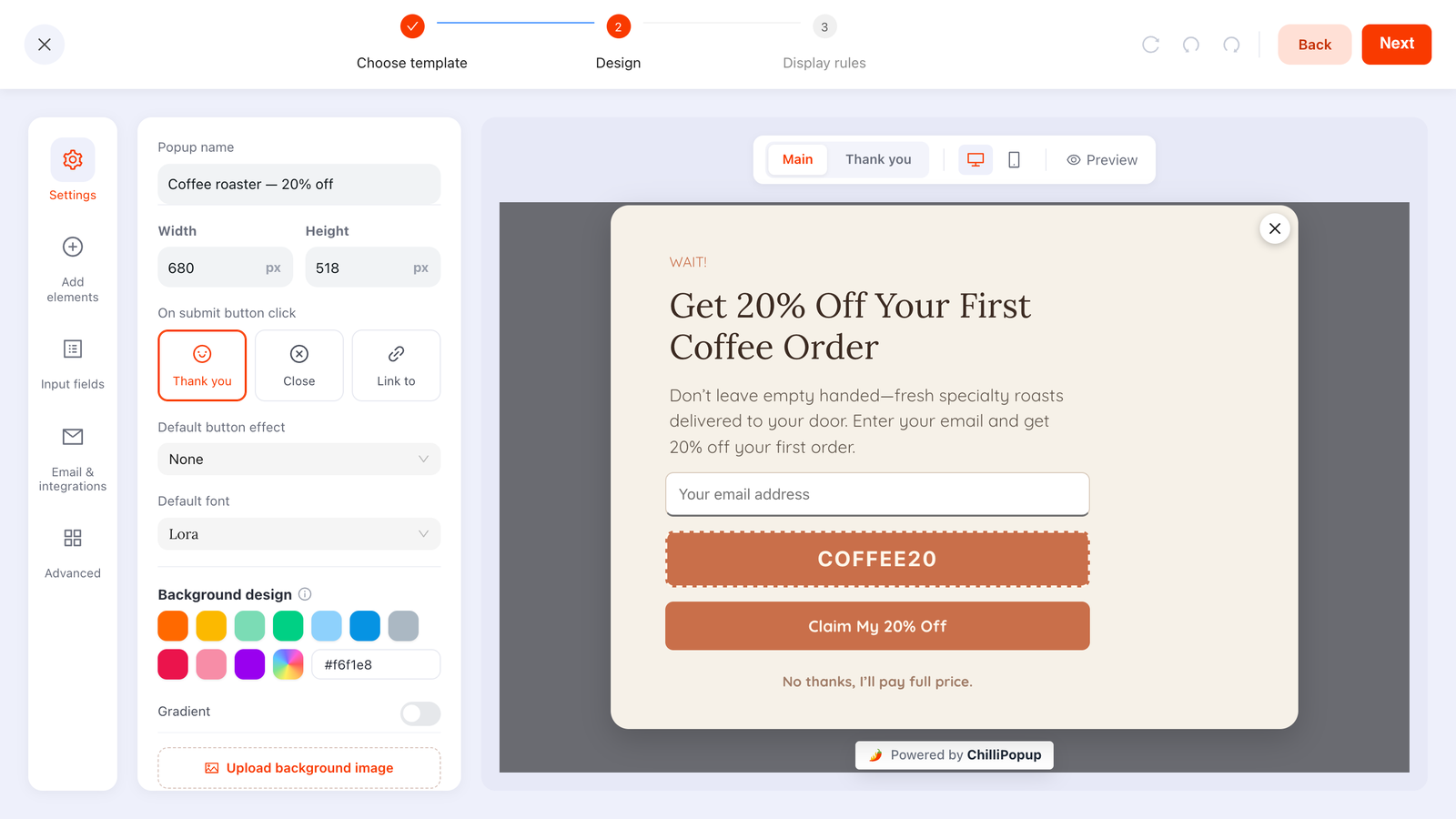
Exactly one field: email, or phone if SMS is truly your channel. Not both. First name only earns a slot if you genuinely personalise subject lines, and even then make it optional. The shape to aim for is the one at the top of this page: one input, one button, one reason to fill it in.
Stage 2 — the segmenter
The single field that changes which content this person receives. Shopping category or size for a store; role or use case for software. Pick the field with the highest routing value, not the highest sales value — this rung exists to make your emails relevant, which is what earns you the right to ask a third time.
Stage 3 — the qualifier
The field the revenue team actually needs: phone number, birthday, team size, budget band, timeline. It appears only after you've delivered value at least twice, and it should usually be bundled with a reward rather than extracted for free.
The "so what" test
Before a field goes anywhere on the ladder, name the exact email, segment, product recommendation or sales action that changes because of the answer. No name, no field. Fields that fail this test don't get demoted to stage 3 — they get deleted.
Choice chips beat text inputs
Wherever you can, replace a text input with three to five tappable options — a one-question quiz, built from
the editor's Choices panel. They complete in one gesture,
they work on a phone, and — critically — they return normalised values instead of Mktg,
marketing ops and Marketing, which you then cannot segment on. A one-question
quiz is often the cheapest rung you'll ever build.
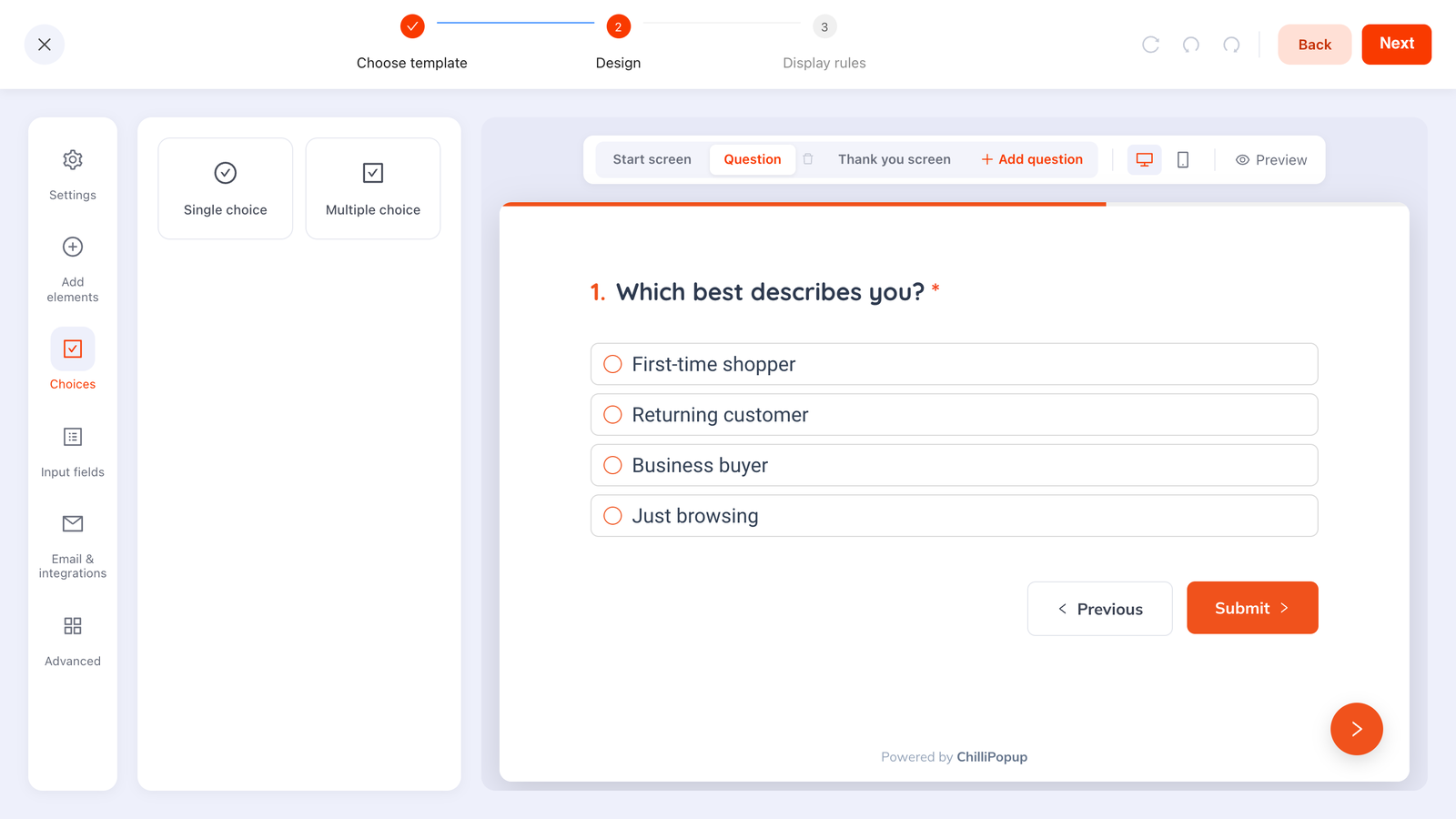
A stage-2 segmenter done right: one question, four options, one tap — and a clean value you can route on.
| Stage | Ecommerce | SaaS / B2B | Cost to the visitor |
|---|---|---|---|
| 1 — Identity | Email (business-email validation on) | Very low — they already decided | |
| 2 — Context | Category: Women's / Men's / Kids / Home | Role: Founder / Marketing / Product / Engineering | Low — one tap |
| 3 — Intent | Birthday month, size, favourite store | Team size, timeline, phone number | High — needs a reward or a warm moment |
| Never | "How did you hear about us?" | "Anything else we should know?" | Pure friction, zero routing value |
Cap the ladder at three rungs. A fourth ask is almost always where the marginal field costs more in unsubscribes and reflexive dismissals than the data returns.
Two worked progressive profiling examples
Ecommerce: an apparel store's three-rung ladder
Rung 1 — first visit, exit intent on product and collection pages.
"Wait! Get 10% off your first order — enter your email and the code is yours." One email input, one button, and a visible "No thanks, I'll pay full price" decline link. The code appears on the popup's thank-you screen straight away, and again in whatever welcome email your email tool sends.
Rung 2 — second visit, a small one-question quiz.
"Welcome back — so we only send you the good stuff, what are you shopping for?" with chips for Women's, Men's, Kids and Home. One tap writes the category and routes them into the matching welcome flow.
Rung 3 — after the first order, wrapped in a game.
"Scratch to unlock your birthday gift." The customer plays the scratch card, the claim screen asks for birthday month and size, and submitting it reveals the prize. Those two fields would have destroyed rung 1; here they're the last step before a reward the customer has already won.
SaaS: a project-management tool's three-rung ladder
Rung 1 — blog and resources pages, 50% scroll.
"Get the weekly teardown." Email only. No company field, no role, no "how did you hear about us". Turn on business-email validation if your list quality matters more than raw volume.
Rung 2 — on the return visit.
"Tailor what we send — what best describes you?" with chips for Founder, Marketing, Product and Engineering. That single answer changes the newsletter segment and the call-to-action in every later email.
Rung 3 — when a returning visitor lands on pricing.
"Want a 15-minute walkthrough for a team your size?" — a one-question quiz whose options are the team-size bands, followed by a booking link. The qualifier arrives bundled with an offer instead of being extracted for free.
What both ladders share: each ask is smaller than the value already delivered, each rung is a separate campaign with its own rules, and every answer visibly changes what happens next.
The display rules behind each rung
This is where a profiling ladder is actually built. In ChilliPopup, every popup, form, survey and quiz carries its own display rules, and the ladder is nothing more than three campaigns ruled so they fire at different moments in the relationship.
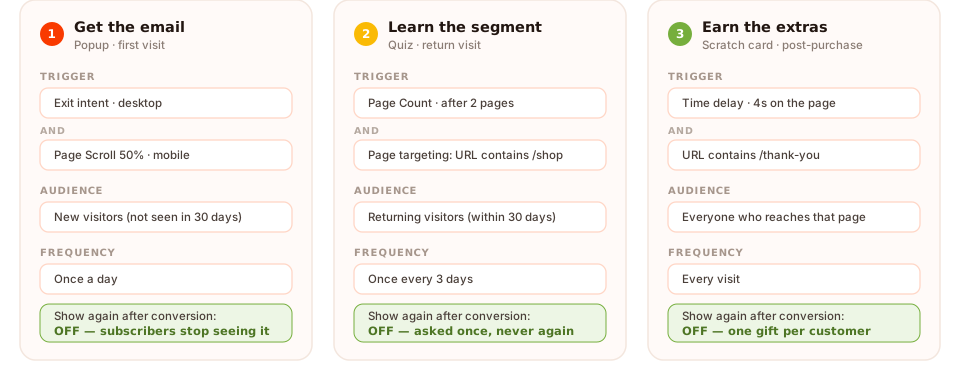
Three campaigns, three rule sets. Turning off "show again after conversion" is what stops a rung repeating itself.
The pieces you'll use:
- Triggers — exit intent, a time delay in seconds, page scroll percentage, page count, click count, or inactivity. The content appears as soon as the first enabled trigger fires.
- Page targeting — restrict a rung by URL with contains, does not contain, is exactly, is not, starts with or ends with. This is how rung 3 only ever appears on your order-confirmation page.
- Audience — everyone, new visitors, or returning visitors, where you define what "new" and "returning" mean in days. Rung 2 lives here.
- Frequency — once a day, every visit, every session, once every N days, once every N visits, or all pages all the time. This is your cooldown between rungs.
- Show again after conversion — turn it off and that campaign stops showing to anyone who already submitted it. This is the single most important switch in the whole ladder.
- A direct link — the same screen gives you a copyable link that launches the campaign on arrival. Put it in your welcome email and rung 2 opens when they click through, which is how you reach the people who would never have come back on their own.
Be precise about what the conversion gate does. It's per campaign: it suppresses that popup for someone who submitted that popup. There is no rule that says "show quiz B only to people who submitted popup A" — that's why rung 2 targets returning visitors rather than "stage-1 converters". In practice the two overlap heavily, and rung 2's own conversion gate stops it repeating. Design for that, and the ladder behaves.
Two more rules worth knowing: recognition of new versus returning visitors is computed from the visitor's own browser storage, so someone on a second device, or browsing privately, looks like a new visitor. And every enabled targeting rule is an AND gate — device, OS and browser, a date window, even a weekday-and-hour schedule can all narrow a rung further.
How to make the second ask feel earned
A ladder fails when rung 2 arrives before anything has been delivered. The order is always value → ask, never the reverse. Four moments that consistently work:
- Inside the same stepped ask. Make rung 1 a two-step survey: screen one is the required email, screen two is one optional question. The visitor has already committed by the time they see it, what they answered is kept in the response, and if they bail on screen two you still keep what they entered as a partial response. It's the cheapest extra answer you'll ever collect.
- Right after the discount is used. They've had the benefit. Now the category question reads as service, not extraction.
- Post-purchase, on the order-confirmation page. Target the URL, delay a few seconds, and ask for the two fields that make the next order better.
- Behind a game. A spin wheel, scratch card, slot machine or claw machine puts the ask on the claim screen — the visitor plays, fills in the claim form, and submitting is what reveals the prize. They're claiming a win, not filling in a form. The outcome is decided server-side, so it can't be rigged from the browser.
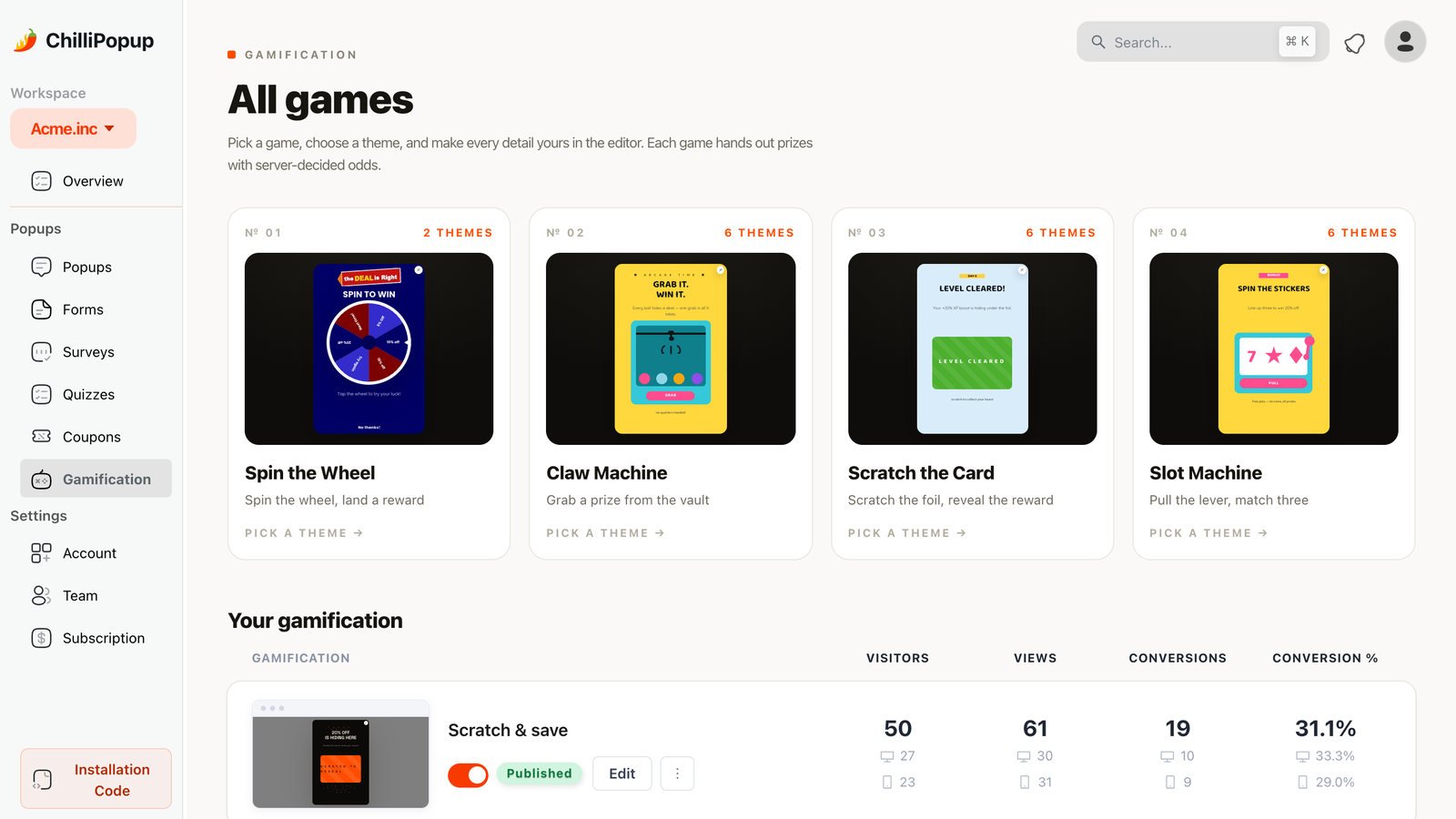
Games move the ask to the moment after someone has won something — the best time to request an expensive field.
One ask per visit. Never stack two rungs in the same session. That single discipline is what keeps a ladder feeling like a conversation instead of an interrogation.
How to link the rungs — and join the data
Two practical problems remain: how the next ask gets triggered, and how you end up with one row per person instead of three unrelated ones.
Chaining an ask immediately
If you can't build stage 1 as a two-step survey, five lines of JavaScript get you the same effect: the pixel fires a browser event on every submit and exposes a small API for opening any campaign by id, so the second question can open the moment the first is submitted. This is the one place to break the one-ask-per-visit rule, and only when the second ask is a single tap.
window.addEventListener('chillipopup:submit', function (e) {
  // e.detail = { popupUuid: '…', data: { email: 'jo@example.com' } }
  if (e.detail.popupUuid !== 'YOUR_STAGE_1_UUID') return;
  window.ChilliPopup.close();                      // open() is a forced open —
  window.ChilliPopup.open('YOUR_STAGE_2_UUID');    // close first or they stack
});
Forms, surveys and quizzes fire their own equivalents — chillipopup:form_submit,
chillipopup:survey_submit and chillipopup:quiz_submit — each carrying the
submitted answers under its own id key (formUuid, surveyUuid,
quizUuid), so match on the right one.
Anything bigger than a single tap belongs on the next visit, or as a second screen inside the same stepped campaign.
Keep an email field on every rung
Each campaign stores its own submissions, and there is no shared contact record stitching a category answer to the email someone gave you three weeks ago. So put an email field on rung 2 and rung 3 as well — it's the key you match rows on when you read them in the dashboard's Collected input data table or copy them into your email tool.
Asking a known subscriber to confirm their email is cheap — they've typed it a hundred times, and the field can be pre-checked for typos and, on B2B forms, restricted to business addresses. Guessing which anonymous answer belongs to which contact is not cheap. Take the tiny friction.
One more honest constraint: steps run in order. There's no branching — no "if they answer Kids, jump to question 5". Design each rung as a small, self-contained ask rather than a decision tree, and use separate campaigns targeted at different pages when you genuinely need different questions for different audiences.
What to measure
The metric that matters is not the conversion rate of any single rung. It's enrichment rate: the share of your list for which you have the field at all — reach × answer rate. To see why, take a made-up example: a question that 60% of people answer but only 8% ever see enriches about 5% of your list — not worth the rung.

Each rung reports its own views, submissions, conversion rate and field inputs — plus a breakdown of the values collected per field.
Per rung, watch four numbers:
- Reach — unique views. If rung 2 is barely shown, no rewrite of the question will save it; the rules are wrong.
- Conversion rate — the dashboard divides submissions by views, so read it as "of everyone who saw this, how many finished". Compare a rung against itself over time, never rung 1 against rung 3.
- Drop-off by question — on stepped content, the dashboard's drop-off analysis ranks the questions people quit on, based on the last field they touched. That's your rewrite list.
- Completion rate and average time — for surveys and quizzes, the results view shows a four-stage funnel (views → interactions → abandoned → submissions), completion rate, average time to finish, and when your responses actually arrive.
Then read the qualitative half: the Collected fields breakdown tells you the top values per field, and partial responses on stepped content show what people typed before leaving. A question that produces one dominant answer and no drop-off usually didn't need asking — you could have inferred it.
Seven mistakes that break a profiling ladder
- Asking rung 2 before delivering anything. The discount code has to be used, or the first email opened, before the second ask is fair.
- Two separate campaigns in one session. It reads as an interrogation and dismissals spike. A two-step survey is fine — that's one campaign, one ask flow — and so is the chained single-tap question above. A second popup with a second real ask is not.
- Leaving "show again after conversion" on. Now subscribers see the signup popup forever, and you look like you don't know who they are.
- A rung with no cooldown. Someone who dismissed the category question should not meet it again on their next page view. Set the frequency.
- Free-text where chips would do. You get unnormalised values you can never segment on.
- Collecting a field nobody consumes. If no email, flow or recommendation changes, the field is friction with no payoff — however good it looks in a dashboard.
- Dripping sensitive data through incremental asks. Health, financial details, precise location and anything else special-category under GDPR should be collected once, in context, with explicit purpose-specific consent — never salami-sliced across popups.
When not to use progressive profiling
Be honest about whether the second rung will ever fire. Skip the ladder when:
- Your traffic is single-session paid traffic pointed at one offer. Rung 2 never gets a chance. Run a multi-step popup inside that one session instead.
- Your volume is low. Splitting a small conversion pool across three stages leaves samples too small to read. Get a few hundred stage-1 conversions before adding a rung you can't evaluate.
- You can't recognise returning visitors. Heavy shared-device traffic or privacy-first browsing means rung 2 either never shows or shows to the wrong person. Do the enrichment by email instead.
- It's a deadline campaign. A one-weekend sale has no runway; the enriched field would arrive after the campaign it was meant to personalise.
Build your first ladder in ChilliPopup
Forty-five minutes, five steps, no code. If you don't have the pixel on your site yet, start with the one-line install guide — the same script serves every rung, so there's nothing extra to embed later.
1. Audit the popup you already have
List every field on it and run the "so what" test on each one. Delete the fields that fail. What's left gets sorted into identity, context and intent — that's your ladder, already designed.
2. Build rung 1 as a single-field popup
One email input, one reward, one button. In display rules: exit intent for desktop (page scroll around 50% for mobile, where exit intent is unreliable). Switch the display frequency rule on — the audience and conversion controls only appear once it is — then set the audience to new visitors and turn off "show again after conversion" so subscribers stop seeing it.
3. Build rung 2 as a one-question quiz
One choice question with three to five options, plus an email field so you can match the answer back. Target returning visitors — that is what makes it a later rung — and trigger on page count after two pages, which counts pages within the current session. Set the frequency to once every few days, and turn off "show again after conversion" here too.
4. Add rung 3 only where value already landed
Page-target your order-confirmation URL, or put the ask behind a scratch card or spin wheel so the expensive fields are collected on the claim screen that reveals the prize. If you have nowhere that qualifies yet, stop at two rungs — that's a complete ladder.
5. Read the numbers in two weeks, fix one thing
Check reach and conversion on each rung and the drop-off analysis on the stepped ones. Rewrite or remove the single question that loses the most people. Then leave it alone for another two weeks.
Turn one long form into a ladder
Build popups, forms, surveys, quizzes and games from one editor — and one pixel. Free plan, no credit card required. Paid plans from $29/month.
Start free →Related reading
Frequently asked questions
What is progressive profiling?
Progressive profiling is a data-collection method that asks a visitor for one or two pieces of information at a time, spread across several visits, instead of demanding everything in one form. A progressive profiling popup applies that idea on your website: the first popup captures an email, and later popups ask returning visitors for the extra details you actually act on.
What is the difference between a multi-step popup and progressive profiling?
A multi-step popup splits one form into several screens inside a single session — the visitor answers everything before they close it. Progressive profiling splits the questions across separate visits, so it depends on recognising a returning visitor. Most sites should run both: a two-step survey or quiz for the first ask, then a genuine second ask on a later visit.
How many fields should a popup ask for?
One, in the first ask. An email address is nearly free once someone has decided to convert, while a phone number or a qualifier question behaves like an objection. Keep the first popup to a single identifier, and move everything else to a later stage where you have already delivered something.
Which field should I ask for at each stage?
Stage one takes one identifier — usually email. Stage two takes the segmenter, the single field that changes what you send them, such as shopping category or role. Stage three takes the qualifier your revenue team needs, such as a phone number, birthday or team size, and it should only appear after value has been delivered at least twice.
How do I connect the answers from different stages to the same person?
Keep an email field on every stage after the first. Each ChilliPopup campaign stores its own submissions, so the email is the key you use to match rows together when you read them in the dashboard or copy them into your email tool. Asking a known subscriber for their email again is cheap; guessing which anonymous answer belongs to which contact is not.
Does progressive profiling work for low-traffic sites?
Not well at the start. Splitting a small conversion pool across three stages leaves samples too small to read, and the second stage never fires if visitors rarely come back. Get a few hundred stage-one conversions first, then add a second rung you can actually evaluate.