Most teams treat the popup and the email programme as two projects with two owners. The popup team counts signups; the email team counts opens. Nobody owns the sentence in the middle — and that sentence is where open rates are actually decided.
A popup is a contract. It states what someone will receive, how often, and in exchange for what. Every email you send afterwards is either honouring that contract or breaking it, and subscribers can tell the difference three months later even when you cannot.
Key Takeaways
- The popup sets expectations; the email programme inherits them. Vague promises produce unengaged lists.
- One tappable question at capture is worth more than a month of guessing at segments later.
- Deliver the reward on the thank-you screen, not only by email. Then repeat it in the welcome message.
- Decide the data path before launch — batch export, or a submit-event hook to your own endpoint.
- A campaign direct link in a newsletter is the practical way to reach existing subscribers.
What the popup decides about your email programme
Four things, and all four are set before a single email is sent:
- Who is on the list. A 20% discount attracts a different population than a size guide. Neither is wrong; they just behave differently forever.
- What you know about them. If the popup asked nothing but the address, every email is a broadcast. One extra answer makes segmentation possible.
- What they expect. "Join our newsletter" creates no expectation, so any email is a surprise. "One email a week, our best deals" creates a small, keepable promise.
- Whether they will open anything. Engagement starts with a kept promise in the first hour, not with a clever subject line in week three.
The test. Read your popup, then read the last email you sent. If a stranger would not recognise them as the same relationship, you have found your problem.
The five stages of the handoff
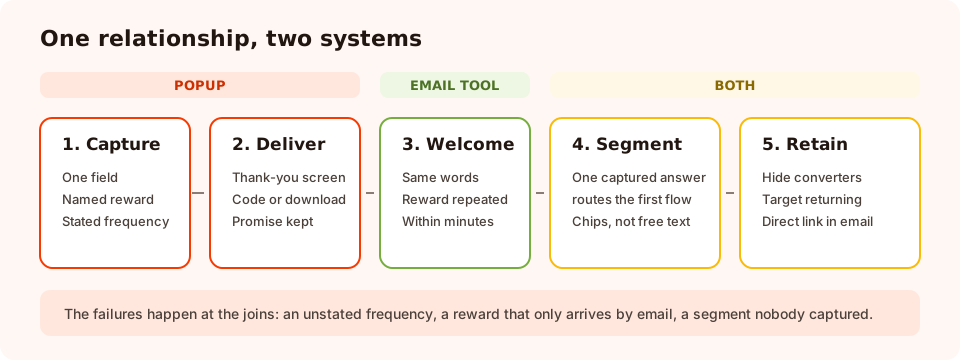
Two systems, five stages. The failures happen at the joins, not inside either tool.
| Stage | Owned by | What good looks like | Common failure |
|---|---|---|---|
| 1. Capture | The popup | One field, a named reward, a stated frequency | Five fields and "stay in touch" |
| 2. Deliver | The popup thank-you screen | Code or download shown immediately | "Check your inbox" — then nothing arrives |
| 3. Welcome | The email tool | Same promise, same words, within minutes | A generic brand email that mentions nothing |
| 4. Segment | Both | One captured answer routes the first flow | Everyone gets everything, forever |
| 5. Retain | Both | Popups for returning visitors; direct links in emails | Subscribers shown the signup popup again |
Stage 1: write the contract into the popup
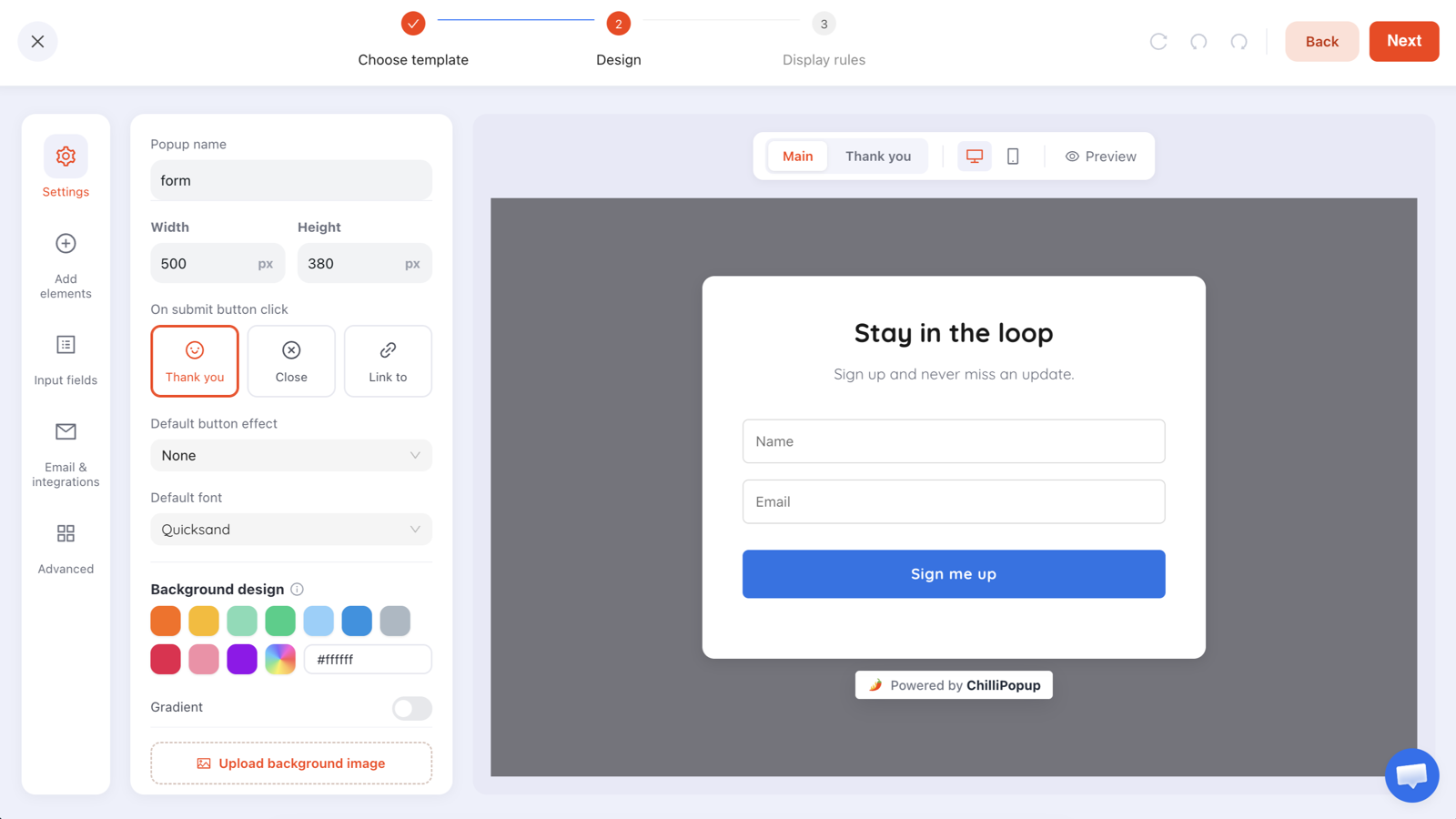
Three lines do the work. The headline names the reward, the subhead sets frequency and permission, and the button confirms what happens next.
Headline:  Get 10% off your first order
Subhead:   One email a week with new arrivals and offers. Unsubscribe any time.
Field:     you@example.com     (required, email format validation on)
Button:    Send my code
Decline:   No thanks, I'll pay full price
Consent:   By subscribing you agree to receive our emails. See our privacy policy.
"One email a week" is the line that pays for itself. It costs you a fraction of a percent in signups and it removes the single most common reason people unsubscribe or mark mail as spam — surprise. Say the real number; if you cannot commit to a cadence, describe the trigger instead ("only when something is genuinely on sale").
Careful with over-promising rewards. A discount that turns out to be single-use on full-price items only, revealed after signup, produces a subscriber who opens exactly one email. Put the material condition in the popup, in normal words.
Stage 2: deliver before you send
Set the popup's submit action to a thank-you step and put the reward on it — the code, the download link, the "you're on the list for Thursday's drop" confirmation. Email is the backup copy, not the delivery mechanism, because deliverability delays turn a converted lead into a support ticket.
If you are handing out discount codes, the coupon block renders the code with a copy control, and prize codes for games are only revealed after the claim form is submitted — the winning outcome is decided server-side, so nothing is sitting in the page waiting to be found.
Stage 3 and 4: welcome, then segment
The welcome email should be boring in the best sense: same promise, same words, reward repeated, one clear next step. Our welcome email guide has the structure.
Segmentation is where the popup earns its keep, and it hinges on one design choice: chips instead of
text. A one-question choice — "What are you shopping for?" with four tappable options —
completes in a single gesture and returns a normalised value you can route on. A free-text field returns
Mktg, marketing ops and Marketing, which you cannot segment on at all.
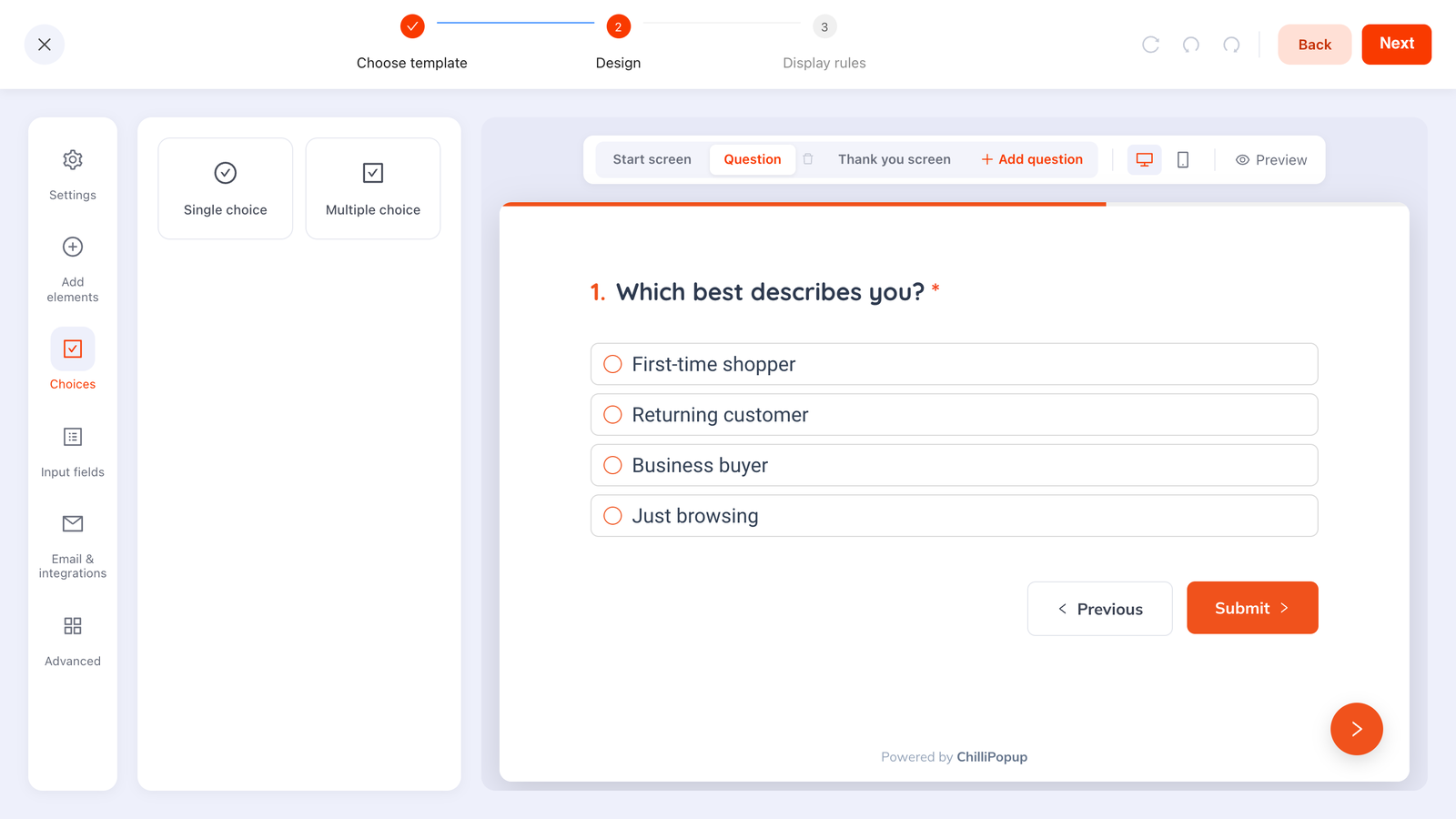
One question, four options — captured next to the address, so the first email can already be relevant.
Two honest constraints worth designing around. Steps run in order and there is no branching, so build small self-contained asks rather than decision trees. And each campaign stores its own submissions with no shared contact record, so keep an email field on any later ask — the address is the key you match rows on. The progressive profiling guide covers how to stage those asks without shrinking the first one.
Getting the data across
This is the part that gets skipped in planning and then absorbs someone's Monday morning forever. There are three paths, and only the first two are real.
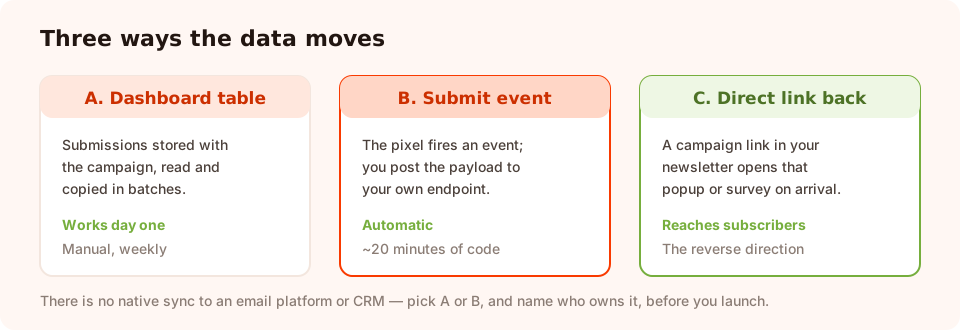
Path A works from day one. Path B is twenty minutes of code and then never touched again.
Path A — the dashboard table
Every submission is stored with its campaign, and the collected values are shown per field in the dashboard. Fine for a weekly batch, fine while you are learning what converts, and it needs no engineering. It stops being fine when you promise same-day follow-up.
Path B — the submit event
The pixel fires a browser event on every submission. Listen for it on your own site and post the payload wherever you need it — your backend, a serverless function, a queue. Twenty minutes of work, and the handoff becomes automatic.
['chillipopup:submit',
 'chillipopup:form_submit',
 'chillipopup:survey_submit',
 'chillipopup:quiz_submit'].forEach(function (name) {
  window.addEventListener(name, function (e) {
    // e.detail = { popupUuid | formUuid | surveyUuid | quizUuid, data: { email: ... } }
    fetch('/api/subscribe', {
      method: 'POST',
      headers: { 'Content-Type': 'application/json' },
      body: JSON.stringify({ source: name, detail: e.detail }),
      keepalive: true,           // survives the page unload after a submit
    }).catch(function () { /* never break the host page */ });
  });
});
Note the two details that matter in production: keepalive, because a submit is often followed by
a navigation, and the empty catch, because your subscribe endpoint having a bad afternoon must
never break the page a customer is shopping on.
Path C — the one that does not exist
There is no native sync between ChilliPopup and an email platform or CRM, and no automatic list writing. If a native integration is a hard requirement, plan for path B rather than hoping. Saying this out loud is cheaper than discovering it in week three.
Stage 5: using popups on people who already subscribed
A popup cannot read your email list, so "subscribers only" is not a targeting option. Three things work instead:
- Hide converters. Turn off "show again after conversion" and a campaign stops appearing to anyone who submitted it. That alone removes the most embarrassing pattern in email marketing: selling the newsletter to a subscriber.
- Target returning visitors. Set the audience to returning, with your own definition in days. It overlaps heavily with "already a subscriber" in practice.
- Put the campaign's direct link in an email. Every campaign gives you a copyable link that opens it on arrival. Send it in a newsletter and the survey, quiz or offer opens for exactly the people who clicked — the closest thing to list-based targeting a popup can do.
A good use of that link: a two-question survey to your engaged segment, asking what they want more of. It is the cheapest content research available, and the answers arrive attached to the campaign rather than in an inbox.
What to measure on each side
The popup and the email tool each report half the story. Read them together, in this order:
| Question | Where to look | What a bad answer means |
|---|---|---|
| Is the campaign being seen? | Campaign views | The display rules are wrong, not the copy |
| Do people finish it? | Submissions ÷ views | The offer or the ask is too big for the moment |
| Are the addresses real? | Collected field values | Turn on validation; consider a stricter mode |
| Do they open the welcome? | Email tool | The popup promised something the email did not keep |
| Are they still opening at week six? | Email tool | The source is attracting the wrong population |
When you want to compare two versions of the capture, run them as an A/B test — two variants, a split you choose, separate numbers each — and change one thing at a time. The offer moves the rate; the wording moves the quality.

The popup half of the picture. The other half lives in your email tool — read them side by side.
Six mistakes at the join
- No stated frequency. Every email afterwards is a surprise, and surprises get marked as spam.
- Reward only by email. A delivery delay becomes a broken promise. Put it on the thank-you screen.
- A welcome email that does not mention the offer. The subscriber signed up for one thing; you sent another.
- No segmenting answer captured, ever. You will still be broadcasting in a year.
- Free-text where chips would do. Unnormalised values you can never route on.
- No agreed data path. The leads sit in one system while everyone assumes someone else moved them.
Set the handoff up properly
Forty minutes, five steps. If the pixel is not on your site yet, start with the one-line install guide.
1. Write the contract
Reward, frequency, permission, unsubscribe. Four facts, two lines, no marketing language.
2. Capture the address and one answer
Email required with validation on, plus a single choice question if — and only if — it changes what you send.
3. Pick the data path and name its owner
Batch from the dashboard, or the submit-event hook above. Write the decision down somewhere a colleague will find it.
4. Deliver on the thank-you screen
Code, download or confirmation, visible immediately — then repeated in the welcome email within minutes.
5. Close the loop with a direct link
Put a campaign link in the next newsletter so subscribers can answer a question or claim an offer in one click.
Capture the list, and the reason they joined
Popups, inline forms, surveys and quizzes from one editor — with the answers stored next to the address. Free plan, no credit card required. Paid plans from $29/month.
Start free →Related reading
Frequently asked questions
How do popups fit into email marketing?
A popup is the acquisition and expectation layer of an email programme. It decides who joins the list, what you know about each subscriber, and what they believe they signed up for. Everything your email tool does afterwards — segmentation, welcome flows, deliverability — inherits those three decisions.
Do popups damage email deliverability?
Indirectly, yes, if they are sloppy. Addresses with typos, joke entries and unengaged subscribers all push complaint and bounce rates up. Format validation, a business-only option where it fits, honest frequency wording and a reward that matches the promise are the popup-side controls; confirmation emails and re-engagement are your email tool's job.
Should I use double opt-in with a popup signup?
Double opt-in is a feature of your email platform, not of the popup: the popup captures the address and the platform sends the confirmation. Use it when list quality matters more than raw volume, and when you use it, deliver the incentive on the popup thank-you screen too so people are not waiting on an email before they get what they were promised.
What should the welcome email after a popup signup say?
It should repeat the exact promise made in the popup, in the same words, and deliver the reward again. Whatever the popup said — 10% off, the checklist, first pick of the next drop — is what the subscriber is expecting in the inbox. Anything else reads as a bait-and-switch even when it is more generous.
How do I get popup submissions into my email platform?
ChilliPopup stores each submission with its campaign and shows the collected values in the dashboard, and there is no built-in sync to an email platform or CRM. The two workable paths are moving batches across yourself, or listening for the pixel submit event on your own page and posting the payload to your endpoint. Choose one before launch and name its owner.
Can I show a popup to people who are already subscribers?
Not by matching them to your list — a popup cannot read your email database. What it can do is target returning visitors, hide any campaign from people who already submitted it, and open on arrival when someone clicks a campaign direct link you put in a newsletter. That link is the closest thing to "subscribers only" targeting.