An email address is personal data. That single fact puts every signup popup you run inside the General Data Protection Regulation — not because popups are special, but because collecting a name and an address in order to email someone is exactly what the rules are about. The good news is that compliant lead capture is mostly four decisions, and none of them are expensive.
This guide covers what consent has to look like in a popup, the wording that satisfies it without reading like a contract, what a popup stores in a visitor's browser, and who carries the responsibility when something goes wrong.
Not legal advice. This is a practical guide written by a popup company, not a law firm. It reflects how the rules are normally applied to email capture; your obligations depend on your jurisdiction, your sector and what you actually do with the data. When the stakes are real, have a lawyer read your wording.
Key Takeaways
- The popup doesn't need consent — the mailing does. The lawful basis attaches to what you do with the address, not to the overlay.
- Unticked, separate, specific. Consent must be a positive action, and it must name what the person is agreeing to receive.
- You are the controller. Your popup tool is a processor acting on your instructions; the wording and the visitor requests are yours.
- Minimise the fields. Data minimisation is a legal principle that happens to be the best conversion advice in this guide.
- Keep the record. Consent you cannot evidence is consent you do not have.
What GDPR actually asks of a signup popup
Strip away the jargon and four obligations touch a lead capture popup directly:
- A lawful basis. You need a reason you are allowed to process the data. For marketing email to a stranger, that reason is normally consent.
- Transparency. At the moment of collection the visitor should know who you are, what you will do with the data, and where to read more.
- Data minimisation. Collect what the stated purpose needs and nothing else.
- Rights. People can ask for access, correction, deletion and withdrawal of consent — and you have to be able to act on that.
What "consent" has to be
Freely given, specific, informed and unambiguous — indicated by a clear affirmative action. In popup terms: an unticked box the visitor ticks themselves, next to a sentence that names what they are agreeing to receive. Silence, inactivity and pre-ticked boxes do not count.

Five parts, one of which most popups are missing: an unticked, specific consent tick next to a sentence that says what you will send.
Where the line falls: transaction versus marketing
The most common mistake is treating every popup the same. There are really two situations, and they need different handling.
| What the popup does | Example | What you need |
|---|---|---|
| Delivers the thing requested | "Email me the discount code" / "Send me the size guide" | You may send that one thing. It does not license a newsletter. |
| Adds them to a marketing list | "Join the weekly edit" / "Get our offers" | Consent — unticked, specific, evidenced. |
| Both at once | "Get 10% off" and a newsletter subscription | Deliver the code, and keep the marketing tick separate and optional. |
| Asks a question, stores no identifier | An anonymous CSAT or NPS rating with no email field | Much lighter footprint — but say what the feedback is used for. |
| Collects sensitive detail | Health, financial or biometric information | Special-category rules. Do not do this in a popup. |
The bundling trap. "Enter your email to get the code — by submitting you agree to receive our newsletter" ties consent to something the visitor cannot get otherwise, which undermines the "freely given" test. Split it: the code is the transaction, the newsletter is a tick.
The consent checkbox, done properly
ChilliPopup's input panel includes a dedicated email consent field for exactly this, alongside the usual name, email, phone and custom fields — so the tick is a real, stored answer rather than a line of decoration in your popup text.
Four rules for the checkbox itself:
- Unticked by default. Non-negotiable. A pre-ticked box is not consent.
- Separate from the submit action. "By submitting you agree…" is a claim, not an affirmative action.
- Specific about what arrives. "Email me new arrivals and offers" beats "I agree to the terms" — the person has to know what they said yes to.
- One tick per purpose. If you want to email them and text them, that is two decisions, not one.
Wording you can copy:
☐ Email me new arrivals, offers and the occasional good idea. Unsubscribe any time.
We'll never share your address. See our privacy policy.
That is two lines. It names the content, sets the frequency expectation, states the exit and links the detail — which is the whole "informed" requirement, in a popup-sized amount of text.
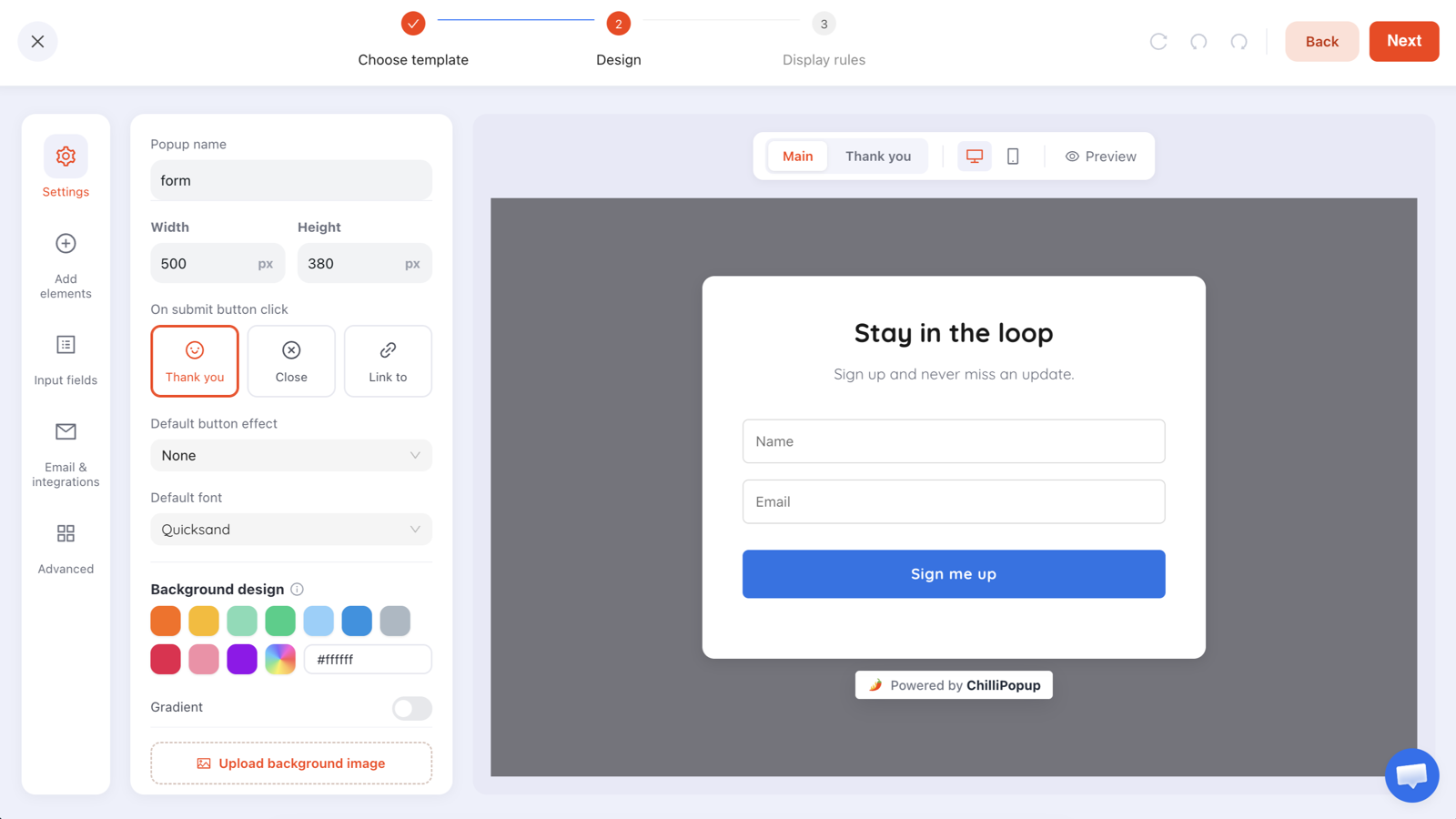
The consent tick is a field like any other — which means the answer is stored with the submission, not lost in the design.
What a popup stores in the visitor's browser
This is where popups get confused with tracking, and the distinction matters. A popup platform needs some memory or it cannot behave itself — "don't show this again to someone who already subscribed" requires knowing that they did.
ChilliPopup's pixel uses first-party local and session storage on the visitor's own browser to remember which campaigns have been shown, which have been converted, and how many pages they have viewed in this session. It does not set advertising cookies, and it does not build a profile that follows anyone to another website. The interaction events it records — views, clicks, closes, submissions — carry the page URL, the device type and a session identifier, which is what makes the analytics work.

Two different things travel: housekeeping that stays in the visitor's browser, and the data you deliberately collected.
Practical consequences worth knowing:
- Your cookie notice should still describe it. "Strictly necessary" is a judgement call you should make deliberately, not by omission.
- Private browsing and cleared storage reset everything. Someone who wipes their browser looks like a brand-new visitor, so frequency caps and "hide after conversion" start again. That is a design constraint, not a bug — build for it.
- Storage is per-device. The same person on a phone and a laptop is two visitors as far as any browser-side rule is concerned.
Who is responsible: controller versus processor
People assume the tool carries the obligation. It does not — not for the visitor data your popups collect.
- You are the controller for the emails and answers your popups collect from your visitors. You decide why you are collecting them and what happens next.
- The popup platform is a processor, handling that data on your instructions. That is exactly how ChilliPopup describes the split in its privacy policy: controller for its own account data, processor for the visitor data its customers collect.
Which means three things belong to you, permanently: the consent wording, the purpose you stated, and the response when a visitor asks what you hold on them. Choosing a good tool does not transfer any of them.
Data minimisation is also the best conversion advice
GDPR says collect what the purpose requires and no more. Popup practitioners arrived at the same rule from the other direction — every extra field costs conversions.
Run the test on each field: name the email, segment or action that changes because of this answer. If you cannot, the field is both a compliance liability and a conversion tax. Delete it.
| Field | Justifiable when… | Verdict on a first-touch popup |
|---|---|---|
| You are going to email them | Keep — it is the purpose | |
| First name | You genuinely personalise sends | Optional at most |
| Phone number | SMS is a channel you actually run, with its own consent | Separate ask, separate tick |
| Birthday | You run a birthday campaign that exists | Later stage, after value delivered |
| Company / role | It routes them to different content | Only on a B2B form |
| "How did you hear about us?" | Almost never — analytics answers this | Delete |
The progressive profiling guide shows how to collect the extra fields later, once you have a relationship and a reason.
Build capture you can defend
Consent fields, email validation and per-campaign submissions — in the same editor as your popups, forms, surveys and quizzes. Free plan, no credit card required. Paid plans from $29/month.
Start free →Keeping the record — and honouring the request
Consent you cannot evidence is consent you do not have. The record should show, for each subscriber, what they agreed to, when, and where.
In ChilliPopup each campaign stores its own submissions, and the consent tick is stored with them as one of the collected fields, timestamped like every other answer. Two habits make that record actually usable later:
- Name the campaign after the promise. "Weekly edit signup — footer bar" tells you in a year exactly what wording that subscriber saw. "Popup 3 (final)" tells you nothing.
- Version the wording, don't silently edit it. If the promise changes materially, publish a new campaign rather than rewriting the old one — otherwise your record says people agreed to a sentence that did not exist when they ticked.
Then make sure a human can act. Someone in the business must be able to find a subscriber's rows, delete them on request, and honour an unsubscribe in the tool you actually mail from. A popup that collects addresses into a system nobody can search is a rights problem waiting for the first email that starts "please delete my data".
The quiet one: exports. The moment you copy submissions into a spreadsheet, that spreadsheet is personal data too — living on someone's laptop, outside your deletion process. Keep exports to a minimum and delete them when the campaign is over.
The pre-publish checklist
Run this before any popup that collects an address goes live:
| Check | Pass looks like |
|---|---|
| Purpose stated | The popup says what will arrive, and roughly how often |
| Consent mechanism | An unticked checkbox for marketing, separate from the submit button |
| Privacy link | A visible link to your privacy policy inside the popup |
| Fields | Every field maps to something you actually do |
| Identity | The visitor can tell which business is collecting this |
| Exit | A clear close control, and no penalty for declining |
| Record | The consent answer is stored with the submission, timestamped |
| Downstream | Your email tool has an unsubscribe link in every send |
| Children | If your audience may include minors, you have thought about age |
Six mistakes that turn a good popup into a liability
- The pre-ticked box. Still everywhere, still not consent.
- "By continuing you agree…". Continuing is not an affirmative action; it is the absence of one.
- Vague promises. "Receive updates" does not tell anyone what they signed up for, which is a transparency problem and the reason for half your unsubscribes.
- One tick, three channels. Email, SMS and partner offers are three different agreements. Bundling them is the fastest way to lose all three.
- Collecting sensitive data casually. Health conditions, financial details and anything special-category do not belong in an overlay on a marketing site.
- No route to deletion. If a request would send your team scrambling through spreadsheets, the process fails before the law does.
Set up a compliant capture popup in five steps
Half an hour, no code. If the pixel is not installed yet, start with the install guide.
1. Write the purpose sentence first
One line: what you will send, and how often. Everything else in the popup — headline, tick, small print — is that sentence rephrased for a different job.
2. Add the email field and the consent field
Email plus the dedicated consent checkbox from the input-fields panel. Leave the checkbox unticked and label it with what arrives, not with "I agree".
3. Link your privacy policy from inside the popup
A small text block under the field with your business name and a link. It costs one line of copy and it is the difference between informed and implied.
4. Cut every field that does not earn its place
Run the "so what" test on each one. On a first-touch popup you should usually be left with an email field and a tick — which is also the highest-converting shape.
5. Name the campaign after the promise, then publish
"Weekly edit — blog scroll" beats "Popup 3". A year from now that name is the only record of what a subscriber was actually shown.
Related reading
Frequently asked questions
Do popups need GDPR consent?
The popup itself does not need consent to appear. What needs a lawful basis is what you do with the personal data it collects. If you are collecting an email address in order to send marketing, consent is normally what you rely on — and it has to be freely given, specific, informed and given by a clear affirmative action, which is why an unticked checkbox is the standard pattern.
Does a popup need a cookie banner?
Only if it sets cookies or storage that are not strictly necessary. A popup that uses first-party browser storage purely to remember which popups a visitor has already seen is doing housekeeping, not tracking. ChilliPopup's pixel uses local or session storage for exactly that and does not set advertising cookies — but your own cookie notice should still describe the storage your site uses.
Is a pre-ticked consent box allowed under GDPR?
No. Consent must be a clear affirmative action, and a pre-ticked box, silence or inactivity does not qualify. Leave the box unticked. The upside is practical too: people who tick it themselves are far more likely to open, click and stay subscribed.
Can I make the discount conditional on marketing consent?
Be careful. Consent has to be freely given, and bundling it with something the visitor cannot get otherwise weakens that. The safer pattern is to deliver the code for the transaction itself and keep the marketing consent as a separate, optional tick — you lose a few signups and keep a list you can actually mail.
Who is responsible for the data collected in a popup — me or the popup tool?
You are. In GDPR terms the business running the website is the controller for the visitor data its popups collect, and the popup platform acts as a processor on your instructions. That is how ChilliPopup describes the split in its privacy policy, and it means the consent wording, the purpose and the response to any visitor request are yours to get right.
What should the small print under a popup field say?
Three things in one sentence: who is collecting the data, what you will send, and where to read the detail. Something like "We'll email you one edit a week. Unsubscribe any time — see our privacy policy" satisfies the informed part of consent without turning the popup into a legal notice.