Email list management is the unglamorous half of email marketing: how addresses get on the list, how they're labelled, and what happens to the ones that go quiet. It matters because mailbox providers judge you on how recipients react, not on how many you have. Send to thousands of people who never open, and you'll reach fewer of the people who do.
The single most useful thing to understand: most list quality is decided at signup, not at cleanup. What you offered, what you validated, and what you promised at the moment of capture determines almost everything that follows. So that's where these ten practices start.
Key Takeaways
- Quality is decided at capture. The offer you use determines who signs up — and a high-value instant reward attracts the most junk.
- Validate on submit, with a typo guard. Most bad addresses are honest mistakes, not attacks.
- Say what arrives and how often, on the form. Setting the expectation is the cheapest unsubscribe prevention there is.
- Segment on fields you actually use. A tag nothing routes on is maintenance debt.
- Write down a sunset policy. One re-engagement attempt, then remove. Deleting inactive contacts almost always improves results.
1. Fix the source before you clean the list
Cleaning a list without fixing capture is bailing out a boat with a hole in it. Before you touch the list, look at what each signup source is producing:
| Source | Typical quality | Why |
|---|---|---|
| Checkout / post-purchase opt-in | Best | They paid you. Intent doesn't get stronger than that. |
| Content offer (guide, checklist, benchmark) | Good | The offer self-selects for genuine interest in the topic |
| Newsletter signup with a specific promise | Good | They know what's coming, so they stay subscribed |
| Discount popup | Mixed | Some genuine buyers, some people who only wanted the code |
| Prize draw or giveaway | Poor | The prize is the motive; your product may be incidental |
| Purchased or scraped lists | Don't | No consent, spam traps, and it can damage your sending reputation |
This isn't an argument against discount popups — they're one of the most effective capture tools there is. It's an argument for knowing which source produced which contact, so you can judge the sources separately and stop treating a giveaway entrant and a customer as the same person.
2. Validate at the point of capture
The cheapest cleanup is the address that never gets onto the list. Two things to switch on at the form itself:
- Format validation with a typo guard. Most bad addresses are honest mistakes —
gmial.com,hotmial.com, a missing dot. Catching those at submit recovers real subscribers who'd otherwise be silently lost. - Business-email validation where it fits. This rejects free providers on submit, which keeps B2B demo and quote forms clean. Use it on high-intent forms, not on top-of-funnel content offers, where plenty of genuine people use a personal address.
In ChilliPopup, an email input's validation mode is a per-field setting — format with typo guard, business-only, both, or none — so the same builder can run a permissive blog form and a strict demo form. The spam signups guide covers the rest of the pattern.
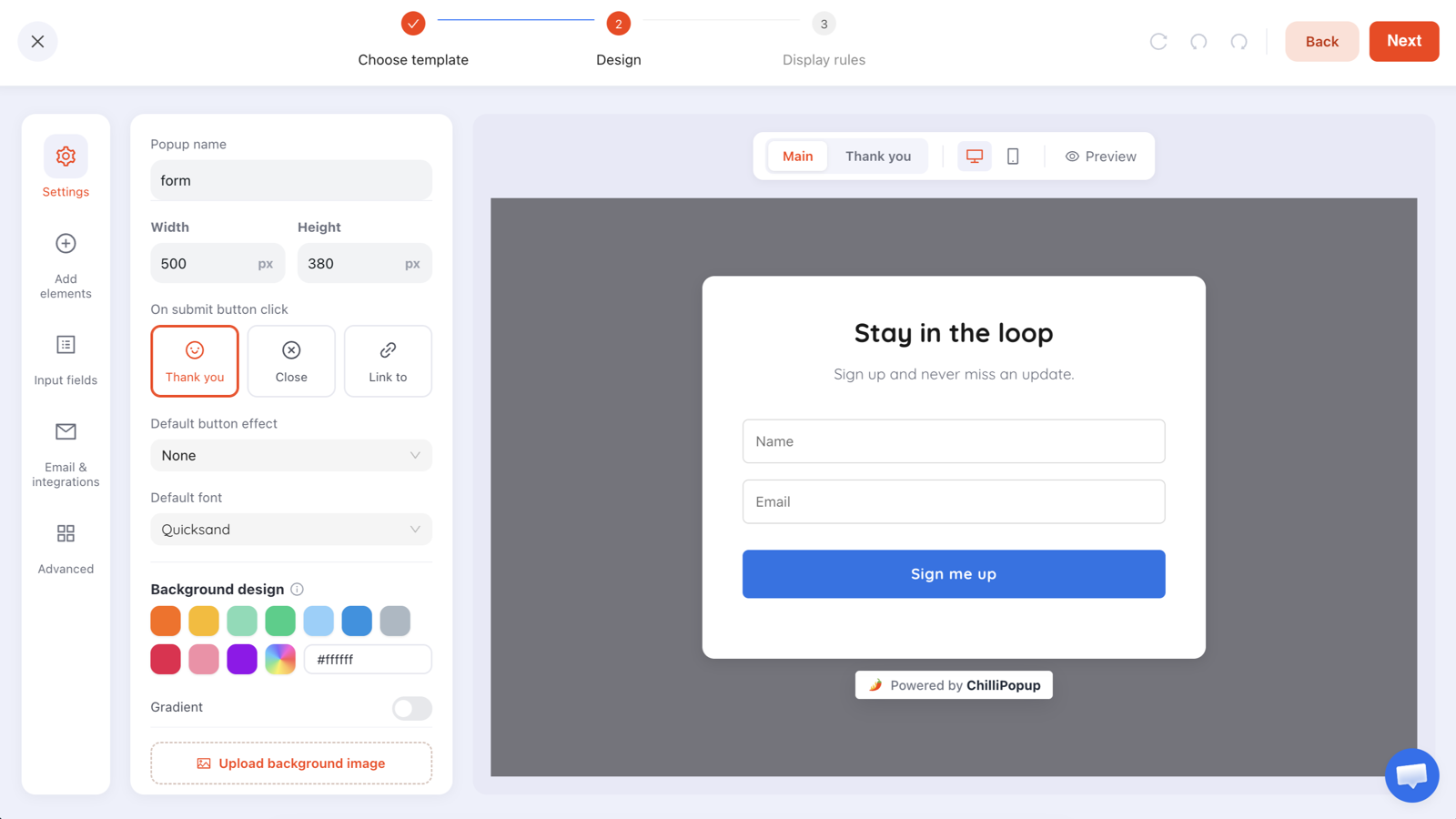
Validation is a per-field setting. Strict on demo requests, permissive on content offers.
3. Ask for consent properly, once
Consent needs to be freely given, specific, informed and unambiguous — which in practice means an unticked checkbox where consent is required, plain language about what you'll send, and no bundling marketing consent with the thing they actually came for.
Two habits keep this simple. Record when and where consent was given, because "prove it" is the only question that ever gets asked. And keep the wording specific — "Email me new arrivals and offers, about twice a month" is both better consent and a better conversion rate than "Subscribe to our newsletter", because the reader knows what they're agreeing to. The GDPR popup guide goes through the mechanics.
Pre-ticked boxes are not consent under GDPR, and a "by continuing you agree" line buried in small print isn't either. Beyond the legal exposure, contacts acquired that way are exactly the ones who mark you as spam later — which costs you more than the extra signups were worth.
4. Set the expectation on the form itself
Unsubscribes are mostly a broken-promise problem. Someone signs up for a 10% code, then receives four emails a week about things they never asked about. The fix costs one line of copy on the form:
"One email a week: new arrivals and one useful thing. Unsubscribe any time."
What arrives · how often · how to leave. Three facts, one sentence, and a measurably
calmer list six months later.
Then keep the promise. If you said weekly, weekly is the contract. A list that expects your email is a list that opens it, and open behaviour is what mailbox providers actually watch.
5. Segment on fields you actually use
Segmentation earns its keep only when something downstream changes because of it. Before adding a field or a tag, name the email, flow or recommendation that changes as a result. If you can't, you're creating maintenance debt.
The four segments most small lists genuinely need:
- Source — how they arrived. Decides tone, and lets you judge capture campaigns.
- Customer or not — the single most valuable split there is. Never send a first-order discount to an existing customer.
- Interest or category — one field, collected as tappable options rather than free text so the values stay clean.
- Engagement recency — last opened or clicked. This is what your sunset policy runs on.
For the interest field, a one-question quiz beats a text input every time: it completes in one tap, works on a phone, and returns normalised values instead of three spellings of the same answer. Ask it on a later visit rather than piling it onto the first signup — that's the progressive profiling pattern, and it's what lets you segment without shrinking your signup rate.
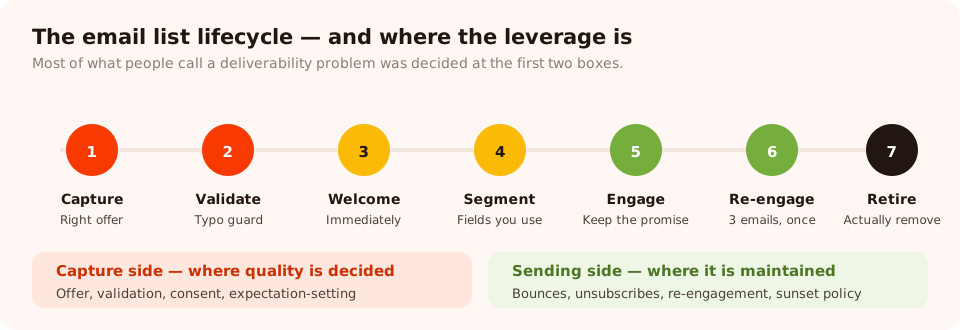
List management is a lifecycle, not a spring clean. Most of the leverage is at the left-hand end.
6. Send the welcome message immediately
The first message is the highest-engagement email you will ever send, and it does three jobs for list health: it confirms the address is real, it teaches the mailbox provider that your mail is wanted, and it sets the pattern for everything after.
Deliver whatever you promised in it — and if it's a discount code, show the code on the popup's thank-you screen as well, immediately. Making someone wait for an email before they can use their reward is how you turn a converted visitor back into a bounced one. The welcome email guide covers what to put in it.
Fix the capture end first
Signup popups and inline forms with per-field email validation, consent checkboxes and instant code delivery. Free plan, no credit card required. Paid plans from $29/month.
Start free →7. Handle bounces the boring way
Two kinds, two rules:
- Hard bounces — the address doesn't exist. Remove immediately and automatically. Most email platforms do this for you; check that yours is actually doing it rather than assuming.
- Soft bounces — temporary: full mailbox, server issue, message too large. Retry, but treat a repeated soft bounce over several sends as a hard bounce and retire it.
A rising bounce rate is a diagnostic, not just a nuisance. If it climbs after a campaign, look at the campaign — usually a form without validation, or an offer valuable enough that people typed something false to get it.
8. Make unsubscribing easy
This feels counter-intuitive and it isn't. Someone who can't find the unsubscribe link marks you as spam instead — and a spam complaint costs you far more than a lost subscriber, because it damages delivery to everyone else.
Put the link where people look, honour it immediately, and consider offering a downgrade next to it: "Too many emails? Switch to monthly" or "Only send me sale announcements". A meaningful share of would-be unsubscribers take the lesser option, and they stay engaged.
9. Re-engage, then retire
Contacts who haven't opened or clicked in six months are costing you deliverability. Give them one honest attempt, then let them go.
The sequence:
- Email one — the direct question. Subject line along the lines of "Still want these?" Body: two sentences and two buttons — Keep me on the list / Unsubscribe me. No offer yet.
- Email two, a week later — the best thing you have. Your single most useful piece of content or your strongest offer. If this doesn't move them, nothing will.
- Email three — the goodbye. "We're removing you on Friday unless you click here." This one often outperforms both of the others, because it's the only email that's genuinely time-bound.
- Then remove them. Actually remove them. A suppression list you keep mailing "just in case" is the same problem with extra steps.
Opens are a weak signal now. Privacy features in some mail clients pre-load images, which can register as an open the recipient never made. Where you can, judge engagement on clicks and on purchases, and treat open rate as a trend rather than a fact about an individual.
10. Write the sunset policy down
The reason lists rot is that nobody wants to be the person who deleted 4,000 contacts. Writing the rule down converts that decision into maintenance. A workable default:
Our sunset policy. Hard bounces are removed on the next send. Contacts with no open, click or purchase in 180 days enter the re-engagement sequence. Contacts who don't respond to it are removed within 30 days. Reviewed quarterly.
Adjust the numbers to your buying cycle — a business selling something people buy once every two years should be more patient than a weekly-purchase brand. What matters is that the number exists and someone owns it.
Seven mistakes that quietly ruin a list
- Optimising for list size. Total subscribers is the metric most likely to make you do the wrong thing.
- Buying or scraping addresses. No consent, spam traps, and a damaged sending reputation that affects your legitimate mail too.
- One giant unsegmented list. Everyone gets everything, so everyone eventually ignores everything.
- Vague signup promises. "Subscribe to our newsletter" sets no expectation, so any email can break it.
- Keeping inactive contacts for the vanity number. They're not free — they cost you deliverability with the people who do open.
- Showing the signup popup to existing subscribers. Turn off "show again after conversion" and the problem disappears.
- Collecting fields nobody uses. Every unused field is friction at signup and debt forever after.
What a healthy list looks like
- Growth net of unsubscribes and bounces — not gross signups. A list growing 400 a month while losing 380 is flat.
- Bounce rate, watched as a trend. A jump points at a specific capture campaign.
- Spam complaint rate. The number that most directly threatens your ability to reach anyone. Keep it as close to zero as you can.
- Active share — the percentage of the list that clicked or bought in the last 90 days. The single most honest health metric there is.
- Revenue per subscriber, which puts an actual price on list quality and settles the "but bigger is better" argument permanently.
- Conversion rate per capture campaign. Each popup, form, survey and quiz reports its own opens, unique views, clicks, submissions and conversion rate, plus the values collected per field — so you can trace a quality problem back to the campaign that caused it.

When bounce rate jumps, the collected-fields breakdown usually shows which campaign started it.
One note on how the pieces fit together
Capture and sending are separate jobs, and it's worth being clear about which tool does which. ChilliPopup builds and rules the capture side — the popups, inline forms, surveys and quizzes, the validation, the consent checkbox and the instant code delivery — and stores each campaign's submissions with a breakdown of the values collected per field. Your email platform does the sending, the automation and the suppression lists.
So the practical workflow is: get capture right at the source, read each campaign's collected data to judge its quality, then move addresses into your email tool and apply the sending-side practices above there. Fixing the source is the half most people skip — and it's the half that decides the other nine.
Related reading
Frequently asked questions
What is email list management?
Email list management is everything you do to keep a mailing list accurate, permissioned and engaged: how addresses get on it, how they are labelled, how inactive contacts are re-engaged or removed, and how you handle bounces and unsubscribes. It is mostly a set of habits, not a tool.
How often should I clean my email list?
Review it quarterly and act on it at least twice a year. Remove hard bounces immediately and automatically, watch repeated soft bounces, and run a re-engagement sequence for anyone who has not opened or clicked in six months before you remove them.
Does a smaller email list perform better?
A smaller engaged list usually performs better than a larger disengaged one, because mailbox providers judge you on how recipients react. Sending to people who never open teaches the provider that your mail is unwanted, which then affects delivery to the people who do want it.
Should I use double opt-in?
Use it when list quality matters more than raw volume — B2B, regulated industries, or anywhere you have had spam-trap or bounce trouble. Skip it when you are delivering something instantly, such as a discount code, where an extra confirmation step costs conversions. A validated single opt-in with a typo guard is a reasonable middle ground.
What is a sunset policy?
A sunset policy is a written rule for retiring contacts who have not engaged for a defined period — commonly six to twelve months, after one re-engagement attempt. Writing it down matters more than the exact number, because it turns an uncomfortable judgement call into routine maintenance.
How do I stop fake signups on my forms?
Validate the address format with a typo guard on submit, restrict to business addresses where that fits your audience, avoid rewarding submissions with something valuable enough to be worth faking, and watch for bursts of submissions from a single source. Rewarding every signup with an instant high-value code is what attracts most junk.