Most businesses do not have a review problem. They have an asking problem. The customers who would happily vouch for you are never asked at a moment when saying yes is easy — they get an email four days later, from a sender they don't recognise, with a link to a site they'd have to sign into.
Asking on your own website fixes most of that. This guide covers the four moments that work, the three-part ask that produces quotable testimonials rather than one-word ratings, the permission you need before you publish anything, and the one shortcut you must not take.
Key Takeaways
- Ask on-site, at a moment they're already thinking about you — the confirmation page, the order-status page, or a return visit after delivery.
- Open with one tap. A star or thumbs rating first; the text box only after they've committed.
- The testimonial is in the second answer. "What made the difference?" produces the sentence you'll actually publish.
- Collect permission in the same ask — a named checkbox, not an assumption.
- Never gate reviews. Filtering out unhappy customers before inviting a public review breaks platform rules and consumer law — and the negative answers are the useful ones.
Why review-request emails underperform
The standard flow is: customer buys, three days pass, an automated email arrives asking for a review, and a link takes them somewhere else entirely. Every step of that leaks people.
- The email has to be opened. Most aren't.
- The moment has cooled. Whatever they felt at purchase has faded into ordinary life.
- The link leaves your site, often into a login wall on a platform they don't have an account for.
- The ask is enormous. "Write a review" means facing a blank box with no idea how long the answer should be.
An on-site ask reverses all four. They are already here, already logged in to nothing, and the first thing they see is a row of stars they can tap without thinking. The written part comes after they've already said something — which is when writing feels like finishing rather than starting.
Keep the email too. On-site and email are not rivals: the site catches people who are on it, and the email catches people who aren't. What changes is which one carries the heavy ask.
The four moments that work
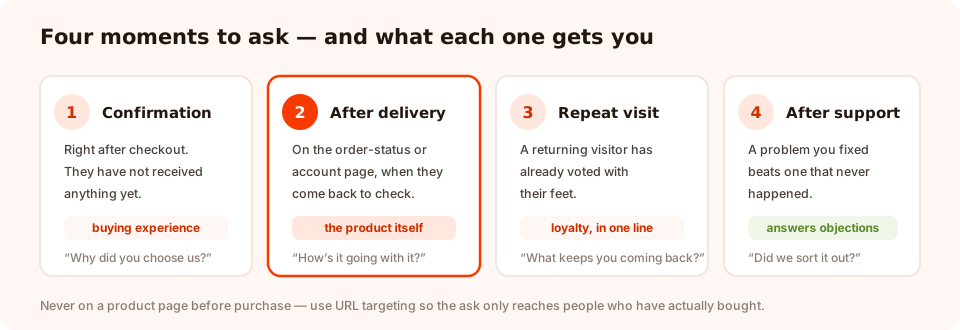
Ask where the customer already is, at a point where they have something to say.
1. The order-confirmation page
Best for reviewing the buying experience, not the product — they haven't received it yet. Ask how easy ordering was and what nearly stopped them. It's also where you catch the reason they chose you, which is the most reusable sentence a customer will ever write for you.
2. The order-status or account page, after delivery
The best product-review moment you own on your own site. Target the URL of your order-status or account area and use a returning-visitor rule so it reaches people who came back to check on something — they've had the product in their hands.
3. A repeat visit
Someone who comes back a second or third time has voted with their feet. Target returning visitors, fire on a scroll depth or a short delay, and keep it to one question.
4. After a resolved support conversation
The most underused moment of the four. A customer whose problem you just fixed is often more positive than one who never had a problem — and their testimonial answers the objection your prospects are actually worried about.
Don't ask on the product page before purchase. It sounds obvious written down, but a site-wide review request will do exactly that. Use URL targeting to keep the ask on pages only customers reach.
The three-part ask
A review request that produces publishable testimonials always has the same three parts, in this order.
Part 1 — the rating (one tap)
A five-star scale, or thumbs up/down if you want the highest possible completion. This is the commitment device: once someone has tapped, finishing feels natural. It is also the filter you'll use later when reading the answers.
Part 2 — the reason (one open question)
This is where the testimonial lives. The question decides the quality of what you get:
| Instead of | Ask | Why it's better |
|---|---|---|
| "Leave a review" | "What made you choose us?" | A specific question gets a specific sentence |
| "Any comments?" | "What surprised you most?" | Surprise produces detail, not adjectives |
| "Rate your experience" | "What were you worried about before ordering?" | Names the objection your next customer has |
| "Tell us about the product" | "What do you use it for?" | Gives a use case future buyers recognise |
Make it optional. A required text box turns a two-second favour into a task, and the people who abandon at that point were going to give you your best quote.
Part 3 — permission and attribution
A testimonial you cannot attribute is a testimonial nobody believes. Add three small fields: first name, email, and a checkbox with your own wording. In the builder, a custom checkbox field lets you write that label yourself — use plain language:
"You can publish this on your website with my first name and city."
That single sentence is the difference between a comment in a dashboard and a quote you can put on a product page without worrying.
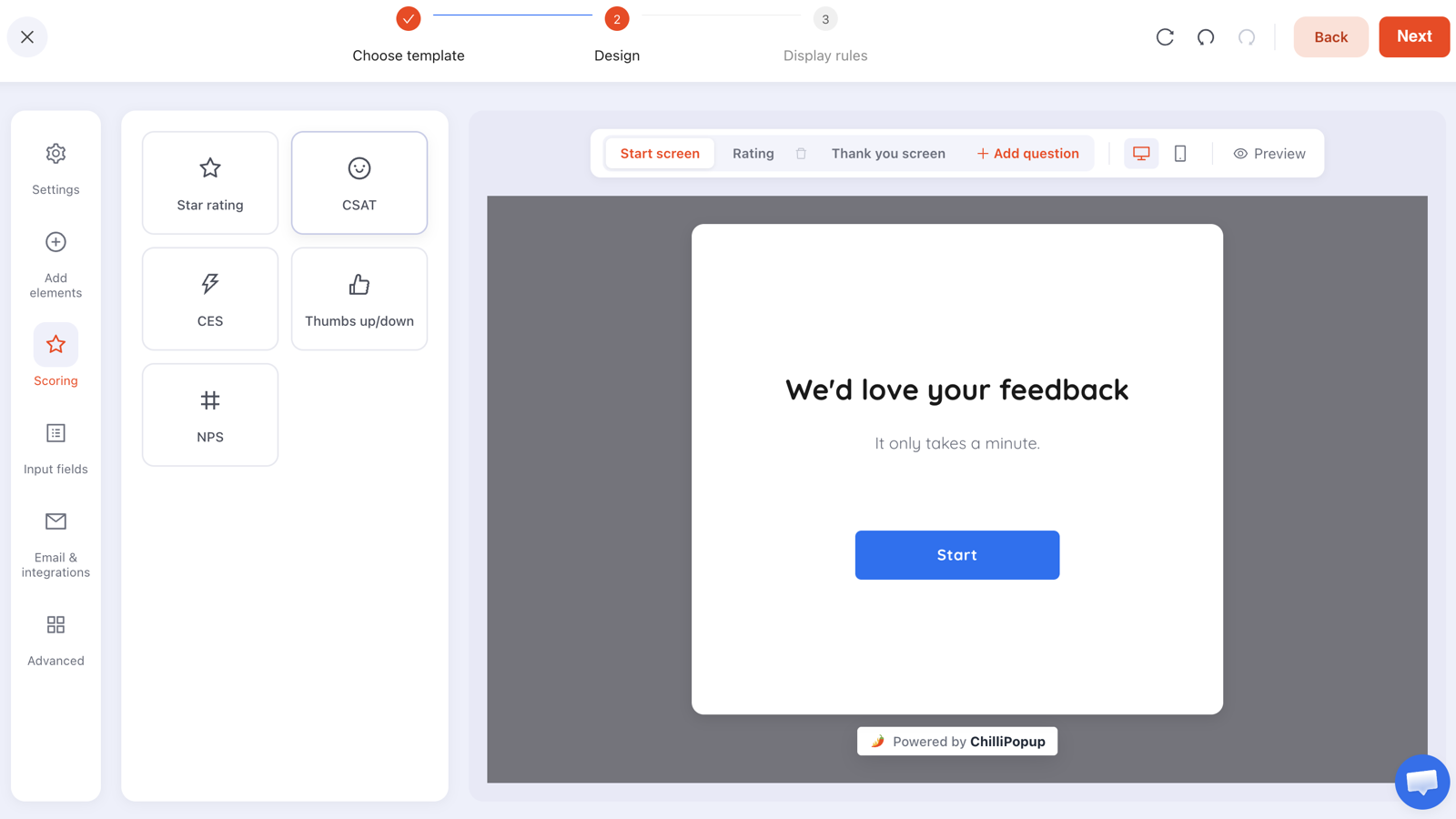
Rating, reason, permission — three screens, about twenty seconds, and everything you need to publish.
The copy, word for word
Ecommerce, after delivery
Screen 1: "How's it going with your order?" — five stars,
labelled Not great to Love it.
Screen 2: "What would you tell a friend who's thinking about ordering?"
— open text, optional.
Screen 3: first name, email, and the permission checkbox.
Thank you: "Thank you — that genuinely helps. If you've got another thirty
seconds, we'd love the same thoughts here." with the submit button linking to your public review
page.
Software, after the first successful outcome
Screen 1: "Did that do what you needed?" — thumbs up or
down.
Screen 2: "What were you doing before you found us?" — the single
best testimonial question in software, because the answer is always a story.
Screen 3: name, company, permission checkbox.
A local service business
Screen 1: "How did we do?" — five stars.
Screen 2: "Anything we should have done differently?" — open, and
deliberately inviting criticism, because that is the answer worth having.
Thank you: the same public-review invitation for everyone.
Why you must not gate your reviews
The tempting design is obvious: show five-star raters a link to your public review profile, and quietly route everyone else to a private complaints box. It is called review gating, and you should not build it.
- The major review platforms ban it outright in their terms — a site caught doing it can lose its rating or its listing.
- Consumer-protection regulators treat it as deceptive. Rules in several markets explicitly cover selectively suppressing negative reviews and publishing unrepresentative averages.
- It doesn't even work. A product page where every review is five stars reads as curated, and shoppers discount it accordingly.
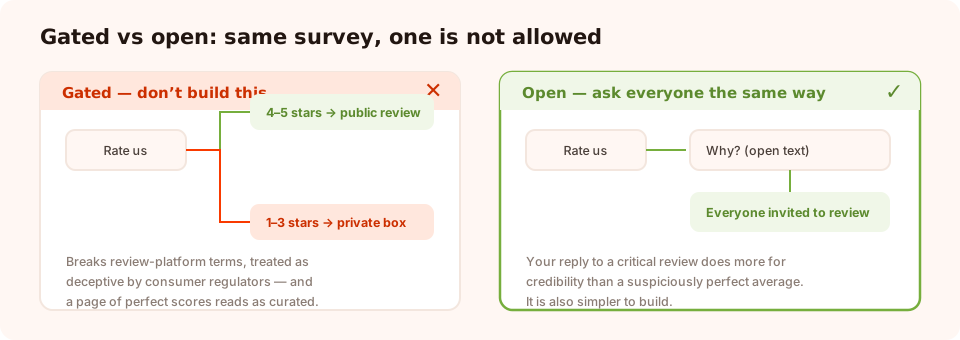
Same survey, two designs. Only one of them is allowed — and it's also the one that produces trustworthy proof.
The honest design is simpler to build anyway: everyone gets the same invitation. Ask the rating, ask the reason, and set the submit button to link to your public review page for all respondents. Some unhappy customers will take you up on it — and your reply to those reviews will do more for your credibility than a suspiciously perfect average ever could.
Worth knowing before you plan a flow: survey steps run in order, with no branching between them, so a "send five-star raters down a different path" design is not something you can build here even if you wanted to. The constraint happens to point at the right answer.
Start asking, on the page they're already on
Surveys, forms, popups, quizzes and games from one editor — and one pixel. Free plan, no credit card required. Paid plans from $29/month.
Start free →From an answer to a published testimonial
Collecting is the easy half. Here is the weekly routine that turns responses into something on a page:
- Read the responses. The dashboard lists every submission in a Collected input data table — one row per person, one column per field, with the rating, the sentence, the name and the permission flag side by side.
- Filter by permission first, rating second. No checkbox, no publication — however good the quote.
- Trim, don't rewrite. Cut length, fix an obvious typo, keep the meaning and the voice. If your edit would surprise the customer, it's too far.
- Publish where the objection lives. A quote about sizing belongs on the sizing section, not in a testimonials carousel nobody scrolls to. The social proof guide covers placement properly.
- Reply to the bad ones. Personally, within a couple of days, saying what changed.
One practical limit to plan around: there is no automatic connection to a review platform, and no CSV export of submissions — you read the answers in the dashboard and copy the ones you want. For a weekly review routine that is genuinely fine. For thousands of responses a month, use the browser event the player fires on submit and forward the data into your own system.
What to measure
Two numbers matter, and neither one is the average rating.
- Response rate — submissions divided by views. Under 5% means you're asking at the wrong moment, not that customers are indifferent.
- Text-answer rate — the share of respondents who wrote something. This is your real testimonial supply. If people tap the stars and vanish, your second question is too vague or too demanding.
The results view also gives you a completion funnel, average time to finish, and a per-question drop-off breakdown — which will tell you, precisely, whether it was the text box or the permission checkbox that lost people.
Six mistakes
- Opening with a text box. Always earn a tap first.
- Asking before the customer has experienced anything. A review of an undelivered product is a review of your checkout.
- Publishing without explicit permission. One angry customer is all it takes.
- Incentivising only positive reviews. If you offer a reward, it must be for any review — and platforms often require you to disclose it.
- Asking the same person every visit. Turn off show-again-after-conversion and set a frequency cap.
- Collecting and never publishing. A folder of unused testimonials helps nobody. Put one on a page this week.
Build the ask in ChilliPopup
Forty minutes end to end. If the pixel isn't installed, start with the one-line install guide.
1. Pick one moment
Order-status page after delivery is the safest first choice. Note the exact URL — you'll target it in step four.
2. Build three screens
Star rating, open question, then name plus email plus your permission checkbox. Only the rating is required.
3. Set the thank-you screen to invite a public review
Point the submit button at your public review profile, for everyone. That's the whole "gating" question answered.
4. Target the page and cap the frequency
A URL rule for the order-status page, a short delay, and show again after conversion switched off so nobody is asked twice.
5. Book fifteen minutes a week to read them
Publish two testimonials, reply to every critical one, and note the objection that keeps coming up. That last one is usually worth more than the reviews.
Related reading
Frequently asked questions
How do I get customers to leave a review?
Ask them on your own website at a moment when they are already thinking about you — the order-confirmation page, the order-status page, or a repeat visit after delivery — and make the first step a single tap. Response rates collapse when the first thing a customer sees is an empty text box or a link to a third-party site.
When is the best time to ask for a review?
After the customer has experienced the thing you want reviewed. For physical products that means a few days after delivery, not at checkout. For software or a service it means after the first successful outcome. Asking too early gets you a review of your marketing; asking too late gets you silence.
Is it legal to only ask happy customers for public reviews?
Filtering out unhappy customers before inviting a public review — often called review gating — breaches the terms of the major review platforms and is treated as a deceptive practice by consumer-protection regulators in several markets. Ask everyone the same way, and use the negative answers to fix the problem instead.
Do I need permission to publish a customer testimonial?
Yes, and you should collect it in the same form. A short, explicit checkbox — naming what you will publish and how the person will be identified — is far safer than assuming consent, and it costs you almost nothing in completion rate.
Can I edit a testimonial before publishing it?
Trim for length and fix an obvious typo, yes. Change the meaning, combine two customers into one quote, or add words they did not say, no. If the edit would surprise the person who wrote it, do not publish it.
How many reviews do I need before they help?
Fewer than you think for a specific claim, more than you think for a rating average. A handful of detailed, believable testimonials on a product page does more work than a large but vague star average, because specificity is what makes proof credible.
What should I do with a bad review that arrives privately?
Treat it as the most valuable answer of the week. Reply personally, fix what can be fixed, and tell the customer what changed. A private complaint you resolved is a public review you never had to earn back.