A post-purchase survey asks two or three questions on the order-confirmation page, right after someone has bought. It is the cheapest research your business will ever run: the sale is already banked, the customer is pleased with you, and for about fifteen seconds they have nothing else to do.
Almost nobody uses that moment. Most stores show a receipt and a "continue shopping" button, then email a survey four days later that 3% of people open. This guide covers what to ask on the page instead, in what order, and how to tell whether the answers mean anything.
Key Takeaways
- The thank-you page beats the follow-up email for anything about the buying experience — they are still on your site, and the memory is minutes old.
- Two or three questions. One per screen. The fourth question is where completion rate goes to die.
- "How did you hear about us?" belongs here, not in your signup popup — it is friction before a purchase and gold after one.
- Target the confirmation URL and nothing else. A survey that leaks onto checkout is a survey that costs you money.
- Read drop-off per question, not just the overall response count — it tells you exactly which question to delete.
Why the thank-you page is your best research real estate
Every other survey moment is compromised. Mid-session surveys interrupt a task. Exit-intent surveys catch people who are already annoyed. Email surveys reach whoever still opens your email — a sample so skewed towards your fans that the answers flatter you.
The order-confirmation page has none of those problems:
- Nothing is at risk. The conversion is complete, so a question cannot cost you the sale. This is the only page where that is true.
- Goodwill is at its peak. They just decided to trust you with money. That decision is still warm.
- The memory is fresh. Ask three days later what nearly stopped them and you get a reconstruction. Ask now and you get the reason.
- There is a natural pause. The page's job is finished. Yours can start.
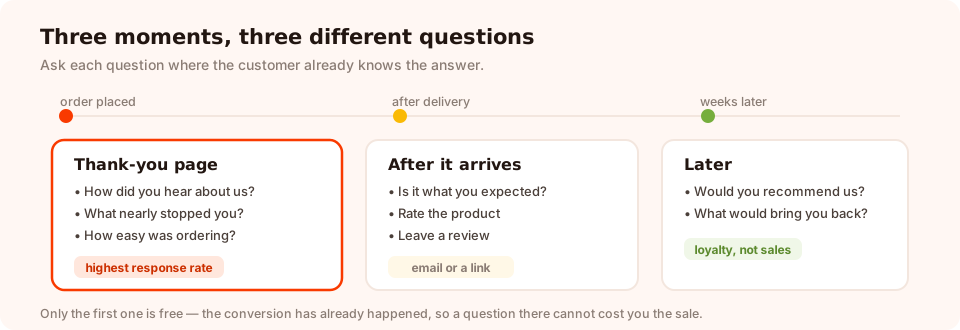
Three moments, three different questions. Only the first one is free.
Split the questions by what the customer can actually know. On the confirmation page they know why they bought and how they found you. They do not yet know whether they like the product. Ask each question where the answer exists.
The seven questions worth asking
You are picking two or three of these, not all seven. Each one buys you a different decision.
| Question | Format | What it changes |
|---|---|---|
| "How did you hear about us?" | Choice, 4–6 options + Other | Where you spend the next marketing budget |
| "What nearly stopped you from ordering?" | Choice or open text | The objection to answer on the product page |
| "How easy was it to place your order?" | CES scale, 1–7 | Whether your checkout needs work |
| "What made you choose this over the alternatives?" | Open text | Your headline copy, in your customers' words |
| "Was there anything you looked for and couldn't find?" | Open text | Range gaps and missing page content |
| "Who are you buying this for?" | Choice: myself / a gift | Which follow-up email they get |
| "How likely are you to recommend us?" | NPS, 0–10 | A trend line — but see the warning below |
Careful with NPS on the confirmation page. A customer who has bought but not yet received anything is rating your marketing, not your product. If you want a loyalty number, ask it after delivery. For a full treatment of the score and its traps, see the NPS survey guide.
Choosing between the rating scales
The survey builder gives you five scoring formats: star (1–5), CSAT (1–5 satisfaction), CES (1–7 effort), thumbs (up or down) and NPS (0–10). For a post-purchase survey, CES answers the most useful question — how hard did we make this? — and thumbs gets the highest completion rate because it is one tap with no thinking. Pick by which decision you want to make, and read the feedback survey guide if you want the full comparison.
The attribution question, done properly
"How did you hear about us?" has a bad reputation, and it deserves it — in a signup popup. There it is pure friction: a stranger being asked to do admin before they get anything. On the confirmation page it becomes the single most valuable question on this list, because it catches everything your analytics can't see.
Podcast mentions, a friend's recommendation, a comment in a group chat, a package someone saw at a party — none of that carries a tracking parameter. A post-purchase choice question is how you find out it is happening.
Write the options as the customer would say them. Not "Organic search" and "Referral" — use "Google", "A friend told me", "Instagram or TikTok", "A podcast", "Saw an ad", and an Other option with a text box. You are asking a human, not filling in a report.
Two things to accept up front. The answers are self-reported and therefore approximate — people genuinely misremember. And they are directional, not a replacement for your ad platform's numbers. Used as a trend across hundreds of orders, though, they will surface a channel you had no idea was working.
Two worked surveys, word for word
An ecommerce store: three screens
Screen 1 — the opener (one tap)
"Thanks for your order! One quick thing — how did you first hear about us?"
Options: Google · A friend or family · Instagram or TikTok
· Saw an ad · Somewhere else
Screen 2 — the one that pays for the survey
"Was there anything that almost stopped you from ordering?"
An open text box, placeholder "Shipping cost, sizing, wasn't sure about…", not
required.
Screen 3 — the thank you
"That's genuinely useful — thank you. Your order confirmation is on its way to your inbox."
A SaaS signup: two screens
Screen 1
"You're in. How easy was it to get set up?" — a CES scale from Very difficult to Very easy.
Screen 2
"What's the one thing you're hoping this solves?" — open text. The answers become your onboarding email sequence, written in the words your customers used rather than the words your marketing team likes.
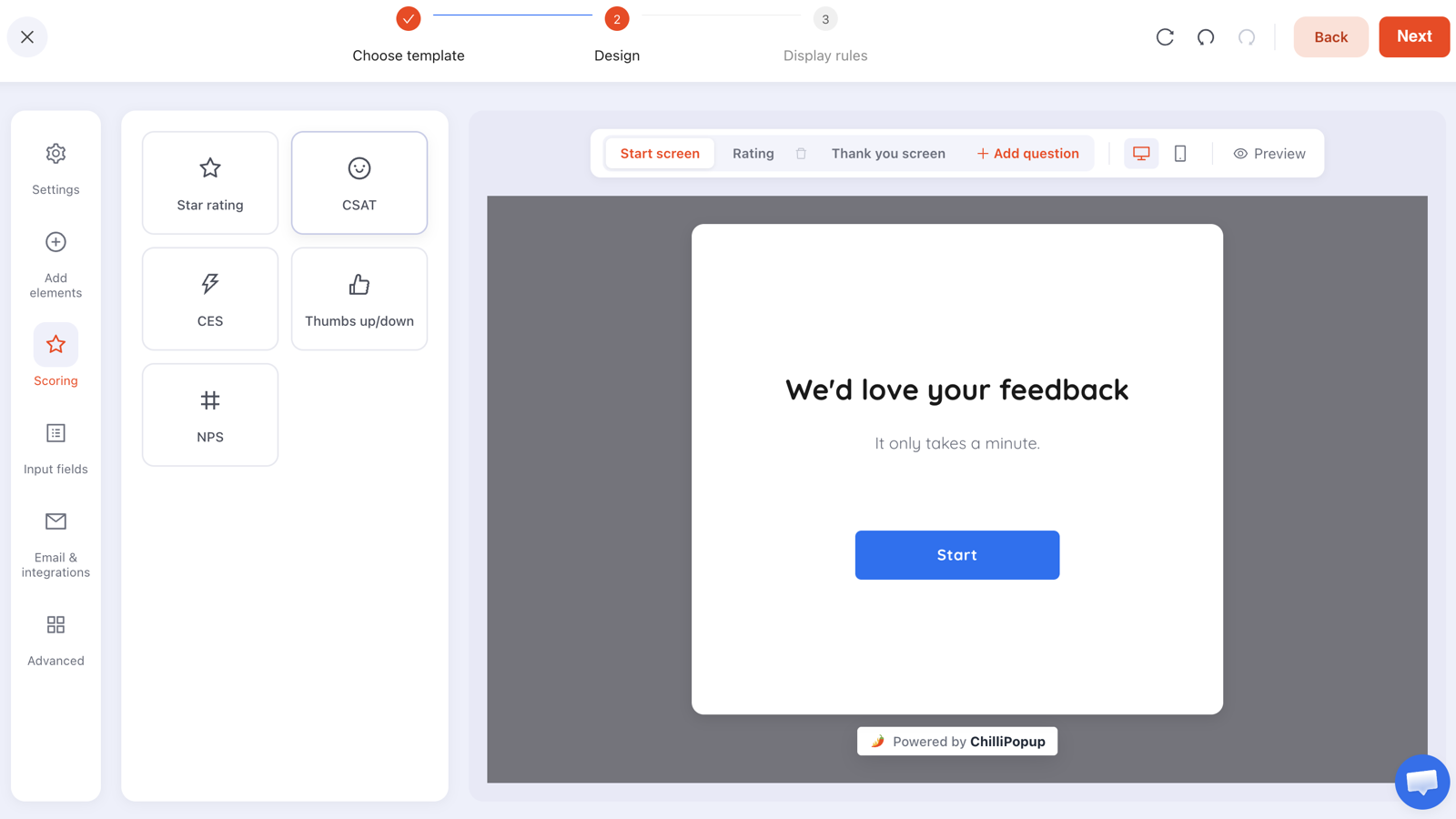
One question per screen. The start and thank-you screens are separate steps, so the questions never share space.
One structural constraint to design around: survey steps run in order, and there is no branching — you cannot ask a different follow-up depending on the rating someone gave. Write a follow-up that works for every answer ("what's the main reason for your answer?") instead of planning a decision tree that the tool will not build.
The display rules for a thank-you page survey
A post-purchase survey is defined by its rules more than its questions. Get these four right and the rest is copywriting.
- Page targeting: the confirmation URL, and only that. Use a contains rule on
the part of the URL your platform uses — commonly
/thank_you,/order-received,/orders/or/checkout/success. Add a doesn't contain rule for/cartif the paths are similar. Check your own URL rather than guessing. - Trigger: a time delay of 4–8 seconds. Let them read the confirmation number first. A survey that lands instantly reads as if the receipt was a pretext.
- Frequency, and show-again-after-conversion off. A repeat customer should not answer the same survey every order. Switching off "show again after conversion" stops it appearing for anyone who has already responded.
- Device: both, but check the mobile version. Most confirmation pages are read on a phone. A five-option choice question with long labels is a very different thing on a 375px screen.
A useful pairing: a survey can also be opened from a link. Put that link at the bottom of your shipping-confirmation email and you catch the customers who closed the tab too fast — same survey, second chance, no extra build.
Ask two questions on your thank-you page
Surveys, quizzes, forms, popups and games from one editor — and one pixel. Free plan, no credit card required. Paid plans from $29/month.
Start free →Reading the answers without fooling yourself
Surveys report more than a pile of responses. The results view gives you a four-stage funnel — views, interactions, abandoned, submissions — plus completion rate, average time to finish, a day-by-hour activity heatmap, and a drop-off breakdown showing which question people quit on.
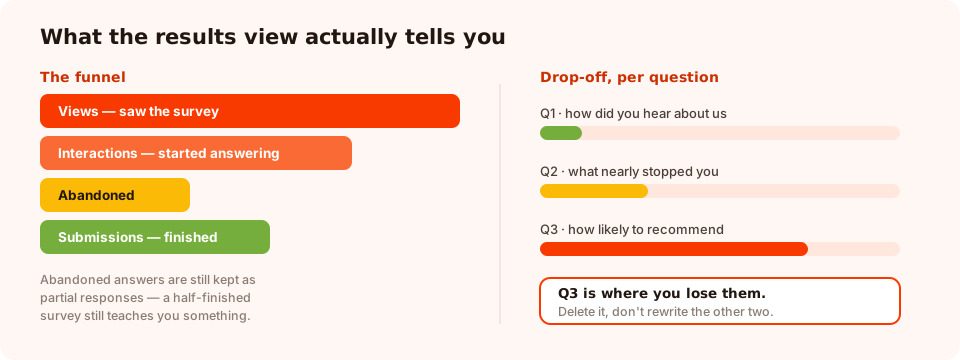
Completion rate tells you the survey is too long. Drop-off tells you which question made it too long.
Four readings that change what you do next:
- High views, low interactions. The opening screen isn't inviting. Shorten it, and make the first question a single tap.
- Interactions but low completion. The survey is too long. Delete a question — the drop-off chart names which one.
- Average time far above 30 seconds. A question is making people think harder than the answer is worth to you.
- One dominant answer, no spread. You already knew this. Replace the question with one whose answer you cannot predict.
Abandoned answers are kept too. If someone answers screen one and closes without submitting, what they entered is still recorded as a partial response — so a survey people quit halfway through still teaches you something.
Then there is the qualitative half, which is where the value actually is. Read the open-text answers as writing, not as data. Twenty customers explaining what nearly stopped them is worth more than any percentage on this page, and it usually rewrites a product page inside a week.
Seven mistakes that ruin a post-purchase survey
- Six questions. You will get fewer answers to all six than you would have to two.
- Asking about the product before it arrives. They cannot answer, so they guess, and you store the guess as data.
- Letting it leak onto checkout. One sloppy URL rule and you are interrupting people mid-payment. Test it with a real order.
- Making every question required. On this page, required fields convert a favour into a toll. Make the open text optional.
- Firing it instantly. Give the confirmation a few seconds to be read.
- Collecting answers nobody reads. If no one has a calendar slot for reading the open-text responses, do not ask for them.
- Asking the same customer every time. Turn off show-again-after-conversion, or your best customers get surveyed most.
Build it in ChilliPopup
Forty minutes, five steps. If the pixel isn't on your site yet, start with the one-line install guide.
1. Write down the decision first
"We will move budget to whichever channel wins the attribution question" is a decision. "We want customer insight" is not. If you cannot name it, don't build the survey.
2. Build two question screens, plus the thank-you
Screen one is the one-tap opener — a choice question or a rating. Screen two is one optional open text box. The thank-you screen is its own step, so it never shares space with a question.
3. Target the confirmation URL
Add a page rule matching your real order-confirmation path. Place a test order and confirm the survey appears there and nowhere else.
4. Delay it, cap it, publish it
A time delay of 4–8 seconds, display frequency enabled, and show again after conversion switched off. Then publish — drafts are never served.
5. Read it in two weeks and cut one question
Check completion rate and drop-off, read every open-text answer, and remove or rewrite the single question that costs the most people. Then leave it running.
Related reading
Frequently asked questions
What is a post-purchase survey?
A post-purchase survey is a short set of questions shown to a customer immediately after they buy — usually on the order-confirmation page. Because the purchase is already complete, the questions cost you nothing in conversion, and the customer is at their most positive, which is why response rates beat almost every other survey moment.
What should I ask in a post-purchase survey?
Two or three questions, no more. One easy opener that takes a single tap (a rating, or a choice question about what nearly stopped them), one open text box for the reason, and optionally one attribution question about how they found you. Anything else belongs in a later survey.
Should a post-purchase survey go on the thank-you page or in an email?
Both, for different questions. The thank-you page catches the customer while they are still on your site and gets far more responses, so put the questions about the buying experience there. Save questions about the product itself for an email a week or two after delivery, when they have actually used it.
Does asking 'how did you hear about us' actually work?
As a post-purchase question, yes — it is the practical way to catch word of mouth, podcasts, offline mentions and anything else your analytics cannot see. The same question is a mistake in a signup popup, where it is pure friction. Timing is what makes it valuable rather than annoying.
How long should a post-purchase survey be?
Two or three screens. Completion rate falls with every additional question, and the answers to questions four and five are usually rushed anyway. If you need more, run a second survey to a different cohort rather than lengthening this one.
Will a survey on the thank-you page hurt my conversion rate?
No — the conversion already happened. That is the entire reason this moment is safe. The only risks are showing it before the order confirmation has been read, or letting a badly targeted survey leak onto the checkout page, which is why the URL rule matters.
Can the survey ask a different follow-up depending on the score?
Not automatically — survey steps run in order and there is no branching between them. The practical workaround is a single open-ended follow-up that works for every score, such as "what is the main reason for your answer?", or two separate surveys targeted at different pages or moments.