To track popup conversions in Google Analytics 4, listen for the popup's submit event in the browser
and forward it to GA4 as a custom event — either with a gtag call or a dataLayer
push and a Google Tag Manager tag. Then mark that event as a key event so GA4 counts it as a
conversion.
The more useful question is why. Your popup tool already knows the conversion rate. What it cannot tell you is which channel, campaign or landing page produced the visitors who converted — and that is the one thing GA4 is genuinely good at.
Key Takeaways
- Two dashboards, two jobs. Popup analytics answers "is this popup any good"; GA4 answers "where did the people who converted come from".
- Four browser events fire on submit — popups, forms, surveys and quizzes each emit their own.
- Never send an email address to GA4. PII in Google Analytics breaks Google's terms.
- Views are not emitted to the page — read those in the popup dashboard, not GA4.
- Mark the event as a key event or it will not appear as a conversion anywhere in GA4.
Decide what each tool is for first
Teams usually wire popups into GA4 and then discover the numbers do not agree with the popup dashboard's, and spend a week trying to reconcile them. They will never agree, because they are counting different things — different session definitions, different bot filtering, different consent behaviour, different sampling.
| Question | Answer it in | Why |
|---|---|---|
| What is this popup's conversion rate? | Popup dashboard | It counts the views itself; GA4 never sees them |
| Which question do people quit on? | Popup dashboard | Per-field drop-off and partial answers |
| Which channel produced the signups? | GA4 | Only GA4 knows where the session came from |
| Which landing page produced the signups? | GA4 | Same — session context |
| Did the paid campaign pay for itself? | GA4 | Cost and campaign data live there |
| Which device converts better? | Either | The popup dashboard breaks down by device too |
| What did people actually type? | Popup dashboard | Never send that to GA4 |
Stop trying to make the two match. Use each for what only it can answer. A popup conversion rate that differs by 15% between two systems is normal, and reconciling it has never once changed a marketing decision.
What the pixel actually emits
Every successful submit dispatches a browser event on window, carrying the campaign's id
and the submitted data. There are four, one per content type:
| Content type | Event name | Id key in detail |
|---|---|---|
| Popups and games | chillipopup:submit | popupUuid |
| Forms | chillipopup:form_submit | formUuid |
| Surveys | chillipopup:survey_submit | surveyUuid |
| Quizzes | chillipopup:quiz_submit | quizUuid |
Submits only. Views, clicks and closes are recorded by the pixel and reported in the ChilliPopup dashboard, but they are not emitted as browser events — so you cannot build a view-to-submit funnel inside GA4. Read conversion rate where it is measured properly and use GA4 for attribution.
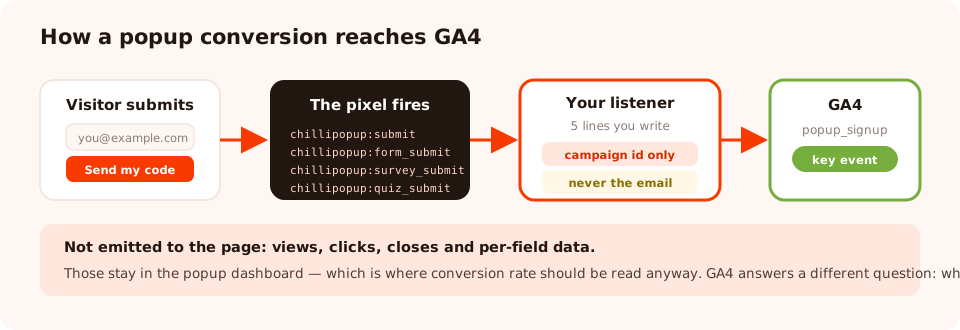
Three hops: the pixel fires an event, your listener translates it, GA4 records it. Nothing is sent without you writing that middle step.
Option A — send it straight to GA4 with gtag
If you have the GA4 tag on the page directly (not via Tag Manager), this is the whole integration. Put
it anywhere after the GA4 snippet — the <head> is fine, since the listener
just waits.
<script>
['submit', 'form_submit', 'survey_submit', 'quiz_submit'].forEach(function (name) {
  window.addEventListener('chillipopup:' + name, function (e) {
    var d = e.detail || {};
    var id = d.popupUuid || d.formUuid || d.surveyUuid || d.quizUuid;
    if (typeof gtag !== 'function') return;
    gtag('event', 'popup_signup', {
      campaign_id: id,          // which popup converted
      content_type: name        // submit | form_submit | survey_submit | quiz_submit
      // never send d.data.email or anything else identifying
    });
  });
});
</script>
That is it. GA4 will start receiving a popup_signup event with two parameters. Custom
event parameters need to be registered as custom dimensions in GA4 before they appear in standard
reports, so do that for campaign_id if you want to break results down by popup.
Option B — via Google Tag Manager
If GTM already runs your tags — and on most sites it should — push to the dataLayer instead and let GTM own the GA4 side. This keeps the code on your site free of analytics vendor details.
<script>
window.dataLayer = window.dataLayer || [];
['submit', 'form_submit', 'survey_submit', 'quiz_submit'].forEach(function (name) {
  window.addEventListener('chillipopup:' + name, function (e) {
    var d = e.detail || {};
    window.dataLayer.push({
      event: 'popup_signup',
      popup_campaign_id: d.popupUuid || d.formUuid || d.surveyUuid || d.quizUuid,
      popup_content_type: name
    });
  });
});
</script>
Then in Google Tag Manager:
- Create a Custom Event trigger with the event name
popup_signup. - Create two Data Layer Variable variables for
popup_campaign_idandpopup_content_type. - Create a GA4 Event tag, event name
popup_signup, with those two as event parameters, firing on the trigger above. - Use Preview mode, submit a popup on your own site, and check the tag fires.
- Publish the container.
If GTM is also how you installed the popup pixel itself, this all lives in one place — see the Tag Manager install guide for that side.
Mark it as a key event in GA4
A custom event is not a conversion until you say so. Once the event has fired at least once:
- Open GA4 Admin → Events (under Data display).
- Find
popup_signupin the list — it appears after it has been received, which can take up to 24 hours. - Toggle Mark as key event.
It will then appear in the key events report and can be used as a conversion in Google Ads and in attribution reports. Until you flip that toggle it is just an event nobody looks at.
Consent mode matters. If your consent banner blocks analytics until the visitor agrees, popup submits from visitors who declined will not reach GA4 — while the popup dashboard still counts them, because it measures its own campaigns. This is the single largest source of "the numbers don't match", and it is working as intended.
Get popup analytics that do not need wiring up
Build popups, forms, surveys, quizzes and games from one editor — and one script tag. Free plan, no credit card required. Paid plans from $29/month.
Start free →What to send — and what never to send
| Parameter | Send it? | Why |
|---|---|---|
| Campaign id | Yes | Lets you break conversions down by popup |
| Content type | Yes | Separates popup, form, survey and quiz submits |
| A chosen quiz option | Yes, if it is not identifying | "shopping for: kids" is useful segmentation |
| A rating value | Yes | Non-identifying and genuinely analysable |
| Email address | Never | PII — breaks Google's terms of service |
| Name, phone, address | Never | Same |
| A free-text answer | No | You cannot guarantee it contains no PII |
| A discount code | No | Nothing to analyse, and it leaks into a shared report |
The safe habit is an allow-list, not a block-list: name the two or three parameters you are sending and
never spread the whole data object into the event. It is one line of restraint that keeps
a property alive.
What to do with it once it works
Having the event is not the point. Three reports make it worth the twenty minutes:
- Signups by session source and medium. The one that changes budgets. Organic search often produces fewer popup signups than social but far better ones — and you can only see that here.
- Signups by landing page. Tells you which content is doing the acquisition work, and therefore which pages deserve the better popup.
- Signups by device category. Cross-check it against the popup dashboard's own device split. A large gap usually means a mobile layout problem, not a measurement one.

Conversion rate, drop-off and collected values stay here. GA4 adds the one thing this cannot know: where the visitor came from.
Troubleshooting
| Symptom | Usual cause | Fix |
|---|---|---|
| Nothing in DebugView | The listener runs before gtag exists, or GA4 is blocked | Check typeof gtag, and disable ad blockers while testing |
| Event fires, no parameters | Custom dimensions not registered in GA4 | Admin → Custom definitions → register the parameter |
| Not showing as a conversion | Not marked as a key event | Admin → Events → Mark as key event |
| Fires twice | The snippet is on the page and in GTM | Keep one, remove the other |
| Numbers lower than the popup dashboard | Consent mode, ad blockers, or bot filtering | Expected — do not reconcile |
| Survey submits missing | Only listening for chillipopup:submit | Listen for all four event names |
| GA4 property warning about PII | An email was sent as a parameter | Remove it immediately and switch to an allow-list |
Wire it up, step by step
1. Decide what GA4 is for
Attribution, not conversion rate. Keep the rate, drop-off and field data in the popup dashboard.
2. Add the listener
All four event names, one handler. Both snippets above are complete as written.
3. Forward to GA4 or the dataLayer
gtag('event', …) if GA4 is on the page directly; a dataLayer push if GTM owns your tags.
4. Send an allow-list, never the whole payload
Campaign id and content type. No email, no name, no free text.
5. Mark it as a key event
Admin → Events → Mark as key event. Register the parameters as custom dimensions too.
6. Verify, then leave it 24 hours
DebugView or GTM Preview for the immediate check; the standard reports need a day.
Related reading
Frequently asked questions
How do I track popup conversions in Google Analytics 4?
Listen for the popup's submit event in the browser and forward it to GA4 as a custom event, either with a gtag('event', …) call or by pushing to the dataLayer and firing a GA4 Event tag in Google Tag Manager. Then mark that event as a key event in GA4 so it shows up as a conversion in your reports.
Does ChilliPopup send data to Google Analytics automatically?
No, and that is deliberate — automatically writing to someone else's analytics property is not something a pixel should do without being asked. ChilliPopup fires a browser event on every submit and you decide what, if anything, is forwarded. Five lines of JavaScript, or one GTM tag, connects the two.
Which events does the popup pixel fire?
Four, all on submit: chillipopup:submit for popups and games, chillipopup:form_submit for forms, chillipopup:survey_submit for surveys and chillipopup:quiz_submit for quizzes. Each carries the campaign's id and the submitted answers. Views, clicks and closes are recorded in the ChilliPopup dashboard rather than emitted to the page.
Can I track popup views in Google Analytics too?
Not from a browser event — only submits are emitted to the page. View, click, close and per-field data live in the ChilliPopup dashboard, which is where you should read conversion rate anyway. Use GA4 for what only GA4 can tell you: which channel, campaign or landing page produced the visitors who converted.
Should I send the email address to GA4?
No. Sending personally identifiable information to Google Analytics breaks Google's terms and can get a property disabled. Forward the campaign identifier and non-identifying context — a chosen option, a plan band, a quiz answer — and never the email, name, phone number or anything that identifies the person.
How do I attribute revenue to a popup signup?
GA4 will not join the signup to a later purchase by itself for an anonymous visitor. The practical approach is comparison, not attribution: mark the popup submit as a key event, then use GA4's exploration or segment tools to compare purchase behaviour for sessions that fired it against those that did not, and treat the result as directional.