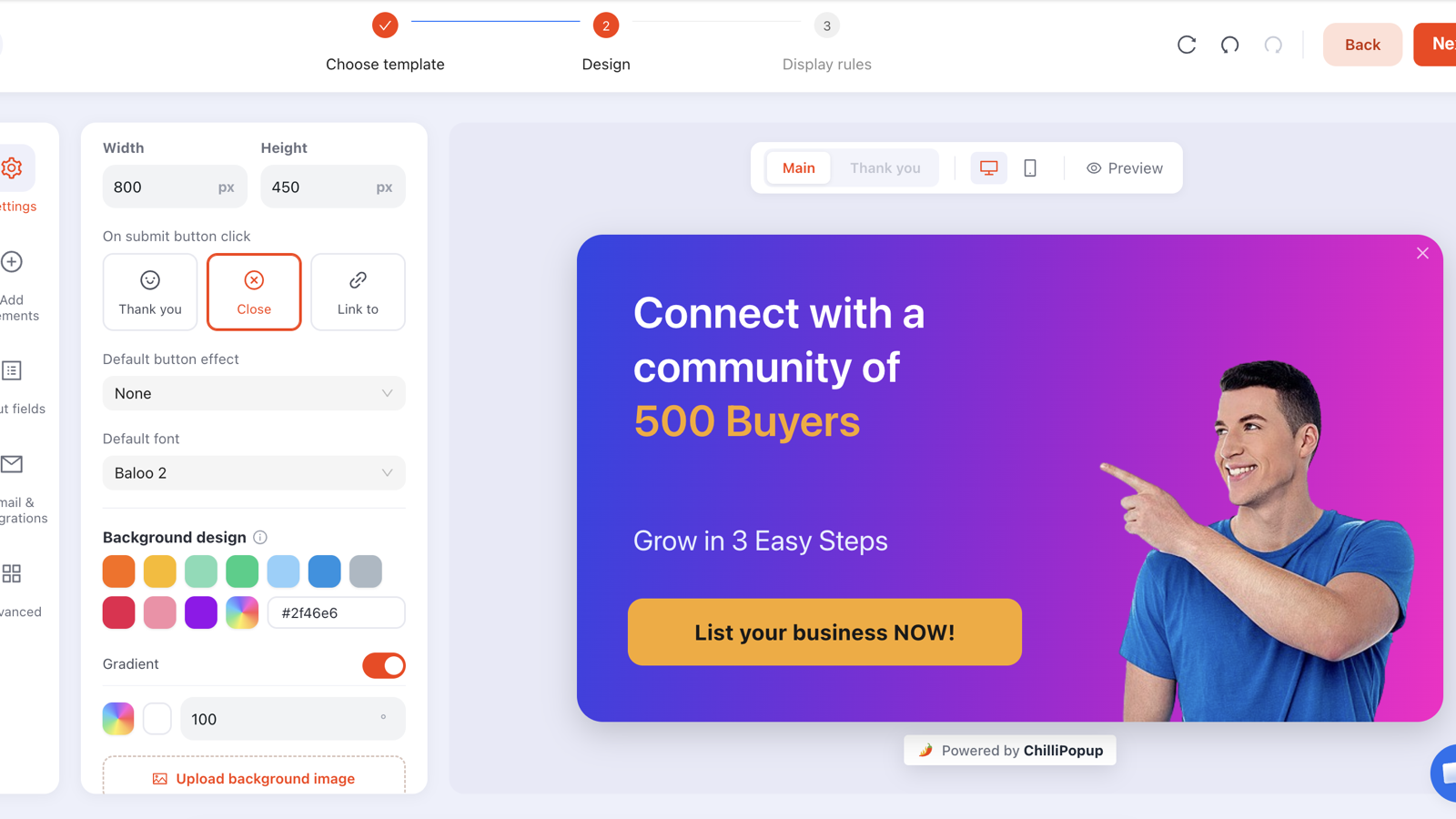
Choosing a popup builder looks like a feature-list problem and is actually a friction problem. Every tool on the market can put a centred card on a page. The ones that work are the ones where your fourth campaign is as easy as your first — where the rule you need exists, the design survives mobile, and someone can answer "how is this performing?" without a meeting.
This is the checklist we would use as a buyer, grouped into the four things that actually decide it: what you can build, who sees it, what it costs your site, and what you learn.
Key Takeaways
- Buy for campaign three, not campaign one. The first popup is easy in every tool.
- Targeting depth is the real differentiator — especially a switch that hides a campaign from people who already converted.
- Ask what happens to a lead 30 seconds after capture. Native sync, export or an event hook — but get a real answer.
- Check the pricing meter, not the headline price: visitors, domains and seats produce wildly different bills.
- Twenty minutes in a trial beats an hour of demo. Build your real campaign and try to break it.
Start from the campaigns, not the feature list
Before you compare anything, write down the three campaigns you will run in the first month. Something like: a welcome offer on collection pages, an exit-intent rescue on the cart, and a one-question survey after checkout. That list is your specification, and it instantly makes half of every feature grid irrelevant.
What a popup builder actually is
Three systems wearing one interface: an editor that produces the content, a rules engine that decides who sees it and when, and a delivery script that renders it on your site and records what happened. Tools differ far more in the second and third than in the first — which is unfortunate, because the first is what demos show.
The 12 features that matter
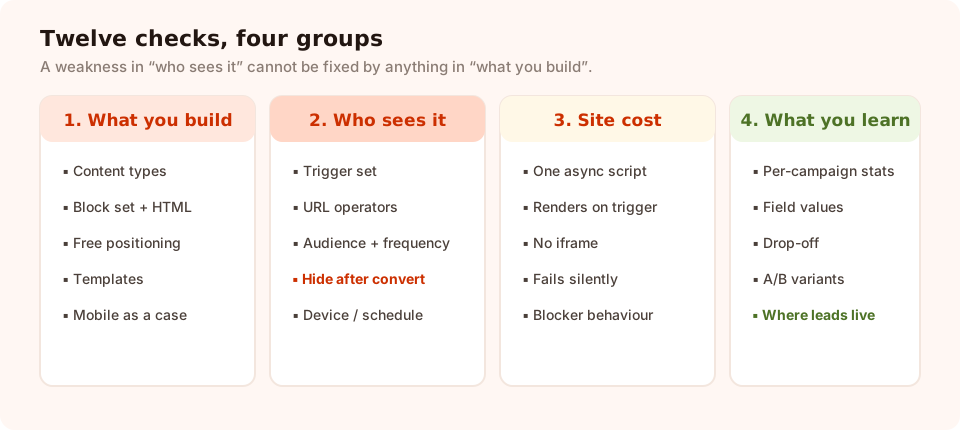
Twelve checks in four groups. If a tool is weak in group two, nothing in group one saves it.
What you can build
- More than one content type. Popups get you started; the second month you want an inline form, a multi-step survey, a quiz that segments, and possibly a prize game. Tools that only do overlays turn into two subscriptions.
- A real block set. Text, image, button, input, countdown timer, coupon code, shapes, icons, embedded video, and a raw HTML escape hatch for the one thing nobody anticipated. Check the escape hatch exists — it is what stops a small requirement becoming a blocker.
- Free positioning, and templates worth starting from. Drag-placed blocks beat fixed slots, and a template library saves an afternoon per campaign. Bonus points for undo history that survives a reload.
- Mobile as a first-class case. Not "it is responsive" — can you preview it, can you run a different campaign on phones, and does the close control stay reachable when the keyboard opens?
Who sees it
- Triggers. Exit intent, a time delay, scroll depth, page count, click count and inactivity, at minimum. Ask how the tool handles exit intent on mobile — if the honest answer is "it does not", that is fine; a tool that pretends otherwise is not.
- URL targeting with operators. Contains alone is not enough. You want does not contain, is exactly, is not, starts with and ends with, so a cart campaign cannot leak onto a collection page.
- Audience and frequency. New versus returning visitors — with the day thresholds under your control — plus caps like once a day, once every N days or once every N visits.
- A conversion gate. The single most under-demoed switch in this category: stop showing a campaign to anyone who already submitted it. Without it, your subscribers get sold the newsletter forever.
- Advanced gates you may need later. Device, OS and browser restrictions, a start/end date window in a chosen time zone, and a weekday-and-hour schedule — the difference between a sale campaign that retires itself at midnight and one you have to remember to switch off.
What it costs your site, and what you learn
- Delivery that cannot break the host page. One small asynchronous script, no framework shipped into your page, no iframe if the content needs to inherit your fonts, and network calls that fail silently rather than throwing errors into your console.
- Reporting you will actually open. Views, clicks, submissions and conversion rate per campaign, the values collected per field, and — for stepped content — which question people quit on.
- A/B testing that keeps the variants separate. Two versions, a split you choose, and separate numbers for each. Without separate numbers you are not testing, you are hoping.
| Capability | Verdict | How to test it in five minutes |
|---|---|---|
| Multiple content types | Must have | Try to build an inline form and a two-step survey, not just a popup |
| Raw HTML block | Nice to have | Look for it in the block list; you will need it once |
| Exit intent + scroll + delay | Must have | Enable all three and watch which one fires first |
| URL operators beyond "contains" | Must have | Try to exclude a single page from a site-wide campaign |
| Hide after conversion | Must have | Submit the form, reload, and see whether it comes back |
| Schedule / date window | Nice to have | Set a campaign to end tomorrow at 23:00 |
| Per-campaign analytics | Must have | Find views and submissions for one campaign in under a minute |
| A/B testing | Nice to have | Create a variant and check it reports separately |
| Where submissions live | Must have | Submit a test lead and go find it |
| Template library | Nice to have | Count how many you would genuinely use |
| AI first draft | Nice to have | Generate one and see how much editing it needs |
| Seat / role management | Depends | Only matters if more than one person will touch it |
The performance questions to ask
A popup builder is third-party JavaScript on every page of your site. Three checks tell you almost everything:
- Is the script asynchronous and small? View source on your own page after installing. One tag, loaded async, is the shape you want.
- Does it render before it needs to? Nothing should be injected into the DOM until a trigger fires. Open dev tools and watch.
- What happens when it is blocked? Turn on a content blocker. Your page must be entirely unaffected — and, worth knowing, the tool's own analytics may under-report because of exactly this. A vendor that talks openly about blocker behaviour has thought about it.
Watch for iframes. Rendering the popup inside an iframe makes life easier for the vendor and harder for you: your fonts and CSS do not apply, so the popup never quite looks like your brand. Rendering directly into the host page is more work to build and much better to live with.
Data, consent and where the leads live
Popups collect personal data, which makes this a compliance question and not just a features one. Ask:
- Where are submissions stored, and for how long? You need an answer you could repeat to a customer who asks.
- Can you put a consent line and a privacy-policy link in the popup? It should be an ordinary text block, not a paid add-on.
- Can you delete a person's data on request? Test it, do not assume it.
- What is the export path? The honest answers range from a native sync to "read the table and copy it". Any of them can work — but decide who does the work before launch.
For what to write in the consent line and which fields to avoid collecting altogether, the GDPR-compliant popups guide covers it properly.
Worth saying plainly about our own tool: ChilliPopup stores every submission with its campaign and shows it in the dashboard, and there is no built-in sync to an email platform or CRM. The two paths that work are moving batches across yourself, or listening for the pixel's submit event on your own page and posting the payload to your endpoint. If a native integration is a hard requirement for you, that is a fair reason to choose differently — better to know now than in week three.
How to read the pricing
The headline number rarely predicts the bill. What matters is the meter:
| Metered on | Who it suits | The trap |
|---|---|---|
| Monthly visitors or sessions | Small and mid-size sites with steady traffic | A viral post or a paid campaign can blow the tier in a week — check what happens when you exceed it |
| Popup impressions | Sites running one or two campaigns | Good targeting reduces impressions, so the meter quietly punishes running more campaigns |
| Sites or domains | Agencies and multi-brand owners | Staging and subdomains sometimes count as separate sites |
| Seats | Teams where several people build campaigns | Shared logins to avoid seat costs are a security problem, not a saving |
Two more things to check on the plan you would actually buy, not the top one: whether the tool puts its own badge on your popup, and what happens at the moment you cross the limit — a warning, an upgrade prompt, or content silently stopping.
The 20-minute trial script
Demos show the editor. Trials show the tool. Run this and you will know more than any comparison table can tell you.
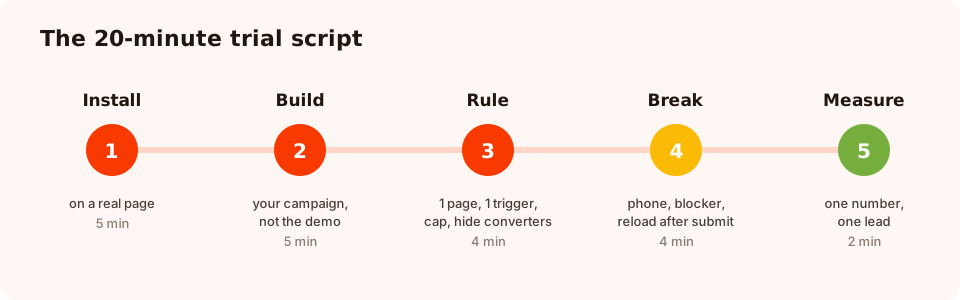
Five steps, twenty minutes. Step four is the one vendors never demo.
1. Install it on a real page (5 min)
Staging or a low-traffic page. Time it. If a standard site needs developer help, that cost repeats every time you change platforms or add a domain.
2. Build your campaign, not the demo (5 min)
Your offer, your fields, your brand colours and font. Write down every compromise you had to make. Those compromises are the product.
3. Rule it like production (4 min)
One page only, one trigger, a frequency cap, and hidden from converters. If you cannot do all four, stop the trial here.
4. Try to break it (4 min)
Phone. Two campaigns on one page. A content blocker. A reload after converting. A slow connection. The tool that survives this survives your Black Friday.
5. Find one number and one lead (2 min)
How many people saw it, and where is the email you just submitted. Two questions, two minutes. If either answer is hard to reach, you have learned the most important thing about the tool.

Step five, in practice: reach, rate and the values collected, per campaign.
Seven red flags
- No way to hide a campaign from people who converted. The tool has not run in production.
- Only "contains" URL matching. You will eventually need to exclude one page, and you will not be able to.
- Everything renders in an iframe. Your popup will always look almost like your brand.
- Analytics only at the account level. You cannot improve what you cannot attribute.
- No answer to "where do submissions live?" Walk away — that is a data-protection question, not a feature question.
- Pricing that hides the meter. If you cannot tell what counts, you cannot forecast the bill.
- A support channel that is a form with no reply time. You will need help during a sale, at speed.
Your one-page checklist
Print this, take it into the trial, and fill it in for each tool. Ten minutes of note-taking now saves a migration later.
BUILD
[ ] Popups, inline forms, surveys, quizzes, games — which are included?
[ ] Block set covers: text, image, button, input, timer, coupon, video, raw HTML
[ ] Templates I would genuinely use: ___
[ ] Mobile preview + separate mobile campaign possible?

TARGET
[ ] Triggers: exit intent / delay / scroll / page count / clicks / inactivity
[ ] URL operators beyond "contains"
[ ] New vs returning audience, with editable day thresholds
[ ] Frequency cap options: ___
[ ] Hide after conversion — YES / NO
[ ] Device, schedule, date window

DELIVER
[ ] One async script? Renders only on trigger?
[ ] Page unaffected when the script is blocked?
[ ] Rendered in the host page (not an iframe)?

MEASURE + DATA
[ ] Per-campaign views / clicks / submissions / conversion rate
[ ] Per-field collected values; drop-off on stepped content
[ ] A/B variants report separately
[ ] Where submissions are stored, and for how long: ___
[ ] Lead path after capture: sync / export / event hook / manual
[ ] Consent line + privacy link possible in the popup

COMMERCIALS
[ ] Metered on: visitors / impressions / domains / seats
[ ] What happens when I exceed the limit: ___
[ ] Vendor badge on my popup on my plan — YES / NO
[ ] Support channel and realistic response time: ___
The decision rule. Pick the tool where your third campaign takes ten minutes, not the one with the longest feature list. Iteration speed is what produces conversions; features only make it possible.
Run the trial script on us
Build a real campaign, rule it properly and ship it in an afternoon. Free plan, no credit card required. Paid plans from $29/month.
Start free →Related reading
Frequently asked questions
What should I look for in a popup builder?
Four things, in this order: an editor that can build your campaign without code, display rules precise enough to keep it on one page and away from people who already converted, a script that does not slow or break your site, and reporting that tells you both the conversion rate and where the collected data lives. Everything else is preference.
Do I need a popup builder, or can I code popups myself?
A hand-coded popup is cheap once and expensive forever. The code is the easy part; the parts you end up rebuilding are exit-intent detection, per-visitor frequency and cooldown storage, mobile behaviour, submission storage, and reporting. Build it yourself if popups are a one-off; use a builder if you plan to iterate on them.
How much does a popup builder cost?
Most tools meter one of: monthly visitors or impressions, number of sites or domains, or team seats — and the same headline price can mean very different things depending on which. Work out your monthly visitor count first, then compare on the tier you would actually be on rather than the entry tier. ChilliPopup has a free plan for up to 1,000 visitors a month, with paid plans from $29/month.
Do popup builders slow down your website?
A well-built one adds a single small asynchronous script and renders nothing until a trigger fires, so the effect on your Core Web Vitals should be near zero. Check three things during the trial: whether the script is loaded async, whether it injects fonts or frameworks, and whether the page still works when the script is blocked.
What targeting rules does a popup tool need?
At minimum: URL targeting with more than "contains", a real trigger set including exit intent, scroll depth and a delay, new-versus-returning audience selection, a frequency cap, and a switch that stops showing a campaign to visitors who already submitted it. Without that last one you will advertise your newsletter to your own subscribers.
Should a popup builder integrate with my email tool?
Ask the harder version of that question: what happens to a lead thirty seconds after it is captured? Some tools sync natively, some export, some expose a browser event you can hook. Any of those can work — what fails is discovering after launch that the answer is "someone copies a table every Monday" when nobody agreed to be that someone.