Email list segmentation means splitting subscribers into groups that get different emails. The fastest way to do it is not to analyse your existing list — it is to capture the segment at the moment someone signs up, with one extra question or one extra popup. Everything you don't collect then, you spend the next year guessing at.
This guide covers the four segments that are worth having, the four you can collect without asking anything at all, and the one question to add to your signup popup if you only ever add one.
Key Takeaways
- A segment must change something you send. If no email, offer or subject line changes, it's a label, not a segment.
- Capture it at signup. Retrofitting segments onto an existing list means re-permissioning people who already ignored you once.
- Fixed options beat text boxes. Typed answers arrive as twelve spellings of the same word and can't be sorted on.
- Four free segments come from the page, the campaign, the offer and the visitor type — no question required.
- Stop at three or four segments. Each one multiplies the emails you have to write and divides the sample you have to learn from.
What counts as a segment worth having
The test is brutally simple: name the email that changes because of this segment. If you can't name it, the segment is decoration. Most lists that "aren't segmented" are actually over-segmented in a spreadsheet somewhere and under-used in the email tool.
Four segments carry almost all the value for a small business:
- Interest — the product category, topic or use case they care about. Changes what you feature.
- Stage — browsing, subscribed-not-bought, customer. Changes whether you educate, convince or upsell.
- Source — which campaign or page captured them. Changes the tone of the first email and tells you what they were doing when they said yes.
- Value — one purchase versus repeat, or free versus paid. Changes how hard you're allowed to sell.
Notice what's missing: demographics. Age, gender and location are easy to collect and almost never change what a small business sends. Collect them when they route something real — a size chart, a shipping zone — and skip them otherwise.

One question decides whether a segment is real: what would you send differently?
Why signup is the only cheap moment
There are three moments you can segment someone: at signup, by asking later, or by inferring from behaviour. They are not equally priced.
| Moment | What it costs | Coverage you get | Use it when |
|---|---|---|---|
| At signup | One tap, from someone already converting | Nearly everyone who joins from now on | Always — this is the default |
| Asking later | A whole email or a second popup, plus attention you'd rather spend selling | Whoever opens — a fraction of the list | Backfilling an existing list, once |
| Inferring from clicks | Nothing to the subscriber, real work in your email tool | Only the people who click | As a top-up, never as the plan |
Signup wins because the person is already mid-decision. They have chosen to give you their address; one tappable question afterwards is the cheapest data you will ever collect. The same question sent as a standalone email three weeks later gets answered by a small minority of an already-small open rate.
Four segments you can capture without asking
Before you add any question at all, take the segments you're already sitting on. Each of these is free, and together they cover more ground than most people's questionnaire.
1. The page they signed up on
Run a separate popup per section of the site — one for the outdoor category, one for the kids category, one for the blog — using URL rules like contains /outdoor. Each campaign stores its own submissions, so the campaign is the segment. Nobody had to answer anything.
2. The offer they accepted
Someone who took "10% off your first order" is shopping. Someone who took "the free beginner's guide" is researching. Same list, radically different first email. If you run both, you have already segmented by intent.
3. New versus returning
Display rules let you target new visitors or returning visitors, and define in days what each means. Two campaigns with the same design and different audiences give you a first-timer segment and a considerer segment for free.
4. Device
Not glamorous, but occasionally decisive — a subscriber who only ever signs up on a phone will read your emails on a phone. If your template is a two-column desktop layout, that's worth knowing.
Do the free ones first. Splitting one signup popup into three page-targeted campaigns takes twenty minutes and costs your visitors nothing. Adding a question costs conversions. Spend the free segmentation before you spend the paid kind.
The one-question quiz: the cheapest segmenter
When you do need to ask, ask once, with fixed options. A
one-question quiz — a choice block with three to
five tappable options — completes in a single gesture, works on a phone, and returns a normalised value
you can actually sort on. A text input asking the same thing returns Mktg,
marketing ops and Marketing, which is three segments of one person each.
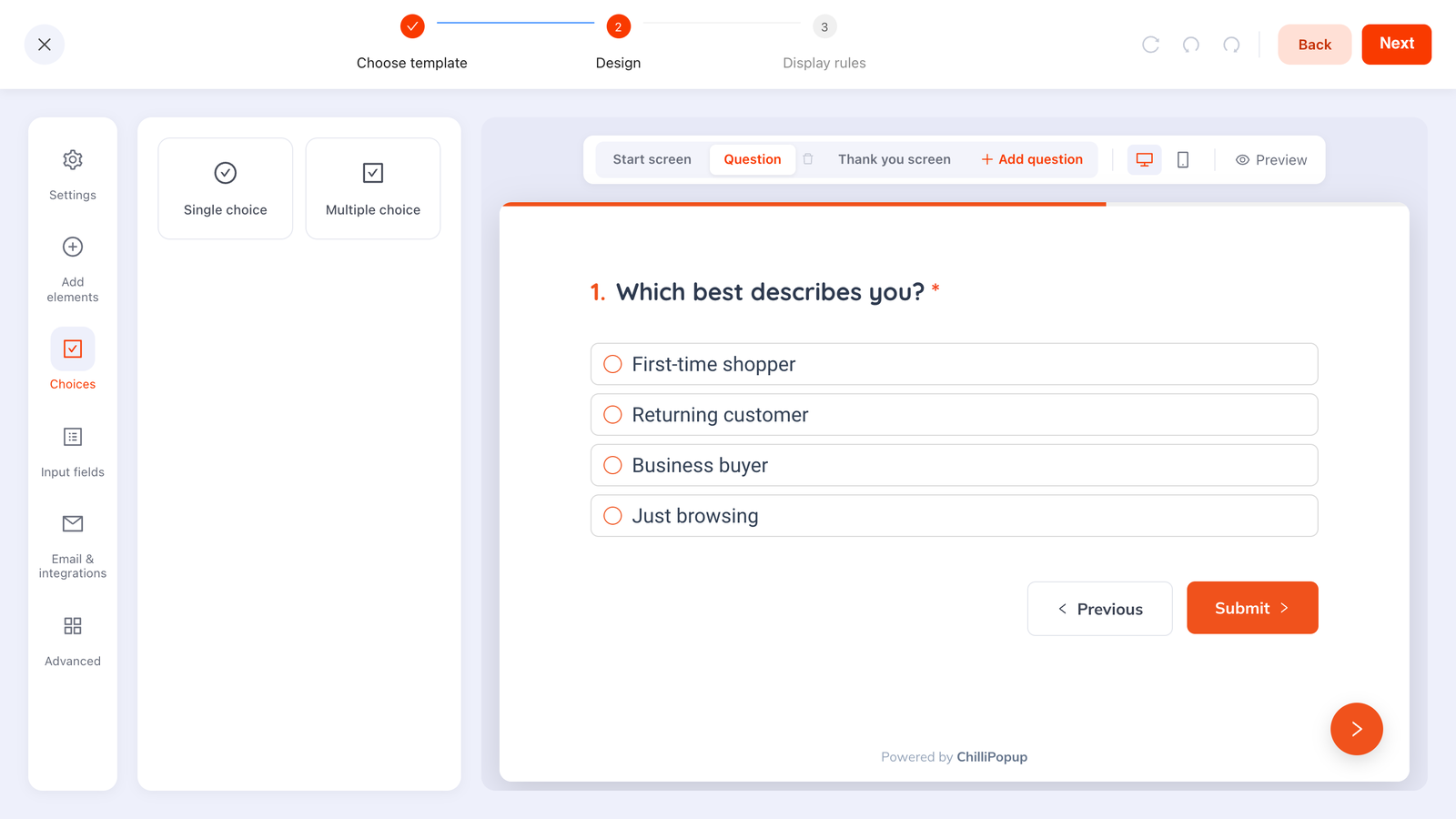
Three to five options, one tap, one clean value — the whole segmentation strategy on one screen.
Structure it as two screens: email first, question second. That order matters more than the wording. If someone abandons after the email, you still have the subscriber. And because answers entered on a stepped survey or quiz are recorded as a partial response even when it is never submitted, an abandoned question still tells you which options people hovered over.
| Business | The one question | Options | What changes |
|---|---|---|---|
| Apparel store | "What are you shopping for?" | Women's / Men's / Kids / Home | Which products the welcome series features |
| Software | "What best describes you?" | Founder / Marketing / Product / Engineering | The use case and the call to action |
| Course creator | "Where are you starting from?" | Complete beginner / Some experience / Pro | Which course you point them at first |
| Local service | "What do you need help with?" | Three services you offer | Which case study and price guide you send |
| Publisher | "Which topics do you want?" | Three to five sections | What's in the weekly digest |
One question, not a questionnaire. Every extra screen between the email field and the reward costs subscribers. If you catch yourself adding a third question, you are no longer segmenting — you're running a survey, and that belongs somewhere else in the relationship.
Getting the segment into your email tool
Be realistic about the plumbing, because this is where segmentation plans quietly die. Each campaign stores its own submissions with the values collected per field, which you read in the dashboard. There is no automatic contact sync into an email platform, so the segment travels the last few feet by hand.
That has one important consequence: keep the number of segments small enough that moving them is a five-minute job. Three segments is a weekly habit. Nine is a project you'll abandon in a month.
Two patterns that keep it manageable:
- One campaign per segment. Page-targeted popups mean each segment is already a separate list of submissions — no filtering, no sorting.
- One campaign, one question. Read the collected-fields breakdown, which shows the top values per field, and move each group into its matching list or tag.
Keep an email field on any campaign that asks a segmenting question, even if you already have the address. It's the key you match rows on. Asking a subscriber to retype an email they've typed a hundred times is cheap; guessing which anonymous answer belongs to which contact is not.
A worked example: a two-segment store
A homewares shop with two clear audiences: people furnishing a first flat, and people buying gifts. One question, two segments, three emails each.
The capture. Exit-intent popup on product pages, new visitors, one email field, 10% off. Screen two: "So we send you the good stuff — what brought you in?" with two chips, "Furnishing my place" and "Buying a gift".
What changes.
- Furnishing gets a room-by-room series, bundle pricing and restock alerts.
- Gifting gets price-banded gift guides, delivery deadlines and gift wrapping — and goes quiet in February.
Same list, same discount, same signup popup. The only difference is one tap — and the gifting segment stops receiving eight emails about sofa care.
Six segmentation mistakes
- Segments nobody sends to. The most common failure by a mile: the data is collected, and every subscriber still gets the same newsletter.
- Asking before the email. Put the identifier first. A question above the email field turns a signup into a quiz nobody agreed to take.
- Free text where chips belong. Unnormalised values you can't sort are the same as no data.
- Too many segments, too early. Six segments on a list of 400 people means six samples of nothing.
- Collecting demographics by reflex. Age and gender feel like segmentation and usually change nothing about what you send.
- Never checking it worked. If the segmented emails don't beat the unsegmented ones on clicks, the question was wrong — not the idea.
How to tell it's working
Two checks, one on each side of the handover. On the capture side, compare the campaign's conversion rate before and after you added the question — a one-tap second screen usually costs very little, and if it costs a lot, the question is too personal or too early. On the sending side, compare click rate per segment against the unsegmented emails you sent last month. Opens tell you the subject line landed; clicks tell you the content was right for that group, which is the thing segmentation is supposed to fix.

Watch the capture rate when you add the question — the segment has to be worth what it costs.
Build your first segmented signup
Forty-five minutes, and most of it is deciding what the segments are.
1. Write the two emails first
Draft the two different first emails you'd send. If you can't make them meaningfully different, you have the wrong segment — try again before building anything.
2. Take the free segments
Split your existing signup popup into page-targeted campaigns where your sections are genuinely different. Twenty minutes, zero conversion cost.
3. Add one question, on screen two
Build the capture as a two-screen quiz: email first, one choice question with three to five options second. Start free if you need an account.
4. Move the segments once a week
Read the submissions and collected fields, and copy each group into its list or tag in your email tool. Put it in the calendar — the habit is the hard part.
5. Compare clicks after four sends
Segmented click rate versus your old unsegmented baseline. If it hasn't moved, change the question, not the number of segments.
Ask one question. Get a segmented list.
Build the popup, the quiz and the segment question in one editor, and see every answer per campaign. Free plan, no credit card required. Paid plans from $29/month.
Start free →Related reading
Frequently asked questions
What is email list segmentation?
Email list segmentation is splitting your subscribers into groups that receive different messages — by what they are interested in, how they signed up, where they are in the buying cycle, or what they have bought. The point is not tidiness: a segment only earns its existence if something you actually send changes because of it.
How many segments should a small list have?
Two or three to start, four at most. Every segment multiplies the emails you have to write, and a small list split six ways gives you six samples too small to learn anything from. Add the second segment only once the first one is visibly changing your open and click rates.
What is the best question to ask for segmentation?
The single question whose answer changes what you send next — usually a category or a role. Give it three to five fixed options rather than a text box, because typed answers come back as a dozen spellings of the same thing and cannot be sorted on.
Can you segment a list without asking anything?
Yes, and it is the cheapest kind. The page someone signed up on, the campaign that captured them, the offer they accepted and whether they were a new or returning visitor are all segments you already know. Run a separate popup per category page and the campaign name becomes the segment.
How do I get the segment into my email tool?
Each ChilliPopup campaign stores its own submissions with the collected field values, which you read in the dashboard and carry into your email tool as a list or a tag. There is no automatic contact sync, so keep the number of segments small enough that moving them stays a five-minute job rather than a weekly chore.
Does segmentation still work if people abandon the question?
Partly, and that is why field order matters. Put the email address on the first screen and the segmenting question on the second: on a survey or quiz, answers typed before someone leaves are still recorded as a partial response, so you keep the subscriber and often learn something about the question itself.