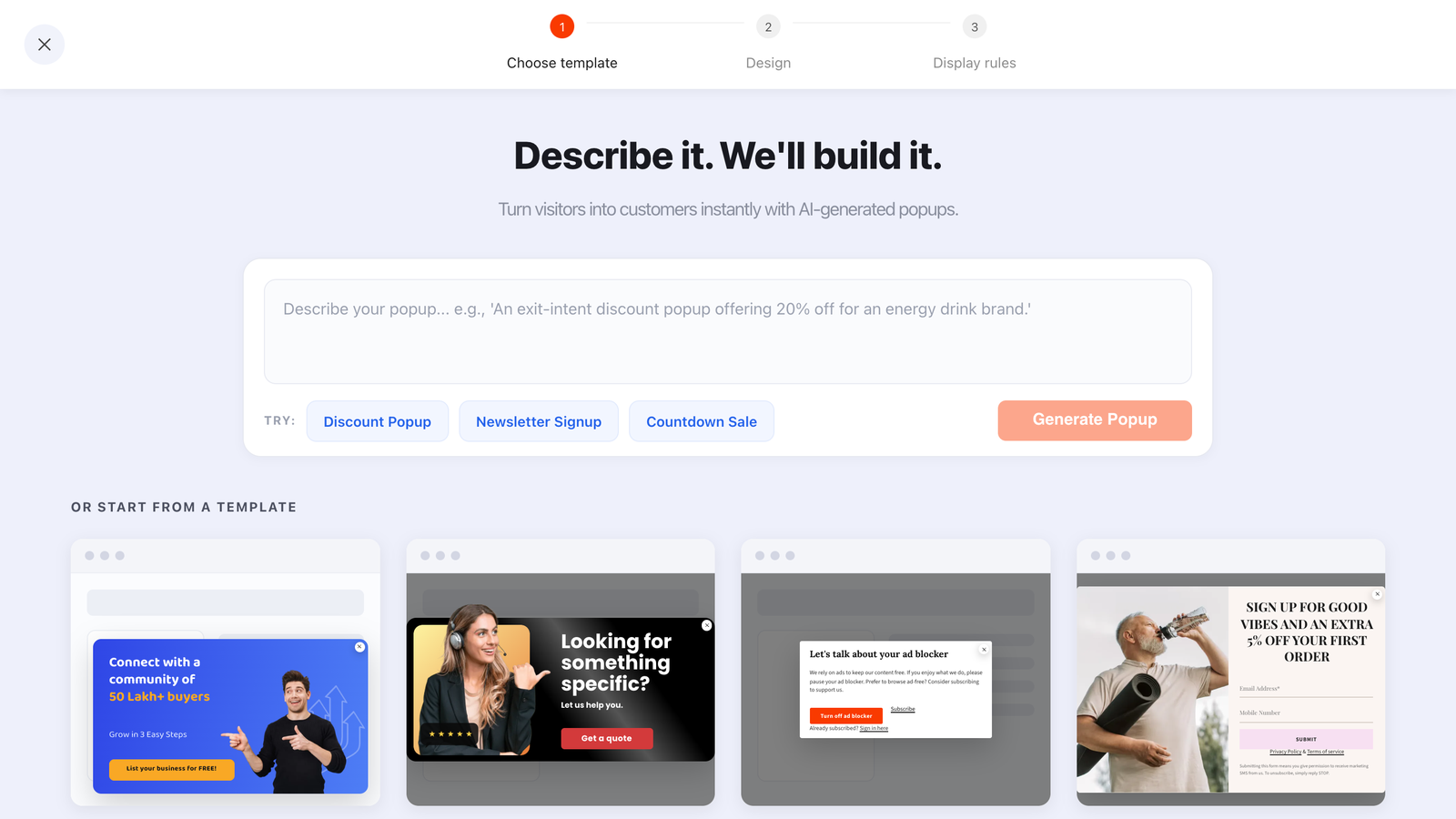
AI popup generation collapses the slowest part of the job — going from blank canvas to a laid-out, on-brand draft — into about ten seconds. You type one sentence describing the popup you want and get back a finished design: size, position, colours, fonts, animations and every block, fields and button included.
What it doesn't do is decide what popup you should be running. That distinction is the whole skill, and it's the difference between a draft you ship in five minutes and a draft that looks like every other AI-generated popup on the internet.
Key Takeaways
- The prompt bar sits above every template gallery — popups, forms, surveys and quizzes all generate the same way.
- Five ingredients make a prompt work: content type + trigger, audience, offer, tone, and one constraint.
- Generic in, generic out. "Make me a newsletter popup" returns exactly the popup you're imagining — and so does everyone else's version of that prompt.
- Always edit three things: the offer wording, the field list, and the thank-you screen.
- Never let AI set the display rules. When a popup fires is a business decision, not a design one.
What an AI popup generator actually does
AI popup generation, defined
An AI popup generator turns a natural-language description into a complete popup design rather than just a block of copy. In ChilliPopup it produces the whole thing — dimensions, position, background, typography, animation and every block on the canvas — and hands it back as an ordinary editable draft. Nothing is locked, and nothing publishes until you say so.
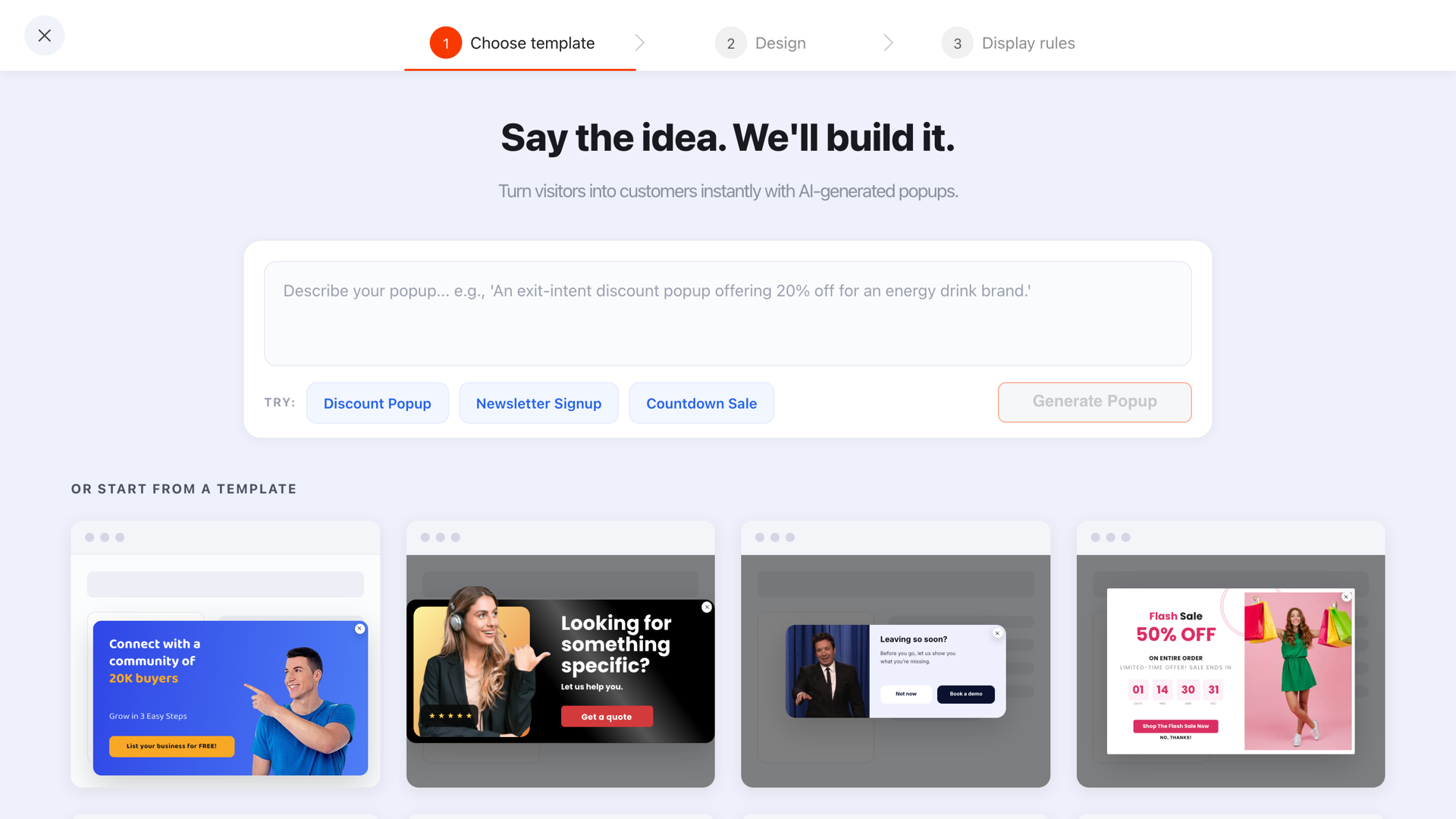
One prompt bar, then the template gallery underneath — you can start from either, and both land in the same editor.
Three things are worth knowing before you type anything:
- It generates structure, not just words. Ask for a two-column layout with an image on the left and you get one, not a paragraph describing one.
- The output is readable by construction — contrast is checked and the blocks are laid out so nothing overlaps or overflows. You inherit a working design, not a pile of elements to nudge.
- It's included on every plan with a fair-use daily limit per workspace: 10 generations a day on Free, 50 on Pro, 200 on Business. There is no AI add-on to buy.
The five ingredients of a prompt that works
A weak prompt isn't short — it's underspecified. Any of the five ingredients you leave out gets filled in with an average, and a popup made of averages is exactly the generic result you were trying to avoid.
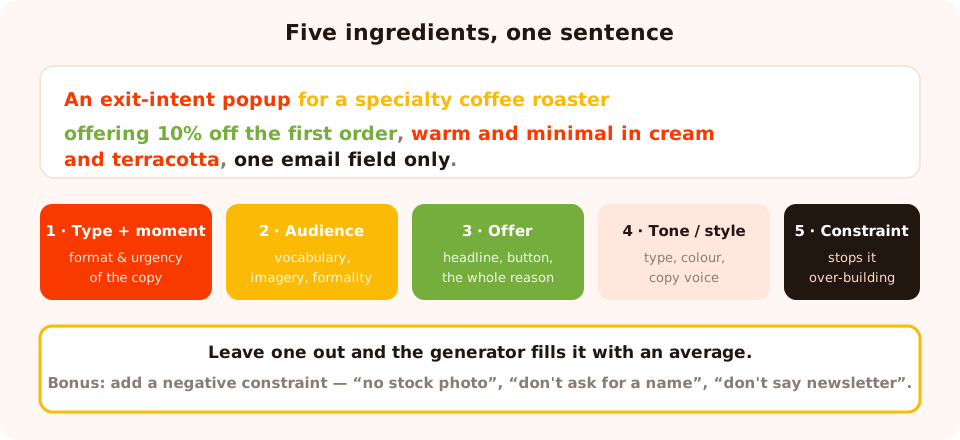
Five ingredients, one sentence. Leave one out and the generator picks an average for you.
| Ingredient | What it controls | Example fragment |
|---|---|---|
| 1. Type + moment | Format and implied urgency of the copy | "an exit-intent popup", "a slide-in", "a signup form" |
| 2. Audience | Vocabulary, imagery, formality | "for a specialty coffee roaster", "for B2B software buyers" |
| 3. Offer | The headline, the button, the whole reason it converts | "offering 10% off the first order", "offering the size guide" |
| 4. Tone or style | Typography, colour, copy voice | "warm and minimal, cream and terracotta", "bold and playful" |
| 5. One constraint | Stops the generator over-building | "one email field only", "no image", "small corner card" |
The fifth is the one people skip and the one that changes the result most. Without a constraint you tend to get a generous, feature-complete popup: three fields, an image, a headline, a subheadline and a badge. With "one email field only, no image" you get the popup that actually converts.
A prompt library you can steal
Each of these is one sentence containing all five ingredients. Swap the brand and the offer and they work as-is.
| Goal | Prompt |
|---|---|
| First-order discount | "An exit-intent popup for a specialty coffee roaster offering 10% off the first order, warm and minimal in cream and terracotta, one email field only." |
| Cart recovery | "A cart-recovery popup for a sneaker store reminding shoppers free shipping applies over £50, bold and high-contrast, one email field and a strong single button." |
| Lead magnet | "A slide-in popup for a garden centre offering a printable seasonal planting calendar, friendly and illustrated in greens, email field only, small corner card." |
| B2B asset | "An exit-intent popup for a B2B analytics platform offering a pricing and implementation guide, restrained and professional in navy and white, one work-email field, no image." |
| Restock / waitlist | "A compact popup for a skincare brand offering restock alerts on a sold-out serum, clean and clinical, one email field, no discount language." |
| Event registration | "A popup for a design agency promoting a free 30-minute webinar on landing pages, confident and editorial in black and yellow, name and email, date shown prominently." |
| Seasonal sale | "A countdown popup for an online toy shop announcing a weekend sale ending Sunday night, festive and colourful, timer above a single shop-now button, no form." |
| Feedback survey | "A three-question post-purchase survey for a furniture store asking about delivery, product quality and what nearly stopped them buying, calm and neutral, one question per screen." |
| Segmenting quiz | "A one-question quiz for a pet supplies store asking whether they have a dog, cat or both, playful and bright, four tappable options and an email field." |
| Inline page form | "An inline signup form for a running blog offering a weekly training email, understated and typographic, email field and button on one line." |
Weak prompt vs strong prompt, side by side
Weak: "Create a newsletter signup popup."
You'll get a competent, completely interchangeable popup: a generic headline about staying updated, a
name field you didn't want, a stock-looking layout and a button that says Subscribe. Nothing is wrong
with it. Nothing is yours either.
Strong: "An exit-intent popup for a specialty coffee roaster offering 10% off the first
order, warm and minimal in cream and terracotta, one email field only, headline focused on the discount
not the newsletter."
Now every decision the generator makes is constrained by something you actually care about — and the
last clause is doing real work, because "newsletter" is the default framing it will otherwise reach for.
A useful habit: put the thing you don't want in the prompt. "No stock photography." "Don't ask for a name." "Don't use the word newsletter." Negative constraints are unusually effective because they override the generator's defaults directly.
The three things to always edit afterwards
AI is genuinely good at layout, hierarchy and first-draft copy. It has no way of knowing your margins, your list-quality standards or what your legal team will accept. Three edits, every time:
1. The offer wording
Make it match what you can actually deliver. "10% off" needs to say whether it applies to sale items; "free shipping" needs the threshold; "instant access" needs to actually be instant. A generated popup will happily promise something slightly better than what you can honour, and the resulting support tickets cost more than the signups.
2. The field list
Generated popups tend to ask for name and email because that's what most popups do. Delete the name unless
you genuinely personalise. Then set the email field's validation to check format & prevent typos
— it catches gmial.com and .con with a "did you mean…?" prompt — or, on a B2B form,
to business-emails-only.
3. The thank-you screen
This is the most common gap. The generated thank-you screen usually says thank you; it should deliver — the code in copyable text, what happens next and precisely when, and one onward action. It's a separate editable screen inside the same campaign, so this takes about a minute.
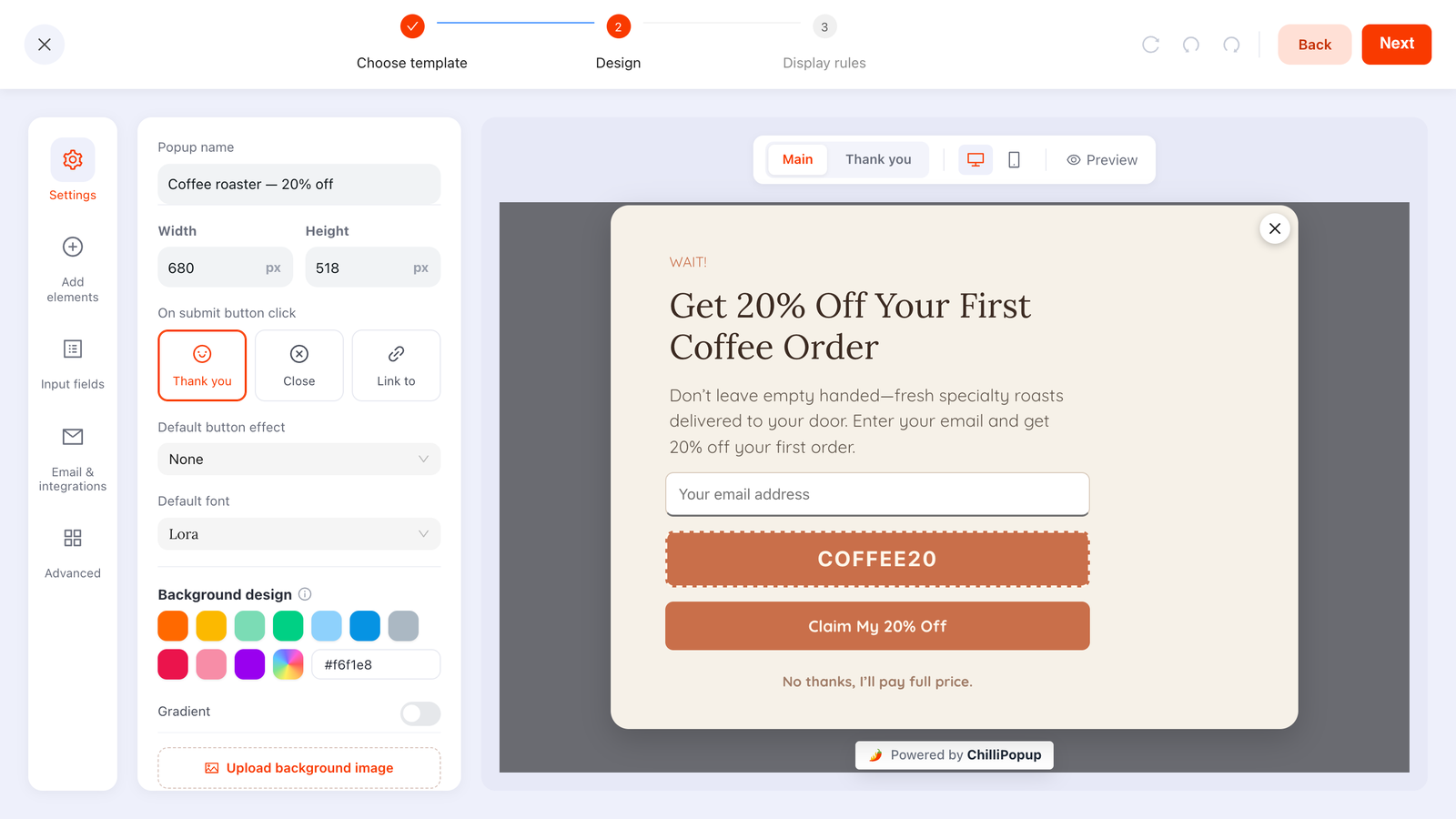
The draft lands in the normal editor — every block, colour, font and screen is still yours to change.
The same trick for forms, surveys and quizzes
The prompt bar fronts all four galleries, and the payoff is biggest on the ones that take longest to write by hand.
- Surveys. Describe the outcome you want to learn — "find out why customers who added to cart didn't check out" — and you get an ordered set of questions instead of a blank first screen. Question order is most of the work in a good survey, and it's exactly what a language model is good at.
- Quizzes. Generate the options, not just the question. Four tappable choices that come back as normalised values beat a free-text box you can never segment on.
- Forms. Useful for the layout more than the copy — describe the shape ("email and button on one line, understated, no heading") and drop the result inline on a page.
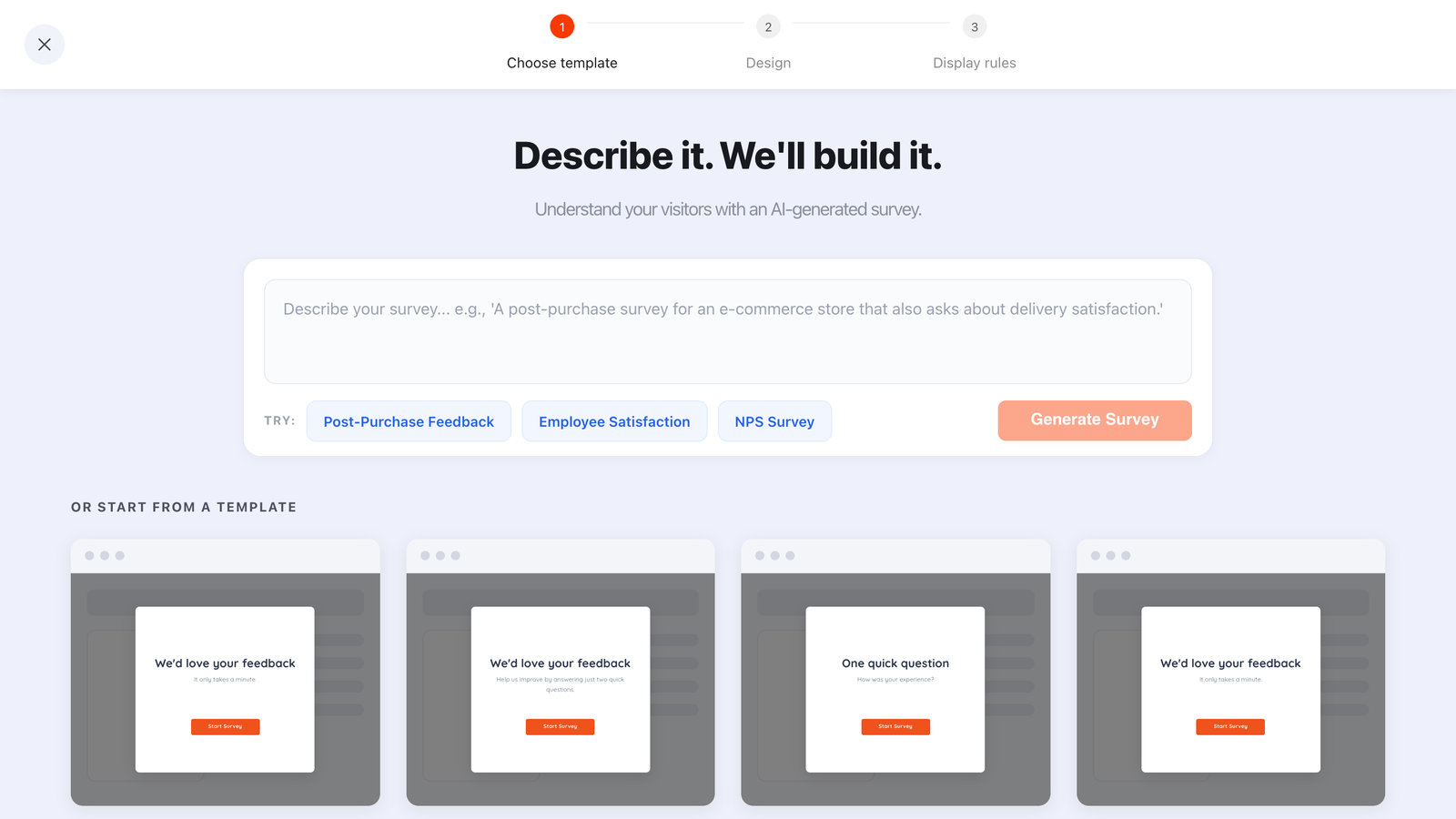
On surveys and quizzes, the AI is really writing the question order — the slowest part of the build.
What AI should never decide
Three decisions belong to you, permanently, because they have consequences a generator can't evaluate.
- The offer. Whether 10% off is profitable, whether a discount trains your regulars to wait for one, whether a free guide is better than money off — margin questions, not design questions.
- The display rules. The trigger, page targeting, device, audience and frequency decide who gets interrupted and when. Set them by hand, every time, and turn off "show again after conversion" so subscribers stop seeing the signup popup.
- The data you collect. Every field you keep is a field you are responsible for storing, justifying and eventually deleting. A generated form asking for a phone number and a birthday is not consent to collect them.
The AI can't see your site. It doesn't know your existing popups, your traffic mix or which page this will run on. Two generated popups can happily both target the homepage and collide. The rules screen is where you prevent that.
Turn one prompt into a real test
Because generation is fast, the interesting workflow isn't "generate one popup" — it's "generate two deliberately different popups and let the traffic choose".
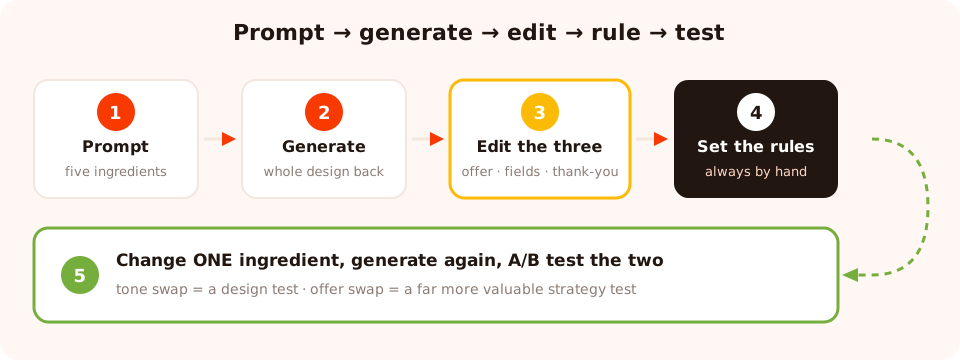
Generation is cheap, so make the second draft genuinely different rather than a tweak of the first.
- Write the prompt with all five ingredients and generate draft A.
- Change one ingredient — the offer, or the tone — and generate draft B. Changing the tone alone gives you a design test; changing the offer gives you a much more valuable strategy test.
- Edit both for the three things above, and give them identical display rules.
- Run them as an A/B test so the split and the reporting are handled for you, and leave it alone until the numbers stop moving.
Six mistakes with AI-generated popups
- Publishing the first draft unedited. The offer, the fields and the thank-you screen are wrong more often than not — they're the parts that depend on facts about your business.
- Prompting for a "newsletter popup". You get the mechanism instead of a reward, which is the single most common reason popups underconvert.
- Never using a negative constraint. "No stock photo", "don't ask for a name" and "don't say newsletter" are the fastest quality upgrades available.
- Letting generated copy over-promise. Every claim on a popup is a promise you have to keep at the thank-you screen and in the inbox.
- Generating ten variants and shipping all of them. More live popups on the same page is not more conversions — it's more dismissals.
- Skipping the rules screen. A beautiful popup with a two-second delay on every page is still a bad popup.
Build your first AI popup
Twenty minutes end to end. If the pixel isn't installed yet, start with the one-line install guide.
1. Decide the offer first
Write the exact thing the visitor gets and the moment they should be asked. Do this before you open the generator, or the generator will decide it for you.
2. Write the five-ingredient sentence
Type + moment, audience, offer, tone, constraint. Add one negative constraint for good measure.
3. Generate, then judge the structure
Look at layout, hierarchy and field count before you touch individual words. If the structure is wrong, re-prompt rather than repair.
4. Edit the three things AI can't know
Offer wording, field list, thank-you screen. Set email validation while you're in there.
5. Set the rules yourself, then publish
Trigger, page targeting, device, frequency — and turn off "show again after conversion". Drafts never serve, so nothing is live until you publish.
6. Generate the challenger
Change one ingredient, generate again, and run the two as a split test instead of debating them.
Describe it. Let the AI build it.
AI generation for popups, forms, surveys and quizzes is included on every plan. Free plan, no credit card required. Paid plans from $29/month.
Start free →Related reading
Frequently asked questions
Can AI create a popup for my website?
Yes. In ChilliPopup an AI prompt bar sits above every template gallery: describe the popup in one sentence and a complete draft comes back — size, position, colours, fonts, animations and every block, including the input fields and the button. It is a normal draft in the editor afterwards, so you can change anything, and nothing goes live until you publish it.
What makes a good AI popup prompt?
Five ingredients: the content type and trigger, who it is for, the exact offer, the tone or visual style, and one constraint. "An exit-intent popup for a specialty coffee store offering 10% off the first order, warm and minimal, one email field only" returns something usable. "Make me a popup" does not.
Does an AI-generated popup still need editing?
Always edit three things: the offer wording so it matches what you can genuinely deliver, the field list so it asks for the minimum, and the thank-you screen so it delivers the promise. AI is very good at layout and structure and cannot know your discount terms, your list quality standards or your brand voice guardrails.
Can AI write forms, surveys and quizzes too?
Yes — the same prompt bar fronts all four template galleries, so a form, a survey or a quiz can be generated the same way. Surveys and quizzes benefit most, because writing five well-ordered questions from scratch is the slowest part of building one.
Is AI popup generation included in the plan?
It is included on every ChilliPopup plan with a fair-use daily limit per workspace — 10 generations a day on Free, 50 on Pro and 200 on Business. There is no separate AI add-on to buy.
What should AI never decide about a popup?
The offer, the display rules and the data you collect. Whether a 10% discount is profitable, whether the popup should fire on exit intent or after three pages, and whether you are allowed to ask for a phone number are business decisions with consequences. Let AI build the thing; you decide what the thing should be.