
When a site gets slow, third-party scripts are the first suspects — and popups are the most visible third-party thing on most sites. Usually the accusation is wrong: an async script that does nothing until after render is close to free. Occasionally it is right, and when it is, the culprit is almost never the script. It is the 2.4 MB background image somebody dropped into the popup.
This is a guide to telling those two situations apart, and to keeping a fast site with popups on it.
Key Takeaways
- The script is async. It downloads without blocking HTML parsing and does nothing until the page is ready.
- An overlay cannot shift your layout. It is drawn on top of the page — but an inline embed with no reserved height absolutely can.
- Image weight is the real cost, by an order of magnitude over everything else on this page.
- A second font family is the second cost. Reuse a font your site already loads and it becomes free.
- Timing decides whether Core Web Vitals notice. A popup that appears immediately competes with your own content; one that waits does not.
What actually happens when a page loads
Worth knowing before you optimise anything, because the shape of the load explains which decisions matter.
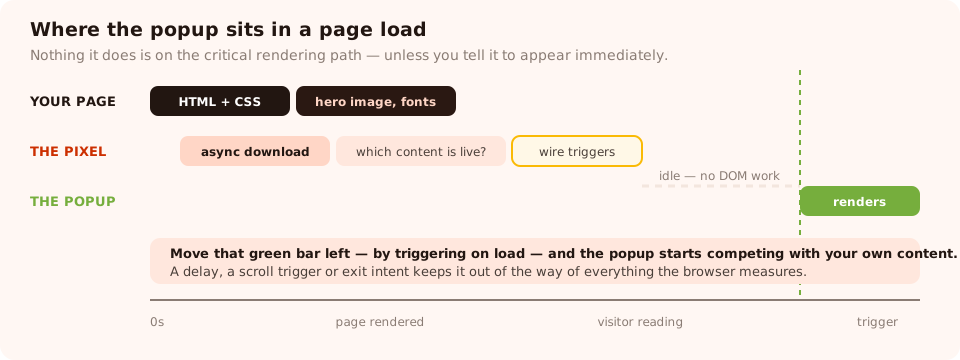
Nothing the popup does happens before your page has rendered — unless you configure it to.
- The browser meets the script tag in your head. Because it carries
async, it starts downloading in parallel and HTML parsing continues uninterrupted. This is the difference between a script that costs you nothing and one that stalls the page. - The bundle arrives — a single framework-free file from a static host, not from an application server, so it is a plain cached file fetch.
- It asks the API which content is live for your workspace. That response is cacheable for a minute, and nothing is rendered while it is in flight.
- Triggers are wired up — a timer, a scroll listener, an exit listener. Cheap bookkeeping, no DOM work.
- A trigger fires and the popup is built into the page. This is the only moment any visible work happens, and by then your page has long since rendered.
One consequence worth internalising: the popup is not part of your critical rendering path. Nothing above is racing your hero image or your stylesheet. That is why the honest answer to "do popups slow down a site" is "the script barely does — what you put in it might".
The three things that actually cost you
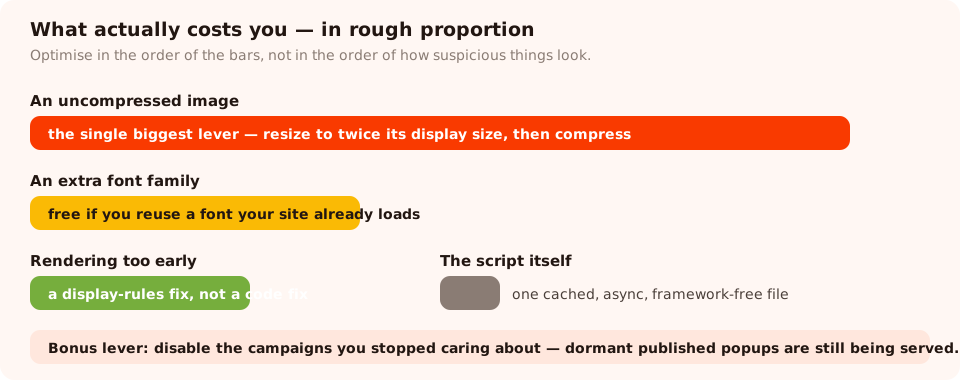
Spend your optimisation effort in proportion to the bars, not in proportion to how suspicious something looks.
1. Image weight
By far the biggest lever, and the easiest to get wrong, because the editor will happily accept whatever you upload. A photograph straight off a phone is several megabytes; the same image resized to the space it actually occupies and saved as a modern format is a small fraction of that.
Three rules that solve almost all of it:
- Resize before uploading. A popup image displayed at 400 pixels wide does not need to be 4,000 pixels wide. Twice the display size is plenty for high-density screens.
- Compress. Most photographs survive aggressive compression with no visible loss.
- Ask whether it earns its place. A lot of popups are better without an image — the headline and the offer are doing the work, and stock photography is usually decoration.
2. An extra font family
A popup renders in whatever font family you choose, and if that family is not already on your page, it has to be fetched. One extra font is a modest cost; three, in four weights, is not.
The free fix is to pick a family your site already loads. The popup then draws with a font that is already in the browser's cache, and the marginal cost drops to zero — with the bonus that the popup actually looks like it belongs to your site.
3. When you tell it to appear
The one performance decision that lives in the display rules rather than the design. A popup configured to appear the instant the page is ready is competing with your own content for bandwidth and for the visitor's attention. A popup on a five-second delay, a scroll trigger or exit intent is not competing with anything.
This is where popups touch Core Web Vitals, so it is worth being precise about how.
Popups and Core Web Vitals
| Metric | Can a popup affect it? | When, and what to do |
|---|---|---|
| Largest Contentful Paint | Yes, if it appears early | A large popup image drawn in the first seconds can become the element the browser measures. Delay the trigger, or shrink the image |
| Cumulative Layout Shift | Overlays: no. Inline embeds: yes | An overlay is drawn on top and moves nothing. An inline embed drops content into your page — reserve height on its container |
| Interaction to Next Paint | Marginally | Building a popup is DOM work. It is small, but avoid three campaigns racing to render on the same trigger |
The layout-shift point is the one that surprises people. Because overlays are drawn above the page, they genuinely cannot push your content around — which makes the overlay the safer format for this metric. The risk sits entirely with inline embedding, where a container that is zero pixels tall until the content arrives will shift everything below it.
<!-- min-height stops the page jumping when the form renders -->
<div class="chillipopup-inline"
     data-uuid="YOUR_CONTENT_UUID"
     style="min-height: 320px"></div>
Set the min-height to roughly the finished height of the embedded content, measure it once on desktop and once on mobile, and the shift disappears. The form embedding guide covers the rest of the markup.
Different question, different article. This page is about load performance. Whether Google treats a popup as an intrusive interstitial is a separate concern with separate rules — do popups hurt SEO covers that one.
Where the script tag belongs
In the <head>, with async, exactly as the install snippet ships it:
<script id="chillipopup-pixel"
        src="https://player.chillipopup.com/javascript/pixel.js?id=YOUR_WORKSPACE_ID"
        data-api="https://api.chillipopup.com" async="true"></script>
Four temptations worth resisting:
- Do not add
deferas well. It changes nothing useful and delays your popups. - Do not let an optimiser "combine" or "delay" it. Plugins that merge scripts or push them behind the first user interaction routinely strip attributes or move the tag somewhere it never executes. Add it to the exclusion list.
- Do not introduce a tag manager just for this. A tag manager has to download and run before it can even request the pixel — one extra hop in the chain for no benefit if you have no other tags.
- Do not self-host a copy of the bundle. You lose the shared cache and inherit the job of keeping it up to date.
Fast site, working popups
One async script tag serves popups, forms, surveys, quizzes and prize games — no iframes, no framework, no per-campaign scripts. Free plan, no credit card required. Paid plans from $29/month.
Start free →How to measure it properly
Arguments about page speed are settled by numbers, and they are easy numbers to get. Run the same test twice — once as your visitors see it, once with the popup script blocked — and compare like with like:
- Use the same page, the same network profile and the same device profile for both runs. Comparing a throttled mobile run against an unthrottled desktop one proves nothing.
- Run each version at least three times and take the median. Single runs vary by more than most of the differences you are looking for.
- Look at the waterfall, not the score. A performance score is a weighted composite; the waterfall tells you which request actually took the time.
- Check the popup's own resources separately. The bundle, the content fetch, any font and any image. In practice one of those four will dominate, and it is almost always the image.
- Test with the popup triggered, too. Measuring a page where the popup never fires tells you about the script and nothing about the campaign.
The checklist
Ten minutes, and it covers everything above:
- ☐ Script in the head,
async, unmodified, excluded from any script-combining plugin - ☐ Every popup image resized to about twice its display size and compressed
- ☐ Popup fonts limited to families your site already loads
- ☐ No popup set to appear immediately on load — delay, scroll or exit instead
- ☐ Inline embed containers given a
min-height - ☐ One campaign per page rather than three racing each other
- ☐ Old campaigns disabled rather than left published and dormant
- ☐ A before-and-after measurement saved somewhere, so the next argument takes two minutes

The cheapest performance win available: disable the campaigns you stopped caring about six months ago.
Five myths
- "Popups block page rendering." An async script cannot block HTML parsing. If your page is render-blocked, the cause is a synchronous script somewhere else.
- "Every third-party script costs the same." A framework-free file that runs after render is not comparable to a script that boots a runtime before your content appears.
- "Popups cause layout shift." Overlays cannot. Inline embeds without reserved height can, and that is a markup problem with a one-line fix.
- "An iframe would be safer." An iframe is a second document with its own load cost. Rendering into the host page avoids that entirely.
- "Disabling popups fixed our score." Sometimes true, and worth checking why — nine times out of ten what you actually removed was an uncompressed image.
Related reading
Frequently asked questions
Do popups slow down your website?
A well-built popup script costs very little, because it loads asynchronously and does nothing until the page has rendered. What genuinely costs you is what you put inside the popup — an uncompressed background image, a font your site does not already load, or a popup configured to appear immediately on load. Those three decisions matter far more than the script itself.
Do popups affect Core Web Vitals?
They can affect two of the three. An overlay drawn on top of the page does not push content around, so it does not normally hurt cumulative layout shift — but an inline embed dropped into a container with no reserved height does. And a popup that appears in the first couple of seconds, carrying a large image, can become the element measured as your largest contentful paint.
Should the popup script be async or deferred?
Async, which is how the install snippet ships. It means the browser downloads the script without pausing HTML parsing, and runs it as soon as it arrives. There is nothing to gain from deferring it further — the script already does nothing until the page is ready, and delaying it only makes your popups late.
Is it better to load the popup script through a tag manager?
Only if you need the tag manager for something else. Loading it directly in your page markup means one fewer dependency in the chain — a tag manager has to download and execute before it can even request the pixel. If you already run one for other reasons, adding the script to it is fine, but do not introduce one just for this.
Why does my popup make my page jump?
Almost always because it is embedded inline rather than shown as an overlay, and the container it renders into has no height until the content arrives. Give that container a min-height matching the finished size and the jump disappears. An overlay sits above the page and cannot move your content.
How do I stop a popup being blamed for a slow site?
Measure before you argue. Run a performance profile with the script in place, then again with it removed, and compare the numbers rather than the feelings. In most cases the difference is a fraction of the cost of one hero image — and if it is not, the guilty part is usually a heavy image inside a popup rather than the script that draws it.